An SEO audit of a page is a set of yes/no questions Google's crawler answers in the first second: is there a title, is it about the right thing, can I index this, which URL is the real one, where do the links go, what are the images. None of them is hard on its own. The value of an audit is doing all of them at once, on every template, and ranking the misses by impact. This guide walks through the getReport SEO module the way a consultant would: what the score means, what to fix first for each kind of page, and what to leave alone.
Quick answer
- Every page needs: one
<title>of 30–60 characters, a meta description of 70–160, one<h1>, a self-referencing canonical, no accidentalnoindex, alt text on meaningful images, and at least a few internal links in and out. - The page must be indexable: HTTP 200, not blocked by robots.txt, no
noindexin meta or headers. - A score under 70 usually means one of the fundamentals is missing, not many small things.
- Fix in order: indexability → title/canonical → headings and description → links → images → the rest.
- Run the SEO audit on one page of each template (home, category, product/article).
What the audit covers
The SEO module runs about 50 checks grouped like this:
| Group | Checks | What it protects |
|---|---|---|
| Indexability | HTTP status, robots.txt, meta robots, X-Robots-Tag | Whether the page can be in Google at all |
| Title & description | present, length, duplicate of H1 | What shows in the result and the click-through rate |
| Headings | one H1, no skipped levels | Structure for Google and screen readers |
| Canonical & URLs | canonical present and valid, www and slash consistency, URL length, redirect chain | Which URL earns the rankings |
| Links | internal count, nofollow share, broken links, redirecting links | Crawl paths and link equity |
| Images | alt present, decorative alts | Image search and accessibility |
| Content | word count, language attribute, viewport | Thin pages and mobile |
| Sitemaps & robots | robots.txt present, sitemap declared/valid/reachable | Discovery |
| International | hreflang validity and return links | Language targeting |
| Extras | favicon, touch icon, breadcrumb nav, pagination, AMP | Polish |
Each check has a weight; failing the title costs 10 points, a missing favicon 1. The score is 100 minus the weighted misses, so a low score has one or two big causes.
How getReport checks it
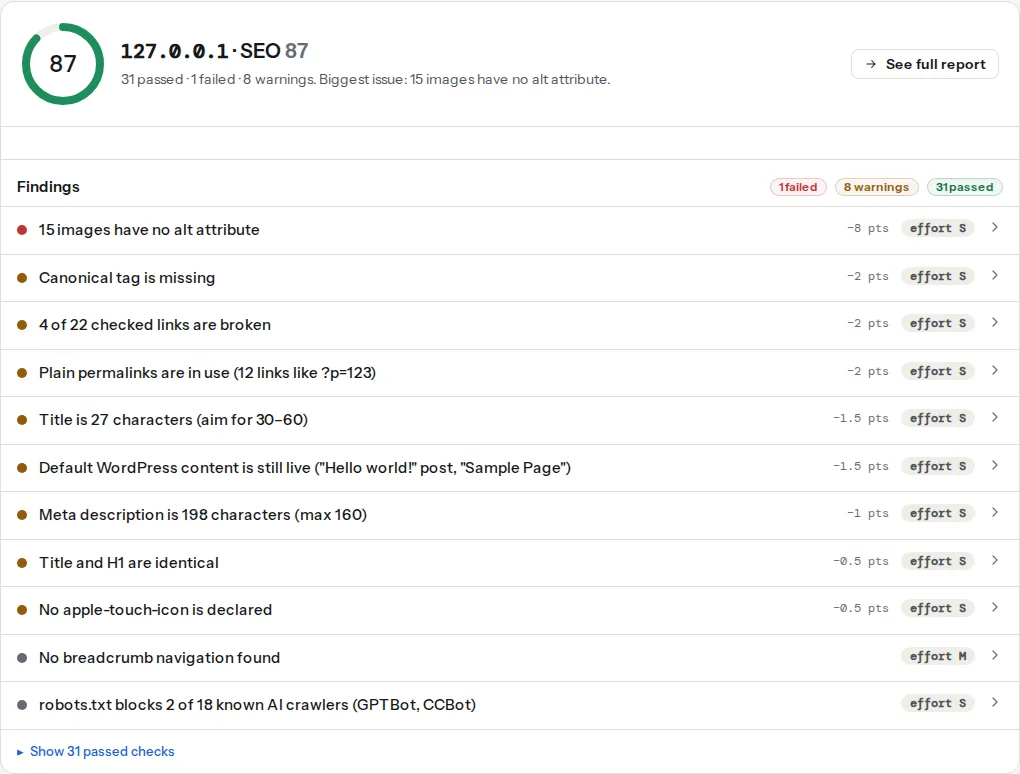
Step by step
1. Confirm the page can be indexed
The indexability finding is the one that can make everything else irrelevant. It fails when the page returns a non-200 status, when robots.txt blocks Googlebot from it, or when a noindex is present in the meta robots tag or the X-Robots-Tag header. All three happen by accident: staging rules copied to production, a plugin's "discourage search engines" left on, a CDN rule adding a header. On WordPress the report's WordPress Doctor names the setting; see WordPress rookie mistakes.
Intentional noindex pages (thank-you pages, internal search results, filters) fail this check too, and that is fine; the audit does not know your intent. Ignore it there.
2. Fix the title and the canonical together
The title is what the result page shows; the canonical is which URL it shows. A missing title is the single most expensive finding. A canonical pointing at another page moves the ranking to that page. Both are template-level problems: one fix covers every page of that type. Titles and descriptions for the result page and Canonical tags explained cover the details.
3. Headings and description
One H1 that says what the page is about, H2s for the sections, no jumps from H2 to H4. The description does not affect ranking, but it is often the text under the result, so write it for the click. "Title duplicates H1" is a warning to check that the title carries something the H1 does not (the brand, the location, the year).
4. Links
Fewer than three internal links means the page is a dead end for the crawler and the visitor; more than 300 dilutes each one. The broken and redirecting link findings list what to fix; the broken link checker shows the full table. A high nofollow share on internal links (some plugins add it to everything) blocks link equity within your own site.
5. Images
Meaningful images need alt text: what is in the picture, in a short sentence. Decorative ones need alt="" so screen readers skip them; the audit distinguishes the two. Image search is a real traffic source for shops and recipes.
6. The rest, by template
- Home page: everything above plus the brand in the title, Organization structured data (the schema module), a favicon and a touch icon.
- Category / listing: pagination pages canonical to themselves; the listing itself should not be
noindexunless it is a filter. Thin-content warnings are expected on listings with little text and can be ignored. - Product: Product structured data with price and availability (schema module), one H1 with the product name, alt text on the photos, the canonical on the flat URL (
/products/x, not/category/x). - Article: Article structured data, one H1, a description that summarises, the date in the content, internal links to related articles.
- Landing page for ads: often
noindexon purpose; the audit's indexability failure is expected. Everything else still applies because the page has visitors.
Reading the score
| Score | Meaning |
|---|---|
| 90–100 | Fundamentals in place; the remaining findings are polish |
| 70–89 | One weight-heavy miss (canonical, description, alt text on many images) or several mid ones |
| 50–69 | Two or more fundamentals missing; fix the template |
| under 50 | Usually indexability: the page cannot be in Google as it stands |
The score compares pages of the same site over time better than it compares different sites: a listing page and an article have different natural scores.
Verify
- Re-run on the same page; fundamentals green, indexability passed.
- Run the audit on one page per template; the same finding on all of them is a template fix.
- Check Search Console's Pages report a few weeks later: "Excluded by noindex" and "Duplicate without user-selected canonical" should shrink.
Common mistakes
- Fixing the score, not the template. Editing one page's title by hand while 400 product pages share the same bug.
- Stuffing the title. 60 characters, one topic, the brand at the end. Google rewrites long or repetitive titles.
- Treating warnings on
noindexpages as bugs. Internal search and filters should stay out of the index. - Chasing thin-content warnings on listings. A category page with 20 products and 40 words is normal.
- Ignoring the technical findings because the content is good. A perfect article behind a
noindexheader ranks for nothing.