There is a gap in every deploy. The pipeline goes green, the new version is live, and everyone moves on. Then, days or weeks later, someone notices that search traffic has been sliding since the 14th, or that a security scan the client ran came back worse than last quarter. The site was broken the whole time. Nothing crashed, no error was thrown, and nobody was told.
That gap is where most website damage happens, because the things that break are invisible by design. A page with a stray noindex renders perfectly; it just quietly leaves Google. A dropped security header changes nothing a visitor can see. A redirect loop on one template looks fine from every page you happen to open yourself. getReport's catalogue holds 222 checks for exactly this kind of problem, but until September it could only find them when a person remembered to run a report.
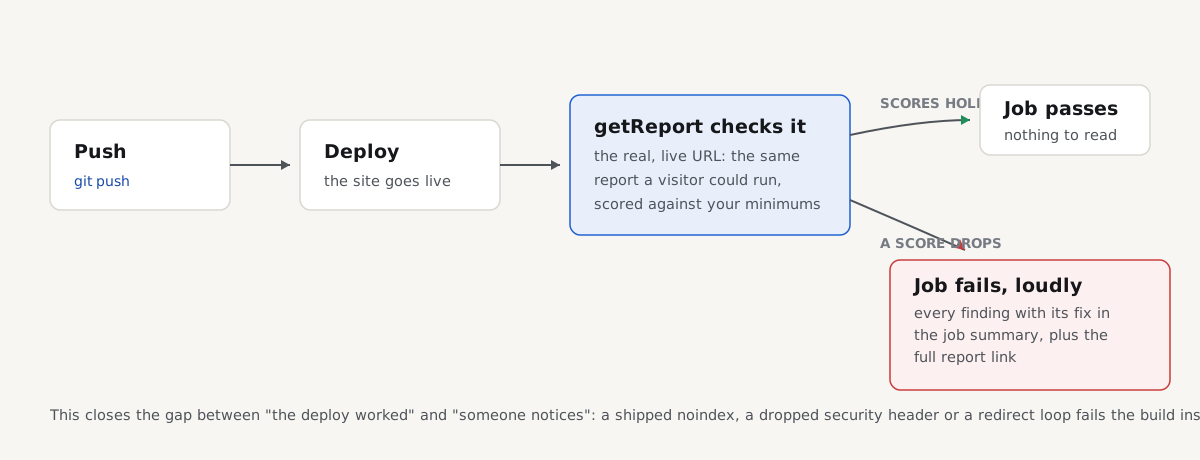
getreport/action@v1 closes the gap: a GitHub Action that runs a full checkup on your live or preview URL after every deploy, and fails the job when a score drops below the minimum you set. This post is the story and the design decisions behind it. The step-by-step setup lives in its own guide, Check your website in CI, and this post ends by pointing you there.
- 7modules checked on every run: speed, SEO, security, accessibility, structured data, social, best practices
- 100new reports a day with a free API key
- 0dependencies in the action: two JavaScript files on node20
What actually breaks on a deploy
The regressions that hurt are the ones that pass every test you already have, because they are not bugs in your code. They are side effects of templates, plugins, servers and CDNs, and they ship silently. Three examples, each a real check in every getReport report:
A noindex ships to production. Staging environments carry noindex on purpose, and sooner or later a template, a plugin setting or an environment variable carries it into production with a release. The site keeps working; it just starts disappearing from search results page by page. The robots-meta-noindex check catches it in both the robots meta tag and the X-Robots-Tag header, on the same day it ships instead of after the traffic graph bends.
A redirect goes round in a loop. Two redirect rules that each undo the other, usually www against non-www or http against https, and the page never loads for anyone. The redirect-loops check names each address that leads back to where it started. If the loop lands on the very URL your workflow checks, the report cannot fetch the page at all, and the action fails the job for that reason alone, whatever your thresholds say.
A security header quietly disappears. A server migration, a new CDN configuration, a reverse proxy that stops passing headers through, and the Strict-Transport-Security header is gone. Browsers no longer insist on HTTPS for your domain, and nothing anywhere looks different. The hsts check in the security module notices, and the security score drops.
None of these show up in unit tests, because none of them are in your repository. They exist only on the running site, which is why the check has to run against the running site.
What the action is, and what it is not
The action is honest about its job: it asks getReport to check one URL, waits for the result, and compares the scores with your minimums. It starts a report through the same POST /api/v1/reports endpoint anyone can call with a free key, polls every 5 seconds until the report finishes (8 minutes at most by default), writes the scores to the job summary, and sets the step's exit code. One run covers all seven modules: speed, SEO, security, accessibility, structured data, social previews and best practices.
It is not a unit test, and it does not look at your code. It checks the live URL you give it, the way a visitor and a search engine see it, which is the point: the problems above exist only there. That also sets its limits. The URL must be public, because the check runs from getReport's servers, not from your runner; localhost and private networks are out of reach, and a password-protected preview is too. The practical pattern is to check production right after the deploy finishes, or a public preview deployment before the merge.
The whole setup is one file
The workflow goes in .github/workflows/site-check.yml. This version, straight from the guide, checks production after every push to main and once a week:
# .github/workflows/site-check.yml
name: Site check
on:
  push:
    branches: [main]
  schedule:
    - cron: '17 6 * * 1' # Mondays 06:17 UTC
  workflow_dispatch:

# One check at a time per branch, so a burst of merges does not use up the site's hourly limit
concurrency:
  group: site-check-${{ github.ref }}
  cancel-in-progress: true

jobs:
  getreport:
    runs-on: ubuntu-latest
    steps:
      - uses: getreport/action@v1
        with:
          url: https://example.com/
          api-key: ${{ secrets.GETREPORT_API_KEY }}
          min-score: 80
          thresholds: speed=70, seo=90, security=80, a11y=85
No checkout, no Node setup, no other actions. The step runs on GitHub's node20 runtime, and the action itself is two small JavaScript files with no dependencies, MIT-licensed at github.com/getreport/action, so you can read exactly what it sends in a few minutes. The key is free from the API page, lives in your repository as the GETREPORT_API_KEY secret, and the action masks it in the log.
How a build turns red
The mechanics are deliberately simple. You set minimums in two places:
min-scoreis the floor for the overall score. The default is0, which never fails.thresholdssets per-module floors, written asspeed=70, seo=90. The seven module names arespeed,seo,security,a11y,schema,socialandpractices.
When the report finishes, the action compares each score with its minimum and fails the step when any score is below it, or when the page could not be fetched at all. A module you leave out of thresholds is still shown in the summary but never fails the job. A module that has no score, because it could not be checked this run, fails only if you set a minimum for it, and the failure message says so rather than pretending the score was zero.
Either way, the job summary gets a table of every score against its minimum, the letter grade, and a link to the full report. The step also exposes outputs (report-url, report-id, overall, grade and scores as JSON) for later steps, so you can post the link to a pull request comment or to chat.
Three design decisions
Scores, not per-check gates. We could have let you fail the build on any single check, and we chose not to. A report runs a lot of checks, and each one carries a severity and a weight precisely because they are not equally important; a missing theme-color meta tag and a site-wide noindex should not be able to stop a deploy with equal authority. Gating on module scores means a serious regression moves the number enough to fail, a cosmetic one does not, and your workflow file stays three lines instead of a policy document. It also absorbs measurement noise: lab speed varies a few points between runs through no fault of yours, which is survivable for a threshold set a little below your baseline and fatal for a gate on one speed check. The guide has a table of starting minimums per module; the short version is to set them a few points below today's scores and raise them as you fix things.
The full report link lands in the job summary. A failed check is only useful if the person staring at the red build can see what to do next, and that person is often not the person who will fix it. The summary shows the numbers; the link opens a normal getReport report, with every finding explained in plain language, the fix spelled out, and the technical detail behind a toggle. It is shareable and permanent like any other report, so "the build failed" becomes a URL you can hand to whoever owns the template, the plugin or the server. Sending the fixes to your developer covers turning that report into tickets.
CI traffic obeys the same rules as everyone else. The action is not special-cased anywhere; it has no privileges the public API does not have. A free key allows 100 new reports in any 24 hours, each site can be checked 5 times an hour whoever asks, and a report of the same page and device from the last 12 hours is served from cache without counting against your key, which the action uses when you set fresh: false. Those limits are why getReport can stay free, and CI is exactly the kind of client that would flood them by accident, so the workflow above runs on merges to main with a concurrency block rather than on every push to every branch. If the sixth check of a site arrives within the hour, the API answers 429 and says how long to wait.
Where it fits
The action gives a team one shared definition of "good enough", and it puts that definition in the repository. The minimums live in the workflow file next to the code, so changing them is a reviewed commit with a message, not a matter of opinion in a meeting. When a drop is intentional, say a third-party widget the business asked for, lowering the minimum in a commit that explains why leaves a record most teams never have.
It also plays well with stricter tools instead of replacing them. If you hold a hard speed budget with byte-level assertions, a speed budget in CI with Lighthouse CI is the finer instrument for that one module, and the two run side by side: Lighthouse CI guards the bytes, getReport guards everything else.
And because the action is a thin wrapper around the public API, GitHub is a default rather than a requirement. From GitLab CI, Bitbucket Pipelines or a plain shell script, the same POST /api/v1/reports with your key does the same job; the API page has a curl example.
Shipped alongside: the score card
The same release added the embed, for the opposite moment: not catching a drop, but showing a score you are keeping up. It is a small card with your grade and every module score, linking to your full report, served as one self-contained iframe that loads no script and sets no cookie:
<iframe src="https://api.getreport.app/embed/example.com"
  title="Website checkup scores by getReport"
  width="560" height="120" loading="lazy"
  style="border:0;max-width:100%"></iframe>
It reads the same public scores as your site page and updates when you run a new check. For something smaller, the score badge is a single SVG image.
Set it up in ten minutes
Everything practical that this post skipped is in the guide: getting a key, taking a baseline, checking preview deployments on Vercel and Netlify, choosing minimums per module that do not fail at random, using the outputs, and the limits to plan for. Start there, and the next regression that ships with a deploy will be a red build within minutes instead of a mystery weeks later: Check your website in CI with the getReport GitHub Action.