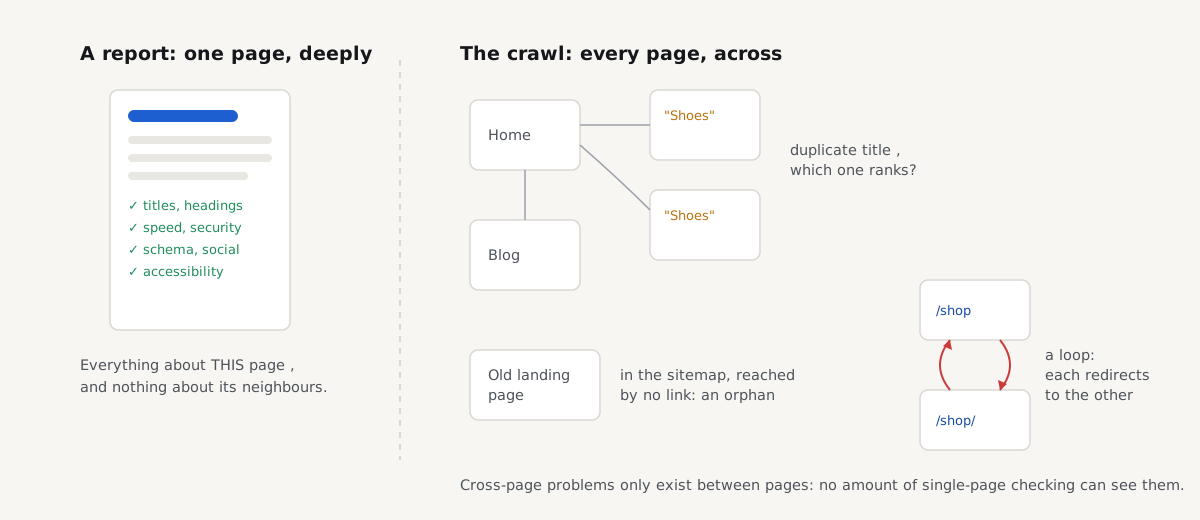
A report checks one page very thoroughly, from its title tag to its security headers. But some of the most expensive problems on a site do not live on any single page. They live between pages, and no single-page check can see them, because seeing them means having read every page.
Three examples, all real finding types from the new crawl.
Two pages, one title. Your category page and its "page 2" both carry the title "Hoodies". To Google, that is one answer offered twice, so it shows one of them for the search and quietly keeps the other out, and it does not always pick the page you would have picked. On the page itself, the title looks fine. The problem only exists because another page has the same one. The crawl's Duplicate titles check groups every set of pages that share a title, so you can see each group side by side and give each page a title that says what is different about it. The guide on duplicate titles and descriptions across a site walks through fixing the templates so the duplicates stop coming back.
The page your sitemap lists but no link reaches. A landing page built for a spring campaign went into the sitemap, as it should, but nobody ever linked it from a menu, a category or a related post. Visitors cannot stumble into it, and to Google a page that the whole site declines to link to looks unimportant, whatever the sitemap says. The Orphan pages check finds exactly this shape: listed in the sitemap, answering 200, unreachable by following links from the start page. The fix is linking, and the orphan pages guide shows where those links should come from.
The redirect that chases its own tail. One rule adds a trailing slash, another removes it: /blog redirects to /blog/, which redirects to /blog. Each rule is reasonable on its own. Together they send every browser in a circle until it gives up with "too many redirects", and everything behind the loop is unreachable for visitors and crawlers alike. The Redirect loops check follows each redirect hop by hop and reports every path that returns to an address already on it, with the full path so you can see which two rules undo each other. If your redirects are merely long rather than circular, the redirect chains guide covers flattening them to one hop.
The crawl behind our XML sitemap generator already visits all those pages to build the sitemap. So it now tells you what it found on the way.
- 17site-wide checks on every crawl
- 100pages per crawl, 500 once you verify you own the site
- 30 daysa crawl's results stay available
The 17 checks, by family
Every crawl runs the same 17 checks, defined in the same catalogue as our report checks, each with the same plain-language explanation and concrete fix. Failures come first, then warnings, then lists worth a look.
Links and errors
- Broken internal links finds pages your own links point to that answer 404 or 410, and names the page and link text that point there, so you fix the link at its source instead of hunting for it.
- Pages with server errors lists pages that answer 500 or another 5xx, which visitors and Google both see as a broken site; Google drops pages that keep failing.
Redirects
- Redirect loops finds redirects that lead back to where they started, so the page never loads for anyone. Like broken links and server errors, these count as failures, not warnings.
- Redirect chains finds links that pass through 2 or more redirects before they land. Every hop costs visitors a round trip, and a chain breaks as soon as one hop changes.
Duplicates and missing text
- Duplicate titles groups pages that use the same title, so Google cannot tell them apart in search results.
- Duplicate meta descriptions groups pages that reuse the same description, the snippet Google may show under the title; a shared one stops telling searchers which page is which.
- Missing meta descriptions lists pages with no description at all, which leaves Google to build the snippet from any text on the page, often a menu or a cookie notice.
- Near-duplicate pages finds pages whose text is almost the same, which split links and rankings between two addresses instead of adding them up. It compares the main text of every pair of pages, not just exact copies.
Sitemap hygiene
- Orphan pages finds pages your sitemap lists that no crawled page links to, so visitors cannot reach them.
- Noindex pages in the sitemap finds pages where the sitemap asks Google to index them while the page itself says noindex. Google follows the noindex, but the mixed signal wastes crawls and can hide pages you meant to show.
Signals between pages
- Canonical chains finds canonical tags that point at a page that redirects, fails or names yet another canonical. The signal is supposed to settle an argument; a chain reopens it, and Google may ignore the tag entirely.
- hreflang return links across the site checks that every language version a page names also names it back. Google only trusts the pair when both pages point at each other; a one-way tag is ignored, and searchers can land on the wrong language.
- Pagination loops follows
rel="next"through paginated lists and finds series that come back to an earlier page, usually a template building the next link from the wrong page number.
Structure, weight and speed
- Deep pages finds pages more than 4 clicks from the start page, which visitors and search engines reach last and least often.
- Thin pages lists pages with under 300 words of body text, counted without menus, header and footer. Contact and checkout pages are short by nature, so this is a list to review, not a list of mistakes.
- Largest pages lists pages whose HTML alone is over 500 KB, before any images, scripts or styles; the median page's HTML is about 30 KB.
- Slowest pages lists pages whose server took over 0.8 s to send the first byte during the crawl. These are single measurements, so treat them as pages to test again, not a verdict.
Only pages meant for search count towards the duplicate, missing-description, thin and deep checks: pages that answer 200, are HTML, are not noindex and are canonical to themselves. Your redirecting "page 2" does not get scolded for having a thin page.
One more thing these checks never do: change a report's scores. They are about the whole site, not any one page, so they live on the crawl's own results page and leave your single-page reports alone.
How the crawl works, and where it stops
The crawler starts at the page you give it and follows same-site links breadth-first, up to 10 clicks deep, so each page's recorded depth is its real click distance from the start. It then reads your sitemap, the files robots.txt declares or /sitemap.xml, and with budget left it fetches the listed pages that no link reached. That second pass is what makes the orphan check possible: a page found only through the sitemap is, by definition, a page no link reaches.
For every page it records the status, title, meta description, first heading, word count, canonical, language versions, rel="next", HTML size and server response time. That is the raw material for all 17 checks.
The honest limits, because a free crawl that stayed useful had to pick some:
- 100 pages per crawl, or 500 once you verify you own the site. Verification is a DNS record, a meta tag or a small file, with no email and no account. The limit exists so nobody can point us at a big site they do not run.
- Polite by design. At most 2 requests at once to your server, 500 ms apart, through the same SSRF guard as our reports. robots.txt is respected, and a 429 or 503 answer stops the crawl immediately, because that is your server asking everyone to slow down.
- 8 minutes, then pencils down. A crawl that hits the time limit keeps everything it found and says it stopped on time. On a test site shaped like a typical WordPress blog, with a deliberately slow 300 ms server, 500 pages took 3 minutes 24 seconds, so most sites finish well inside the cap.
- Only the HTML your server sends. Pages reachable only through JavaScript, forms or search are not found.
- A finished crawl is reused for 24 hours, so crawling the same site twice in an afternoon costs your server nothing the second time.
Reading the results
Every crawl gets a results page with the issues first. Open an issue and you get the same why-and-fix explanation a report finding has, plus the affected pages: broken links with the page and link text that point to them, duplicates listed per group, and redirect and canonical problems with their full path, hop by hop.
Below the issues sits a sitemap-versus-crawl comparison, pages only the sitemap knows versus pages only the crawl found, and the full page table: status, title, description, words, response time and which checks each page fails, filterable by text and status. The whole thing downloads as CSV or JSON, so you can sort 500 pages in a spreadsheet or feed them to a script. The generated sitemap is still one click away; the crawl was always its by-product, now the by-product earns its keep.
There is also a page for every domain. /site/{domain} collects a site's recent reports and crawls, buttons to run either again, ownership verification and the score badge. Open getreport.app's own page to see one. Links to the individual reports and crawls show only to the site's verified owner, in the browser that verified; everyone else sees scores and dates, not what was checked.
Crawl results stay available for 30 days. Reports keep their 12 months; a crawl is working data, meant to be acted on and then rerun.
What this deliberately is not
It is not a scheduled monitor. A crawl runs when you ask for one and sleeps otherwise; nothing watches your site between crawls, and nothing emails you. It is not a rank tracker either: it reads your pages, not Google's results, so it can tell you two pages share a title but not which positions they hold. And it is not a 10,000-page enterprise crawler. At 500 pages it covers most small-business and WordPress sites whole; for a much larger site, it still makes a sharp sample of your most linked pages.
What it is: the fastest way to see the problems that live between your pages. Run it at /tools/sitemap-generator, fix the failures first, and crawl again, free, no account, and your server barely notices.