WP Rocket is the caching plugin most sites reach for because its defaults are safe and its page cache works on any host. Safe defaults also mean that half the settings that move Core Web Vitals are off after install. This guide goes through the tabs in the order that pays, explains what each switch does to the findings in the report, and names the two or three that break things so you can test for them. Tested on WP Rocket 3.17; the menu is Settings → WP Rocket.
Quick answer
- Cache: mobile cache on, separate mobile files only when the theme serves different HTML on phones, user cache off.
- File Optimization: Minify CSS, Optimize CSS delivery → Remove Unused CSS (the one that moves the unused-CSS and render-blocking findings), Minify JavaScript, Load JavaScript deferred. Delay JavaScript execution last, with exclusions.
- Media: LazyLoad for images and iframes, hero excluded, Add missing image dimensions.
- Preload: preloading on, fonts preloaded by exact URL.
- Do not combine it with another caching plugin or a second minifier.
- Tools → Export settings before you start. Deactivating the plugin puts the site back as it was.
Why the settings matter
Three of the four findings this guide targets come from Lighthouse: render-blocking resources, unused CSS and lazy loading. Each names files, and each is fixed by rewriting how the theme's CSS and JavaScript are loaded, which is exactly what File Optimization and Media do. The fourth, cache headers, is the .htaccess block WP Rocket writes for browser caching.
The page cache alone fixes the first byte and nothing else. A site with WP Rocket active and File Optimization untouched typically still has 300–800 ms of render-blocking CSS and a lazy-loaded hero image. The order below is the order of payoff: the settings that help most and break least come first, the one that breaks most (delayed JavaScript) comes last.
How getReport checks it
WP Rocket is recognised from the comment it prints at the end of every cached page ("This website is like a Rocket…"), and its assets under /wp-content/plugins/wp-rocket/ are attributed to it in the cost table. The version column stays empty because WP Rocket's own files carry no ?ver= query string, and the report reads versions only from what the page reveals.
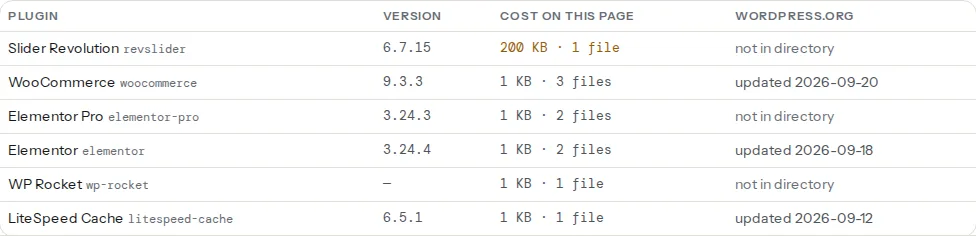
The findings that change as you go through the tabs:
Lighthouse findings come from a fresh, logged-out load, which is what a cached page looks like to a first-time visitor. Clear the cache before every re-test, or the report compares against a page WP Rocket has not processed yet.
Step by step
0. Export, then check for a second plugin
Settings → WP Rocket → Tools → Export settings. Keep the file. Then run the plugin detector: if a second caching plugin shows up (LiteSpeed Cache, W3 Total Cache, WP Super Cache) or a second minifier (Autoptimize doing minify and defer too), remove one before you touch a setting. Two plugins deferring the same script in different orders is the classic cause of a "$ is not defined" error; two caching plugins: why it breaks explains which one to keep.
1. Cache
Enable caching for mobile devices ON. Separate cache files for mobile devices only if your theme sends different HTML to phones (an AMP plugin, a mobile-specific menu that is rendered server-side); a responsive theme sends the same HTML and a separate mobile cache just halves the hit rate. Enable caching for logged-in WordPress users OFF: their pages are personal and caching them costs memory for nothing. Cache Lifespan: the default 10 hours is fine; WP Rocket clears the relevant pages when you publish anyway. This tab also writes the browser-cache rules: saving it rewrites .htaccess with ExpiresByType lines for CSS, JS, images and fonts, which is what the cache-headers finding wants. On nginx .htaccess is ignored and the host has to add expires 1y; for static files.
2. File Optimization → CSS
Minify CSS files ON. Then Optimize CSS delivery, which has two modes:
- Remove Unused CSS sends each page to WP Rocket's service, which works out the rules that page actually uses and replaces every stylesheet with one inline block (id
wpr-usedcss). This is the setting that moves both the unused-CSS and the render-blocking findings, because the stylesheets are gone. It needs your licence connected, it queues each page on first visit, and the used CSS is cached per page: visit the home page, a post and a category page as a logged-out visitor to get them processed, and give it ten minutes before judging. - Load CSS asynchronously keeps every stylesheet, inlines critical CSS and loads the rest without blocking. Fewer surprises, smaller gain: unused CSS still downloads.
Start with Remove Unused CSS. If something that appears after interaction (a drop-down menu, a pop-up, slider arrows) loses its styling, add its class names to the CSS safelist, save, and click Clear Used CSS on the Dashboard. If it keeps fighting you, fall back to Load CSS asynchronously.
3. File Optimization → JavaScript
Minify JavaScript files ON. Combine JavaScript files OFF: it only helps on HTTP/1.1, and the HTTP/2 test will tell you that your host is not one of those. Load JavaScript deferred ON: scripts download in parallel and run after parsing, which removes them from the render-blocking list. Save, clear the cache, and test menus, sliders and forms in a private window. A script that breaks goes into Excluded JavaScript Files by file name; if it is jQuery-dependent inline code, exclude jQuery instead.
Delay JavaScript execution is the INP lever. Delayed scripts do not run until the first scroll, tap or key press, so analytics, tag managers, chat widgets, social embeds and ad scripts stop competing with the page while it loads. The cost is a "first interaction lag": the moment someone touches the page, every delayed script runs at once, and a slider or a search box built with delayed JavaScript reacts a beat late. WP Rocket ships one-click exclusions for themes and plugins known to break (tick the ones you use) and a free-text Excluded JavaScript Files list for the rest. Turn it on last, test the checkout, the search, the mobile menu and the cookie banner, then decide.
Tip
One option per save. Turn on a switch, save, clear the cache, load the home page and one inner page in a private window. When something breaks you know which switch did it, and Rollback is one untick.
4. Media
LazyLoad: Enable for images ON, Enable for iframes and videos ON, Replace YouTube iframe with preview image ON if you embed YouTube (the player loads on click). Since 3.16 WP Rocket keeps the images it detects above the fold out of lazy loading on its own; if the LCP finding still names a lazy-loaded hero, add part of its file name or its CSS class to Excluded images or iframes. Add missing image dimensions ON so images without width and height do not shift the layout when they appear, which is a CLS fix. WebP compatibility → Enable WebP caching only displays WebP files that already exist; WP Rocket does not convert anything, that is Imagify's job (Image Optimization tab) or another converter's.
5. Preload
Activate Preloading ON: WP Rocket visits your pages in the background after a purge so the first visitor gets a cache hit; it finds the URLs from your sitemap. Enable link preloading ON: when a visitor hovers a link, the next page is fetched early. Prefetch DNS Requests: paste the origins of third parties the page loads (//fonts.gstatic.com, //www.googletagmanager.com), one per line. Preload Fonts: the exact URLs of the one or two font files used in headings, on your own domain only; WP Rocket adds <link rel="preload"> for each, which is the standard fix for a late web font and a CLS source. See web fonts without layout shift for choosing which.
6. Advanced Rules
Never Cache URL(s): WP Rocket already excludes the WooCommerce cart, checkout and account pages and the wc-ajax request, so an empty list is correct on most shops. Add translated cart slugs or a members area if you have them. Cache Query String(s): a page with ?utm_source= is served from the cache of the plain URL, which is what you want; only add parameters that change the content (a filter, a language switch).
7. Database, CDN, Heartbeat, Add-ons
Database: cleaning revisions, auto-drafts and expired transients shrinks tables; it makes the admin faster and the uncached page slightly faster. It does nothing to a cached page and nothing to Core Web Vitals; run it once with a backup, then the weekly automatic cleanup. CDN: paste the CNAME of a pull CDN (BunnyCDN, KeyCDN) so static URLs are rewritten; not needed with Cloudflare, which is a proxy. Heartbeat: reduce it in the post editor and disable it on the front end; it is an admin-ajax call every 15–60 s that costs server CPU, not visitor speed. Add-ons: the Cloudflare add-on clears the edge cache when WP Rocket clears its own; the Varnish add-on does the same on hosts that run Varnish. Both matter only so a purge actually reaches your visitors.
8. Clear, re-run, compare
Clear cache from the WP Rocket menu in the admin bar, then run the speed test twice on the same page: the first run is the miss, the second the hit. Read the four findings, not the score. Render-blocking resources should list nothing or only what you excluded on purpose; unused CSS should be down to a few KB; lazy loading should pass with the hero not in the list; cache headers should pass. If the LCP element in the report is still a lazy-loaded image, the exclusion in step 4 has not matched.
Platform notes
WooCommerce
Cart, checkout and account pages are excluded automatically; confirm with the WooCommerce checker, which also reports cart fragments. WP Rocket 3.17 has no switch to remove that request; Delay JavaScript execution postpones it to the first interaction, but the request still fires, so the finding stays until a snippet dequeues wc-cart-fragments on pages without a cart. Test an order end to end after Delay JavaScript; payment fields are where it bites.
nginx hosts
The page cache works because WP Rocket's advanced-cache.php serves the cached file from PHP. The .htaccess rules (browser cache, gzip) do nothing on nginx, so ask the host for expires and gzip on in the server block, or install the rocket-nginx configuration from WP Rocket's documentation so nginx serves the cache directly.
Managed hosts with their own cache
Kinsta, WP Engine and similar run a server-level page cache and tell you which WP Rocket features to leave off (usually the page cache itself, which their install disables). The File Optimization and Media tabs still apply.
Verify
curl -sI https://example.com/on a cached page: WP Rocket's comment at the end of the HTML (curl -s https://example.com/ | tail -3) and anexpiresorcache-control: max-age=31536000on a CSS file.- In the page source: scripts carry
defer(ortype="rocketlazyloadscript"when delayed), stylesheets are replaced by thewpr-usedcssinline block, images below the fold havedata-lazy-src. - The plugin detector shows WP Rocket as the only caching plugin.
- Menus, sliders, search, forms, the cookie banner and a test order all work in a private window on phone and desktop.
Common mistakes
- Load CSS asynchronously when the finding says unused CSS. It fixes blocking, not waste. Remove Unused CSS is the one that empties the stylesheet list.
- Delay JavaScript on day one. It is the switch with the most side effects. Do it last, with the one-click exclusions ticked and an order placed afterwards.
- Combine JavaScript files. One giant file on an HTTP/2 host blocks longer and breaks more than ten small ones. Off.
- Judging the change on a cache miss. The first load after a purge is the slow one. Run the test twice.
- A second minifier. Autoptimize's minify and defer on top of WP Rocket's produce double-minified files and scripts deferred twice. One plugin per job.
- Uninstalling instead of deactivating during a debugging session. Deactivate keeps the settings; WP Rocket removes its
.htaccessblock,advanced-cache.phpandWP_CACHEon deactivation, so the site behaves as before the plugin. Reactivate and import the exported settings to continue.