Yoast vs Rank Math is a closer race than the comparison posts suggest: both write reliable titles, descriptions, canonicals, sitemaps and schema, and either is fine for most sites. Rank Math puts more into its free version, such as redirects and several focus keywords; Yoast is the older, more widely documented plugin with a simpler editor. The choice matters far less than one rule: never run both. Two SEO plugins write two of every tag, and Google discards the ones it cannot trust. This guide compares them, helps you choose by your site's history, and shows how to move settings across. Plugins that do the same job twice are one of the causes in why is my WordPress site so slow.
Quick answer
- Keep one SEO plugin. If both are active, the page source has duplicate tags right now; check
<title>,<meta name="description">andrel="canonical". - Choose by data, not features: keep the plugin that holds your hand-written titles and descriptions, and import from the other.
- Rank Math if you want redirects, a 404 monitor and several focus keywords in the free version.
- Yoast if your team already knows it, or your theme and extensions integrate with it.
- Import (Rank Math: Status & Tools → Import & Export; Yoast: Tools → Import and Export), deactivate the other, purge the cache, re-run the WordPress health check.
Yoast vs Rank Math: what differs
Both are free on wordpress.org with paid upgrades, and both cover the core job. The differences are in what the free version includes and how the editor feels. Features and tiers change often, so check each plugin's own feature page before you buy.
| Yoast SEO (free) | Rank Math (free) | |
|---|---|---|
| Titles, descriptions, canonicals, robots | Yes | Yes |
| XML sitemap | /sitemap_index.xml | /sitemap_index.xml |
| Schema graph | Yes, page and article types per post | Yes, with a schema generator per post |
| Focus keywords analysed per post | 1 (more in Premium) | Up to 5 (more in Pro) |
| Redirect manager | Premium only | Included |
| 404 monitor | Not built in | Included |
| Search Console data in wp-admin | Yes, through the Site Kit by Google plugin | Yes, built-in Analytics module |
| llms.txt file | Yes | Yes (module) |
| Import from the other plugin | Yes | Yes |
What the table does not show:
- Settings screens. Yoast has fewer switches and more defaults. Rank Math has modules you turn on and off, which gives more control and more to get wrong.
- Documentation. Yoast has been around since 2010, and most WordPress tutorials, themes and agencies assume it. Rank Math's knowledge base is thorough but the ecosystem is smaller.
- Upsells. Both show promotions for their paid tiers in wp-admin.
Neither choice changes rankings by itself. The tags both plugins print are equivalent; what you write in them is what counts.
Why running both breaks the site
Each SEO plugin writes the same set of things into every page through the same WordPress hooks. Yoast, Rank Math, All in One SEO, SEOPress and The SEO Framework all produce a <title>, a meta description, a canonical, the robots meta tag, Open Graph tags, a JSON-LD graph and an XML sitemap. None checks for the others, so the page gets both sets:
| Tag | With two plugins | Effect |
|---|---|---|
<title> | Two title elements, or one plugin's filter wins per template | Search results show whichever Google picks |
| Meta description | Two descriptions, often different | Google takes one or writes its own |
rel="canonical" | Two canonicals, sometimes to different URLs | Google ignores both and chooses itself |
| Robots meta | Two tags; if either says noindex, the page is out | A setting in the forgotten plugin hides pages |
| Open Graph | Two og:title, two og:image | Sharers take the first |
| JSON-LD graph | Two Organization and WebSite entities with different @id | Rich results are withheld rather than doubled |
| Sitemap, llms.txt | Both plugins answer the same address | One wins, and it may not be the one you configured |
The canonical row is the expensive one. Google's guidance is that a page with conflicting canonicals is treated as having none, so the protection against duplicate URLs is gone site-wide; canonical tags explained covers the cost. Two plugins also both run on every request and both add metaboxes, so editors fill in a title in one box and wonder why the other shows.
How getReport checks it
The check is passive: it reads the page it fetched and nothing else. Asset paths under /wp-content/plugins/<slug>/ name the plugin (wordpress-seo, seo-by-rank-math, all-in-one-seo-pack, wp-seopress, autodescription, squirrly-seo), and each plugin prints an HTML comment around its output, such as "This site is optimized with the Yoast SEO plugin" or "Search Engine Optimization by Rank Math". A free and a premium edition of the same plugin count once, so the finding fires only for two different products.
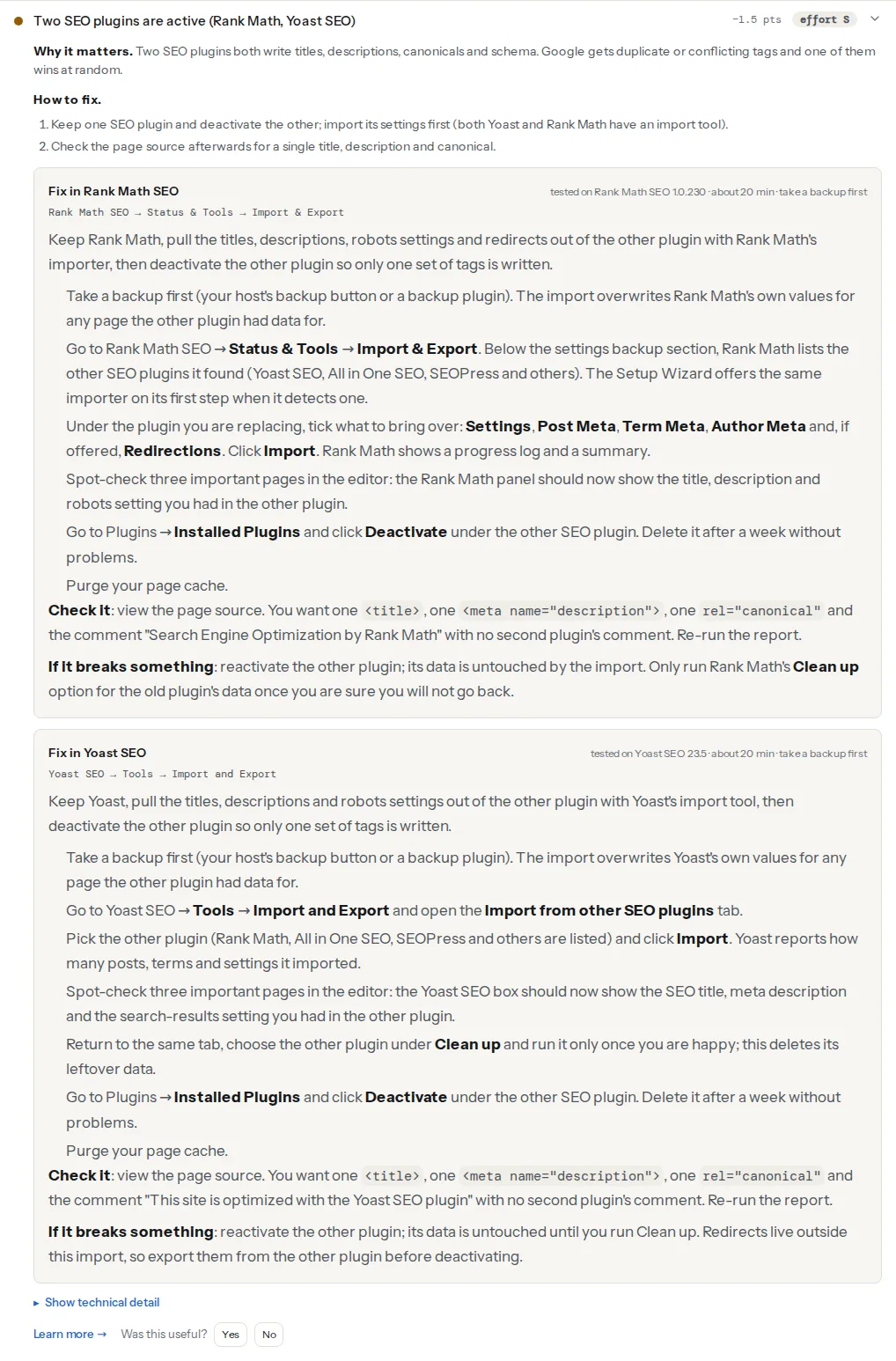
The schema finding catches a subtler case. Each plugin marks its JSON-LD block with a class (yoast-schema-graph, rank-math-schema, aioseo-schema, seopress-schema), and the report counts the generators. One SEO plugin plus a dedicated schema plugin also gives two graphs, which is fine as long as only one prints the Organization. WooCommerce's Product block is not counted. The canonical finding shows the damage:
How to switch from one to the other
1. Confirm it on the page source
Open a post and the home page, view the source, and search for rel="canonical", og:title and application/ld+json. Two of each, or both plugin comments, confirms it.
2. Find out which plugin holds the data
- A migration that stopped halfway. Someone installed Rank Math, ran the import, and never deactivated Yoast. The newer plugin has the data.
- An agency added its favourite. The new plugin has the pages they touched; the old one has everything else.
- A theme demo import that shipped with one plugin configured, before someone installed another.
- Rank Math installed for one feature (redirects, the 404 monitor) while Yoast keeps the titles.
Open a few important pages in the editor and see which plugin's box has hand-written titles and descriptions. Years of tuned titles are worth more than any feature, so that plugin is usually the one to keep.
3. Back up, then import
Take a full backup first. Imports overwrite the target's values for every page the source had data for, and only the backup undoes that.
Keeping Rank Math. Rank Math SEO → Status & Tools → Import & Export lists the other SEO plugins it found. Tick Settings, Post Meta, Term Meta, Author Meta and, if offered, Redirections, then Import. The setup wizard offers the same importer when it detects another plugin.
Keeping Yoast. Yoast SEO → Tools → Import and Export → Import from other SEO plugins. Pick the plugin, click Import, and Yoast reports what came across. The Clean up option on the same tab deletes the other plugin's data; run it only once you are sure.
Spot-check three important pages afterwards: the kept plugin's box should show the title, description and index setting you had in the other.
4. Deal with what the import does not carry
- Redirects. Yoast's importer does not bring redirects across; Rank Math's does. Export the redirect list before you deactivate the losing plugin.
- Sitemap address. Yoast and Rank Math both serve
/sitemap_index.xml. All in One SEO serves/sitemap.xml. If the address changes, redirect the old one and resubmit in Search Console → Sitemaps:
# nginx: old sitemap address → the new plugin's
location = /sitemap.xml {
    return 301 /sitemap_index.xml;
}- Schema, verification codes and robots.txt edits. Organisation name, logo, social profiles and Search Console verification live in each plugin's own settings. Check them in the kept plugin.
5. Deactivate, purge, delete later
Deactivate the losing plugin and purge the page cache, the host cache and the CDN; cached pages carry both sets of tags until they expire. Leave the plugin installed but inactive for a week, then delete it.
If a dedicated schema plugin stays, turn the Organization and WebSite output off in one of them; schema markup in WordPress walks through merging the two graphs.
Platform notes
Multisite. The SEO plugin can be network-activated while another is activated per site. Check Network Admin → Plugins.
WooCommerce. Both plugins extend WooCommerce's Product schema rather than replacing it. After the switch, run the WooCommerce checker on a product page: offers.price and offers.availability should still be there.
Verify
- Re-run the WordPress health check: "One SEO plugin is active" and "One plugin generates the structured data".
- Page source on a post and the home page: one
<title>, one description, onerel="canonical", one plugin comment. - Search Console → Sitemaps reads "Success" with the page count you expect.
Common mistakes
- Deactivating before importing. The hand-written titles vanish overnight and Google rewrites the snippets.
- Running Clean up straight away. If the import missed something, it is gone. Wait a week.
- Keeping the old plugin "just for redirects". It still writes every tag. Move the redirects first.
- Forgetting the page cache. The report still sees two plugins because it fetched a cached page.
- Leaving a noindex in the losing plugin. If the import copied it, the page stays out of Google. Review the indexability of important pages, as in the WordPress rookie mistakes.
Questions people ask
Is the free version of Yoast or Rank Math enough?
Yes, for most sites. Both free versions write correct titles, descriptions, canonicals, robots tags, sitemaps and a schema graph, which is what search engines read. The paid tiers add convenience: redirects in Yoast Premium, more keyword analysis, content AI and extra schema types. Pay only for a feature you will use every week.
Will switching from Yoast to Rank Math hurt my rankings?
Not if the import carries your titles, descriptions, canonicals and noindex settings across, because the tags Google reads stay the same. Rankings drop when the old plugin is deactivated before the import, when redirects are lost, or when the sitemap address changes without a redirect. Spot-check important pages and the sitemap on the day you switch.
How do I switch from Rank Math to Yoast?
Back up the site, then open Yoast SEO → Tools → Import and Export → Import from other SEO plugins, pick Rank Math and import. Export Rank Math's redirects separately, because Yoast's importer does not bring them across. Check three important pages, deactivate Rank Math, purge every cache and delete it a week later.