A canonical tag is one line in a page's <head>, <link rel="canonical" href="…">, that tells search engines which URL is the main version of the content when the same page can be reached at several addresses. Most pages can: with and without www, with and without a trailing slash, over http and https, with ?utm_source= on the end, through a category path and a flat path. Google sees each address as a candidate and indexes one. The canonical tag is how you make that choice yourself, so links, shares and ranking signals land on one URL instead of being split. This guide covers what the tag does, how Google weighs it, how to add it, how it relates to duplicate content, redirects and Search Console, and the mistakes we see most.
Quick answer
- Every indexable page carries exactly one
<link rel="canonical" href="…">in<head>, pointing at its own clean URL: absolute, https, your preferred host, no tracking parameters. That is a self-referencing canonical. - Duplicates (the
?utmversion, the sorted view, the print version) point their canonical at the original. - The canonical URL must answer 200 directly. A canonical that redirects or 404s is a weak hint at best.
- The canonical is a strong hint, not a command. Redirects, internal links, the sitemap,
og:urland hreflang must name the same URL, or Google may choose another. - Use a 301 redirect, not a canonical, for pages visitors should never land on, such as http and
wwwvariants. - Run the canonical checker: it shows the chain from the URL you typed to the URL Google should index.
What is a canonical tag?
The canonical tag is an HTML link element with rel="canonical". It was introduced by Google, Yahoo and Microsoft in 2009 and is described in RFC 6596, "The Canonical Link Relation". It sits in the <head> of a page and names the preferred URL for that content.
Canonical tag example
For the page https://example.com/shoes/runner-x/, the head contains:
<head>
  <title>Runner X running shoe | Example Shop</title>
  <link rel="canonical" href="https://example.com/shoes/runner-x/" />
</head>
The same product is also reachable at https://example.com/shoes/runner-x/?utm_source=newsletter and https://example.com/sale/runner-x/. Both of those print the identical tag, so all three addresses name one canonical URL.
What is a canonical URL?
The canonical URL is the address that represents a group of duplicate pages in search results. You declare it with the canonical tag; Google then chooses it, usually agreeing with you. Search Console shows both in the URL Inspection tool: "User-declared canonical" is what your tag says, and "Google-selected canonical" is what Google picked. When those two differ, one of the other signals disagrees with your tag.
Canonical in an HTTP header
Files that have no <head>, such as PDFs, can declare a canonical in the HTTP response instead. Google supports this Link header:
Link: <https://example.com/guides/size-chart.pdf>; rel="canonical"Use it when a PDF duplicates an HTML page you want indexed.
How Google chooses the canonical: canonicalization in SEO
Canonicalization is the process of picking one representative URL from a group of duplicates. Google's documentation on consolidating duplicate URLs lists the signals it uses, from strongest to weakest:
- Redirects. A 301 or 308 is a strong signal that the target should be canonical.
rel="canonical", in the HTML or the HTTP header, is also a strong signal.- Sitemap inclusion is a weak signal: the URLs you list are the ones you consider canonical.
Google also weighs other things: which URL internal links use, whether the page is served over https, hreflang annotations, and whether the pages really are the same content. That is why the canonical is called a hint. When every signal names the same URL, Google follows it almost every time. When your tag says one thing and your internal links, sitemap and redirects say another, Google may pick a different canonical.
Two things are not canonicalization tools, according to the same documentation: robots.txt (a blocked URL cannot be read, so its canonical is never seen) and noindex for choosing between duplicates on your own site.
Why the canonical tag matters for SEO
Google groups duplicate URLs into a cluster and picks a representative. Without a canonical, the pick is based on redirects, internal links, the sitemap and guesswork, and it can change from one crawl to the next. With one, you name the representative, and what the duplicates earn (links from other sites, social shares) is credited to it.
The cost of getting it wrong is silent. A canonical that points at another page tells Google "index that one instead of me": the page drops out of the index and its content ranks under the other URL, or not at all. A canonical that redirects is treated as a hint Google may ignore. Multiple canonical tags that disagree, typically a theme and a plugin each printing one, are likely to be ignored altogether.
Canonicals are one part of technical SEO, next to crawling, indexing, redirects and status codes. The technical SEO guide shows how they fit together.
How to check your canonical tags
The canonical checker runs a normal report and shows the SEO findings about canonicals, redirects and host consistency, plus a "Canonical chain" table that walks from the entered URL to the URL Google should index. It reads every canonical tag in the HTML, so a second tag from a theme or plugin shows up; requests the canonical URL to confirm it answers 200 without redirecting; compares it with og:url; and requests the http and www variants to see whether they redirect to it.
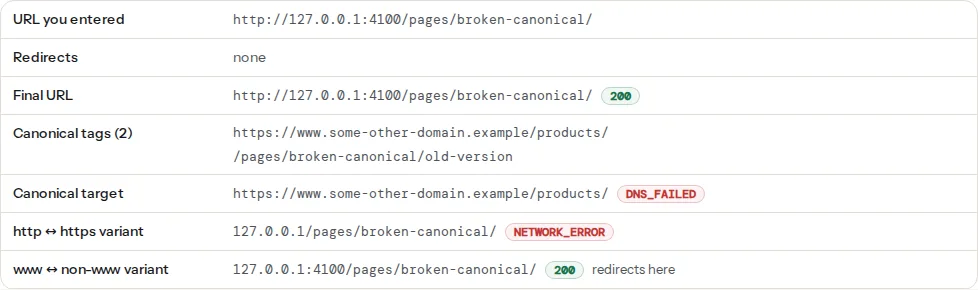
The findings behind it:
The checker looks at one page and its http and www variants per run. To see which canonical Google actually chose, use URL Inspection in Search Console. The canonical tags fix page has the short version of the fixes below.
Canonical tag best practices
Rules that follow from the one line in the example above:
- Absolute.
href="/shoes/runner-x/"is accepted by Google, but Google recommends absolute URLs, and a relative path breaks when the page is served from a mirror or a scraper copies it. Write the full URL. - Self-referencing on the original. The page points at itself. That is not redundant: it protects against parameter and host variants, including links other sites add with their own tracking parameters.
- One tag, in
<head>. Google ignores a canonical in<body>. With several tags that disagree, it is likely to ignore all of them. - Same as the final URL. If
/shoes/runner-x(no slash) redirects to/shoes/runner-x/, the canonical says/shoes/runner-x/too. - Indexable and 200. The target must not be
noindex, blocked in robots.txt, redirected or missing. - Consistent with every other signal.
og:url, the sitemap entry, hreflang annotations and internal links all name the same address. - Not the only fix. A canonical does not stop Google crawling duplicates. When a variant has no purpose for visitors, a redirect is cleaner.
How to add a canonical tag
In HTML
Put the tag inside <head>, once, with the full URL of the version you want indexed:
<link rel="canonical" href="https://example.com/shoes/runner-x/" />On a hand-built or templated site, build it from the site's configured base URL plus the page's clean path, never from the incoming request. A canonical built from the request copies every tracking parameter and every preview domain into the tag.
In WordPress and Shopify
WordPress core prints a self-referencing canonical on single posts and pages. Yoast SEO and Rank Math take that over, print it on every page type, and let you set a custom canonical per post (in the Advanced tab of the SEO box). Shopify themes print {{ canonical_url }} in theme.liquid by default. On both platforms, the usual problem is not a missing tag but a second one from a theme or page builder, or a Site Address still on http:// after a move.
How to add a canonical tag in WordPress and Shopify shows where core, Yoast SEO, Rank Math and All in One SEO print the tag, the per-post field and the filter for each, what core leaves out (archives and the blog index), and on Shopify how canonical_url handles collection paths and variants, how to link products without the collection path, and how to override the canonical for one page with a metafield.
Step by step: fixing canonical tag issues
1. Run the checker on the URL people actually use
Type the address as it appears in a link or an ad, including the query string if that is how visitors arrive. The chain table starts from what you typed and shows every redirect. If the entered URL redirects three times before the page, that is a separate problem: see Redirects without chains.
2. Read the "Canonical target" row
- self-referencing: correct for an original page.
- another URL with status 200: fine for a deliberate duplicate; wrong for a page you want to rank. Open the target and ask whether it should really be the indexed version.
- another URL with a redirect or 404: fix the canonical to the final, live URL.
- none: add the tag.
3. Check the http and www variants
The last two rows request the other scheme and the other host. Each should either "redirect here" (301 to the canonical) or not exist. "Serves its own copy" means both variants answer 200 with the same content; Google now has two pages with one canonical, which works but wastes crawls, and it breaks the moment one of them prints a different canonical. Add the redirects at the server:
# nginx: http → https and www → bare, in one place
server {
    listen 80;
    server_name example.com www.example.com;
    return 301 https://example.com$request_uri;
}
server {
    listen 443 ssl;
    http2 on;
    server_name www.example.com;
    # ssl_certificate and ssl_certificate_key as in your main server block
    return 301 https://example.com$request_uri;
}# Apache .htaccess
RewriteEngine On
RewriteCond %{HTTPS} off [OR]
RewriteCond %{HTTP_HOST} ^www\. [NC]
RewriteRule ^ https://example.com%{REQUEST_URI} [L,R=301]Trailing slashes, www and https: pick one and redirect the rest has the same rules for Caddy and WordPress, and how to test all eight variants of one page.
4. Make the trailing slash consistent
Pick one style for directory-like URLs and redirect the other. The finding lists mixed styles on the page's own links. Most CMSs have a setting; nginx's try_files and Apache's DirectorySlash handle the redirect for real directories.
5. Remove tracking parameters from the canonical, not from the URL
?utm_source=newsletter on a link is fine; the page's canonical must still be the clean URL. Most SEO plugins do this automatically. If yours prints the parameters into the canonical (usually a custom template that uses the current URL), strip the query string when building the tag.
6. Fix multiple canonical tags
View the page source and search for rel="canonical". Two hits mean two generators. In WordPress, disable the theme's canonical output (theme options, or remove_action('wp_head', 'rel_canonical'); in a child theme) and let the SEO plugin print it. Also check the rendered page: a tag injected by JavaScript can contradict the one in the HTML, and Google sees both. Keep the one that is correct on the most pages.
Duplicate content and canonical tags
Duplicate content is the same or nearly the same content at more than one URL, on your site or across sites. It is the problem canonical tags exist to solve, and every site with parameters, printable pages, two hosts or products in several categories has some. There is no penalty for ordinary duplication: Google says some duplicate content on a site is normal and not a violation of its spam policies. What it costs is control, because Google picks which URL to show, splits links between copies and spends crawling on them.
The fix depends on the source: 301 redirects for protocol, host and trailing-slash variants, a canonical for tracking and sort parameters and second category paths, and rewriting or merging for near-duplicate pages such as location pages. Duplicate content: what it is, whether it hurts SEO, and how to fix it has the full table of sources, how to find duplicates with Search Console and a quoted search, and what to do when another site copies you.
Duplicate titles and descriptions are a different finding with a different fix: see duplicate titles and descriptions across a site.
Canonical statuses in Search Console
The Pages report in Search Console groups non-indexed URLs by reason, and three reasons are about canonicals. None of them is an error in itself; each says how Google grouped a page with its duplicates.
Duplicate without user-selected canonical
Google found that the page duplicates another URL, the page has no canonical tag, and Google chose a different URL to index. Often nothing is lost, because the content is indexed under the other URL; it matters when Google chose the wrong URL or left out a page you want in search. Duplicate without user-selected canonical: what it means and how to fix it shows how to export the examples, group them into patterns (parameters, hosts, feeds, archives, variants) and fix each one.
Duplicate, Google chose different canonical than user
Your page declares a canonical, and Google disagreed. Usually another signal wins: internal links or the sitemap use a different URL, the declared canonical redirects or is noindex, or the pages are so similar that Google treats them as one regardless. Fix the conflicting signal rather than the tag; the same guide covers this status too.
Alternate page with proper canonical tag
This is a status, not an error. The page correctly points its canonical at another URL, and Google accepted it, so this page is not indexed on its own. It is expected for tracking and sort parameters, product variants, AMP and m-dot pages and filtered views.
Act only if the list contains pages you want indexed: then their canonical points somewhere it should not, typically a template that sends every page to the home page, paginated pages pointing to page 1, or language versions pointing to one language. Alternate page with proper canonical tag: what it means and when to act has a table of the expected URL patterns and a five-step check to find the ones that need a fix.
For every other reason a page is missing from the index, such as "Crawled - currently not indexed", see why is my page not in Google.
Canonical vs redirect vs noindex
The three tools answer different questions, and mixing them up is one of the most common canonical tag issues.
| You want | Use | What happens |
|---|---|---|
| Visitors and crawlers to land on another URL | 301 redirect | The old URL shows nothing; signals move to the new one |
| Visitors to keep using the duplicate, but only the original indexed | Canonical | Both URLs work; Google indexes the canonical |
| A page kept out of search entirely | noindex | The page works but is dropped from the index; signals are not passed on |
A redirect is the strongest signal and the right choice for http and www variants, moved pages and merged content; the 301 redirects guide covers when and how. A canonical fits duplicates people still need, such as tracking and sort parameters. noindex is for pages with no search value at all, such as internal search results; the noindex and nofollow reference has the syntax. Never combine noindex with a canonical pointing to another URL: one says "drop this", the other says "merge this", and Google has to guess.
Redirect vs canonical tag vs noindex turns this into a decision table for 16 common cases, from http variants and merged articles to discontinued products, A/B tests and paginated pages, and lists the other combinations that send Google mixed signals, such as a canonical pointing at a redirect or a robots.txt block that hides the tag.
Special cases
Pagination
Page 2 of a category canonicalises to itself (/shoes/page/2/), not to page 1. Pointing all pages at page 1 hides the products and posts that only appear on later pages. Google stopped using rel="prev" and rel="next" in 2019, so self-referencing canonicals plus plain links between the pages are what counts now. Pagination in 2026: rel=prev/next is gone, what now covers titles, "load more" buttons and the WordPress settings.
Filters, sorting and tracking parameters
?sort=price shows the same products in another order: canonical to the unsorted URL. A filter that changes which products appear (?colour=red) is a different page and may deserve its own self-referencing canonical, if people search for it. Tracking parameters such as utm_source and gclid always canonicalise to the clean URL, and should never be blocked in robots.txt. Faceted navigation and parameter URLs has a per-parameter table of what to canonicalise, what to noindex and what to block, plus the cache and analytics side of tracking parameters.
Cross-domain canonicals and syndication
A canonical can point to another domain, for example when the same product page exists on two of your shop domains. For articles republished by other sites, Google now recommends that the partner uses noindex on its copy rather than relying on a canonical, because a canonical to a page with different surroundings is often ignored. A mirror domain or an old domain after a move needs 301 redirects, not canonicals. Canonicals across domains has the full table of situations.
Language versions
Each language version canonicalises to itself; hreflang connects them. A canonical from /de/ to /en/ tells Google to drop the German page. See Hreflang return links.
og:url
Facebook, LinkedIn and WhatsApp file shares under og:url. When it differs from the canonical, share counts split and cards can link to the wrong page. Set both from the same source; og:url and the canonical tag explains what the report compares.
AMP, print and PDF versions
They point at the HTML original, with a <link> tag for AMP and print pages and the HTTP header for PDFs.
Platform notes
WordPress. Yoast and Rank Math print a self-referencing canonical on every page and let you override it per post (Advanced tab). A common failure is a page-builder template or a theme also printing one. Another is the Site Address (Settings → General) still on http:// or www. after a move, which makes every canonical point at the redirecting variant.
Shopify. Shopify prints canonicals automatically; products reachable under collection paths (/collections/shoes/products/runner-x) canonicalise to /products/runner-x, which is correct. Do not override it in the theme.
Static sites and frameworks. Set the canonical from the site's base URL in config, not from the request; a build served from a preview domain otherwise prints the preview URL on every page.
How to verify
- The chain table shows "self-referencing" for original pages and "redirects here" for both variants.
- Exactly one canonical tag per page, in the HTML and in the rendered page.
og:urlequals the canonical (the social module's finding).- The sitemap lists only canonical URLs.
- In Search Console, URL Inspection shows "User-declared canonical" equal to "Google-selected canonical". After a fix, request indexing and allow a few days to weeks for the change.
Common mistakes
- Canonical to the home page on every page. A template that hard-codes the site URL. Every page tells Google to index the home page instead.
- Canonical to the http or
wwwvariant after moving to https. The canonical points at a redirect on every page. - Relative canonical with a wrong base.
href="shoes/runner-x/"resolves differently on/shop/and/shop/shoes/. - Canonical on a
noindexpage pointing at an indexable page. Contradictory signals; pick one: eithernoindexthe duplicate or canonicalise it. - Canonical from a paginated page to page 1. Hides everything after page 1.
- Blocking duplicates in robots.txt. Google cannot read the canonical of a blocked URL, so the duplicates stay as bare URLs in the index.
- Changing the canonical to fix a ranking problem. The canonical says "this is the same content"; it is not a redirect and does not move rankings from one page to another.
Questions people ask
What is a canonical tag in SEO?
A canonical tag is a line in a page's head, <link rel="canonical" href="…">, that tells search engines which URL is the main version when the same content is reachable at several addresses. Google treats it as a strong hint: it indexes the named URL and credits it with the signals of the duplicates. Every indexable page should carry one pointing at its own clean URL.
Does Google always follow my canonical tag?
No. Google treats rel="canonical" as a strong hint, not a rule, and picks another URL when other signals disagree: internal links or the sitemap use a different version, the canonical URL redirects or returns an error, or the pages are not really duplicates. Make every signal point at the same URL and Google follows the tag in almost every case.
How do I add a canonical tag in HTML?
Put <link rel="canonical" href="https://example.com/page/"> inside the <head> of the page, with the full absolute URL of the version you want indexed, and only once per page. On WordPress, Yoast or Rank Math add it automatically and let you override it per post; Shopify themes print it by default. Check the result with a canonical checker, which also shows whether the target answers 200.
What is a non-canonical URL?
A non-canonical URL is any address that shows a page's content but is not the version chosen for indexing: the http or www variant, the URL with ?utm_source= or a sort parameter, a print or AMP version. It is not an error to have them; they should redirect to the canonical URL or carry a canonical tag pointing at it, and your internal links and sitemap should never use them.
Is a self-referencing canonical tag necessary?
It is not required, but it is recommended on every indexable page. Without one, any link to your page with added parameters, or any http or www variant that slips through, becomes a separate candidate and Google has to guess which to index. A self-referencing canonical settles it in one line. Most SEO plugins and CMSs add it automatically, so check it exists rather than writing it by hand.
Is a canonical tag the same as a 301 redirect?
No. A 301 redirect sends visitors and crawlers to another URL, so the old address stops showing content; a canonical tag leaves the page reachable and only asks search engines to index another URL instead. Use a redirect when a page has moved or the duplicate serves no visitor purpose, such as http and www variants. Use a canonical when visitors need the duplicate, such as tracking or sorting parameters.
Should paginated pages have a canonical to page one?
No. Each page in a series, such as /blog/page/2/, should point its canonical to itself, because its content differs from page one. Pointing every page to page one can make Google ignore the posts or products that only appear deeper in the series. Google no longer uses rel=next and rel=prev, so plain links between the pages plus self-referencing canonicals are enough.
Do canonical tags work across different domains?
Yes. Google supports a cross-domain canonical, for example when the same product page exists on two of your shop domains and you want one of them indexed. The pages must be near-identical, because Google treats the tag as a hint. For articles republished by other sites, Google now recommends that the partner adds noindex instead, since a canonical to a page with different surroundings is often ignored.