Take any page on your site, say /shop/. It can be reached with or without https, with or without www, with or without the slash: two by two by two, eight addresses for one page. Search engines treat each as its own URL until you tell them otherwise, and every link, share and bookmark lands on whichever form the person happened to use. This guide gets you to one form: how to choose it, how to redirect the other seven in one hop, and how to keep the canonical tag, the sitemap and your own links on it. Budget an hour, most of it testing.
Quick answer
- Choose one form:
https://always, thenwwwor bare host (either is fine), then slash or no slash (match what your CMS already does). - Redirect every other combination straight to the final form with one 301, never through a chain (
http://example.com/shop→https://www.example.com/shop/in one response). - Put the chosen form in the canonical tag, the XML sitemap and every internal link.
- In WordPress, Site Address decides the host and Settings → Permalinks decides the slash; the server handles
http→https. - Test all eight variants of one inner page with the redirect checker or
curl; each should take exactly one hop or none.
Why one form matters
To Google, http://example.com/shop, https://www.example.com/shop/ and the six others are different URLs. It will crawl each one it discovers, pick one to index, and quietly discount the rest. Links from other sites point at whichever form the linking site used, so the ranking signal for one page is split across several addresses. Google merges some of it through canonical tags and redirects, but only when those are consistent, and it is your consistency that makes the merge reliable.
The cost is not only search. Cookies are set per host, so a visitor who logs in on www and follows a link to the bare host is logged out. Analytics counts two sessions. Browser caches and CDNs keep two copies. Ad platforms verify one form and reject the other. And http:// is a plain security problem: without a redirect, an old link or a typed address lands on an unencrypted page that anyone on the network can read or alter. The redirect to https:// is the one part of this guide that is not optional.
Trailing slashes are the variant people forget. Google says a trailing slash on the host does not matter (example.com and example.com/ are the same), but on a path it does: /shop and /shop/ are different URLs. Most CMSs redirect one to the other, which is fine, as long as your own links do not point at the redirected form on every page.
How getReport checks it
The audit fetches the page and follows its redirects to the final URL. It then makes two extra GET requests: the same URL with the other scheme (http:// for an https:// page) and the same URL with the other host (www. added or removed). Each is followed through its redirects. If the variant ends on your host, the finding passes and names the status code; if the variant answers 200 on its own host, both copies are live and the finding warns. A variant that does not resolve at all is treated as "does not exist" and is not held against you.
For the slash, the audit does not request /shop and /shop/; it reads your internal links. Every same-host link whose path looks like a directory (no file extension in the last segment) is sorted into "ends with a slash" or "does not". If both sets are non-empty, the finding warns and lists up to five examples of each, which is exactly the list to fix in your templates.
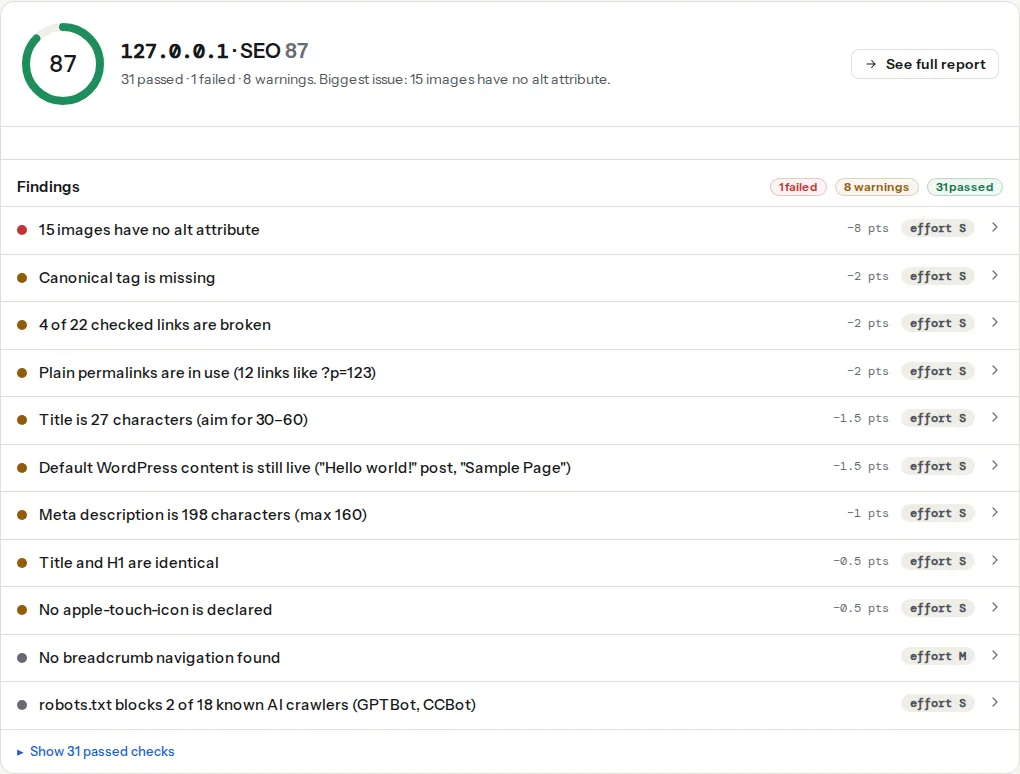
The best-practices module runs a similar host check under www-redirect, worded for visitors rather than crawlers (cookies, analytics, caches). Both pass once the redirect is in place.
Step by step
1. Decide the one form
Write it down before touching a config file, because every later step copies it:
| Decision | Options | How to choose |
|---|---|---|
| Scheme | https:// | No decision to make |
| Host | www.example.com or example.com | Keep whatever has more links and history; if equal, www is slightly easier with CDNs and cookies on subdomains, bare is shorter |
| Slash | /shop/ or /shop | Match your CMS: WordPress with the default permalink structure ends in /; most static-site and framework hosts do not |
Changing the host or slash on an established site is a migration. The redirects make it safe, but expect a few weeks of movement in search while Google recrawls. Changing http to https is always worth it; changing www to bare for taste alone usually is not.
2. Map the eight addresses
Pick one inner page with a directory-style path and test every combination. From a terminal:
for u in http://example.com/shop http://example.com/shop/ \
         http://www.example.com/shop http://www.example.com/shop/ \
         https://example.com/shop https://example.com/shop/ \
         https://www.example.com/shop https://www.example.com/shop/; do
  printf "%-40s " "$u"
  curl -sL -o /dev/null -w "%{num_redirects} hops -> %{url_effective}\n" "$u"
done
The goal: seven lines with 1 hops ending at the final form, one line with 0 hops. Anything with 2 or more is a chain to remove; anything ending somewhere other than the final form is a variant still serving its own copy. The redirect checker shows the same hops with their status codes if you prefer a page over a terminal.
3. Add the redirects at the server, in one rule
The rule that keeps it to one hop: any request that is wrong in any way is sent to the fully correct URL. Do not fix the scheme in one place and the host in another.
nginx. In /etc/nginx/sites-available/example.com, two small server blocks catch everything wrong and one serves the site. This example keeps www; swap the hosts to prefer the bare domain:
# Plain http on either host: one hop to https on the canonical host
server {
    listen 80;
    listen [::]:80;
    server_name example.com www.example.com;
    return 301 https://www.example.com$request_uri;
}

# https on the wrong host: same single hop
server {
    listen 443 ssl;
    listen [::]:443 ssl;
    server_name example.com;
    ssl_certificate     /etc/letsencrypt/live/example.com/fullchain.pem;
    ssl_certificate_key /etc/letsencrypt/live/example.com/privkey.pem;
    return 301 https://www.example.com$request_uri;
}

# The canonical host serves the site and owns the slash decision
server {
    listen 443 ssl;
    listen [::]:443 ssl;
    server_name www.example.com;
    ssl_certificate     /etc/letsencrypt/live/example.com/fullchain.pem;
    ssl_certificate_key /etc/letsencrypt/live/example.com/privkey.pem;
    root /var/www/example;

    # /shop/ -> /shop (only for sites routed through index.php or a framework,
    # not for real directories on disk, which nginx would redirect back)
    rewrite ^/(.+)/$ /$1 permanent;
}
$request_uri keeps the path and query string; permanent makes the rewrite a 301 and nginx appends the query string itself. To add slashes instead, replace the rewrite line with if ($request_uri ~ "^([^?.]*[^/?])(\?.*)?$") { return 301 $1/$2; }. The certificate must cover both hosts or the browser errors before it sees the redirect. Test with nginx -t, then systemctl reload nginx.
Apache. In .htaccess at the site root, above the # BEGIN WordPress block if there is one. First block fixes scheme and host in one hop; second adds the slash to directory-style paths on the canonical host:
RewriteEngine On

# Wrong scheme or wrong host: one hop to the final form, path and query kept
RewriteCond %{HTTPS} off [OR]
RewriteCond %{HTTP_HOST} !^www\.example\.com$ [NC]
RewriteRule ^ https://www.example.com%{REQUEST_URI} [R=301,L]

# Add a trailing slash to paths that are not files and have no extension
RewriteCond %{REQUEST_FILENAME} !-f
RewriteCond %{REQUEST_URI} !/$
RewriteCond %{REQUEST_URI} !\.[a-zA-Z0-9]{1,5}$
RewriteRule ^(.*)$ https://www.example.com/$1/ [R=301,L]
To remove slashes instead, replace the second block with:
RewriteCond %{REQUEST_FILENAME} !-d
RewriteRule ^(.+)/$ https://www.example.com/$1 [R=301,L]
Behind Cloudflare or a load balancer that ends TLS, %{HTTPS} is always off and the first rule loops; use RewriteCond %{HTTP:X-Forwarded-Proto} !https instead.
Caddy. Caddy already redirects http to https permanently. Declare the wrong host so it goes to the final one in a single hop. In the Caddyfile:
example.com {
    redir https://www.example.com{uri} permanent
}

www.example.com {
    root * /var/www/example
    # Remove trailing slashes (drop this block to keep them)
    @slash path_regexp dir ^/(.+)/$
    redir @slash /{re.dir.1} permanent
    file_server
}
permanent matters: redir without it sends a 302.
Cloudflare. SSL/TLS → Edge Certificates → Always Use HTTPS handles the scheme. For the host, Rules → Redirect Rules → create a rule with the expression http.host eq "example.com", a dynamic target of concat("https://www.example.com", http.request.uri.path), status 301 and Preserve query string on. Then remove the origin's own host redirect, or http://example.com/ takes two hops (edge fixes the scheme, origin fixes the host). Set SSL mode to Full (strict) so the origin never sees plain http and redirects it back.
4. WordPress: two settings do the work
Settings → General has WordPress Address (URL) and Site Address (URL). Set both to the final scheme and host, https://www.example.com, with no trailing slash. WordPress then generates every internal link on that host and redirects requests on the other host to it. If the server also redirects the host, make sure both agree, or the browser reports "too many redirects".
Settings → Permalinks decides the slash. A structure ending in / (/%postname%/, the default) makes WordPress add the slash and redirect /shop to /shop/; a structure without it does the reverse. WordPress handles this redirect itself, so on a WordPress site you can leave the slash rules out of the server config and keep only scheme and host there. That keeps each decision in one layer, which is what prevents chains.
After changing the Site Address on an existing site, the content still contains the old form in hard-coded links and image sources. Run a search and replace (the Better Search Replace plugin, or WP-CLI wp search-replace 'http://example.com' 'https://www.example.com' --dry-run first) so posts stop linking to the redirected form.
5. Canonical, sitemap and links on the chosen form
The redirect catches links you do not control. Three things you do control must already use the final form:
- Canonical tag.
<link rel="canonical" href="https://www.example.com/shop/">on every page, matching scheme, host and slash. A canonical on the redirected form asks Google to index a URL that redirects, which it resolves by ignoring the tag. Canonical tags explained covers the rest. - XML sitemap. Every
<loc>in the final form. SEO plugins and most generators read the Site Address, so this fixes itself once step 4 is right; check a few entries anyway. - Internal links. Menus, footers, in-content links,
og:url, hreflang alternates. The audit's slash finding lists mixed examples; the broken link checker's "links go through a redirect" finding lists every link on a page that hits one of your new redirects, which is the fastest way to find the leftovers page by page.
6. Turn on HSTS last
Once every host answers on https in one hop, add Strict-Transport-Security so returning browsers skip the http request entirely. It is a one-line header, but it is hard to undo, so do it after the redirects are proven, not before: HSTS safely and the preload list.
Platform notes
WordPress
Covered in step 4. One extra: if a cache plugin or the host's page cache serves the old host from cache, purge it after changing the Site Address, or the redirect and the cached page disagree for a while.
Shopify
Settings → Domains: one domain is primary and the others are set to redirect to it. Shopify serves https and redirects http itself. Shopify URLs have no trailing slash; do not add one in your own links.
Static sites / custom
Netlify redirects domain aliases to the primary domain and http to https automatically; the slash is controlled by "Pretty URLs" under asset optimisation, and by _redirects for exceptions. Vercel does the same per domain in the project settings. Next.js has a trailingSlash: true option in next.config.js that generates links and redirects the other form; set it once and every page follows.
Verify
- The eight-variant
curlloop from step 2 prints seven1 hopslines ending at the final form and one0 hopsline. - In the SEO audit, the www finding reads "Only one of www and non-www serves the page",
http://redirects tohttps://, and internal links use trailing slashes consistently. - The canonical finding shows a URL identical to the address in the browser bar, slash included.
- Google Search Console: add a Domain property, which covers all hosts and schemes, and watch "Page with redirect" grow (expected) while "Duplicate without user-selected canonical" shrinks.
Common mistakes
- Two layers, two hops. Cloudflare fixes
http, the server fixeswww, WordPress fixes the slash: three hops forhttp://example.com/shop. Symptom: the redirect checker shows a chain. Make one layer responsible for scheme and host, and let the CMS handle only the slash. - Site Address disagrees with the server. The server forces
www, WordPress's Site Address has none, and the browser shows "too many redirects". Set both to the same host. - Canonical on the redirected form. After moving to
www, the theme still printshttps://example.com/...canonicals. Google ignores canonicals that redirect; fix the Site Address or the SEO plugin's canonical setting. - Slash redirect on real directories.
rewrite ^/(.+)/$ /$1on a static site loops: nginx removes the slash, then adds it back because/shopis a directory on disk. Use it only for CMS-routed paths, or keep the slash. - 302 instead of 301.
header('Location: …')in PHP,redirin Caddy and mod_rewrite withoutR=301all default to 302, which tells Google the move is temporary. Check the status code in the redirect checker, not just the destination. - Testing in your own browser. Browsers cache 301s. After changing a rule you still see the old behaviour. Use
curlor a private window.