Someone types example.com/shop. The server sends them to https://example.com/shop, which sends them to https://www.example.com/shop, which sends them to https://www.example.com/shop/. Four requests before the first byte of the page, and every one of those rules was added by a different person for a good reason. This guide explains which redirect status to use when, why chains build up, and how to rewrite the rules so any address reaches the final page in one hop. Allow an hour, most of it testing.
Quick answer
- Use 301 (or 308) for anything permanent: a moved page, http → https, www ↔ non-www. Use 302 (or 307) only when the old address will come back.
- Aim for one hop from any variant of an address to the final URL. Two is worth fixing; three or more is a chain.
- Do scheme, host and trailing slash in one rule, at the first layer that answers (the CDN, else the web server).
- Point redirects at the final URL, never at another redirect. Update internal links so they need no redirect at all.
- Check with the redirect checker or
curl -sIL, not in a browser that has cached the old 301.
Why redirect chains matter
Each hop is a full round trip: the browser asks, the server answers "go there instead", and only then can the browser ask again. On a phone that is typically 100–300 ms per hop, and more when the hop changes host, because the new host needs its own DNS lookup, connection and TLS handshake. A three-hop chain can cost a visitor from an ad or a social post most of a second before anything appears. None of it shows in your own browser, because you always arrive at the final URL from a bookmark or a link that is already correct.
For search engines the cost is reliability more than speed. Google follows up to 10 hops and then reports a redirect error. It treats 301 and 308 as a strong signal that the target should replace the old URL, and 302 and 307 as a hint that the old URL is still the one to keep. A chain that mixes the two, or that ends at a page which later moves again, sends mixed signals and is where most "why is the old URL still indexed?" questions start. Google's documentation on redirects and Google Search covers the details.
The status codes
| Status | Meaning | Use it for |
|---|---|---|
| 301 Moved Permanently | Permanent. Browsers cache it, often indefinitely. | Moved pages, http → https, host changes |
| 308 Permanent Redirect | Permanent, and the request method and body are kept | The same, and anything that receives form posts or API calls |
| 302 Found | Temporary. Not cached unless headers say so | A page that is away and will come back; A/B tests; login walls |
| 307 Temporary Redirect | Temporary, method and body kept | Temporary moves of form or API endpoints |
| 303 See Other | "Look at this other page with GET" | After a form submission, never for moved pages |
With 301 and 302, older clients may turn a POST into a GET on the next request; 307 and 308 forbid that. For ordinary pages, 301 and 308 behave the same.
A <meta http-equiv="refresh"> tag or a window.location script is not an HTTP redirect. The server answers 200 with a page, the browser loads it, and only then navigates. Google can follow both, but they are slower, invisible to many tools, and ours does not follow them: the redirect checker reports the page that contains them as the final page. Use them only where you cannot configure the server.
You may also see 307 Internal Redirect in Chrome's developer tools on an http:// link. That one is created by the browser itself because of your HSTS header; it costs no round trip and is a good sign.
Why chains happen
Nobody designs a chain. They build up in layers:
- http → https was added at the host or CDN.
- non-www → www (or the reverse) was added in the web server years earlier.
- Trailing slash is added by the CMS: WordPress adds or removes it to match the permalink structure.
- Old page → new page rules from a redesign point at URLs that a later redesign moved again.
- The CDN and the origin both redirect, each doing half of the job.
Each layer works; stacked, they add up to three or four hops for anyone who arrives at an old or incomplete address.
How getReport checks it
The checker requests the address you enter and follows every redirect, recording each hop's status code and Location. It then requests the http:// and the other www variant of the final URL to see where they end up, and asks Lighthouse how much time the redirects cost during the page load.
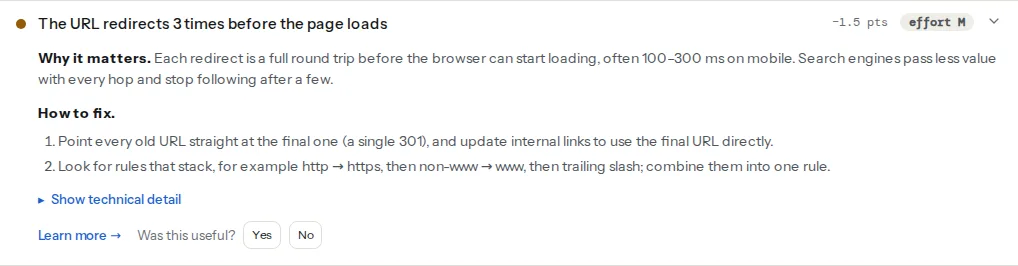
One redirect passes this check; two or more are a warning. The technical detail lists every hop as status from → to, which tells you which layer to change.
The www question appears twice on purpose: in SEO, because two hosts split rankings, and in Best practices, because two hosts split cookies, caches and analytics. Both pass as soon as the other variant redirects to your final host, whatever the number of hops, so read them together with the chain finding.
This one comes from Lighthouse and measures the time the redirects before the page cost in the lab run. The redirects learn page has the short version of all of this.
Step by step
1. Decide the one final form
Write down the canonical form of every URL: scheme (https), host (www.example.com or example.com) and trailing slash (yes or no). Both host choices are fine; what matters is that there is exactly one. It must match what the site's canonical tags, sitemap and internal links already use, so check those first; canonical tags explained covers how the three should agree.
2. Map what happens today
Run the redirect checker on the four variants of the home page and one inner page without its slash:
http://example.com/
http://www.example.com/
https://example.com/
https://www.example.com/
http://example.com/shop
Or from a terminal, one line per variant:
curl -sIL http://example.com/shop | grep -iE "^(HTTP|location)"
curl -sL -o /dev/null -w "%{num_redirects} redirects, ended at %{url_effective}\n" http://example.com/shop
Every variant should show exactly one redirect (or none, for the final form itself).
3. Redirect everything to the final form in one rule
The principle is the same everywhere: a request that is wrong in any way (scheme, host or slash) is sent straight to the fully correct URL, in one response.
nginx. One server block catches every non-canonical combination and returns a single 301; the canonical block serves the site. In /etc/nginx/sites-available/example.com:
# Plain http, both hosts: one hop to the canonical https URL
server {
    listen 80;
    listen [::]:80;
    server_name example.com www.example.com;

    # Only if your URLs end in a slash: add it in the same hop
    # (paths without a dot and without a trailing slash)
    if ($request_uri ~ "^([^?.]*[^/?])(\?.*)?$") {
        return 301 https://www.example.com$1/$2;
    }
    return 301 https://www.example.com$request_uri;
}

# https on the non-canonical host: same rule
server {
    listen 443 ssl;
    listen [::]:443 ssl;
    server_name example.com;
    ssl_certificate     /etc/letsencrypt/live/example.com/fullchain.pem;
    ssl_certificate_key /etc/letsencrypt/live/example.com/privkey.pem;

    if ($request_uri ~ "^([^?.]*[^/?])(\?.*)?$") {
        return 301 https://www.example.com$1/$2;
    }
    return 301 https://www.example.com$request_uri;
}

# The canonical host serves the site
server {
    listen 443 ssl;
    listen [::]:443 ssl;
    server_name www.example.com;
    ssl_certificate     /etc/letsencrypt/live/example.com/fullchain.pem;
    ssl_certificate_key /etc/letsencrypt/live/example.com/privkey.pem;
    root /var/www/example;
}
The certificate must cover both hosts, or the browser shows an error before it ever sees the redirect. Remove the two if blocks if your URLs do not end in a slash. Reload with nginx -t && systemctl reload nginx.
Apache. In .htaccess at the site root, above any CMS block (in WordPress, above # BEGIN WordPress), because rules run top to bottom and the first match with [L] ends processing:
RewriteEngine On

# Wrong scheme or host AND a directory-style path without slash:
# fix all three in one hop (remove this block if your URLs have no slash)
RewriteCond %{HTTPS} off [OR]
RewriteCond %{HTTP_HOST} !^www\.example\.com$ [NC]
RewriteCond %{REQUEST_URI} !/$
RewriteCond %{REQUEST_URI} !\.[a-zA-Z0-9]{1,5}$
RewriteRule ^(.*)$ https://www.example.com/$1/ [R=301,L]

# Wrong scheme or host: fix both in one hop, keep path and query string
RewriteCond %{HTTPS} off [OR]
RewriteCond %{HTTP_HOST} !^www\.example\.com$ [NC]
RewriteRule ^(.*)$ https://www.example.com/$1 [R=301,L]
Without R=301, mod_rewrite sends a 302. If a CDN or load balancer ends TLS in front of Apache, %{HTTPS} is always off and this loops; test %{HTTP:X-Forwarded-Proto} !https instead.
Caddy. Caddy redirects http to https on its own with a permanent redirect. Declare the non-canonical addresses explicitly so they go to the final host in one hop. In the Caddyfile:
http://example.com, https://example.com {
    redir https://www.example.com{uri} permanent
}

www.example.com {
    root * /var/www/example
    file_server
}
redir without permanent sends a 302, which is the most common Caddy mistake.
Cloudflare. Turn on Always Use HTTPS (SSL/TLS → Edge Certificates). For the host, create a Redirect Rule (Rules → Redirect Rules) matching http.host eq "example.com", with a dynamic target of concat("https://www.example.com", http.request.uri.path), status 301 and "Preserve query string" on. Then check with curl whether http://example.com/ takes one hop or two; if it takes two, change the rule to match both schemes and remove the origin's own redirects so the edge does all of it. Set the SSL mode to Full (strict): with "Flexible", Cloudflare talks http to the origin, the origin redirects to https, and visitors get an endless loop.
4. Point old redirects at the final URL
Export your list of page redirects (from the server config, the CMS plugin or the host) and look for targets that themselves redirect. Every rule should point at a URL that answers 200. When you move a page again, update the old rules to the new target instead of adding a rule from the previous target.
5. Update internal links
A redirect is a safety net for links you do not control. Menus, footers, the sitemap and in-content links should use the final URL directly. The broken link checker's "links go through a redirect" finding lists them per page; find and fix broken links shows how to update them in bulk.
Platform notes
WordPress
Settings → General has two addresses: WordPress Address (URL) and Site Address (URL). Both must match your final form exactly, scheme and host included. If the server forces www and Site Address has no www, WordPress redirects back and the browser shows "too many redirects". If Site Address still says http://, every internal link WordPress generates goes through a redirect.
WordPress also redirects on its own: to the Site Address host, and to add or remove the trailing slash according to Settings → Permalinks. Those count as hops, so let the server handle scheme and host and let WordPress handle only the slash, or the reverse, never both for the same request. WordPress permalinks covers changing the structure without breaking old links.
For page redirects, the Redirection plugin (Tools → Redirection) sends 301 by default and can watch for changed slugs and add redirects automatically. Check its list for chains after every restructure.
Shopify
Shopify handles http → https and the primary domain itself: Settings → Domains, with the other domains set to redirect to the primary one. Page redirects live under URL redirects in the navigation settings and are permanent. Chains come from pointing a redirect at a URL that is itself redirected.
Static sites
On Netlify, rules in _redirects default to 301 (/old /new 301), and domain aliases redirect to the primary domain. On Vercel, domain redirects are set per domain in the project settings; page redirects go in vercel.json with "permanent": true.
Verify
- The redirect checker shows one hop from
http://example.com/shopto the final URL, and the chain finding reads "The URL loads without a redirect chain" when you enter the final URL itself. curl -sL -o /dev/null -w "%{num_redirects}\n"prints1for every non-canonical variant and0for the final form.- The www and https findings pass, and Lighthouse's "No redirects before the page" passes for the final URL.
- Search Console's Pages report shows the old URLs under "Page with redirect", which is expected and correct.
Common mistakes
- 302 for a permanent move. Symptom: the old URL stays in Google for months. Many tools default to 302 (PHP's
header('Location: …'), Caddy'sredir, most frameworks). Set 301 or 308 explicitly. - Redirecting every old page to the home page. Google treats a redirect to an unrelated page like a 404, and visitors lose their place. Redirect to the closest equivalent, or let the old URL return 404 or 410.
- Chains from updating a target. A → B existed; B moved to C, so someone added B → C. Now A takes two hops. Change A's target to C.
- Loops. "Too many redirects" usually means two layers disagree: Cloudflare Flexible SSL plus an origin https redirect, or a server forcing
wwwwhile WordPress's Site Address has none. Make one layer responsible for each decision. - Testing a 301 in your own browser. Browsers cache 301s, so after changing a rule you still see the old behaviour. Test with curl or a private window, and use 302 while you experiment, switching to 301 once it is right.