A permalink is the permanent address of a post or page. WordPress can build it in six ways, and the one a fresh install falls back to when the server cannot rewrite URLs, /?p=123, is the worst of them: no words, nothing to trust in a search result, and an address that means nothing outside this one database. Switching is one click. Switching without losing rankings takes a plan, which this guide gives you. Allow 15 minutes on a new site and an evening on an established one.
Quick answer
- Choose Post name (
/sample-post/) in Settings → Permalinks unless you have a strong reason not to. - From Plain to anything else: WordPress redirects the old
?p=addresses itself. - From one readable structure to another (say, dates to post name): add 301 redirects from the old pattern, because WordPress only guesses.
- The server must rewrite URLs:
mod_rewriteand the WordPress block in.htaccesson Apache,try_fileson nginx. - Pick one trailing-slash style and keep links, sitemap and redirects consistent with it.
- Test 20 old URLs after the change; each should reach the new address in one hop.
Why permalinks matter
People decide whether to click a search result partly on the address under the title. example.com/leather-bag-care/ tells them what they will get; example.com/?p=4182 does not. The same applies when a link is pasted in a chat or email, where the address is often all there is.
For search engines, words in the URL are a small signal, but a stable, readable URL structure matters more than it looks: it makes internal links readable in the editor, analytics reports readable by humans, and a future migration to another CMS possible without mapping thousands of numeric IDs by hand. The URL structure learn page covers the general rules.
The risk runs the other way too. Every address the site has ever published has links pointing at it, from your own pages, other sites and Google's index. Change the structure without redirects, and every one of them turns into a 404 at once. That, not the choice of structure, is what loses rankings. With redirects in place, expect some movement in search for a few weeks while Google recrawls the old addresses and moves their signals to the new ones; without them, the losses are permanent for every page that had links.
How getReport checks it
The WordPress health check reads the links on the page it fetched. When two or more same-host links use ?p=, ?page_id=, ?cat= or ?attachment_id=, it raises the plain-permalinks finding and lists the examples, so you can see where they come from (menus, widgets, the content itself).
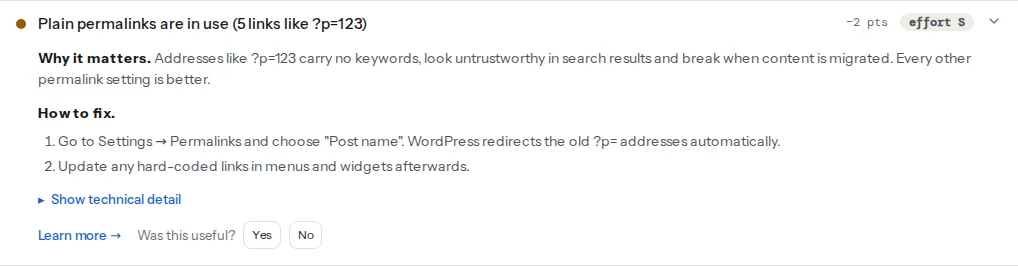
Three general URL findings from the same report matter when you change the structure:
The six structures
Settings → Permalinks offers:
| Setting | Example | Verdict |
|---|---|---|
| Plain | /?p=123 | Avoid |
| Day and name | /2026/09/25/sample-post/ | News sites only |
| Month and name | /2026/09/sample-post/ | News sites only |
| Numeric | /archives/123 | Avoid |
| Post name | /sample-post/ | Best default |
| Custom Structure | /%category%/%postname%/ | Only with a stable category tree |
Post name is right for most sites: short, readable, and it does not change when you reorganise the site. Pages always use their own slug and parent pages (/services/design/) whatever you choose; the setting applies to posts.
Dates make sense where the date is part of the content: a news site, a changelog. On evergreen content they make a 2021 article look stale in the result, even after you update it.
Category and post name (/%category%/%postname%/) reads well and groups content in analytics, but a post's URL now depends on its category. Rename or merge a category and every post in it moves. Choose it only if the category tree is fixed.
Custom Structure accepts the tags %year%, %monthnum%, %day%, %hour%, %minute%, %second%, %post_id%, %postname%, %category% and %author%. Two rules keep a custom structure safe: end it with %postname% or %post_id% so every post has a unique address, and leave out %author% unless authors never change, because reassigning a post moves it.
The Optional section below sets the category and tag bases (/category/, /tag/ by default). Leave them unless you have a reason; Yoast and Rank Math can remove the /category/ prefix entirely, and that change needs the same redirect care as the structure itself.
Step by step
1. Back up and pick a quiet hour
Take a full backup (files and database). Change the setting when traffic is lowest; a mistake in the rewrite rules makes every page except the home page return 404 until it is fixed.
2. Export a list of current URLs
Before anything changes, save the current addresses: download the XML sitemap (/wp-sitemap.xml or /sitemap_index.xml from an SEO plugin), or export the top landing pages from Search Console → Performance → Pages. This is your test list and, for a structure-to-structure change, your redirect map.
3. Check that the server can rewrite URLs
On Apache, WordPress writes this block to .htaccess in the site root when you save the permalink settings. It needs mod_rewrite enabled and AllowOverride permitting it. If the file is not writable, WordPress shows the block for you to paste:
# BEGIN WordPress
<IfModule mod_rewrite.c>
RewriteEngine On
RewriteBase /
RewriteRule ^index\.php$ - [L]
RewriteCond %{REQUEST_FILENAME} !-f
RewriteCond %{REQUEST_FILENAME} !-d
RewriteRule . /index.php [L]
</IfModule>
# END WordPress
On nginx, .htaccess is ignored. The server block needs:
location / {
    try_files $uri $uri/ /index.php?$args;
}
Without it, pretty URLs return nginx's own 404 page. Caddy's php_fastcgi directive already includes the equivalent try_files.
4. Switch the setting
Settings → Permalinks → Post name → Save Changes. Open a post from the front end to confirm it loads at its new address.
5. Redirect the old addresses
From Plain: nothing to add. A request for /?p=123 or /?page_id=45 is answered with a 301 to the new address by WordPress's canonical redirect.
From one readable structure to another: WordPress tries to guess the right post when an old address 404s, matching by slug, but it is a guess and fails on renamed or duplicated slugs. Add an explicit rule. Dates to post name on Apache, above the # BEGIN WordPress block:
RedirectMatch 301 ^/\d{4}/\d{2}/\d{2}/(.+)$ /$1On nginx, inside the server block before the location / block:
# Quoted because the pattern contains curly braces
rewrite "^/\d{4}/\d{2}/\d{2}/(.+)$" /$1 permanent;
For "Month and name", drop one /\d{2} from the pattern. Without server access, the Redirection plugin (Tools → Redirection) accepts the same pattern as a regex redirect: source ^/\d{4}/\d{2}/\d{2}/(.+)$, target /$1, 301. Its "Monitor changes" option also adds a redirect whenever you later change a post's slug. WordPress core already does that for posts, but not for pages.
6. Update links that bypass permalinks
Menus built with the menu editor update themselves. Links typed by hand into content, widgets, the footer or the theme options keep the old address and now go through a redirect. The Better Search Replace plugin updates them in one pass (back up first). The steps in finding and fixing broken links catch the rest, page by page.
7. Test 20 old URLs
Take 20 addresses from the list in step 2, weighted towards pages with traffic and backlinks, and run each through the redirect checker. Every one should answer one 301 to the new address, then 200. If you see two hops (old → http → https, or old → no slash → slash), fold them into one; redirects without chains shows how.
Platform notes
WooCommerce
Product URLs have their own settings on the same screen under Product permalinks (/product/, /shop/ or a custom base). The same rules apply: change once, redirect the old pattern.
Multilingual sites
WPML and Polylang add a language prefix or directory. Change the structure on staging first and test one URL per language.
Trailing slashes
WordPress follows the structure you saved: /%postname%/ gives addresses with a trailing slash and redirects the variant without one. Keep hand-written links, canonical tags and the sitemap on that same style, so no internal link costs a redirect.
Verify
- The WordPress health check shows the plain-permalinks finding as passed, and the trailing-slash finding reports consistent links.
- All 20 test URLs reach their new address with a single 301.
- Search Console → Pages shows no jump in "Not found (404)" over the next two weeks, and the new URLs start replacing the old ones in the Performance report.
Common mistakes
- Changing structure on a large site without a redirect map. Thousands of 404s at once, and Google drops the pages it cannot find. Build the redirect rule first, test it on staging, then switch.
- Dates in URLs for evergreen content. Articles look old in search results and every refresh raises the question of a new URL. Use Post name.
- Obsessing over stop words. Removing "the" and "and" from slugs changes nothing measurable, and changing the slug of a page that already ranks needs a redirect. Keep slugs short, readable and stable.
- Switching on nginx without
try_files. Every post returns 404 while the home page works. Add thelocation /block and reload nginx. - Removing the
/category/base as an afterthought. Every category archive moves, and the old addresses 404. Treat it like a structure change: redirect/category/(.+)to/$1and test. - Stacked redirects. An old rule from the http-to-https move plus a new one from the permalink change means two hops. Point old addresses straight at the final URL.