"This Connection Is Not Private" is the full-page warning Safari shows on iPhone, iPad and Mac when a website's certificate fails its checks: the certificate has expired, it was issued for a different name, or it comes from an issuer your device does not trust. Under the headline Safari adds "This website may be impersonating" the site "to steal your personal or financial information", because it cannot tell a broken certificate from an attacker. On many sites at once, fix your device first; on one site everywhere, the site owner has to fix the certificate. This page is part of SSL errors, browser by browser, which compares the same server faults across Chrome, Firefox, Safari and curl.
Quick answer
- On many sites at once: the cause is your device or network. Turn on automatic date and time, open the Wi-Fi login page, and pause VPNs, content filters and security apps that inspect web traffic.
- On one site, on every device and network: the site's certificate is at fault. Don't tap "visit this website" on a page that asks for a password or a card number; tell the owner.
- Site owner: Safari's headline is the same whether the certificate is expired, for another name or untrusted. Check all three separately with
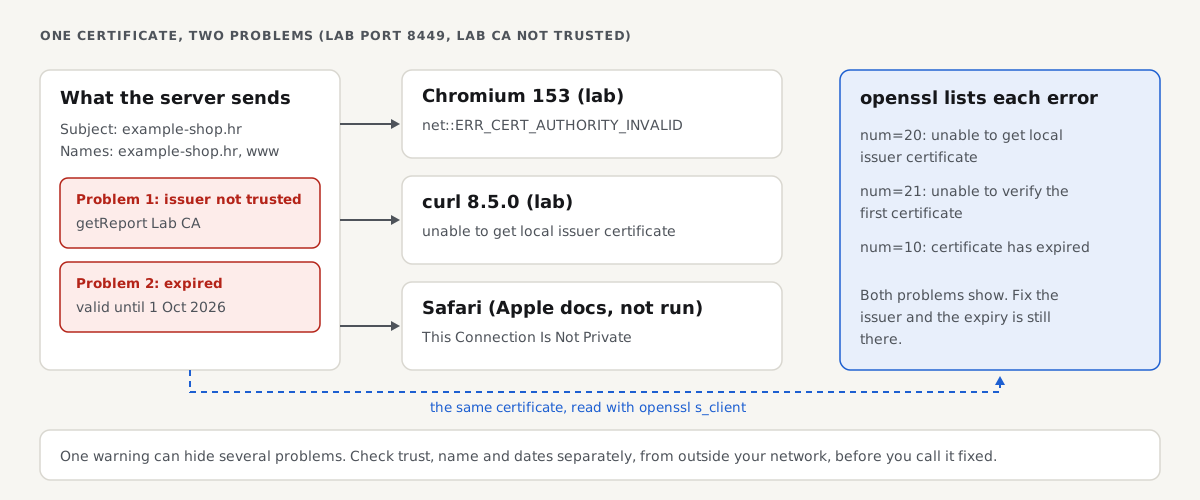
opensslandcurlfrom outside your network, because one warning can hide another problem. - In our lab, an expired certificate and a wrong-name certificate from an untrusted issuer both gave Chromium's
ERR_CERT_AUTHORITY_INVALID. Onlyopenssl s_clientlisted every problem. - Fix it at the source (renew, cover
wwwand the bare domain, send the full chain), reload the server, then confirm with the SSL checker.
What Safari's warning says
Safari's page has a short headline, "This Connection Is Not Private", and the line "This website may be impersonating" followed by the site's name "to steal your personal or financial information". The two buttons are Go Back and Show Details. Show Details explains that the certificate is not valid and ends with a "visit this website" link; tapping it and confirming loads the page anyway. On a Mac, the details also offer a way to view the certificate itself.
Apple's support article on Safari security warnings lists what triggers them: a certificate that has expired or is not legitimate, a site that still uses TLS 1.1 or earlier, and a page over plain HTTP that contains password fields. Only the certificate case produces the full "This Connection Is Not Private" page this guide is about. A server stuck on TLS 1.0 or 1.1 is covered in ERR_SSL_VERSION_OR_CIPHER_MISMATCH, and the plain-HTTP label in HTTP vs HTTPS and the "Not secure" warning.
Safari shows no error code on the page, so the warning alone doesn't say which check failed. Chrome's version, "Your connection is not private", carries codes such as NET::ERR_CERT_DATE_INVALID; those are explained in fixing "Your connection is not private".
One warning, three problems: what each client says
We served the example-shop.hr fixture from three lab ports, each with a different certificate problem. Chromium did not trust the lab certificate authority; curl ran both with it (--cacert) and without it. Safari was not run, so its column comes from Apple's documentation.
| Certificate problem (lab port) | Safari (Apple docs, not run) | Chromium 153 (lab CA untrusted) | curl 8.5.0, lab CA trusted | curl 8.5.0, no --cacert |
|---|---|---|---|---|
| Untrusted issuer, otherwise healthy (8443) | This Connection Is Not Private | net::ERR_CERT_AUTHORITY_INVALID | 200 | unable to get local issuer certificate |
| Expired on 1 Oct 2026 (8449) | This Connection Is Not Private | net::ERR_CERT_AUTHORITY_INVALID | certificate has expired | unable to get local issuer certificate |
| Issued for shop.example.net only (8450) | This Connection Is Not Private | net::ERR_CERT_AUTHORITY_INVALID | no alternative certificate subject name matches target host name 'example-shop.hr' | unable to get local issuer certificate |
Chromium and curl without the lab CA gave one answer for all three ports: the issuer is not trusted. They stop at the first failed check. Only when curl trusted the issuer did the expiry and name problems appear. With a public certificate, Chrome names those directly (ERR_CERT_DATE_INVALID, ERR_CERT_COMMON_NAME_INVALID in Chromium's net error list), but the lesson holds: one warning can sit on top of two problems, and fixing the first reveals the second.
If you're a visitor: fixes on iPhone, iPad and Mac
Try these in order and stop when the page loads.
- Set the date and time automatically. A clock that is days off makes every valid certificate look expired or not yet valid. On iPhone and iPad: Settings > General > Date & Time > Set Automatically. On a Mac: System Settings > General > Date & Time, and turn on setting the time automatically.
- Sign in to public Wi-Fi. Hotel, café, train and airport networks often catch the first secure connection to show their login page, and Safari sees the network's certificate instead of the site's. Wait for the login sheet or open any address starting with
http://, accept the terms, then reload. Mobile data is a quick test: if the site works there, the network was the cause. - Pause VPNs, content filters and profiles. Some VPNs, parental-control apps and work or school profiles inspect encrypted traffic by putting their own certificate in front of every site. On iPhone and iPad, Settings > General > VPN & Device Management shows what is installed; hand-installed root certificates are under Settings > General > About > Certificate Trust Settings. On a Mac, check System Settings > VPN, search System Settings for "Profiles", and pause any security app's "web protection". On a managed device, ask IT before removing anything.
- iCloud Private Relay, only if the warning comes and goes with it. Private Relay passes Safari's traffic through two relays, but the secure connection still runs between Safari and the site, so it is an unlikely cause. To rule it out, turn it off briefly: Settings > your name > iCloud > Private Relay on iPhone and iPad, or System Settings > your name > iCloud on a Mac. We did not test Private Relay.
- Update iOS, iPadOS or macOS. Very old devices miss newer root certificates: Let's Encrypt lists its ISRG Root X1 as trusted from iOS 10 and macOS 10.12.1. Use Settings > General > Software Update, or System Settings > General > Software Update.
- Clear the site's data. It rarely helps, but it clears stale state after a site is repaired. On iPhone and iPad: Settings > Apps > Safari > Clear History and Website Data (Settings > Safari on versions before iOS 18). On a Mac: Safari > Settings > Privacy > Manage Website Data, then remove the one site.
- If it still fails on one site, on every device and network, the site is broken. Let the owner know and wait.
Should you tap "visit this website"? Only when you know why the warning appears and nothing sensitive is involved, such as your own router's admin page with a self-signed certificate. Never on a page where you log in, pay or type personal details, and never on public Wi-Fi.
If you own the site: tell the three problems apart
Start from outside your own network, so your browser's cache, a VPN or a local DNS entry does not hide the fault:
getReport fetches pages with strict certificate checks, like a phone or an API client. If the certificate is expired, for the wrong name or untrusted, the report cannot load the page over HTTPS and stops with "We could not reach that site". When the certificate validates, these findings show how long it has left and whether the chain is complete:
Then read the certificate yourself. We ran the three commands below on 30 October 2026 against the lab ports; on your site, run them from outside your network with your host name and port 443. macOS ships LibreSSL as openssl, and some options differ, so install OpenSSL (for example with Homebrew) or use a Linux server.
1. Names, issuer and dates (terminal, any machine with OpenSSL):
openssl s_client -connect example-shop.hr:443 -servername example-shop.hr </dev/null 2>/dev/null \
  | openssl x509 -noout -subject -issuer -dates -ext subjectAltName
On the expired lab port 8449 it printed:
subject=CN = example-shop.hr
issuer=CN = getReport Lab CA
notBefore=Sep  1 00:00:00 2026 GMT
notAfter=Oct  1 00:00:00 2026 GMT
X509v3 Subject Alternative Name:
    DNS:example-shop.hr, DNS:www.example-shop.hr
The notAfter date is in the past: expired. On port 8450 it showed only DNS:shop.example.net, so example-shop.hr is not covered. An issuer that is not a public authority, or equals the subject, means a private or self-signed certificate.
2. Every verify error, with the name checked (terminal; -verify_hostname is what makes OpenSSL check the name, without it s_client ignores a name mismatch):
openssl s_client -connect example-shop.hr:443 -servername example-shop.hr \
  -verify_hostname example-shop.hr </dev/null 2>&1 | grep -E "Verify return code|verify error"
On the lab ports, with the system trust store (so the lab CA counted as untrusted, as it would for a visitor):
8449 expired:
verify error:num=20:unable to get local issuer certificate
verify error:num=21:unable to verify the first certificate
verify error:num=10:certificate has expired
Verify return code: 10 (certificate has expired)

8450 wrong name:
verify error:num=20:unable to get local issuer certificate
verify error:num=62:hostname mismatch
verify error:num=21:unable to verify the first certificate
Verify return code: 21 (unable to verify the first certificate)
This command shows the hidden second problem: the verify error lines list each failed check, while the final return code, like a browser, reports one. A healthy site ends with Verify return code: 0 (ok) and no verify error lines. Error 20 or 21 alone on a public certificate usually means a missing intermediate.
3. What a strict client sees (terminal, any machine with curl):
curl -sS -o /dev/null -w "%{http_code}\n" https://example-shop.hr/With the lab CA trusted (--cacert ca.pem), the three lab ports gave three different messages:
8443 example-shop.hr       200
8449 example-shop.hr       curl: (60) SSL certificate problem: certificate has expired
8450 example-shop.hr       curl: (60) SSL: no alternative certificate subject name matches target host name 'example-shop.hr'
Without --cacert, all three answered curl: (60) SSL certificate problem: unable to get local issuer certificate, like Chromium. curl and OpenSSL don't download a missing intermediate, and neither do some browsers and apps, so a pass from curl is stricter than a pass in your desktop browser.
Causes and fixes, most likely first
The certificate has expired
The most common cause when every visitor sees the warning at once. Renew, then reload the web server, which keeps the old certificate in memory until you do. With Let's Encrypt and certbot: sudo certbot renew, then sudo systemctl reload nginx (or apache2). On a hosting panel, re-run AutoSSL or the Let's Encrypt switch for the domain. Public certificates now last at most 200 days and keep getting shorter, so renewal has to be automatic and monitored: see certificate expiry: automate renewal, then monitor it.
The certificate does not cover the name in the address bar
The usual case is www versus the bare domain: the certificate covers example.com but visitors arrive at www.example.com, or the other way round. Both need to be on the certificate, because the redirect from one to the other only happens after the secure connection is set up. Command 1 shows the names covered. Reissue with every name: sudo certbot --nginx -d example.com -d www.example.com, or add the www alias in your hosting panel and reissue.
The chain is incomplete
The server sends its own certificate but not the intermediate that links it to a trusted root. Some clients fill the gap from a cache or by downloading the intermediate, others do not, so the site works for you and fails for a visitor. Command 2 then shows error 20 or 21 on an otherwise valid public certificate. Install the full chain file and reload:
- nginx (from the nginx docs, not run in our lab):
ssl_certificatemust point at the full chain, for example/etc/letsencrypt/live/example.com/fullchain.pem, notcert.pem. - Apache 2.4.8 or later (from the Apache docs, not run in our lab):
SSLCertificateFiletakes the full chain file; older versions use a separateSSLCertificateChainFile. - Managed and WordPress hosts: the panel installs the chain for its own certificates. For an uploaded paid certificate, paste the CA bundle into the "intermediate" or "CA bundle" field.
Certificate chain errors and intermediate certificates covers building and testing the chain.
Self-signed or private CA certificates
Routers, NAS boxes and staging servers often ship with a self-signed certificate. For a public site, replace it with a free certificate from Let's Encrypt or your host; getting a free certificate with Let's Encrypt has the steps.
For an internal site that has to use your own certificate authority, Apple devices trust it only after the root is installed and, on iPhone and iPad, full trust is turned on under Settings > General > About > Certificate Trust Settings. Even then, Apple requires every TLS server certificate to meet its rules from iOS 13 and macOS 10.15: an RSA key of at least 2,048 bits, a SHA-2 signature, the host name in the Subject Alternative Name list, and, for certificates issued after 1 July 2019, the server-authentication extended key usage and a lifetime of 825 days or less. A 10-year self-signed certificate breaks them and fails in Safari even when trusted. Certificates from the publicly trusted roots built into Apple devices also must not last more than 398 days if issued on or after 1 September 2020.
Behind Cloudflare or another CDN
Visitors get the CDN's edge certificate, so check its status for that exact host name in the CDN dashboard; a new one can take a few minutes to issue. A Cloudflare Origin CA certificate is trusted by Cloudflare only: if visitors reach your server directly, for example through a DNS record that is not proxied, Safari rejects it. Failures between Cloudflare and your server show as 525 or 526 instead; see Cloudflare errors 525 and 526.
How to verify the fix
- Command 1 shows every host name visitors use, a public issuer and a
notAfterdate in the future. - Command 2 ends with
Verify return code: 0 (ok)and prints noverify errorlines, forexample.comandwww.example.comboth. - Command 3 prints
200(or your redirect code) for each name. - The SSL checker loads the page over HTTPS, and the chain and expiry findings pass.
- Open the site in Safari on an iPhone over mobile data, which skips your office network and any cache on your computer.
How we tested
The getReport team ran the lab on 30 October 2026 on Linux with OpenSSL 3.0.13, curl 8.5.0, Python 3.11 and headless Chromium 153.0.8010.12 (Playwright). openssl s_server served the example-shop.hr fixture homepage on local ports, each with one certificate signed by a lab certificate authority: a healthy one for example-shop.hr and www.example-shop.hr (port 8443), one that expired on 1 October 2026 (8449) and one issued only for shop.example.net (8450). Chromium was pointed at the lab with a host resolver rule and did not trust the lab CA; curl was run with and without --cacert, and openssl s_client with the system trust store and -verify_hostname.
Not tested: Safari on iPhone, iPad or Mac (its wording comes from Apple's documentation), Firefox, Edge, real nginx, Apache or IIS (config notes come from their documentation), Cloudflare, VPNs, content filters, iCloud Private Relay, wrong device clocks, captive portals and HSTS.
Questions people ask
Why does my iPhone say "This connection is not private"?
Your iPhone says it because Safari could not confirm the site's certificate: it has expired, is for another name, or comes from an issuer the phone does not trust. If many sites show it, check Settings > General > Date & Time first, then sign in to the Wi-Fi login page and pause any VPN or content filter. If only one site shows it on every network, the site owner has to fix the certificate.
Is it safe to tap "visit this website" in Safari?
It's safe only when you know why the warning appears and you will not send anything sensitive, such as on your own router's settings page. Safari cannot tell a broken certificate from someone intercepting the connection, so on a site where you log in, pay or type personal details, go back instead. On public Wi-Fi, don't tap it at all: sign in to the network's login page and try again.
Why does Safari show the warning when Chrome on my computer loads the site?
Most often the two are not seeing the same thing: your computer may have cached an intermediate certificate or visited the site on another network, while the iPhone is on Wi-Fi with a login page or a filter. Apple also enforces its own certificate rules, such as a 2,048-bit key and an 825-day limit for private certificates. Run the openssl and curl checks from outside to find out which.
Can I turn off the "This connection is not private" warning on my Mac?
No, Safari has no setting that switches the certificate warning off, and that's deliberate: it is the check that stops a fake site from reading your passwords. You can only pass it for one site with "visit this website", or, for your own internal server, install and trust your private root certificate on the Mac. The lasting fix is a valid certificate on the site.
Does iCloud Private Relay cause "This connection is not private"?
Rarely. Private Relay routes Safari's traffic through two relays, but the secure connection still runs between Safari and the website, so the certificate you see is the site's own. If the warning appears only while Private Relay is on, turn it off briefly to test, then report it to the site owner or Apple. A wrong clock, a Wi-Fi login page or a filtering VPN is far more likely.
Why does one certificate fix sometimes reveal another warning?
Because browsers stop at the first failed check and report only that one. In our lab, a certificate that was both expired and from an untrusted issuer gave Chromium's authority error; trusting the issuer then revealed the expiry. A site owner who replaces a self-signed certificate can still be left with a missing www name. Run openssl s_client with -verify_hostname, which lists every failed check at once.
Sources
- Apple: If you see a Not Secure warning while browsing with Safari (accessed October 2026)
- Apple: Requirements for trusted certificates in iOS 13 and macOS 10.15 (accessed October 2026)
- Apple: About upcoming limits on trusted certificates (398 days) (accessed October 2026)
- Let's Encrypt: Certificate compatibility (accessed October 2026)
- Chromium net error list (accessed October 2026)
- OpenSSL 3.0 s_client manual (accessed October 2026)
- curl: SSL certificate verification (accessed October 2026)
- RFC 5280: Internet X.509 certificate and CRL profile (accessed October 2026)