An SSL error is a browser's message that it could not set up a secure HTTPS connection to a site, either because the TLS handshake itself failed or because the site's certificate could not be trusted, and each browser names the same failure differently. The code under the message tells you which of the two happened and at which step, which in turn tells you whether the fix is on your device or on the server. This guide maps every common message in Chrome, Edge, Firefox and Safari to the server state behind it. We built each of those states on purpose in a small lab, so the table below is measured, not copied.
Quick answer
- Two families. Certificate errors ("Your connection is not private", "Warning: Potential Security Risk Ahead", "This Connection Is Not Private") mean the handshake worked but the certificate failed a check. Connection errors ("This site can't provide a secure connection", "Secure Connection Failed", "Safari can't establish a secure connection") mean the handshake never finished.
- First, find whose problem it is. Open the site on mobile data or another device. If it works there, the cause is on your device or network (clock, antivirus, VPN, captive Wi-Fi). If it fails everywhere, only the site owner can fix it.
- Site owners: the usual causes, most likely first, are an expired certificate, a certificate missing a name (often
www), an incomplete chain, port 443 answering without TLS, a server that offers only TLS 1.0 or 1.1, and a host name the server or CDN does not know. - One problem can hide another. In our lab, Chromium reported an untrusted issuer for an expired certificate and for a wrong-name certificate alike. Fix the first error, then test again.
- Check from outside with the free SSL checker or
openssl s_client, which show the real certificate, chain and protocol your server offers.
What is an SSL error, exactly?
Every https:// page starts with a TLS handshake (SSL is the old name that stuck). In a few milliseconds the browser and the server agree on a protocol version and a cipher, the server sends its certificate, the browser checks it, and only then does any page content move. The SSL handshake, step by step walks through each message in plain language.
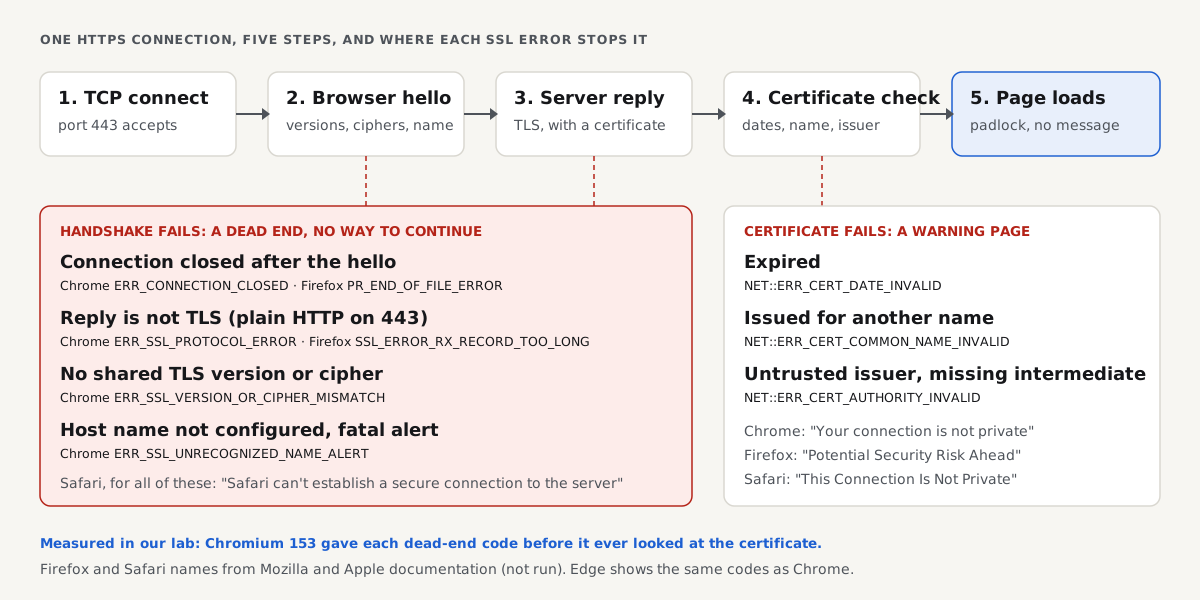
An SSL error is what the browser shows when that sequence stops. Where it stops decides the message, which is why the diagram above matters more than any list of fixes:
- The connection closes or resets before the server answers. Something in the path hung up: a firewall, a dead TLS terminator, interfering software.
- The server answers with something that is not TLS. Usually a plain HTTP server on port 443.
- The server answers with a TLS alert because the two sides share no protocol version or cipher, or because the server has no site for the host name the browser asked for.
- The handshake completes, but the certificate fails a check: expired, issued for another name, or signed by an issuer the browser does not trust (including a chain with a missing intermediate).
Failures 1 to 3 are connection errors. The browser has no certificate to show and no way to continue, so there is no "Proceed anyway" button. Failure 4 is a certificate error: the browser could connect but refuses to trust what it found, and it warns you instead.
The same failure in four browsers
Browsers share the TLS standards but not the vocabulary. Chrome and Edge are both built on Chromium and show the same ERR_ codes. Firefox uses its own security library, NSS, and shows its names (SSL_ERROR_, SEC_ERROR_, PR_). Safari shows plain sentences and hides the detail behind "Show Details".
| Server state | Chrome and Edge | Firefox | Safari | curl |
|---|---|---|---|---|
| Connection closed during the handshake | ERR_CONNECTION_CLOSED | PR_END_OF_FILE_ERROR | Can't establish a secure connection | SSL_ERROR_SYSCALL |
| Plain HTTP on the TLS port | ERR_SSL_PROTOCOL_ERROR | SSL_ERROR_RX_RECORD_TOO_LONG | Can't establish a secure connection | wrong version number |
| Only TLS 1.0 or 1.1 offered | ERR_SSL_VERSION_OR_CIPHER_MISMATCH | SSL_ERROR_UNSUPPORTED_VERSION | Can't establish a secure connection | tlsv1 alert protocol version |
| No cipher the browser offers | ERR_SSL_VERSION_OR_CIPHER_MISMATCH | SSL_ERROR_NO_CYPHER_OVERLAP | Can't establish a secure connection | alert handshake failure |
| Host name not configured, fatal alert | ERR_SSL_UNRECOGNIZED_NAME_ALERT | SSL_ERROR_UNRECOGNIZED_NAME_ALERT | Can't establish a secure connection | tlsv1 unrecognized name |
| Certificate expired | NET::ERR_CERT_DATE_INVALID | SEC_ERROR_EXPIRED_CERTIFICATE | This Connection Is Not Private | certificate has expired |
| Certificate for another name | NET::ERR_CERT_COMMON_NAME_INVALID | SSL_ERROR_BAD_CERT_DOMAIN | This Connection Is Not Private | no alternative certificate subject name matches |
| Untrusted issuer or missing intermediate | NET::ERR_CERT_AUTHORITY_INVALID | SEC_ERROR_UNKNOWN_ISSUER | This Connection Is Not Private | unable to get local issuer certificate |
The Chromium and curl columns come from our lab run below. The Firefox codes are NSS's error names, and the Safari wording comes from Apple's documentation; we did not run Firefox or Safari, so read those two columns as the documented names rather than captured screens. Firefox can also report PR_CONNECT_RESET_ERROR for a reset connection, and interfering software on the visitor's side can produce almost any of these codes.
We caused every error on purpose: the lab
The competing guides list causes. We wanted to know what each server state actually looks like from the client side, so we built them. On 30 October 2026 we served the example-shop.hr fixture homepage from openssl s_server, once per broken configuration, each on its own local port, and opened every port with curl and headless Chromium.
The servers, one line each (the healthy one first):
# Terminal: one OpenSSL test server per broken state, all serving the example-shop.hr fixture
openssl s_server -WWW -accept 8443 -cert good.pem -key good.key                      # healthy, TLS 1.2 and 1.3
openssl s_server -WWW -accept 8444 -cert good.pem -key good.key -tls1 -cipher 'DEFAULT@SECLEVEL=0'      # TLS 1.0 only
openssl s_server -WWW -accept 8445 -cert good.pem -key good.key -no_tls1_3 -cipher 'CAMELLIA128-SHA:@SECLEVEL=0'  # one cipher browsers do not offer
python3 -m http.server 8446                                                          # plain HTTP where TLS is expected
python3 eof_server.py 8447                                                           # reads the hello, then hangs up
openssl s_server -WWW -accept 8448 -cert wrongname.pem -key wrongname.key -servername example-shop.hr -cert2 good.pem -key2 good.key -servername_fatal   # unknown names refused
openssl s_server -WWW -accept 8449 -cert expired.pem -key expired.key               # expired 1 October 2026
openssl s_server -WWW -accept 8450 -cert wrongname.pem -key wrongname.key           # certificate for shop.example.net
What curl 8.5.0 said, with our lab certificate authority passed in --cacert so only the real problem shows:
# Terminal: curl --cacert ca.pem --resolve HOST:PORT:127.0.0.1 https://HOST:PORT/index.html
8443 example-shop.hr       200
8444 example-shop.hr       curl: (35) OpenSSL/3.0.13: error:0A00042E:SSL routines::tlsv1 alert protocol version
8445 example-shop.hr       curl: (35) OpenSSL/3.0.13: error:0A000410:SSL routines::sslv3 alert handshake failure
8446 example-shop.hr       curl: (35) OpenSSL/3.0.13: error:0A00010B:SSL routines::wrong version number
8447 example-shop.hr       curl: (35) OpenSSL SSL_connect: SSL_ERROR_SYSCALL in connection to example-shop.hr:8447
8448 www.example-shop.hr   curl: (35) OpenSSL/3.0.13: error:0A000458:SSL routines::tlsv1 unrecognized name
8449 example-shop.hr       curl: (60) SSL certificate problem: certificate has expired
8450 example-shop.hr       curl: (60) SSL: no alternative certificate subject name matches target host name 'example-shop.hr'
And what headless Chromium 153 reported for the same eight ports:
# Node.js + Playwright: page.goto('https://HOST:PORT/index.html'), the net error of the failed navigation
8443 healthy, lab CA not trusted    -> net::ERR_CERT_AUTHORITY_INVALID
8444 TLS 1.0 only                   -> net::ERR_SSL_VERSION_OR_CIPHER_MISMATCH
8445 TLS 1.2, Camellia only         -> net::ERR_SSL_VERSION_OR_CIPHER_MISMATCH
8446 plain HTTP on the TLS port     -> net::ERR_SSL_PROTOCOL_ERROR
8447 closes after the hello         -> net::ERR_CONNECTION_CLOSED
8448 unknown host name, fatal alert -> net::ERR_SSL_UNRECOGNIZED_NAME_ALERT
8449 expired                        -> net::ERR_CERT_AUTHORITY_INVALID
8450 wrong name                     -> net::ERR_CERT_AUTHORITY_INVALID
Three things stand out.
Connection errors do not care about the certificate. We never added our lab authority to Chromium's trust store, yet ports 8444 to 8448 still produced their own specific codes. The handshake broke before any certificate was looked at, exactly as the diagram shows.
One warning can hide several problems. The expired certificate and the wrong-name certificate were also signed by an issuer Chromium did not trust, and Chromium reported only that: ERR_CERT_AUTHORITY_INVALID for all three. Replace a self-signed or badly chained certificate and the browser may then complain about the date or the name. When you fix a certificate error, test again until the page loads, not until the first message goes away.
Two errors with one Chrome code have different causes. Ports 8444 and 8445 both gave ERR_SSL_VERSION_OR_CIPHER_MISMATCH, but curl separated them (protocol version against handshake failure). If a browser code is ambiguous, the command-line message usually is not.
Visitor or site owner: whose problem is it?
Most SSL error pages look like the website is broken, and often it is. But a large share of the reports in forums come from one device, and the fix is there. One minute settles it:
- Open the site on another network, for example your phone on mobile data with Wi-Fi off.
- Open another HTTPS site you trust on the device that shows the error.
- Run the site through the SSL checker, which connects from our server, not from your network.
If the site fails everywhere and the checker shows a problem, the cause is on the server, and the sections for site owners below apply. If only your device fails, or every HTTPS site fails on it, the cause is local.
Fixes for visitors, most likely first
These apply in every browser. The per-browser guides add the exact menus.
- The date and time are wrong. A clock that is months off makes every valid certificate look expired or not yet valid. Set the date and time to automatic and reload.
- You are on Wi-Fi with a login page. Hotel, airport and train networks intercept your first HTTPS request to show their sign-in page, which fails the certificate check. Open any plain
http://address, such ashttp://neverssl.com, to get the login page, then retry. - Antivirus or security software scans HTTPS. Some products decrypt your traffic with their own certificate. Mozilla names this as a common cause of Firefox's connection errors. Turn off the product's HTTPS or web scanning briefly; if the error goes away, update the product or leave that setting off.
- A VPN, proxy or content filter is in the path. Disconnect it and retry. On an iPhone, look under Settings, General, VPN & Device Management for profiles you do not recognise.
- The device is too old. An operating system that no longer gets updates may lack current root certificates or modern TLS versions. Update it, or use a current browser that ships its own.
- The browser has a stale state. Close all windows, or try a private window, which starts without extensions and cached state.
What you should not do is click through a certificate warning on a site where you log in or pay. A warning on your bank's site is either a local problem you can fix with the steps above, or an attack you should not walk into. Our guide to "Your connection is not private" covers when, if ever, proceeding is reasonable.
Causes for site owners, most likely first
When the error shows for everyone, work down this list. Each item names the browser codes it produces, so you can start from what your visitors reported.
| Cause | What visitors see | How to confirm | Where to fix it |
|---|---|---|---|
| Certificate expired | ERR_CERT_DATE_INVALID, This Connection Is Not Private | openssl x509 -noout -enddate on the served certificate | Renew; make renewal automatic |
| Certificate does not cover this name | ERR_CERT_COMMON_NAME_INVALID, SSL_ERROR_BAD_CERT_DOMAIN | -ext subjectAltName on the served certificate | Reissue with every name (apex and www) |
| Intermediate certificate missing | ERR_CERT_AUTHORITY_INVALID in some clients only | openssl s_client -showcerts shows one certificate, not two or more | Serve the full chain file |
| Port 443 has no TLS | ERR_SSL_PROTOCOL_ERROR, SSL_ERROR_RX_RECORD_TOO_LONG | curl -v http://yoursite:443/ gets an HTTP answer | Turn on TLS for that listener |
| Only old TLS versions | ERR_SSL_VERSION_OR_CIPHER_MISMATCH, SSL_ERROR_UNSUPPORTED_VERSION | openssl s_client -tls1_2 fails | Allow TLS 1.2 and 1.3 |
| Host name not configured on the server or CDN | ERR_SSL_UNRECOGNIZED_NAME_ALERT, or a wrong-name certificate | openssl s_client -servername for each name | Add the name to the server block or CDN |
| Something drops the connection | ERR_CONNECTION_CLOSED, PR_END_OF_FILE_ERROR | The handshake stops with no reply at all | Firewall, WAF, load balancer or proxy rules |
Expired certificates lead the list because they are the one failure every site meets eventually: renewal is automatic on most hosts, and automatic renewals fail quietly. Certificate expiry: automate it, then monitor it covers both halves. Missing names come second, usually www or a new subdomain added after the certificate was issued. Chain problems are sneaky because desktop Chrome often repairs a missing intermediate on its own while apps, older phones and command-line tools fail; certificate chain errors and intermediate certificates explains why and how to build the right file.
The remaining causes are configuration mistakes, and the per-error guides below go through each one by platform.
Chrome and Edge: the ERR_ codes
Chrome and Microsoft Edge share Chromium's network stack, so their codes are identical; Edge only changes the wording around them. Two page types exist.
"Your connection is not private" is the certificate warning, with a NET::ERR_CERT_ code underneath: DATE_INVALID (expired or not yet valid), COMMON_NAME_INVALID (wrong name), AUTHORITY_INVALID (untrusted issuer or missing intermediate). Your connection is not private: what it means and how to fix it takes each code in turn, for visitors and owners.
"This site can't provide a secure connection" is the dead end, with the reason in a sentence and a code:
ERR_SSL_PROTOCOL_ERROR("sent an invalid response") means the server replied with something that is not a valid handshake, most often plain HTTP on port 443. ERR_SSL_PROTOCOL_ERROR: what it means and how to fix it has the server-side causes in order.ERR_SSL_VERSION_OR_CIPHER_MISMATCH("uses an unsupported protocol") means the two sides share no protocol version or cipher. Chromium removed TLS 1.0 and 1.1 years ago, so a server that still offers only those, or only ciphers Chromium dropped, ends here. Our lab produced it both ways, and the dedicated guide shows the probe commands that tell them apart.ERR_SSL_UNRECOGNIZED_NAME_ALERTmeans the server answered the browser's host name with a fatal "unrecognized name" alert: it has no site configured for that name. A dedicated guide explains why the same missing name gives this error on one server and a name-mismatch warning on another.
A closed connection shows as "This site can't be reached" with ERR_CONNECTION_CLOSED, the same page Chrome uses for DNS and routing failures. This site can't be reached maps every code on that page to the layer behind it. If Cloudflare sits in front of your site, its own error pages 525 and 526 describe a failed handshake between Cloudflare and your server rather than between the browser and Cloudflare: see Cloudflare error 525 and 526.
Firefox: two pages and the NSS codes
Firefox splits the errors by page title. Mozilla's documentation describes both.
"Warning: Potential Security Risk Ahead" is the certificate warning. The code is under Advanced: SEC_ERROR_EXPIRED_CERTIFICATE, SSL_ERROR_BAD_CERT_DOMAIN, SEC_ERROR_UNKNOWN_ISSUER and their relatives. You can sometimes accept the risk and continue, but not on a site that uses HSTS, where Firefox shows "Did Not Connect: Potential Security Issue" and offers no way past.
"Secure Connection Failed" is the dead end. It has no button to continue, and it is where Firefox's two best-known codes appear.
SSL_ERROR_RX_RECORD_TOO_LONG is Firefox's name for the plain-HTTP-on-port-443 state that Chrome calls ERR_SSL_PROTOCOL_ERROR. The name sounds cryptic until you look at the bytes. Firefox reads the first five bytes of the server's reply as a TLS record header, and the last two of those are the record's length. Our lab server on port 8446 replied with an HTML error page, so those bytes were <!DOC:
# Terminal: send a real ClientHello, decode the first 5 bytes of the reply as a TLS record header
python3 raw.py 8446
first 5 bytes: 3c 21 44 4f 43 b'<!DOC'
as a TLS record: type=60 version=0x2144 length=20291 bytes
A TLS 1.2 record may carry at most 18,432 bytes (RFC 5246, section 6.2.3), so a "record" of 20,291 bytes is too long, and Firefox says exactly that. The healthy server on port 8443 replied 16 03 03 00 7a: a handshake record of 122 bytes. A dedicated guide to SSL_ERROR_RX_RECORD_TOO_LONG goes through the nginx, Apache and proxy configurations that cause it.
PR_END_OF_FILE_ERROR means the connection ended before the handshake did: Firefox reached the end of the stream while it was still waiting for the server. It is NSPR error -5938, "Encountered end of file". It is more often a visitor-side problem than the others, because VPNs, proxies, antivirus HTTPS scanning and DNS over HTTPS settings can all cut the connection; Mozilla lists them as the usual suspects. When the server is the cause, our lab's port 8447 shows the shape: a server or middlebox that accepts the connection, reads the hello and hangs up. A dedicated guide covers the visitor steps in order and a test that tells you whose side drops the connection.
Firefox shows SSL_ERROR_UNSUPPORTED_VERSION for a server stuck on TLS 1.0 or 1.1 and SSL_ERROR_NO_CYPHER_OVERLAP for a cipher mismatch. Mozilla's own advice for the first one is blunt: it cannot be fixed in Firefox, and the site's owner has to update the server.
Safari: two sentences on iPhone, iPad and Mac
Safari shows less and explains more. It has two messages, and telling them apart is most of the diagnosis.
"This Connection Is Not Private" is the certificate warning. Safari adds that the website may be impersonating the real one to steal personal or financial information, and offers Show Details, where you can view the certificate and, at your own risk, visit the site. Apple's support article on Safari's security warnings lists the triggers: a certificate that is expired or not legitimate, a site that uses TLS 1.1 or earlier, and an unencrypted page asking for a password or a card number. A dedicated guide to "This connection is not private" in Safari covers the iPhone and Mac steps and how a site owner identifies which certificate problem Safari hit, since Safari's message is the same for all of them.
"Safari can't establish a secure connection to the server" is the dead end: a page titled "Safari Can't Open the Page" with no option to continue. It is Safari's word for every connection error in the table above: no shared protocol, no shared cipher, plain HTTP on port 443, a dropped connection, an unknown host name. Apple's WebKit team announced in 2018 that Safari would drop TLS 1.0 and 1.1, with the removal starting in March 2020 updates, so a server stuck on those versions is a classic cause. A dedicated guide maps the message to the server states we reproduced, so a site owner without a Mac can reproduce the failure with curl.
How to check your own site
The quickest outside view is the free SSL checker. It runs a real TLS handshake with your host name, like a browser, and reports the certificate's days left, whether the chain validates against public roots, the names it covers and whether TLS 1.0 or 1.1 are still accepted, plus the HTTPS redirect, HSTS and mixed content. It is not a full cipher-suite audit, but it checks the things that cause browser errors.
The three checks behind most certificate errors:
For more detail, openssl s_client from any terminal shows what your server actually sends. Replace example.com with your host name; run it from a machine outside your own network if you can.
# Terminal: the certificate's names and dates, and how long the chain is
echo | openssl s_client -connect example.com:443 -servername example.com 2>/dev/null \
  | openssl x509 -noout -subject -issuer -enddate -ext subjectAltName
echo | openssl s_client -connect example.com:443 -servername example.com -showcerts 2>/dev/null | grep -c 'BEGIN CERTIFICATE'

# Terminal: which TLS versions the server accepts (a failure on 1.2 and 1.3 is the problem)
for v in tls1_2 tls1_3; do printf "%s " $v; echo | openssl s_client -connect example.com:443 -servername example.com -$v 2>&1 | grep -m1 -E "Protocol *:|alert|error"; done

# Terminal: every name you serve gets the right certificate (apex, www, any subdomain)
for n in example.com www.example.com; do printf "%s " $n; echo | openssl s_client -connect example.com:443 -servername $n 2>&1 | grep -m1 -E "subject=|alert"; done

# Terminal: does port 443 answer plain HTTP? An HTTP status line here means no TLS on 443
curl -sv --max-time 5 http://example.com:443/ 2>&1 | grep -m1 '^< HTTP'
On a healthy server, the first command shows your names in the subject alternative names and an end date weeks or months away, the chain count is 2 or more, both TLS versions return a Protocol line, every name returns your certificate's subject, and the last command prints nothing.
Fixing it by platform
The exact fix depends on where TLS is terminated: your web server, a CDN in front of it, or your host's control panel. The per-error guides have full snippets; these are the settings that come up most.
| Where TLS ends | Certificate and chain | Protocol versions | Host names |
|---|---|---|---|
| nginx | ssl_certificate must point to the full chain file (fullchain.pem with Let's Encrypt) | ssl_protocols TLSv1.2 TLSv1.3; | Every name in a server_name with a certificate that covers it; listen 443 ssl;, not listen 443; |
| Apache | SSLCertificateFile with the chain (Apache 2.4.8 and later) | SSLProtocol -all +TLSv1.2 +TLSv1.3 | ServerName and ServerAlias in the *:443 virtual host, with SSLEngine on |
| Cloudflare | Edge certificate issued automatically once the name is proxied (the free one covers the apex and one level of subdomains); the origin needs its own for Full (strict) | SSL/TLS, Edge Certificates, Minimum TLS Version | The record must exist and be proxied (orange cloud) |
| Managed host or WordPress host | Issue or renew in the control panel's SSL section | Usually fixed by the host | Add each domain or alias in the panel before pointing DNS at it |
The nginx and Apache directives are from their official documentation; we did not run nginx or Apache in this lab. Mozilla's SSL Configuration Generator writes a complete, current configuration for either server and is worth using instead of copying old snippets. If you are turning old protocol versions off, TLS 1.2 vs 1.3, and turning TLS 1.0 and 1.1 off shows how to log which versions visitors still use before you change anything.
How to verify the fix
Re-run the SSL checker after every change. Passing looks like this: the certificate is valid with more than 14 days left, the chain validates, TLS 1.0 and 1.1 are refused, and http:// redirects to https://. Then repeat the openssl loop above for every name you serve, because the checker tests the host you enter and your visitors may use another one.
Finally, open the site in a private window in at least two browser engines (Chrome or Edge, plus Firefox or Safari) on a network outside your office. A fix that works only on your own machine may have hit a cached result.
How we tested
The getReport team ran every lab command in this guide on 30 October 2026 on Linux with OpenSSL 3.0.13, curl 8.5.0, Python 3.11 and headless Chromium 153.0.8010.12 driven by Playwright. Each server state was an openssl s_server (or a small Python script) on its own local port, serving the example-shop.hr fixture homepage from our test suite, with certificates we issued from a throwaway lab certificate authority. Chromium was pointed at the lab with a host resolver rule; the lab authority was never added to any trust store, which is why certificate cases show as an untrusted issuer in the Chromium output.
What we did not test: Firefox, Safari on macOS or iOS, and Edge as a separate browser; their codes and wording come from Mozilla's and Apple's documentation and the NSS error names. We did not run nginx, Apache, IIS or Cloudflare (their settings come from official documentation), and we did not test antivirus HTTPS scanning, VPNs, captive portals or wrong device clocks.
Questions people ask
Why am I getting SSL errors on every website?
When every HTTPS site fails on one device, the cause is on that device, not on the sites. The usual culprits are a wrong date and time, antivirus software that scans HTTPS traffic, a VPN or proxy, a network with a login page, or an operating system so old it lacks current root certificates. Fix the clock first, then switch off the software in the path one at a time.
Why does a site work in Chrome but give an SSL error in Firefox?
Usually because something on your device intercepts HTTPS with its own certificate. Security software and company networks often add their own root certificate to the operating system, which Chrome and Edge accept, while Firefox keeps a separate list of trusted roots and may not. If only Firefox fails on one device, check that software first; if Firefox fails on every device, test the server with the SSL checker.
Can a VPN or antivirus cause SSL errors?
Yes. Software that inspects encrypted traffic sits between your browser and the site, and if its own certificate is not trusted or it handles a handshake badly, the browser reports an SSL error. Mozilla lists VPNs, proxies and antivirus HTTPS scanning among the usual causes of Firefox's connection errors. Disconnect or pause it and reload to find out.
Do SSL errors hurt SEO?
They can, because search engine crawlers need a working HTTPS connection just like browsers. If the handshake fails or the certificate is invalid on your canonical URLs, crawlers cannot fetch those pages reliably, and visitors who see a warning leave before the page loads. A short outage fixed quickly does little lasting harm; an expired certificate left for weeks costs both traffic and crawling.
What is the difference between an SSL error and a certificate error?
A certificate error is one kind of SSL error. It means the secure connection was set up but the certificate failed a check: expired, issued for another name or signed by an untrusted issuer, and the browser warns you. Other SSL errors happen earlier, when the two sides cannot complete a handshake at all, and the browser stops without a warning page or an option to continue.
How do I see the SSL error code behind a vague browser message?
Look near the bottom of the error page. Chrome and Edge print the code in small text under the message. Firefox shows it after you select Advanced or the error code link. Safari shows the certificate under Show Details but not a code. For any browser, curl -v https://example.com/ prints the exact failure in one line.
Sources
- RFC 8446: The Transport Layer Security (TLS) Protocol Version 1.3 (accessed October 2026)
- RFC 5246: TLS 1.2, section 6.2.3 on record length limits (accessed October 2026)
- RFC 6066: TLS Extensions, section 3 on Server Name Indication and the unrecognized_name alert (accessed October 2026)
- Chromium: net_error_list.h, the list of Chrome network error codes (accessed October 2026)
- Mozilla Support: Secure connection and security warning error pages in Firefox (accessed October 2026)
- Apple Support: If you see a "Not Secure" warning while browsing with Safari (accessed October 2026)
- WebKit: Deprecation of legacy TLS 1.0 and 1.1 versions (October 2018)
- Mozilla: SSL Configuration Generator (accessed October 2026)