An SSL handshake, properly a TLS handshake today, is the short exchange at the start of every HTTPS connection in which your browser and the server agree on how to encrypt, the server proves who it is, and both sides derive keys that only the two of them know. It happens before a single byte of the page moves, and when it fails, the visitor sees an error instead of your site. This guide walks through each step of the modern TLS 1.3 handshake in plain language, shows how TLS 1.2 differed and why 1.3 is faster, and routes each kind of handshake failure to its fix. How certificates and HTTPS fit together more broadly is covered in what an SSL certificate is and how HTTPS works.
Quick answer
- The handshake is a negotiation, an identity check and a key agreement, in that order, finished before any page content is sent.
- With TLS 1.3 (RFC 8446) it takes one round trip between browser and server; TLS 1.2 (RFC 5246) needed two. The time is network latency, not computation.
- The browser opens with everything it supports plus its half of a key exchange; the server picks, proves its identity, and from its first reply onwards the connection is already encrypted.
- Repeat visits can resume a previous session, and 0-RTT can even send the request with the first message, at the cost of a replay risk.
- A failed handshake shows as
ERR_SSL_PROTOCOL_ERROR, a version mismatch, a certificate warning or a Cloudflare 525, each with its own fix. - Test your own server's handshake with the SSL checker or
openssl s_client.
What the SSL handshake does
Encryption needs keys, and two machines that have never met cannot simply send each other a secret key: anyone on the network could read it. The handshake solves that with a key exchange where each side contributes half, and only the two of them can compute the result, even if every message was recorded.
Three things have to happen, and the handshake does all of them:
- Agree on the rules: which TLS version and which cipher both sides speak.
- Prove identity: the server shows its certificate and proves it holds the matching private key, so the browser knows it reached the real site and not someone in the middle.
- Derive the keys that encrypt everything after, the page, cookies, form data and passwords.
"SSL handshake" and "TLS handshake" mean the same exchange; SSL is the retired predecessor whose name stuck.
The TLS 1.3 handshake, step by step
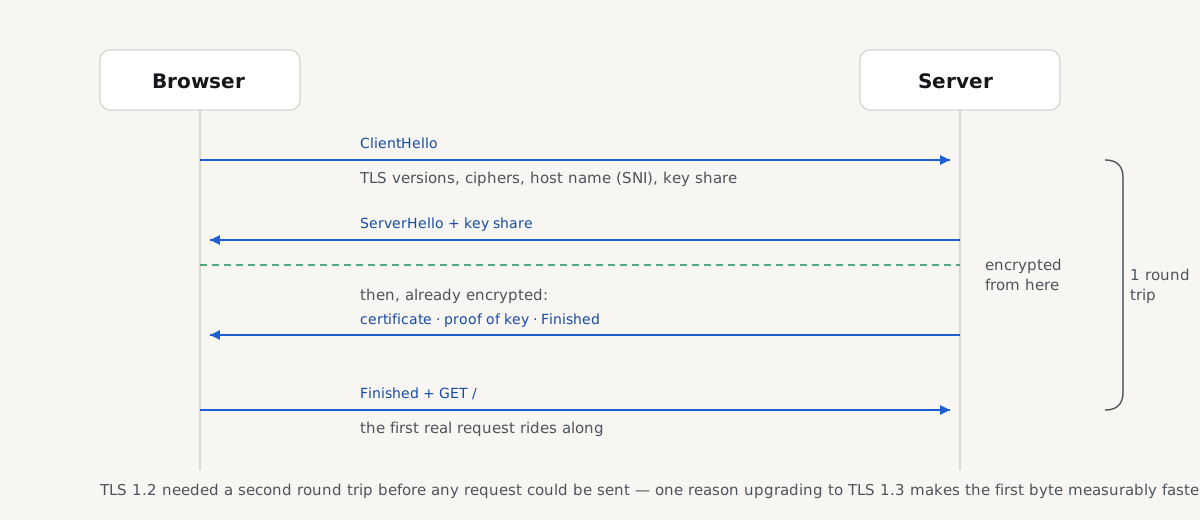
TLS 1.3, defined in RFC 8446, needs one round trip: the browser sends one flight of messages, the server answers with one, the browser confirms, and the page request rides along with that confirmation.
Step 1: the browser's hello
The browser opens with a single message, the ClientHello, that front-loads everything: the TLS versions it accepts, its list of ciphers, the host name it wants (the SNI field, so a server hosting many sites knows which certificate to pick), and a key share, its half of a key exchange, computed in advance for the group it expects the server to choose, usually X25519.
What each party knows now: the server knows everything it needs to decide; the browser knows nothing yet about who answered.
Step 2: the server's reply
The server answers with one flight that does four jobs:
- ServerHello: the version and cipher it picked, plus its own key share. The moment both key shares are exchanged, browser and server can each compute the same shared secret, so everything after the ServerHello is already encrypted, including the certificate.
- The certificate: the server proves its identity here. The browser checks the name, the dates and the chain of signatures; what is inside a certificate and how that trust is built is the ground of the SSL certificate guide.
- Proof of the key (CertificateVerify): a signature over the handshake so far, made with the certificate's private key. A certificate alone could be copied from the real site; only the real server can produce this signature.
- Finished: a checksum over the whole conversation, proving no message was altered on the way.
What each party knows now: the browser knows who it is talking to, that the server holds the key, and that nobody tampered with the negotiation.
Step 3: the browser confirms and the page starts
The browser verifies the certificate and both proofs, sends its own Finished, and, in the same flight, the first HTTP request. One network round trip after the handshake began, the server is reading GET /. If any check fails instead, the browser stops and shows an error; which error depends on where it broke, covered below.
How the TLS 1.2 handshake differed
TLS 1.2, from RFC 5246, ran the same three jobs in a different order, and the order cost a round trip. The ClientHello carried no key share, so the server first answered with its choices and its certificate, in clear text, and only then did the two sides run the key exchange in a second round trip. Only after that could the request leave.
TLS 1.2 also allowed the key exchange to lean on the certificate itself: the browser could encrypt a secret with the certificate's public key, so anyone who later obtained the private key could decrypt recorded traffic. TLS 1.3 removed that option, so every connection gets fresh keys no later leak can unlock, and it saved its round trip by having the browser guess the key-exchange group up front, a guess that almost always lands. If your server still accepts the versions before 1.2, turning off TLS 1.0 and 1.1 covers why and how.
Session resumption and 0-RTT
The full handshake runs once per connection, and browsers reuse connections, so most requests never pay for it. For the next visit, TLS 1.3 goes further: after the handshake, the server can hand the browser a session ticket. The browser presents it next time as a pre-shared key, which skips the certificate entirely; the handshake is still one round trip, just lighter.
0-RTT ("early data") goes one step further: the browser sends the request together with its very first message, so the server can answer with zero extra round trips. The honest caveat: an attacker who records that first flight can replay it, and the server cannot tell the copy from the original. Servers should accept early data only for requests that are safe to repeat, such as plain GETs, and many leave 0-RTT off entirely.
What the handshake costs in milliseconds
The cryptography itself is cheap, around a millisecond of CPU on current hardware. The cost is round trips, and a round trip costs whatever your visitor's latency is. Over TCP, the transport adds one round trip of its own before TLS starts:
| Connection | Round trips before the request leaves | At 100 ms latency |
|---|---|---|
| TCP + TLS 1.2 | 3 (1 TCP + 2 TLS) | about 300 ms |
| TCP + TLS 1.3 | 2 (1 TCP + 1 TLS) | about 200 ms |
| HTTP/3 (QUIC, TLS 1.3 built in) | 1 combined | about 100 ms |
That time sits inside Time to First Byte, before your server has even seen the request, which is why a distant or 1.2-only server looks slow in exactly the way a slow TTFB looks. The practical levers are enabling TLS 1.3 and serving visitors from somewhere nearby.
Why an SSL handshake fails
When the handshake breaks, the browser names the failure after the step that broke. Each row's fix has its own guide:
| What you see | Which step broke | Where the fix is |
|---|---|---|
ERR_SSL_PROTOCOL_ERROR, "This site can't provide a secure connection" | The server's answer was not valid TLS at all: plain HTTP on port 443, or a broken configuration | ERR_SSL_PROTOCOL_ERROR: what it means and how to fix it |
ERR_SSL_VERSION_OR_CIPHER_MISMATCH | Negotiation found no common version or cipher, usually a server stuck on TLS 1.0 or 1.1 | Turning TLS 1.0 and 1.1 off |
"Your connection is not private" with a NET::ERR_CERT_… code | The handshake reached the certificate and the browser rejected it: expired, wrong name or untrusted | Fixing "Your connection is not private" |
| Fine in Chrome, fails in apps, curl or webhooks | The server sends its certificate without the intermediate, so strict clients cannot build the chain | Certificate chain errors and intermediate certificates |
| Cloudflare error 525, "SSL handshake failed" | Your visitor's handshake with Cloudflare succeeded; Cloudflare's handshake with your origin failed | Cloudflare errors 525 and 526 |
alert unrecognized name in openssl, or another site's certificate | SNI mismatch: the name the client sent has no matching site or certificate on the server | ERR_SSL_PROTOCOL_ERROR, "No certificate for this host name" |
The first row is the broad one: when Chrome shows the protocol error, the handshake collapsed before the certificate even appeared, and the ERR_SSL_PROTOCOL_ERROR guide walks through the visitor fix and every server-side cause.
See a TLS handshake yourself
OpenSSL performs a handshake and prints what happened (macOS and Linux have it; on Windows, Git Bash includes it):
openssl s_client -connect example.com:443 -servername example.com </dev/nullThree parts of the output map straight onto the steps above. The Certificate chain block is the server's second flight. Verify return code: 0 (ok) means the identity checks a browser would run all passed. Near the end, Protocol: TLSv1.3 and Cipher: TLS_AES_256_GCM_SHA384 are what the ServerHello picked. The -servername flag fills the SNI field; without it, a server hosting several sites may answer for the wrong one.
curl narrates the same exchange in order:
curl -v https://example.com/ -o /dev/nullYou will see TLS handshake, Client hello (1) go out, the server's hello and certificate come back, then SSL connection using TLSv1.3 / TLS_AES_256_GCM_SHA384, and only after that the GET / request: exactly the sequence above.
Check your server's handshake configuration
The checker runs real handshakes against your host, the same way a browser does. The first is a modern one, with the host name as SNI: it records the negotiated protocol and cipher, and reads the certificate's dates, names and chain. A second handshake offers only TLS 1.0 and 1.1 to see whether your server still accepts the legacy versions. Around the handshake, the page fetch confirms that http:// redirects to https://, whether HSTS is set and whether anything on the page still loads over plain HTTP.
A pass on all three means a current browser completes the handshake with your server on the first try, negotiates a modern protocol, and trusts what it is shown.
Questions people ask
What happens during an SSL handshake?
Three things, in one short exchange before any page data: the browser and server agree on a TLS version and cipher, the server presents its certificate and proves it holds the matching private key, and both sides derive encryption keys only they know. With TLS 1.3 the browser sends its half of the key exchange in its first message, so the whole handshake fits in one round trip and the page request follows immediately.
Why does an SSL handshake fail?
Because one of its steps cannot complete: the server answers port 443 with something that is not TLS, the two sides share no protocol version or cipher, the certificate fails the browser's checks, or the name sent in SNI has no certificate on the server. The browser's error names the broken step, ERR_SSL_PROTOCOL_ERROR for the first, a version mismatch or certificate warning for the others, and each has its own fix on the server.
How long does a TLS handshake take?
One network round trip with TLS 1.3, two with TLS 1.2, so the answer is your visitor's latency: roughly 100 ms versus 200 ms at 100 ms of latency, on top of one round trip for TCP itself. HTTP/3 folds transport and TLS into a single round trip. The computation adds only about a millisecond; distance is the real cost, and it is paid once per connection, not per request.
What is the difference between the TLS 1.2 and TLS 1.3 handshake?
TLS 1.3 finishes in one round trip instead of two, because the browser sends its key-exchange share in its first message rather than waiting for the certificate. It also encrypts everything after the server's hello, including the certificate, which TLS 1.2 sent in clear text, and it removed the key-exchange option that let a stolen private key decrypt recorded traffic. The result is a handshake that is faster and has fewer ways to go wrong.
What is SNI in the SSL handshake?
SNI (Server Name Indication) is the field in the browser's first handshake message that names the host it wants, such as www.example.com. A server hosting many sites on one address uses it to pick the right certificate before the certificate is sent. When the name has no matching site, the handshake fails or returns another site's certificate. SNI travels unencrypted; Encrypted Client Hello, now rolling out in major browsers, is the emerging fix for that.