SSL_ERROR_RX_RECORD_TOO_LONG means Firefox asked a server for an encrypted HTTPS connection and got plain, unencrypted HTTP back, so the first bytes of the reply looked like a TLS record far longer than TLS allows. Firefox shows it on a "Secure Connection Failed" page with the line "SSL received a record that exceeded the maximum permissible length". If you are a visitor, a proxy, VPN or antivirus that scans HTTPS can cause it; if you own the site, the usual cause is port 443 serving HTTP without TLS, which one curl command proves. It is one of the codes in SSL errors, browser by browser, and Chrome shows the same server state as ERR_SSL_PROTOCOL_ERROR.
Quick answer
- Visitor: open the site in a private window and on mobile data. If it works there, check Firefox's proxy setting, pause your VPN and turn off HTTPS scanning in your antivirus. If it fails everywhere, only the site owner can fix it.
- Site owner: run
curl -v http://yourdomain:443/from your computer. If your normal page or a redirect comes back over plain HTTP, port 443 has no TLS. That is the whole diagnosis. - nginx: the listen line needs
ssl:listen 443 ssl;, notlisten 443;, plus a certificate and key. - Apache: the
<VirtualHost *:443>block needsSSLEngine onand certificate lines, andmod_sslmust be loaded. - Not the certificate: an expired or outdated certificate gives a different error. Firefox never got as far as a certificate here.
- After the fix, run the SSL checker to confirm the handshake, the certificate and the redirect.
What "record too long" actually means
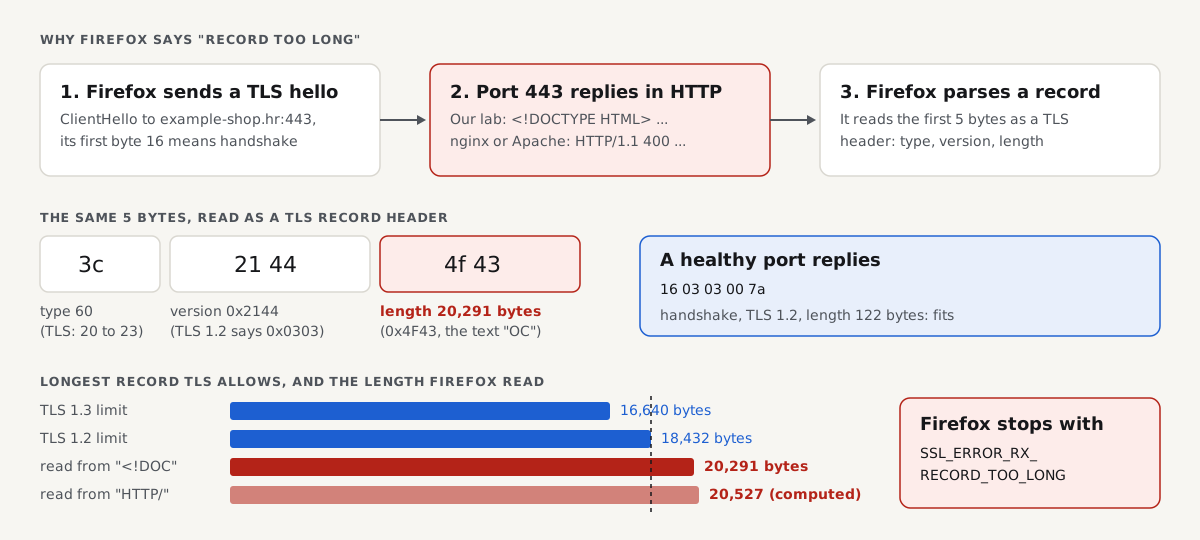
Everything sent over TLS travels in records. Each record starts with a 5-byte header: 1 byte for the content type (handshake, alert, application data), 2 bytes for the protocol version and 2 bytes for the length of what follows. A browser reads those 5 bytes first and then waits for that many bytes of data.
TLS caps that length. RFC 5246 (TLS 1.2), section 6.2.3, says an encrypted record must not exceed 2^14 + 2048 = 18,432 bytes. RFC 8446 (TLS 1.3), section 5.2, lowers it to 2^14 + 256 = 16,640 bytes. A header that announces more than that is invalid, and Firefox rejects it with this error.
Now send that browser an HTML page or an HTTP error instead. Firefox still reads the first 5 bytes as a record header, because that is all it expects on an https:// connection. Bytes 4 and 5 are now two text characters, and read as one number they come out large: for the two cases below, above 20,000 bytes and over the limit. The record Firefox thinks it received really is too long.
The bytes from our lab
We pointed a real TLS client at a port that serves plain HTTP (port 8446 in our lab, python3 -m http.server 8446 serving the example-shop.hr fixture) and decoded the reply as a TLS record header with a short script, raw.py. Run on the lab machine:
$ python3 raw.py 8446
first 5 bytes: 3c 21 44 4f 43 b'<!DOC'
as a TLS record: type=60 version=0x2144 length=20291 bytes
first line: <!DOCTYPE HTML>
The healthy port in the same lab, 8443, replied 16 03 03 00 7a: type 22 (handshake), version 0x0303 (the TLS 1.2 value), length 122 bytes. Here is the arithmetic side by side:
| Reply on port 443 | First 5 bytes | Type | Version | Length read | Under the limit? |
|---|---|---|---|---|---|
| Healthy TLS server (lab, 8443) | 16 03 03 00 7a | 22, handshake | 0x0303 | 122 bytes | Yes |
| HTML page (lab, 8446) | 3c 21 44 4f 43 (<!DOC) | 60, not a TLS type | 0x2144 | 0x4F43 = 20,291 bytes | No: above 18,432 and 16,640 |
| nginx or Apache status line (computed) | 48 54 54 50 2f (HTTP/) | 72, not a TLS type | 0x5454 | 0x502F = 20,527 bytes | No: above 18,432 and 16,640 |
The last row is computed, not captured: nginx and Apache were not in our lab. A web server that receives a binary TLS hello on a plain HTTP port usually answers with HTTP/1.1 400 Bad Request, and the five characters HTTP/ decode to the length shown.
The same server state in other clients
The same broken port, in other clients:
| Client | What it shows for plain HTTP on the TLS port | Source |
|---|---|---|
| Firefox | Secure Connection Failed, SSL_ERROR_RX_RECORD_TOO_LONG | Mozilla's error text; Firefox was not run in our lab |
| Chrome, Edge (Chromium) | This site can't provide a secure connection, ERR_SSL_PROTOCOL_ERROR | Our lab: net::ERR_SSL_PROTOCOL_ERROR on port 8446 |
| curl | curl: (35) ... wrong version number | Our lab, port 8446 |
OpenSSL s_client | wrong version number, no peer certificate | Our lab, port 8446 |
curl and OpenSSL complain about the version bytes (0x2144 is no TLS version), Chromium reports a generic protocol error, and Firefox's TLS library names the length. They are three readings of one header.
If you're a visitor: the quick fix
If the site fails on every device and network, the server is broken and only its owner can fix it. If it fails only on your computer, something between Firefox and the internet is changing the traffic. Mozilla's help page for secure connection errors names security software, proxies and VPNs as common causes. Try these in order:
- Open the site in a private window, then on your phone over mobile data. If it works on the phone, the problem is on your computer or your network.
- Check Firefox's proxy setting. Settings, General, Network Settings: choose "No proxy" or "Use system proxy settings" unless your workplace needs a specific proxy. A proxy entered in the wrong field (an HTTP-only proxy used for HTTPS) can hand Firefox plain HTTP.
- Pause your VPN and turn off HTTPS scanning in your antivirus. Products that inspect encrypted traffic sit in the middle of the connection. If the site loads afterwards, update the product or add an exception for the site.
- Try Firefox's Troubleshoot Mode (Help, Troubleshoot Mode) to rule out an add-on.
- Try another network. Hotel, school and office networks sometimes intercept web traffic until you sign in.
Don't look for a setting that lowers Firefox's security to get past this. There is no certificate to accept: the server never spoke TLS.
If you own the site: prove it in one command
Run this on your own computer (macOS, Linux, or Windows 10 and later, which include curl). Note the http:// with port :443: you are asking port 443 for plain HTTP on purpose.
curl -v http://example.com:443/- Your page or a redirect comes back (
HTTP/1.1 200 OK,301 Moved Permanently): port 443 speaks plain HTTP. This is the cause of SSL_ERROR_RX_RECORD_TOO_LONG. 400 Bad Requestwith "The plain HTTP request was sent to HTTPS port": this is nginx saying port 443 is set up for TLS and you sent it HTTP. Port 443 is healthy; the problem is elsewhere.Empty reply from serveror the connection is reset: the port expected TLS and dropped your plain request. 443 is probably fine; test from the visitor's network instead.Connection refused: nothing listens on 443. Browsers show ERR_CONNECTION_REFUSED for that, not this error.
This is what a plain HTTP answer looks like, from our lab's port 8446 (same machine, same day, with --resolve mapping the fixture name to 127.0.0.1; output trimmed):
$ curl -sv -o /dev/null --resolve example-shop.hr:8446:127.0.0.1 http://example-shop.hr:8446/
> GET / HTTP/1.1
> Host: example-shop.hr:8446
< HTTP/1.0 200 OK
< Server: SimpleHTTP/0.6 Python/3.11.17
< Content-type: text/html
The same port asked for HTTPS, as a browser does:
curl: (35) OpenSSL/3.0.13: error:0A00010B:SSL routines::wrong version numberThen run a full check from outside your network, so a local cache or VPN does not hide the result:
The SSL checker connects like a strict client. While port 443 speaks plain HTTP, it cannot load the page over https:// at all. Once TLS works, these findings should pass:
The causes, most likely first
| Cause | Sign | Fix |
|---|---|---|
nginx listen 443; without ssl | curl -v http://host:443/ gets a normal page | Add ssl to the listen line, plus certificate and key |
Apache *:443 virtual host without SSLEngine on, or mod_ssl not loaded | Same curl result | Enable mod_ssl, add SSLEngine on and certificate lines |
| An app or container speaking HTTP on 443 | Same, with your app's Server header | Put the reverse proxy back in front, or enable TLS in the app |
https:// on a plain HTTP port, such as :80 or :8080 | The URL has a port number | Remove the port, or serve TLS on it |
| Proxy, VPN or antivirus on the visitor's side | Works on another device or network | The visitor fixes in the list above |
nginx: listen 443; without ssl
This is the classic cause, and the nginx guide to HTTPS servers explains why: the ssl parameter on the listen line is what turns TLS on for that socket. Without it, nginx listens on 443 and serves plain HTTP. The snippet below is from the nginx docs, not run in our lab. It goes in your site's file, often /etc/nginx/sites-available/example.com or /etc/nginx/conf.d/example.com.conf:
server {
    listen 443 ssl;
    listen [::]:443 ssl;
    server_name example.com www.example.com;
    ssl_certificate     /etc/letsencrypt/live/example.com/fullchain.pem;
    ssl_certificate_key /etc/letsencrypt/live/example.com/privkey.pem;
    ssl_protocols TLSv1.2 TLSv1.3;
}
Check both the IPv4 and IPv6 lines: a missing ssl on [::]:443 breaks only visitors on IPv6, which looks random. Search every file, because another site's block can define the same port: grep -rn "listen.*443" /etc/nginx/. Test and reload with sudo nginx -t && sudo systemctl reload nginx. If you have no certificate yet, get a free one from Let's Encrypt first.
Apache: a *:443 virtual host without TLS
Apache serves plain HTTP on any port it listens on unless mod_ssl is loaded and the virtual host turns it on. The usual slip is a <VirtualHost *:443> copied from the port 80 block. The lines below are from the Apache mod_ssl docs, not run in our lab; they go in the site's file, for example /etc/apache2/sites-available/example.com-ssl.conf on Debian and Ubuntu:
<VirtualHost *:443>
    ServerName example.com
    SSLEngine on
    SSLCertificateFile    /etc/letsencrypt/live/example.com/fullchain.pem
    SSLCertificateKeyFile /etc/letsencrypt/live/example.com/privkey.pem
</VirtualHost>
On Debian and Ubuntu, enable the module and the site with sudo a2enmod ssl and sudo a2ensite example.com-ssl, then sudo apachectl configtest && sudo systemctl reload apache2. On RHEL-family systems, install the mod_ssl package.
An app server or container on port 443
Node.js, Python and Go apps, and Docker containers, usually speak plain HTTP and expect a reverse proxy (nginx, Caddy, a load balancer) to handle TLS in front of them. The error appears when the app ends up on 443 directly: a docker run -p 443:3000 mapping, an app told to listen on 443, or a proxy removed during a migration. Either put the proxy back so it terminates TLS on 443 and forwards to the app's HTTP port, or start the app with TLS (in Node, https.createServer with a certificate, not http.createServer).
https:// on a port that serves HTTP
A link or redirect such as https://example.com:80/ or https://example.com:8080/ sends a TLS hello to a plain HTTP port, and the browser gets exactly the reply in our lab. Look for the port number in the address bar, in the site's base URL setting (WordPress "Site Address", an app's BASE_URL) and in redirect rules. Remove the port, or serve TLS on it.
Cloudflare: where the error can and can't come from
With the orange cloud on (proxied), the visitor's TLS ends at Cloudflare, so a broken origin does not show this error. If your origin's port 443 speaks plain HTTP, the SSL mode decides what visitors see:
| SSL/TLS mode | How Cloudflare reaches your origin | Origin 443 speaking plain HTTP gives |
|---|---|---|
| Flexible | Plain HTTP on port 80 | No error (port 443 is never used), but the origin link is unencrypted |
| Full | HTTPS on port 443 | Error 525 for visitors |
| Full (strict) | HTTPS on port 443, certificate validated | Error 525 for visitors |
Fix the origin as above and set Full (strict); Cloudflare errors 525 and 526 walks through it. Two cases do show SSL_ERROR_RX_RECORD_TOO_LONG with Cloudflare. First, a grey-cloud (DNS only) record: visitors connect straight to your origin, so its port 443 must serve TLS itself. Second, https:// on one of Cloudflare's HTTP ports: Cloudflare's network ports page lists 80, 8080, 8880, 2052, 2082, 2086 and 2095 as HTTP and 443, 2053, 2083, 2087, 2096 and 8443 as HTTPS. That second case follows from the port list; we did not test it.
Managed and WordPress hosts
On managed hosting you can't edit the server block, but the cause is the same: the host's port 443 serves your domain without TLS, often because a newly added domain or subdomain never got its certificate. In cPanel, Plesk or your host's dashboard, look for the SSL/TLS or "HTTPS" setting for that exact domain and turn it on. Where that option is missing, send support the curl -v http://yourdomain:443/ output: it shows them the problem in one line. Panel names vary by host.
After the fix
curl -v http://example.com:443/no longer returns a normal page: nginx answers "The plain HTTP request was sent to HTTPS port", or the connection closes.openssl s_client -connect example.com:443 -servername example.com </dev/null(on your computer) shows your certificate andVerify return code: 0 (ok).- Repeat for every name visitors use, such as
wwwand subdomains, over IPv4 and IPv6. - Open the site in a Firefox private window and on a phone over mobile data.
- Run the SSL checker again. Check that only TLS 1.2 and 1.3 are accepted, and add HSTS only once HTTPS works on every name:
If Firefox now shows a different code, the next problem is in line behind this one. Our sibling guide on ERR_SSL_VERSION_OR_CIPHER_MISMATCH covers servers that speak TLS but only old versions, and the SSL handshake explained shows the full exchange.
How we tested
The getReport team ran these tests on 30 October 2026 on a Linux machine with OpenSSL 3.0.13, curl 8.5.0, Python 3.11 and headless Chromium 153.0.8010.12 (Playwright). The example-shop.hr fixture homepage was served by openssl s_server on healthy ports and by python3 -m http.server 8446 on the plain-HTTP port. A Python script sent a real TLS hello and decoded the first 5 bytes of the reply; curl, OpenSSL and Chromium connected to the same port.
Not tested: Firefox itself (its message comes from Mozilla's error text, and the "record too long" verdict follows from the bytes and the RFC limits), Safari, real nginx, Apache or IIS (the config snippets are from their docs, and the HTTP/ length of 20,527 bytes is computed), Cloudflare, antivirus HTTPS scanning, VPNs and proxies.
Questions people ask
What does SSL_ERROR_RX_RECORD_TOO_LONG mean in Firefox?
It means the server replied to Firefox's HTTPS request with plain HTTP. Firefox reads the first 5 bytes of every reply as a TLS record header, and text such as <!DOC or HTTP/ decodes to a length above 20,000 bytes, while TLS allows at most 18,432 (TLS 1.2) or 16,640 (TLS 1.3). Almost always the site's port 443 has no TLS configured, so the owner has to fix the server.
Is SSL_ERROR_RX_RECORD_TOO_LONG caused by an outdated certificate?
No. An expired, outdated or wrong-name certificate produces a certificate warning, such as "Warning: Potential Security Risk Ahead", not this error. SSL_ERROR_RX_RECORD_TOO_LONG happens before any certificate is sent, because the server never started speaking TLS. Renewing the certificate alone will not help; the server has to serve TLS on port 443 first, and then its certificate matters.
Why does Firefox show this error when Chrome loads the site fine?
Because something affects Firefox only, usually its own proxy setting. Firefox can use a proxy separate from your system's, and a wrong one returns plain HTTP. If the server's port 443 were really broken, Chrome would fail too, with ERR_SSL_PROTOCOL_ERROR. Check Settings, General, Network Settings, try Troubleshoot Mode to rule out add-ons, and check antivirus software that treats each browser differently.
Can antivirus HTTPS scanning cause SSL_ERROR_RX_RECORD_TOO_LONG?
Yes, Mozilla lists security software that inspects encrypted traffic among the causes of secure connection errors. Such software sits between Firefox and the site, and when it fails it can hand Firefox an unencrypted reply. Turn off the HTTPS or "encrypted connection" scanning option briefly and reload. If the site works, update the product or exclude the site, then turn protection back on.
Why do I get SSL_ERROR_RX_RECORD_TOO_LONG on localhost?
Because you opened https://localhost and your development server only speaks HTTP. Open http://localhost:3000 (or your port) instead, or start the dev server with HTTPS enabled. If Firefox keeps upgrading to HTTPS, check for a redirect in your app, an earlier HSTS header on that name, or Firefox's HTTPS-Only Mode, which you can switch off for one site.
Does turning on TLS 1.3 fix SSL_ERROR_RX_RECORD_TOO_LONG?
No. The server isn't using TLS at all on that port, so no TLS version setting is involved. Changing ssl_protocols or similar lines does nothing while the listen line lacks ssl or SSLEngine on is missing. Turn TLS on for port 443 first; once the handshake works, allow TLS 1.2 and 1.3 and refuse older versions.
Sources
- RFC 8446: The Transport Layer Security (TLS) Protocol Version 1.3, section 5.2 (accessed October 2026)
- RFC 5246: The Transport Layer Security (TLS) Protocol Version 1.2, section 6.2.3 (accessed October 2026)
- Mozilla: Secure connection and security warning error pages in Firefox (accessed October 2026)
- Chromium net error list (accessed October 2026)
- nginx: Configuring HTTPS servers (accessed October 2026)
- Apache HTTP Server: mod_ssl (accessed October 2026)
- Cloudflare: Network ports (accessed October 2026)
- Cloudflare: SSL troubleshooting (accessed October 2026)