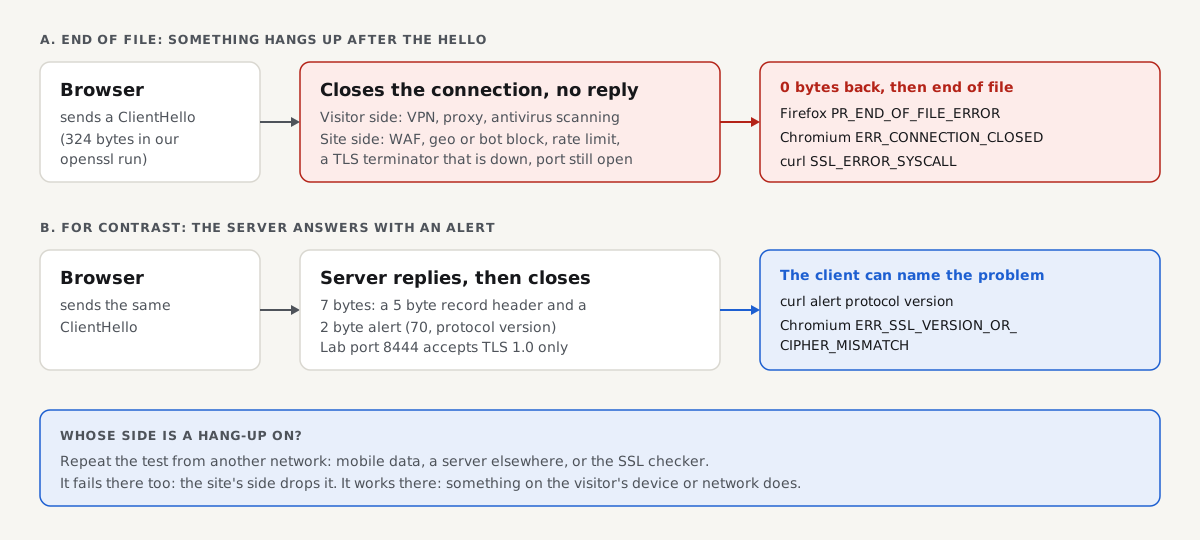
PR_END_OF_FILE_ERROR means Firefox opened a connection, sent the first message of the secure handshake, and the other end closed the connection without answering, so no secure connection was ever set up. Firefox shows it on a "Secure Connection Failed" page, and most of the time the cause is on the visitor's side: a VPN, a proxy, antivirus software that scans HTTPS, or a firewall. When every visitor sees it, the site is dropping the connection itself. Below you get the visitor fix in order of likelihood, then a test that tells a site owner whose side it is. For how this error sits next to the other secure connection errors in Chrome, Firefox and Safari, see SSL errors, browser by browser.
Quick answer
- What it is: the connection closed after Firefox said hello and before any reply. Firefox got no certificate and no error message.
- Visitor, try these in order: turn off your VPN or proxy, pause HTTPS scanning in your antivirus, restart Firefox in Troubleshoot Mode, set the proxy to "No proxy", add a DNS over HTTPS exception, and only then try a new profile.
- Quick split: if the site opens on your phone over mobile data, the problem is on your computer or network. If it fails there too, the site has the problem.
- Site owner: run
openssl s_client -connect example.com:443 -servername example.comfrom a network outside your own. "Unexpected eof" and "read 0 bytes" mean something closed the connection without an alert. - Likely server causes: a firewall, WAF or geo or bot block, a TLS terminator or load balancer that is down while the port stays open, or rate limiting that drops connections.
- Confirm the fix with the SSL checker, which connects from our servers, not from your network.
What PR_END_OF_FILE_ERROR means
Firefox's PR_ error names come from NSPR, Mozilla's portable runtime library. PR_END_OF_FILE_ERROR is NSPR error -5938, "Encountered end of file". For a secure connection, it means the TCP connection worked, Firefox sent its ClientHello (the first message of the SSL handshake, listing its TLS versions, ciphers and the site's name), and then the stream ended before any reply.
That silence is the clue. TLS 1.3 (RFC 8446, section 6) says a party that hits a fatal error should send an alert, a short message with a code, before it closes the connection. An alert lets the browser name the problem: an old protocol, no shared cipher, an unknown host name. An end of file gives the browser nothing to name. A server that answers with something that is not TLS at all causes a different error: SSL_ERROR_RX_RECORD_TOO_LONG in Firefox, ERR_SSL_PROTOCOL_ERROR in Chrome.
Something hangs up without an alert when it is not a working TLS server: a security product, a filter, or a port that stays open while the TLS service behind it is down. Mozilla's help page lists the usual suspects on the visitor's side: VPNs, DNS over HTTPS, antivirus HTTPS scanning, proxy settings and firewalls.
The same server state in every client
We built a server that accepts the TCP connection, reads the ClientHello and closes without a byte of reply, and pointed curl, openssl and headless Chromium at it and at a second server that answers with an alert. Firefox was not in our lab, so its name comes from Mozilla's documentation.
| Client | Server hangs up after the hello (lab port 8447) | Server answers with an alert (lab port 8444, TLS 1.0 only) |
|---|---|---|
| Firefox (not run, per Mozilla's docs) | PR_END_OF_FILE_ERROR | Not run |
| Headless Chromium 153 | net::ERR_CONNECTION_CLOSED | net::ERR_SSL_VERSION_OR_CIPHER_MISMATCH |
| curl 8.5.0 | curl: (35) OpenSSL SSL_connect: SSL_ERROR_SYSCALL | curl: (35) ... tlsv1 alert protocol version |
| openssl s_client 3.0.13 | unexpected eof while reading, read 0 bytes | tlsv1 alert protocol version ... SSL alert number 70, read 7 bytes |
Read the last row closely. With the alert, the client read 7 bytes: a 5 byte record header and a 2 byte alert. With the hang-up, it read 0. Every client reports the hang-up as a connection that ended, in its own words; in Chrome that is ERR_CONNECTION_CLOSED.
Fix it as a visitor, in order of likelihood
First, open the site on your phone over mobile data, with Wi-Fi off. If it loads there, the cause is on your computer or network, and the steps below will find it. If it fails there too, tell the site's owner: nothing on your device will fix it.
- Turn off your VPN or proxy app. Disconnect fully and reload. Some sites block known VPN addresses by dropping the connection. If the site works without the VPN, switch VPN server or add the site to its split tunnelling list.
- Pause HTTPS scanning in your antivirus or security suite. Products that inspect encrypted traffic sit between Firefox and the site and make their own onward connection. If that fails, Firefox only sees its own connection end. The setting is called "HTTPS scanning", "encrypted connection scanning" or "web shield" depending on the product. If the site works with it off, update the product or add an exception, then turn protection back on.
- Restart Firefox in Troubleshoot Mode. Open the menu, then Help, then Troubleshoot Mode, and confirm the restart. It turns off add-ons for that session. If the site loads, turn your add-ons off one at a time in
about:addonsuntil you find the one that breaks it. - Check Firefox's own proxy setting. Open Settings, General, scroll to Network Settings and click Settings. Choose "No proxy", or "Use system proxy settings" if your company requires a proxy, then reload. A leftover manual proxy that no longer works can break secure connections.
- Add a DNS over HTTPS exception. Open Settings, Privacy & Security, DNS over HTTPS, then Manage Exceptions, and add the site's domain. Mozilla lists DNS over HTTPS among the settings to test for this error.
- Try another network or switch the router off and on. A company, school or hotel firewall can drop connections to some sites or countries. Wait for a captive Wi-Fi login page and sign in before you test.
- Last, create a new Firefox profile. Type
about:profilesin the address bar, create a new profile and launch it. If the site works there, move your bookmarks over with sync or import.
Skip advice to delete a "cipher suites file" or to change hidden security.tls preferences. Neither matches what this error means, and weakening Firefox's TLS settings to reach one site is a bad trade.
If you own the site: whose side is it?
First prove whether your site drops the connection or something on the visitor's path does. Test from outside your own network, because your office firewall or VPN can hide the problem or create one.
The SSL checker connects from getReport's servers, not your network. If it completes the handshake and lists your certificate, your server answers TLS for that name from at least one place on the internet, and the visitor's network is the next suspect. If it cannot connect securely either, the drop is at your server or something in front of it. When the handshake works, this finding should be green:
For the exact failure, run OpenSSL from a second network: a cloud server, a friend's connection or your phone's hotspot. Run it on macOS or Linux in Terminal, or in Git Bash on Windows:
openssl s_client -connect example.com:443 -servername example.com </dev/nullThis is what our lab server that hangs up after the hello returned (port 8447, run on our lab machine):
40679A57EB7F0000:error:0A000126:SSL routines:ssl3_read_n:unexpected eof while reading:../ssl/record/rec_layer_s3.c:316:
CONNECTED(00000003)
---
no peer certificate available
---
SSL handshake has read 0 bytes and written 324 bytes
CONNECTED means TCP worked, so the port is open. "Read 0 bytes" means the other end sent nothing back. Compare our server that refuses with an alert (port 8444, TLS 1.0 only):
40C783023F7F0000:error:0A00042E:SSL routines:ssl3_read_bytes:tlsv1 alert protocol version:../ssl/record/rec_layer_s3.c:1599:SSL alert number 70
CONNECTED(00000003)
---
no peer certificate available
---
SSL handshake has read 7 bytes and written 317 bytes
curl shows the same split. Run it from the same outside network:
curl -sv -o /dev/null https://example.com/Against the port that hangs up, the last lines were:
* Connected to example-shop.hr (127.0.0.1) port 8447
* TLSv1.3 (OUT), TLS handshake, Client hello (1):
* OpenSSL SSL_connect: SSL_ERROR_SYSCALL in connection to example-shop.hr:8447
Against the port that sends an alert, curl printed an incoming line first, * TLSv1.3 (IN), TLS alert, protocol version (582):, then the named error. The rule: an (IN) line before the error means the server answered; no (IN) line means the connection was cut.
Then read the results together:
| Inside your network | Outside your network | Whose side |
|---|---|---|
| Fails with end of file | Works | Your network or device (office firewall, VPN, antivirus) |
| Works | Fails with end of file | Something in front of your server treats outside traffic differently (WAF, geo or bot rule, CDN) |
| Fails | Fails | Your server or load balancer drops every handshake |
| Works | Works | The visitor's network, or a rule that targets their address, country or client |
If only some visitors report it, ask for their country, network (mobile carrier, VPN, company) and the time, and check your firewall log for blocked connections from that address at that time.
Site-side causes and fixes
Work down this list, starting with the rules that decide which connections to drop.
A firewall, WAF or geo or bot block
Network firewalls, web application firewalls and DDoS filters can block by dropping the connection rather than answering. Rules that block countries, data centre or VPN address ranges, or clients whose ClientHello looks like a bot can all cut off real visitors after the hello. Nothing then reaches your web server's log.
Fix it in the product that made the decision: search its event log for the visitor's address and the time, then relax or narrow the rule. On a managed or WordPress host, the server firewall is usually run by the host, so send them the address, time and error name and ask whether their firewall dropped it.
SNI-based filtering
The ClientHello carries the site's name in plain text (the Server Name Indication extension, RFC 6066). Network filters and some load balancers or proxies read that name and drop connections to names on a list, or to names they do not know. If one name fails while another on the same address works, test each with -servername. Add the missing name to the load balancer's or proxy's host list, and make sure a certificate covers it.
A TLS terminator that is down while the port stays open
If TLS is handled by a separate process (a reverse proxy, a load balancer, a container sidecar), the port can still accept connections after that process has failed. A load balancer with no healthy backend can do the same. That is exactly our lab server: TCP succeeds, nothing answers.
Check the service behind the port. On a Linux server with nginx, test the configuration and read the error log (from the nginx docs, not run in our lab):
sudo nginx -t
sudo tail -n 50 /var/log/nginx/error.log
With Apache, the equivalents are sudo apachectl configtest and the error log under /var/log/apache2/ on Debian and Ubuntu or /var/log/httpd/ on RHEL (from the Apache docs, not run in our lab). On a cloud load balancer, check its target health, especially right after a deploy.
Rate limiting and connection limits
A connection limit per address can close new connections without a reply. The error then comes and goes, often for visitors behind a shared address such as a company network or mobile carrier. Look for limits in your firewall, DDoS protection and load balancer, and raise them for normal browsing rather than turning them off.
Behind Cloudflare or another CDN
When a CDN proxies the domain, the visitor's handshake ends at the CDN's edge, not at your server. Check that the exact host name has an active edge certificate in the CDN's dashboard, and the CDN's firewall and bot rules as above. A problem between the CDN and your server shows as a CDN error page, such as Cloudflare's 525 and 526, not as an end of file.
An old TLS setup
A server that only accepts TLS 1.0 or 1.1 normally refuses with an alert, as our port 8444 did, so browsers show a version or cipher error, covered in ERR_SSL_VERSION_OR_CIPHER_MISMATCH. Allow TLS 1.2 and 1.3; this finding flags a server that still accepts the old versions:
Reproduce it yourself
This is the whole server behind lab port 8447 (Python 3, no extra packages). Save it as eof_server.py on a test machine and run python3 eof_server.py 8447:
# Accepts TCP, reads the ClientHello, then closes without answering (a middlebox or dead TLS terminator).
import socket, sys
s = socket.socket(); s.setsockopt(socket.SOL_SOCKET, socket.SO_REUSEADDR, 1)
s.bind(("127.0.0.1", int(sys.argv[1]))); s.listen(8)
while True:
    c, _ = s.accept()
    try: c.recv(4096)
    finally: c.close()
In a second terminal on the same machine, openssl s_client -connect 127.0.0.1:8447 -servername example-shop.hr </dev/null shows "unexpected eof" and "read 0 bytes". Opening https://127.0.0.1:8447/ in Firefox should show PR_END_OF_FILE_ERROR; we did not run that step. The script listens on 127.0.0.1 only, so nothing outside the machine can reach it.
How to verify the fix
- From a network outside your own,
openssl s_client -connect example.com:443 -servername example.com </dev/nullprints your certificate chain and reads more than 0 bytes. curl -sv -o /dev/null https://example.com/shows aTLS handshake, Server hello (2)line with(IN)and ends without an error.- Repeat for every name visitors use:
example.com,www.example.comand any subdomain. - Ask a visitor who saw the error to reload in Firefox on the same network.
- Run the SSL checker: the HTTPS and TLS version findings should pass.
If all of those pass and one visitor still sees the error, the cause is on their side: send them the visitor steps above, or what to try when a site can't be reached if a different error appears.
How we tested
The getReport team ran these tests on 30 October 2026 on a Linux lab machine with OpenSSL 3.0.13, curl 8.5.0, Python 3.11 and headless Chromium 153.0.8010.12 (via Playwright). Lab port 8447 ran eof_server.py above; port 8444 ran openssl s_server with the example-shop.hr fixture homepage and a TLS 1.0 only configuration. Chromium reached both with the example-shop.hr name mapped to 127.0.0.1. The curl and Chromium results come from the lab run; the openssl s_client and curl -v outputs were taken on the same day against the same lab servers.
What we did not test: Firefox and Safari were not available in the lab, so the Firefox error name comes from Mozilla's documentation and the NSPR error list, not our run. We did not run real nginx, Apache, IIS, Cloudflare, a WAF, a load balancer, antivirus HTTPS scanning, VPNs or DNS over HTTPS. The nginx and Apache commands come from their documentation. Products that drop connections behave differently by vendor and version.
Questions people ask
What causes PR_END_OF_FILE_ERROR in Firefox?
A connection that ends before the secure handshake finishes. Firefox sent its hello and got no reply, only the end of the stream. On the visitor's side the usual causes are a VPN, a proxy setting, antivirus software that scans HTTPS, an add-on or a network firewall. On the site's side it is a firewall or bot rule that drops the connection, or a TLS service that is down while its port stays open.
Is PR_END_OF_FILE_ERROR my computer's fault or the website's?
Test it on another network to find out. Open the site on your phone over mobile data with Wi-Fi off. If it loads, the cause is on your computer or network, usually a VPN, antivirus HTTPS scanning or a proxy setting. If it fails there too, the site or something in front of it is dropping the connection, and only the site's owner can fix that.
Can a VPN cause PR_END_OF_FILE_ERROR?
Yes, and it is one of the most common causes. The VPN can fail to pass the connection on, or the site can block the VPN's exit address and drop the connection after the hello. Disconnect the VPN fully and reload. If the site works, pick another VPN server or add the site to the VPN's split tunnelling list so it bypasses the tunnel.
Why do I get PR_END_OF_FILE_ERROR on only one website?
Because something on the path treats that site differently. A firewall or filter may block its name or address, your antivirus may fail to scan its connection, or the site itself may block your country, network or VPN. If other HTTPS sites load fine, check the site from mobile data. If it fails there too, the site is the cause.
What is the Chrome version of PR_END_OF_FILE_ERROR?
Usually ERR_CONNECTION_CLOSED. In our lab, a server that read the hello and closed without a reply gave that error in headless Chromium 153, while curl reported SSL_ERROR_SYSCALL. Both describe the same event: the connection ended before any TLS reply. If Chrome shows ERR_SSL_PROTOCOL_ERROR instead, the server sent something that was not TLS, which is a different problem.
Can I click through "Secure Connection Failed" to reach the site?
No. Unlike a certificate warning, there is nothing to accept, because no secure connection exists: the other end hung up before sending a certificate. Try Again only helps if the cause was temporary. Fix the cause on your side using the steps above, or wait for the site's owner, and never switch to a weaker protocol to reach a site on an untrusted network.
Sources
- Mozilla: Secure connection and security warning error pages in Firefox (accessed October 2026)
- RFC 8446: The Transport Layer Security (TLS) Protocol Version 1.3 (accessed October 2026)
- RFC 6066: TLS Extensions, including Server Name Indication (accessed October 2026)
- Chromium network error list (net_error_list.h) (accessed October 2026)
- nginx: Configuring HTTPS servers (accessed October 2026)
- Apache HTTP Server: mod_ssl (accessed October 2026)
- Cloudflare: SSL/TLS troubleshooting (accessed October 2026)