Search Console's Pages report has a row that grows quietly on many sites: "Discovered – currently not indexed". It sounds like a queue, and people treat it like one, resubmitting the sitemap every morning. It is not a queue; it is Google saying it has heard of the page and has not yet decided the page is worth a visit. This guide explains what the status means, how it differs from its sibling "Crawled – currently not indexed", the causes in the order they actually occur on sites under a few thousand pages, and a 20-minute triage with getReport that tells you which cause you have.
Quick answer
- Discovered – currently not indexed: Google knows the URL (from a sitemap or a link) but has not crawled it. Crawled – currently not indexed: Google fetched it and chose not to index it. The first is about crawl priority; the second is about the page.
- On a small site, "Discovered" usually means the page has too few links from pages Google already values, or the server was slow or erroring when Google tried, or the page is one of a large batch that looks alike.
- What helps: internal links from indexed pages with descriptive anchors, a sitemap with honest
lastmod, a fast server, less junk in the index so the good pages stand out, and time (weeks for a new site). - What does not: resubmitting the sitemap daily, requesting indexing for hundreds of URLs, indexing services.
- Triage: run the SEO audit on three affected URLs and the sitemap validator on the site; the decision table below maps the findings to the fix.
Why the status matters, and what it actually says
Google's help for the Page indexing report defines the two statuses precisely (Page indexing report). "Discovered – currently not indexed" means the page was found but not crawled yet; Google adds that it typically wanted to crawl the URL but expected that to overload the site, so it rescheduled, which is why the last crawl date is empty. "Crawled – currently not indexed" means the page was crawled and not indexed, may or may not be indexed later, and there is no need to resubmit it.
Read the "overload" sentence carefully. It does not mean your server is small. It means Google's crawl scheduler had more URLs from your site than it was prepared to fetch at the rate it had set for you, and that rate depends on how fast and error-free the site has been and how much Google wants from it. A new site with 2,000 URLs in its sitemap and no links from anywhere gets a small allowance; the URLs it does not get to sit in "Discovered". The same site with 50 pages, each linked from three others, has no such row. The mechanism is described as crawl budget, and for small sites crawl budget is rarely the limit; demand is.
The causes, in order of likelihood
- Google does not think the page is worth a crawl yet. No page it values links to it; the URL exists only in the sitemap; the site is new and has no reputation. This is most cases on small sites.
- The site was slow or returned errors when Google tried. A first byte over a second, or a burst of 5xx during a backup or a plugin update, lowers the crawl rate for weeks.
- The page looks like many others. Thin pages from a template, filter variants, tag archives with one post, city pages with the city name swapped. Google's scheduler learns that fetching more of them yields nothing new.
- A large batch of new URLs at once. A migration, a bulk import, a programmatic set of pages. The allowance was sized for the old site.
Causes 1 and 3 are also why "Crawled – currently not indexed" happens; the difference is only whether Google got as far as fetching before deciding.
How getReport checks it
getReport checks one page at a time and cannot see Search Console, so the triage is: take three affected URLs and run the audit on each, then read four findings.
The indexable-status finding must pass first: a page that answers anything but 200, carries noindex or is blocked in robots.txt is not "Discovered", it is excluded, and Search Console would usually say so in another row. The internal-links finding counts unique same-host links on the page; it says whether the page is a dead end, not how many pages link to it, which Search Console's Links report shows. The sitemap finding tells you whether the URL is in the sitemap (an information finding; it is skipped when the site uses a sitemap index, as most WordPress sites do, in which case open the child sitemap and search it). The thin-content finding counts words in the body, excluding header, navigation and footer, and warns under 300.
The sitemap validator adds the site-level view. It requests up to 25 listed URLs and shows each with its status and where it lands:
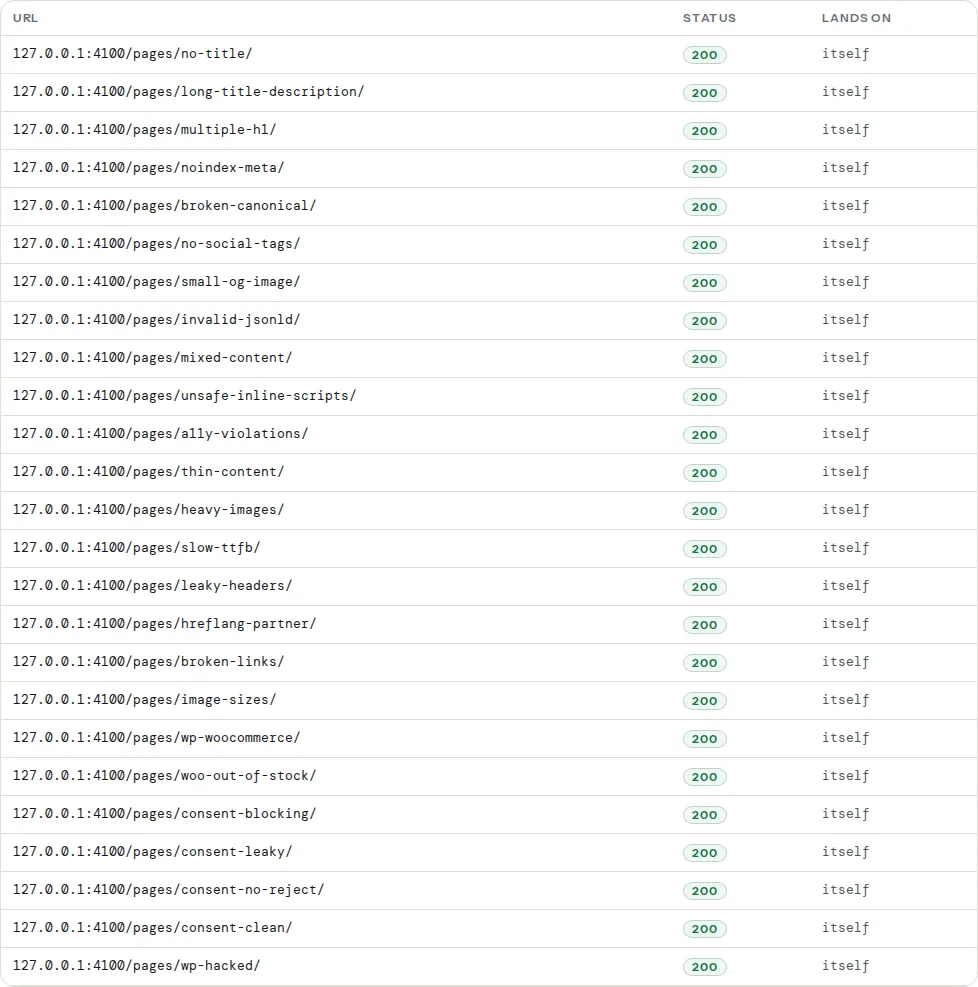
A sitemap with dead entries and a lastmod that reads "today" on every URL is a sitemap Google has learned to discount, and the pages that depend on it for discovery are the ones in the "Discovered" row.
Step by step
1. Confirm the pages can be indexed at all
Run the audit on three of the affected URLs. If indexable-status fails, fix that and stop reading: a noindex left over from launch, a robots.txt rule, a redirect. The indexability checklist covers each case.
2. Link to the pages from pages Google already indexes
This is the fix for cause 1 and it is almost always the one. A page in the "Discovered" row needs links from pages that are indexed and that Google visits, with anchor text that says what the page is:
<!-- On an indexed, related page: a link in the body text, not only in a footer -->
<p>The full sizing guide is in <a href="/guides/running-shoe-sizing/">Running shoe sizing, with a printable chart</a>.</p>
Three links from related pages beat thirty from a sitewide footer. For the pages that matter most, one link from the home page or a hub page moves them to the front of the crawl queue. The audit's internal-links finding tells you when the linking page itself is a dead end (under 3 links) or a link dump (over 300); Internal links: how many, where, with what anchor text covers the placement, and orphan pages covers finding the ones no page links to.
3. Fix the sitemap and make lastmod honest
Run the validator. Every sampled row should read 200 and "itself". Remove deleted URLs, list final URLs instead of redirecting ones, and make sure lastmod is the date the content last changed, not the build time; Google uses lastmod to decide what to re-fetch when it is consistently accurate, and ignores it when it is not. XML sitemap validation has the errors one by one.
4. Check the server
Run the TTFB test on the affected pages and on the home page. Over 800 ms for a page that should be cached is the first thing to fix; a server that answers slowly gets fewer crawls, and the pages at the end of the queue never get fetched. In Search Console → Settings → Crawl stats, "By response" shows whether Googlebot met 5xx answers, and the host status panel says whether it backed off. A daily burst of errors at the same hour is a backup or a cron job.
5. Thicken or consolidate the thin ones
For cause 3: a page under 300 words that is one of many similar pages is unlikely to be worth a crawl, and if crawled, unlikely to be indexed (thin content is the check's name for it). Either give each page something the others do not have (real text, real data, real photos), merge the set into fewer, fuller pages with redirects from the rest, or noindex the set so it stops diluting the site. Thin content: when short pages are fine has the criteria; short is fine when the page answers a real question completely.
6. Remove the junk so the good pages stand out
Tag archives with one post, author pages on a one-author site, date archives, filter combinations, attachment pages: noindex them and leave them out of the sitemap. Google's allowance for the site then goes to the pages you want. On WordPress this is a handful of switches; see step 8.
7. Get one link from outside
A new domain with no external links has no reputation, and Google's scheduler gives it the smallest allowance. One mention from a related site, a directory that matters in your field, a partner's page, is worth more for crawl demand than any sitemap. It also takes the longest, so start it first.
8. Wait the right amount of time, then check
For a new site, weeks, not days. Request indexing in Search Console for the five pages that matter most, once; the button is rate-limited and does nothing for the other five hundred. Then watch the "Discovered" row weekly. It should shrink as the links in step 2 get crawled. If it does not move in four weeks, go back to step 4 and step 5: the server or the content, not the sitemap.
Decision table
| Search Console status | Audit finding | Most likely cause | Do this |
|---|---|---|---|
| Discovered | indexable-status fails | Not "discovered" at all; excluded | Fix the noindex, block or redirect (step 1) |
| Discovered | Page has 0–2 internal links, only in sitemap | No crawl demand | Links from indexed pages (step 2) |
| Discovered | Sitemap sample shows 404s and redirects, lastmod today | Sitemap discounted | Fix the sitemap (step 3) |
| Discovered | TTFB over 800 ms, 5xx in Crawl stats | Crawl rate throttled | Server (step 4) |
| Discovered | Hundreds of similar URLs, thin content | Batch looks alike | Thicken, merge or noindex (steps 5 and 6) |
| Crawled | Thin content warning | Not worth indexing | Improve or consolidate (step 5) |
| Crawled | Everything passes | Duplicate or near-duplicate elsewhere | Check the canonical and the near-copies |
| Either, new site | Everything passes | No reputation yet | External mention, then wait (steps 7 and 8) |
What does not help
- Resubmitting the sitemap every day. Google re-reads sitemaps on its own schedule; submitting again changes nothing and looks like noise.
- Requesting indexing for hundreds of URLs. The tool is for a handful of important pages and is rate-limited; it does not raise the site's allowance.
- "Indexing services" that ping URLs. They send the same request you can send, at scale, and some use link networks that get sites penalised.
- Adding the pages to more sitemaps. One clean sitemap with honest dates is the maximum useful signal.
- Rewriting titles. The page has not been fetched; Google has not read the title.
Platform notes
WordPress
Most "Discovered" rows on WordPress sites are archive and attachment URLs the site never meant to publish. Set tag, date and author archives to noindex (Yoast SEO → Settings → Categories & tags, and Advanced for author and date archives; Rank Math → Titles & Meta, per taxonomy and archive tab), which also drops them from the plugin's sitemap; redirect attachment pages to the file (WordPress attachment pages); and on a single-author site disable the author archive (admin user and author archives). The row then shrinks to real pages, which are the ones to link.
Shopify
Collections reachable under several paths and products under collection paths are canonicalised correctly; the usual "Discovered" entries are tag-filtered collection URLs (/collections/all/red) that the theme links to. Link tags only where you want the page indexed, and give those pages a description.
Static sites
A large build with thousands of programmatic pages (one per city, one per data row) hits cause 3 and cause 4 at once. Publish the set in batches, link each batch from a hub, and give each page something unique before adding the next batch.
Verify
- The audit on the affected URLs passes indexable-status and shows the internal-links finding in range; the linking pages now contain a body-text link to them.
- The validator's sampled URLs all read 200 and "itself", with
lastmoddates that look like real edit dates. - Search Console → Pages: the "Discovered – currently not indexed" count falls week over week; URL Inspection on a fixed page shows a last crawl date.
- Search Console → Crawl stats: total requests rising or steady, no 5xx, average response time under a second.
Common mistakes
- Treating the row as a queue. It is a decision, not a backlog. Change the inputs (links, speed, content) and the decision changes.
- Blocking the junk in robots.txt instead of noindexing it. Blocked URLs cannot be read, so they cannot be dropped; they sit in "Indexed, though blocked by robots.txt" instead.
- Publishing 5,000 pages on launch day. The allowance is sized for a site with no history. Launch with the best 50, linked, and grow.
- Measuring after three days. Crawl rates adjust over weeks. Check weekly for six weeks before changing course.
- Fixing the sitemap and nothing else. A perfect sitemap for pages nothing links to still leaves them last in the queue.