"Thin content" is one of the most repeated phrases in SEO and one of the least understood. It does not mean short. A contact page with an address, a phone number and opening hours is 40 words and exactly what the visitor came for; a 1,200-word "ultimate guide" assembled from other people's articles is thin. Google's word is value: does this page give the visitor something they could not get from the page above it in the results, or from a thousand near-identical pages on the same site? This guide separates the two ideas, shows how to read the report's word-count finding as the prompt it is, and works through the page types that are actually thin and what to do with each.
Quick answer
- Thin content is a page that adds nothing: scraped or spun text, doorway pages made for one keyword each, empty category and tag archives, auto-generated location pages, product variants with one line of copy.
- Short pages are fine when short is the right answer: contact, tools, a definition, a product with a clear spec sheet, a hub that exists to route people.
- The report warns under 300 words of body text. Treat it as a question ("is this page doing its job?"), not a verdict.
- Fix thin pages one of four ways: expand with real information, merge into the page that already covers it, noindex the archives that only exist for navigation, or remove with a 410 or a redirect.
- On WordPress, tag, date, author and attachment archives are the usual thin pages; the SEO plugin can noindex them in one setting each.
Why thin content matters
Google's spam policies name the kinds of page it does not want to rank: doorway pages (many pages targeting one search each that all funnel to the same place), scraped content (copied from other sites, with or without light rewriting), and thin affiliate pages (a product description copied from the merchant with an affiliate link). Pages like that are not penalised one at a time; they lower Google's estimate of the whole site, and the pages you care about rank a little worse for it. A site with 200 good pages and 5,000 empty tag archives is, to a crawler, mostly empty tag archives.
There is a quieter cost before any of that. Every page Google crawls and does not index is a fetch not spent on a page you want indexed. Sites with tens of thousands of auto-generated pages find their real pages crawled less often and their new content indexed later.
For visitors, a thin page is a bounce. Someone lands on a category archive with one post, or a location page that says "We offer plumbing in Zagreb" and nothing else, and goes back to the results.
None of this is about length. Google has said repeatedly that there is no minimum word count. A short page that answers the question completely is a good page. The report's threshold exists because a page that should rank for something and has 80 words of body text has usually left the answer out.
How getReport checks it
The audit counts the words in the page's <body> after removing scripts, styles, <noscript>, <template>, inline SVG, hidden elements, and the <header>, <nav>, <footer> and <aside> elements, so navigation and boilerplate do not count. A word is any run of characters with at least one letter or digit. Under 300 the finding warns. Because the count is taken from the HTML the server sends, text that a script inserts after load is not counted; Google can usually render that text, but it is worth knowing why a page that looks full in the browser fails the finding.
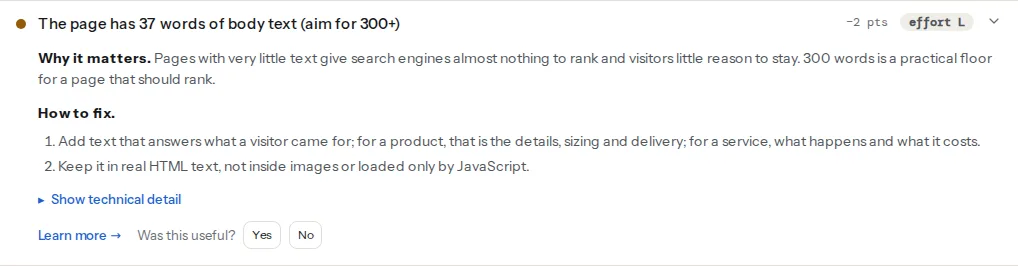
Two other findings in the same audit are the tools for the fix. A page that is thin on purpose (an archive, a filter, a variant) should either carry noindex or point its canonical at the page that has the content, and the audit shows both:
Watch out
The noindex finding is a failure by default because most pages that carry it were not meant to. On a tag archive you noindexed deliberately, it is the finding confirming that the setting took. Read it in context.
Step by step
1. Decide whether the page should rank at all
Every page falls into one of three groups, and the fix depends entirely on which:
| The page exists to… | Should it be indexed? | If it is thin |
|---|---|---|
| Answer a search or sell something (product, service, article, landing page) | Yes | Expand or merge |
| Route visitors (category with many items, hub, index) | Usually yes | Add a paragraph of guidance, keep it short |
| Serve the site's mechanics (tag with one post, date archive, filter result, attachment page, internal search result, thank-you page) | No | noindex, or canonical to the parent |
Most "thin content" problems are group three pages that were never meant to be in Google and are, because the CMS creates them and nothing stops it.
2. Recognise when short is right
Before adding words to a page, check whether the page is already complete:
- A contact page: address, hours, phone, map, form. Adding 400 words about your commitment to customer service makes it worse.
- A tool or calculator: the tool is the content. A sentence about what it does and how to read the result is enough.
- A definition or glossary entry: if the term takes 80 words to define, the page is 80 words. Link it to the deeper article.
- A product with a spec sheet: a name, a price, six photos with real alt text, dimensions, materials, delivery, and returns can be 150 words and still the best page on the web for that product. Add the details a buyer asks about, not filler.
- A hub page: a heading, a sentence per section, and the links. Its job is to send people on.
If the page is one of these and the finding warns, the finding has done its job (you looked) and there is nothing to change.
3. Expand pages that should rank and are missing the answer
The pages to expand are the ones a visitor arrives at with a question the page does not answer. The word count is a symptom; the missing answer is the problem. For each page type, the answer has a shape:
- Product: what it is for, what it is made of, sizes and measurements with units, what is in the box, how it ships and how returns work, what differs from the neighbouring model. Not "premium quality, perfect for any occasion".
- Service: what happens, step by step, what it costs or what decides the cost, how long it takes, who does it, what the customer needs to prepare.
- Location page: only if there is something true and specific to say about that location (the address, the team, the opening hours, the projects done there). A template with the city name swapped in is a doorway page, and 3,000 words of it is 3,000 thin pages.
- Article: the thing the reader came to learn, with the specifics (numbers, steps, examples). If you cannot add anything a competing article does not already say, the page probably should not exist.
Put the text in HTML, on the page. Text inside images, in a PDF, or loaded only after a click is not counted by the audit and is discounted by Google.
4. Merge near-duplicates and canonicalise variants
Ten posts of 150 words on the same topic are worth less than one post of 1,200. Merge them: pick the URL with the most links and traffic, move the useful parts of the others into it, and 301-redirect the old URLs to it. Google consolidates the signals at the target.
Product variants (the same shirt in five colours, each with its own URL and one line of copy) are the e-commerce version. If the variants are one product to a shopper, give them one page with a colour selector, and canonicalise the variant URLs to it:
<!-- On /shirts/oxford-blue/ and /shirts/oxford-white/ -->
<link rel="canonical" href="https://example.com/shirts/oxford/">
If a variant is genuinely searched for on its own ("blue oxford shirt") and you can write something specific about it, it can keep its own page, with its own copy. The test is whether you can, not whether you would like it to rank.
5. Noindex the archives that exist for navigation
Tag pages with one post, monthly archives, author pages on a one-author site, internal search results, filtered category views: useful to click through, useless in Google. Keep them crawlable (they link to the real pages) and mark them noindex:
<meta name="robots" content="noindex">Do not add nofollow alongside it; the links on those pages are how Google reaches the posts. Do not block them in robots.txt either, because a page Google cannot crawl is a page whose noindex it cannot read. The full set of directives and where each belongs is in noindex, nofollow and the robots directives.
6. Remove what has no reason to exist
Scraped text, expired promotions, "coming soon" pages from 2021, the 40 location pages that nobody visits. If a page has links or traffic worth keeping, redirect it to the closest real page. If it has neither, delete it and let it answer 410 Gone (or 404; Google treats both as removal, 410 slightly faster):
# nginx: retired pages answer 410 so Google drops them promptly
location ~ ^/(promo-2021|coming-soon)/?$ {
    return 410;
}# .htaccess
Redirect gone /promo-2021/
Redirect gone /coming-soon/Redirecting everything to the home page is not a fix; Google treats a redirect to an unrelated page as a soft 404, and the visitor is confused.
7. Check the page can be indexed once it is fixed
An expanded page that still carries a stray noindex or a canonical to another URL will never show up. The audit's indexability findings cover that; why is my page not in Google walks through them in order.
Platform notes
WordPress
WordPress generates an archive for every category, tag, author, month and (unless disabled) every uploaded image. On a small site those archives outnumber the real pages ten to one, and they are the thin content the site actually has.
In Yoast SEO: Settings → Categories & tags → Tags → "Show tags in search results" off (and the same for any taxonomy you do not want indexed); Settings → Advanced → Author archives, Date archives → disable or noindex; Settings → Advanced → Media pages → enable the redirect of attachment URLs to the file. Older Yoast versions have the same switches under Search Appearance → Taxonomies and Archives.
In Rank Math: Titles & Meta → Tags → Robots Meta → No Index; the same under Authors, and under Misc Pages for date archives and search results; Titles & Meta → Attachments → redirect attachments to the parent post.
Categories are usually worth keeping indexable, because a category with 30 posts and a short introduction is a good hub. Add that introduction (the category's Description field, shown by most themes) so the page is not just a list. Tags are worth keeping only if each holds several posts and the tag is something people search; most sites do better with tags noindexed.
Attachment pages are their own case: WordPress 6.4 stopped creating them for new sites, but older sites have one bare page per image. WordPress attachment pages covers the redirect.
Shopify
Collections are the archives, and they carry a description field; fill it for the collections you want to rank. Tag-filtered collection URLs (/collections/bags/tan) are canonicalised to the collection by most themes; confirm with the audit. Product variants share one product page by design, which avoids the variant problem. Blog tag pages are thin by construction and cannot be noindexed without theme edits; keep them unlinked if they add nothing.
Static sites / custom
Whatever the generator produces for tags, dates and authors is thin unless you write something for it. Most generators let you disable a taxonomy entirely, which is the simplest fix; otherwise add <meta name="robots" content="noindex"> to that template.
Verify
- On a page you expanded, the audit's finding reads "The page has N words of body text" with N over 300 and the noindex finding passes.
- On an archive you noindexed,
curl -s https://example.com/tag/misc/ | grep -i 'name="robots"'showsnoindex, and the audit reports it (as the deliberate exception). - On a variant, the canonical finding shows the parent product's URL.
- Retired pages answer 410 or 301:
curl -sI https://example.com/promo-2021/ | head -1. - Search Console, Pages report: "Crawled, currently not indexed" and "Duplicate without user-selected canonical" shrink over the following weeks; "Excluded by noindex tag" grows by the archives you meant to exclude.
Common mistakes
- Padding to 300 words. Symptom: the finding passes and the page reads like it was written to pass. Add information a visitor asks for, or accept that the page is short.
- Noindexing categories along with tags. The category pages were the hubs that linked everything together; without them in the index, the posts lose a route in. Noindex tags, keep categories with a description.
- Blocking archives in robots.txt. Google cannot see the
noindexon a page it cannot fetch, so the URL can stay indexed with no description. Use the meta tag and leave the path crawlable. - Deleting old posts without redirects. Every deleted URL with links loses them. Merge into a live page and redirect, or 410 only what nothing points at.
- Location pages by template. Fifty pages that differ only by the city name are a doorway set. Keep the locations where you can say something true and specific; fold the rest into one service-area page.
- Counting the wrong text. The page looks full but the audit says 60 words: the text is in an image, a PDF, or inserted by JavaScript after load. Put it in the HTML.