A site with 5,000 pages does not need 5,000 menu items. It needs a shape: a home page that links to a few dozen hubs, hubs that link to every page in their section, breadcrumbs that show the path back, and pagination that a crawler can follow to the last item. When that shape exists, every page is a few clicks from the home page and Google finds new pages through links instead of waiting for the sitemap. When it does not, the deep pages get crawled rarely, rank weakly and quietly become orphans. This guide shows the shape, the markup for each part, and how to audit it one page at a time.
Quick answer
- Aim for every important page within 3 clicks of the home page and every product or article within 4. Hubs (categories, topics, collections) are what make that possible.
- Every link that matters is a real
<a href="…">in the served HTML. Menus that only render on click or after JavaScript do not count for crawlers. - Hub pages link to every child, through pagination with numbered links or a "view all" page, not only the first 20.
- Breadcrumbs mirror the hierarchy on every page, marked up with
BreadcrumbList. - Keep each page between 3 and 300 unique internal links; giant footers dilute everything.
- The XML sitemap lists every page but never replaces links. Audit deep pages with the SEO audit: breadcrumb, internal link count and sitemap inclusion are three of its findings.
Why structure matters on a large site
Crawlers discover pages by following internal links, and they allocate attention by how many links point at a page and how close it is to the home page. A product that is only reachable from page 43 of a category listing, with no other link to it, is crawled seldom and ranked as the unimportant page its position suggests. Google's own guidance on crawlable links is blunt: it can only follow links in <a> elements with an href, and it uses the anchor text to understand the target.
Visitors have the same problem in a different form. Someone who lands on a deep page from search needs to know where they are and how to get to the rest of the section; breadcrumbs answer both. Someone browsing a category needs to reach item 200 without clicking "next" ten times.
The scale is what makes this a structural job. On a 40-page site, a good menu solves it. On a 4,000-page site, the menu cannot hold everything, so the hubs and the pagination have to carry the load, and a single missing link on a category template can orphan hundreds of pages at once.
How getReport checks it
The audit runs on one page. For structure, run it on a sample of deep pages (a product on page 5 of a category, an old article, a subcategory) rather than the home page; the home page is always well linked.
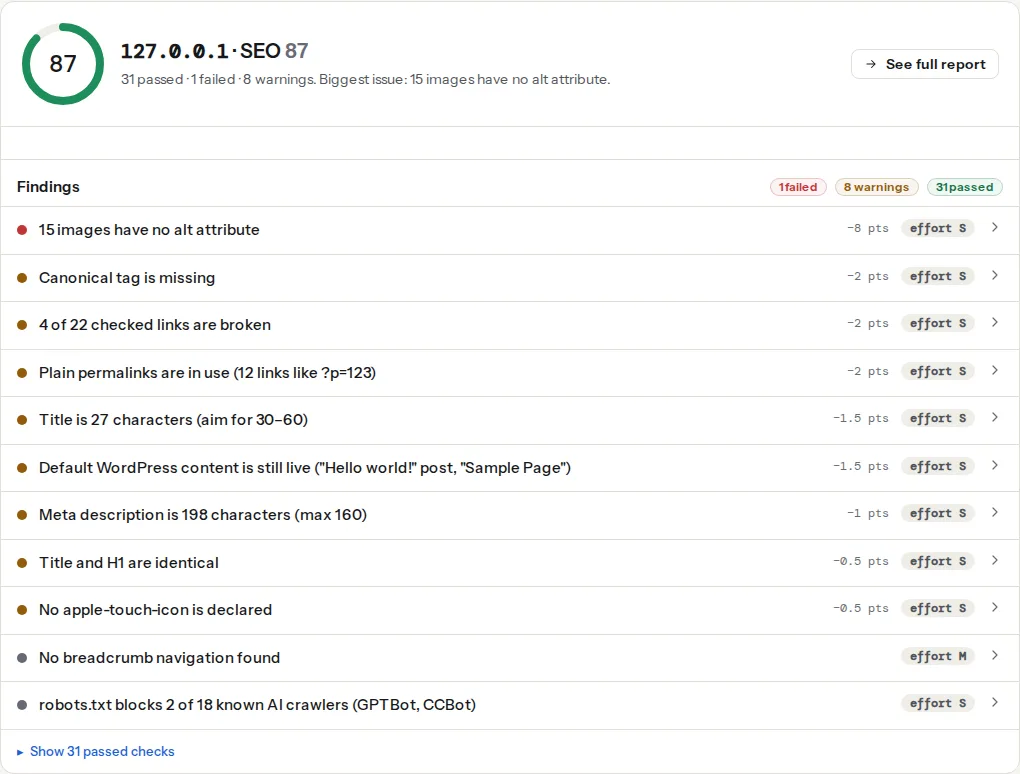
The check looks for four signals: a <nav> whose aria-label contains "breadcrumb", an element with a class containing "breadcrumb", BreadcrumbList microdata, or a JSON-LD block mentioning BreadcrumbList. Its technical line names which of them it found, so "BreadcrumbList JSON-LD" alone means the structured data exists but the visible trail is missing or unlabelled; both should be present.
The count is unique same-host URLs in <a href> elements: duplicates, # anchors, mailto: and tel: links and the page's own URL are left out, and links to another subdomain count as external. Under 3 is a dead end; over 300 is the footer link trap. Both warn.
This runs when the site's sitemap is a plain URL set and compares the page's final URL exactly against the listed URLs. It does not run when the first sitemap found is an index file, which is the usual case on WordPress with an SEO plugin; there, open the child sitemap for the section and search it for the URL. A trailing-slash or www difference counts as "not listed", which is itself worth fixing.
This finding appears only when the page carries rel="prev" or rel="next" on a <link> or <a>, and it is informational. Its absence is not a problem; what matters for crawling is the numbered links in the body, covered in step 3.
Step by step
1. Draw the hierarchy before touching a template
Write down the levels: home → section hubs → subcategories → items. Three levels below home fits most sites up to 10,000 pages: 20 hubs × 15 subcategories × 30 items is 9,000 items, each 3 clicks deep. If a level would need more than about 50 children, split it or add a level. URLs do not have to change to do this; only links and breadcrumbs do (see step 8).
2. Make the main navigation a real list of links
The header menu links to the hubs, in the served HTML:
<nav aria-label="Main">
  <ul>
    <li><a href="/shoes/">Shoes</a>
      <ul>
        <li><a href="/shoes/running/">Running</a></li>
        <li><a href="/shoes/trail/">Trail</a></li>
      </ul>
    </li>
    <li><a href="/clothing/">Clothing</a></li>
  </ul>
</nav>
Submenus may be hidden with CSS and revealed on hover or tap; hidden links still count. Links built by JavaScript after a click do not exist for a crawler that does not click. Mega menus are fine for crawling but expensive for the DOM: a menu with 400 links on every page adds 400 nodes and 400 internal links to every page. If the internal link count on a plain product page is already over 250 before the body starts, the menu is too big; DOM size: why 3,000 nodes is a problem has the numbers.
3. Make hubs link to every child
A category page that shows 20 products and a "Load more" button that fetches the rest with JavaScript links to 20 products. The other 480 are unreachable from that page. The fix is numbered pagination links in the HTML, or a "view all" page linked from the first page, or both:
<nav aria-label="Pagination">
  <a href="/shoes/running/?page=1" aria-current="page">1</a>
  <a href="/shoes/running/?page=2">2</a>
  <a href="/shoes/running/?page=3">3</a>
  …
  <a href="/shoes/running/?page=25">25</a>
  <a href="/shoes/running/?page=2" rel="next">Next</a>
</nav>
<p><a href="/shoes/running/all/">View all 500 running shoes</a></p>
Google's documentation on pagination asks for exactly this: each page linked with a normal <a href>, each page indexable with its own canonical (not canonicalised to page 1), and infinite scroll backed by real paginated URLs. rel="prev" and rel="next" have not been used by Google for indexing since 2019, which is why the report only notes them; pagination after rel=prev/next explains what replaced them.
Add a short description to every hub. A category page that is only a grid of thumbnails has nothing to rank for; 100–200 words about what the category contains gives it a reason to appear in search and gives visitors a reason to trust the list.
4. Put breadcrumbs on every page below the home page
The visible trail and the structured data describe the same path:
<nav aria-label="Breadcrumb">
  <ol>
    <li><a href="/">Home</a></li>
    <li><a href="/shoes/">Shoes</a></li>
    <li><a href="/shoes/running/">Running</a></li>
    <li aria-current="page">Trail Runner 3</li>
  </ol>
</nav>
<script type="application/ld+json">
{
  "@context": "https://schema.org",
  "@type": "BreadcrumbList",
  "itemListElement": [
    { "@type": "ListItem", "position": 1, "name": "Home", "item": "https://example.com/" },
    { "@type": "ListItem", "position": 2, "name": "Shoes", "item": "https://example.com/shoes/" },
    { "@type": "ListItem", "position": 3, "name": "Running", "item": "https://example.com/shoes/running/" },
    { "@type": "ListItem", "position": 4, "name": "Trail Runner 3" }
  ]
}
</script>
Breadcrumbs give every deep page a link up to its hub and its section, which is what makes the hierarchy two-directional. The aria-label="Breadcrumb" is what the check looks for first and what screen readers announce. Breadcrumbs: navigation and structured data together covers the rich result side.
5. Add sideways links
Hubs and breadcrumbs make a tree; a tree alone means item 300 in a category is only reachable through pagination. "Related products", "More in Running", "Popular this month" and in-text links from articles add the cross-links that shorten paths and spread link value. Four to eight related links per page, chosen from the same subcategory, is enough. Keep them as <a href> in the HTML, not as a carousel that loads on scroll. Internal links: how many, where, with what anchor text has the anchor text rules.
6. Add an HTML sitemap for people and as a crawl aid
One page, linked from the footer, listing every hub and subcategory (not every item), grouped by section. For a 5,000-page site that can be a few hundred links; once it passes 300, the internal links finding warns, so split it into one page per section. It gives visitors a map and gives crawlers a second path to every hub.
7. Keep the XML sitemap complete, and treat it as a backstop
The sitemap tells Google a URL exists and when it changed; it does not tell Google the URL matters. A page listed in the sitemap but linked from nowhere is still an orphan in the ranking sense. Use the sitemap validator to confirm the sitemap is reachable and valid, then use the "listed in the sitemap" finding on your sample pages to confirm the generator includes deep pages, paginated pages excluded, product variants excluded. Orphan pages: finding and linking them is the follow-up when the sitemap lists more pages than the site links to.
8. Restructure a flat site without changing URLs
A site where everything is /post-name/ or /product-name/ does not need new URLs to gain a hierarchy. Assign each page to a hub in the CMS (category, collection, tag), build hub pages that list their members, and generate breadcrumbs from the assignment rather than from the URL path. The URLs stay, no redirects are needed, and the next crawl sees a tree. Only change URLs when the old ones are actively harmful, and then follow redirects without chains.
9. Audit a sample and read the logs
getReport does not crawl whole sites yet, so click depth across the site is measured with a desktop crawler (Screaming Frog, Sitebulb) or, once donations switch it on, the 500-page site crawl listed as a funded unlock on the funding page. What you can do today:
- Pick ten deep pages: the last product in three categories, two old articles, a subcategory, a paginated page 5, and three pages from Search Console's "Crawled – currently not indexed" list.
- Run the SEO audit on each. Note the breadcrumb finding, the internal link count and the sitemap finding. A deep page with fewer than 3 internal links or no breadcrumb is a structure bug on its template.
- Drop a week of access logs into the log analyser. It runs in your browser, attributes every hit to a bot, and lists the URLs Googlebot fetched most and the 404s it keeps hitting. If a whole section is missing from Googlebot's list, the links into that section are the problem; server log analysis shows how to read it.
Platform notes
WordPress and WooCommerce
Categories are the hubs. Give each one a description (Posts → Categories → Edit → Description; most themes print it above the list) and make sure the theme's category template paginates with numbered links (the_posts_pagination()), not only "Older posts". For WooCommerce, the products per page are set under Appearance → Customize → WooCommerce → Product Catalog (rows and columns); the shop pagination is numbered by default. Breadcrumbs come from the theme, WooCommerce (woocommerce_breadcrumb) or the SEO plugin; enable exactly one, and check that its JSON-LD is on product pages, not only on the shop page.
Shopify
Collections are the hubs, and a product can belong to several. Themes paginate collections with Liquid's paginate tag at a fixed page size (often 24 to 48 products, set in the theme's collection settings), so a collection of 800 products spans a few dozen pages; keep the theme's numbered pagination and do not replace it with a "load more" that removes the links. Shopify has no "view all" page by default; a collection sorted into subcollections (Running → Trail, Road) does the same job. Breadcrumbs are a theme feature; Dawn does not include them by default, so add a snippet with the BreadcrumbList block above.
Magento
Layered navigation creates a filter URL for every attribute combination, which can be thousands of thin pages per category. Keep the category pages as the hubs, keep numbered pagination on them, and handle the filter URLs as faceted navigation and parameter URLs describes, with canonical tags on category pages turned on in the SEO configuration.
Static sites
The hierarchy is the content folder. Generate hub pages per folder (Hugo's list templates, Astro's collection pages) with pagination configured to link every page, and build breadcrumbs from the path in the layout.
Verify
- The SEO audit on each sample deep page shows "Breadcrumb navigation found" with both the
navand the JSON-LD named in the technical line, an internal link count between 3 and 300, and "This page is listed in the sitemap". - Every category page's last numbered pagination link resolves to a page that lists products, and that page is indexable with its own canonical.
- In the browser with JavaScript disabled, the main menu and the pagination links still show as links.
- Over the following weeks, Search Console's "Discovered – currently not indexed" count for the section goes down.
Common mistakes
- Menu links that appear only after a click. The menu HTML is empty until JavaScript builds it. Symptom: the internal link count on every page is far lower than the menu suggests. Fix: render the menu server-side and hide submenus with CSS.
- A category with 2,000 products and a "Load more" button. Only the first page's products are linked. Fix: numbered pagination links in the HTML and a "view all" or subcategory split.
- Breadcrumbs that do not match the path. The trail says Home › Sale › Shoe while the page lives under Shoes › Running. Google may show the breadcrumb in search, so it should be the primary path. Fix: generate breadcrumbs from the primary category, not from the referrer or the last visited collection.
nofollowon internal links. A theme or a plugin marks pagination or filter linksnofollow, which withholds link signals from your own pages. Fix: remove the attribute from internal links; use robots rules for URLs you do not want crawled.- Orphan hubs. A subcategory exists, has products, and is linked from nowhere because it was never added to the menu or the parent hub. Fix: the parent hub lists every child automatically from the CMS, not from a hand-maintained list.