A soft 404 is a page that tells the visitor there is nothing here while telling the browser, with an HTTP 200, that everything is fine. Google reads the page, decides it is really an error page or an empty one, and drops it from the index as if it had returned 404. The label appears in Search Console's Pages report, usually on pages you did not know were empty. This guide explains how Google decides, how to find your soft 404s, and the fix for each of the six causes, in about an hour for a typical site.
Quick answer
- Google marks a URL as a soft 404 when the response is 200 but the content says "not found", "no results", "product unavailable", or is empty, or when a JavaScript page never renders anything to read.
- The status code is not the problem; the content is. The fix is either to return the honest status (404 or 410) or to give the page real content.
- Find them in Search Console (Pages → "Soft 404"), then confirm each one with the SEO audit: the thin-content finding and the title tell the story. The bulk URL checker cannot see soft 404s by status, but its
titlecolumn can. - Redirecting removed pages to the home page is itself a soft 404. Redirect to an equivalent or return 410.
- Out-of-stock products, empty categories and internal search pages are the usual sources on shops; empty tag archives and attachment pages on WordPress blogs.
Why soft 404s matter
Google's crawler asks two questions about every URL: does it exist, and is it worth indexing. The status code answers the first, and 200 means yes. But Google also reads the page, and when a 200 page looks like an error page ("Sorry, we couldn't find that", "0 results", a category with no products) it overrides the status. The page is then treated as a 404: removed from results, not counted as a valid page, and re-crawled less often. Google's guidance on HTTP status codes is explicit: an error page should return a 404 or 410, and a page that is not an error should have content that shows it.
Two things go wrong for the site. First, pages you wanted indexed vanish, and the reason is buried in a report most people do not read. Second, pages you did not want indexed keep being crawled, because 200 says "come back". A shop with 3,000 empty filter combinations and out-of-stock products all answering 200 spends its crawl budget being told, page by page, that there is nothing to see.
Soft 404s also affect what the site looks like as a whole. Google's quality assessment is not only per page; a site where a third of the crawled URLs are empty shells looks thinner than one where every URL answers with something. That is the argument for fixing them even when each individual page does not matter.
The six causes
- A "not found" page that returns 200. A CMS or JavaScript app that renders a friendly error page without setting the status.
- Empty result pages. A category with no products, a tag with no posts, a search with no hits, a date archive with nothing in it.
- Removed items still served. "This product is no longer available" with a 200, or an event page after the event.
- Redirect-everything-to-home. Removed pages redirected to the home page; Google classifies the redirect itself as a soft 404.
- JavaScript shells. A page whose HTML is an empty
<div id="app">and whose content never renders for Googlebot (a failed API call, a blocked script, a rendering error). - Thin templates. A page that exists and is correct but holds almost nothing: a heading, an image, a "coming soon".
How getReport checks it
No tool outside Google can label a page "soft 404", because the label is Google's judgement about content. What the report shows is the evidence Google uses, on the page you enter: whether it can be indexed at all, how much real text it holds, and what it links to.
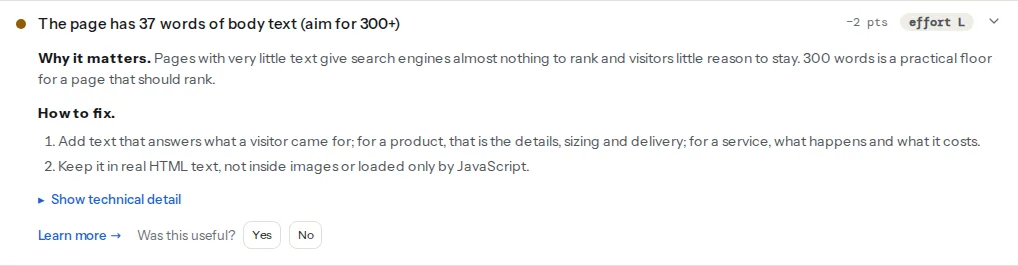
The count is of visible words in <body>, with header, navigation, footer, scripts and styles removed, so a category page whose only content is the menu and the footer scores near zero even though the HTML is 80 KB. The warning threshold is 300 words; a soft 404 candidate typically shows a count under 30. Open the finding and read the fix list, then compare the count with what a visitor sees:
Passes when the page returns 200, carries no noindex and is allowed by robots.txt. On a soft 404 candidate it passes, which is exactly the problem: the page is technically indexable and Google has decided on its own that it should not be. After the fix, this finding should either fail for the right reason (HTTP 404 or 410 for a removed item, noindex for a page you keep but hide) or pass on a page that now has content.
Links to real 404s on the page you ran. It matters here for the opposite reason: if your removed pages return a proper 404, they show up in this finding on the pages that link to them, and you can remove the links. If they are soft 404s, the link checker sees 200s and reports nothing, which is one way soft 404s hide for years.
Step by step
1. Get the list from Search Console
Pages report → the "Soft 404" row under "Why pages aren't indexed" → Export. Google also lists them under "Crawled – currently not indexed" sometimes, so skim that table for URLs that look like filters, searches or removed items. Add the URLs you suspect on your own: empty categories, discontinued products, the 404 page itself.
2. Confirm each one
Run the SEO audit on a sample. Three readings tell you the cause:
- Word count under 30 and a title like "Page not found" or "No results": cause 1 or 2. The template rendered, the content did not.
- Word count normal but the words say "no longer available": cause 3. The page is honest with visitors, not with crawlers.
- Word count near zero, the title generic, and the page looks fine in your browser: cause 5. Your browser runs the JavaScript; the fetcher, like Googlebot's first pass, reads the HTML.
For a long list, paste it into the bulk URL checker. It cannot see soft 404s by status (every row reads 200 and OK), but the CSV's title column shows "Not found", "Search results" and "No products" titles at a glance, and the final_url column shows which rows redirect to the home page.
3. Return the honest status for missing things
For pages that describe something that does not exist (an item, a record, a route that never matched), the fix is the status code. The page can keep the friendly message; only the number changes.
In a PHP template, before any output:
<?php
// Set the real status when the item was not found; keep the helpful page.
if ($product === null) {
    http_response_code(404);   // or 410 when it is gone for good
}
?>
For a section that was removed entirely, at the web server; on nginx in the server block:
location ^~ /events/2022/ { return 410; }and on Apache in .htaccess:
RedirectMatch gone ^/events/2022/.*$The 404 vs 410 vs redirect guide covers choosing between the three for each URL, including the ones with backlinks that deserve a 301 to a real equivalent.
4. Fill or hide empty result pages
An empty category or archive is a page that may fill up again, so a 404 is wrong. Two options:
- Fill it. Add products, or merge the category into its parent and redirect. A category that has been empty for six months is a merge.
- Hide it while empty. Add
noindex, followwhen the result count is zero, and remove it automatically when items return. The page stays crawlable and its links still count.
In WordPress, for WooCommerce categories and any term archive:
// functions.php: noindex empty archives, automatically lifted when they have content.
add_action('wp_head', function () {
    if ((is_archive() || is_search()) && !have_posts()) {
        echo '<meta name="robots" content="noindex, follow">' . "\n";
    }
}, 1);
Internal search result pages should carry noindex whether or not they have results; they are infinite and never a landing page. Yoast SEO adds it to search pages by default; in Rank Math it is a setting under Titles & Meta. Confirm by running the report on a search URL: robots-meta-noindex should fail, which on a search page is the wanted result.
5. Out-of-stock products: keep the page, change the content
A product page that only says "out of stock" is a soft 404 waiting to be labelled. Google's guidance for e-commerce is to keep the page if the product will return, with the return date and alternatives, and to redirect or remove it if it will not. The report's WordPress Doctor has a woo-oos-indexable finding for shops; its fix text says the same, with the two options.
What keeps the page alive as content: the full description and specifications still on the page, an expected date, a "notify me" form, and three or four related products that are in stock. What makes it a soft 404: a template that hides the description when stock is zero.
6. Make JavaScript pages render for crawlers
If the page's HTML has no content until JavaScript runs, Googlebot has to render it, and any failure in rendering (an API that rejects the crawler, a script blocked by robots.txt, an error before the content mounts) produces an empty page that Google labels a soft 404. Google's JavaScript guidance lists the fixes in order: server-side rendering or static generation for the content that must be indexed; for pages that are genuinely errors, either redirect to a URL whose server answers 404, or add a noindex meta tag from the script when the item is not found:
// In the app's not-found handler: tell crawlers this route is an error.
const meta = document.createElement('meta');
meta.name = 'robots';
meta.content = 'noindex';
document.head.appendChild(meta);
Check the fix the way Googlebot sees it: run the report, and read the word count from the HTML the fetcher received. The JavaScript rendering guide goes through the rest.
7. Never redirect removed pages to the home page
A redirect from a specific page to the home page is classified as a soft 404 by Google because the destination has nothing to do with the request. Redirect each removed URL to its closest equivalent (the replacement product, the parent category, the updated article) or return 410. In the bulk checker CSV, filter final_url for the home page to find the existing ones.
Platform notes
WordPress
The usual suspects: tag and category archives with one or two posts, date archives, author archives for users with no posts, attachment pages (one per uploaded image, holding nothing but the image), and internal search. The functions.php snippet in step 4 covers the empty archives and search; the WordPress Doctor's attachment finding covers the attachment pages, with the Yoast and Rank Math settings that redirect them to the file. WooCommerce empty categories show "No products were found matching your selection." with a 200; the same snippet hides them while empty. Discontinued products: trash them (WordPress answers 404) and add a redirect for the ones with traffic.
Shopify
Collections with no products render the collection template with "Sorry, there are no products in this collection", status 200. Shopify has no per-page noindex setting for collections in the admin; in the theme, {% if collection.products_count == 0 %} around a noindex meta tag in theme.liquid does it. Search pages (/search) are disallowed in Shopify's default robots.txt; sold-out products stay live with the "Sold out" button, so keep their descriptions and add recommendations.
JavaScript frameworks
Next.js, Nuxt and SvelteKit each have a way to set the status code from the page (notFound() in the Next.js App Router, createError({ statusCode: 404 }) in Nuxt) that works with server rendering; the friendly page and the honest status stop being in conflict. Static exports cannot set status codes per page, so a host-level rule (_redirects on Netlify with a 404 status) is needed for known removed paths.
Verify
- Search Console's "Soft 404" row shrinks over the following weeks; use "Validate fix" on the row to have Google re-check the URLs.
- Run the report on a fixed URL: a removed item now shows
indexable-statusfailing with "HTTP 404" (or 410); a filled page shows a body word count above 300; a hidden page failsrobots-meta-noindexas intended. curl -sI https://example.com/products/discontinued-item/ | head -1prints a 404 or 410, not 200.- The bulk checker on the original list shows Not found for removed items,
noindex= yes for hidden ones, and nofinal_urlequal to the home page.
Common mistakes
- Fixing the message, not the status. Rewording "Page not found" to "Explore our catalogue" on a page that still answers 200 with no content is still a soft 404. Set the status or add content.
- 404 for empty categories. They will fill again and the URL is linked from the navigation; a 404 there is a broken link. Use
noindexwhile empty. - Hiding out-of-stock products entirely. The page had rankings and links; a 404 throws them away. Keep it with alternatives, or 301 to the replacement.
- Checking in a browser only. Your browser runs the JavaScript and shows the content; the crawler's first pass does not. Read the word count in the report.
- A custom 404 page that returns 200. The most common single cause on custom-built sites, and it turns every broken link on the web into an indexed empty page. Test with the bulk checker: the result must read Not found. For pages that are short on purpose, Thin content: when short pages are fine draws the line.