Yes, Google can crawl JavaScript. Googlebot fetches your page's HTML, puts the page in a render queue, runs the scripts in a headless Chromium that tracks the current Chrome release, and indexes the page as it looks after the scripts ran, including text and links they added. The catch is in the details: rendering happens after the crawl, Googlebot never clicks, scrolls or logs in, and anything the scripts cannot fetch never appears. This guide explains how Google's rendering works, what it misses, and how to see exactly what Google indexed. For the wider picture, including crawlers that do not run JavaScript at all, start with the JavaScript SEO guide.
Quick answer
- Google processes JavaScript pages in three phases: crawl the HTML, render it in Chromium, index the rendered result.
- Rendering is usually fast but not immediate. In a 2024 study of over 100,000 Googlebot fetches, Vercel and MERJ measured a median delay of about 10 seconds between crawl and render, with the slowest 10% taking hours.
- The renderer does not click, scroll, type, accept cookie banners or keep cookies between pages. Content behind those actions is not indexed.
- Resources blocked in robots.txt (scripts, API endpoints) cannot be fetched by the renderer, so the content they build is missing.
- A
noindexin the server HTML can stop Google rendering the page at all. - Check a page with the JavaScript rendering checker and Search Console's URL Inspection → Test live URL.
How Googlebot handles JavaScript
Google's Search Central documentation, "Understand the JavaScript SEO basics", describes three phases.
1. Crawling. Googlebot requests the URL, checks robots.txt first, and reads the HTML the server returns. It collects links from <a href> elements in that HTML straight away and queues them for crawling.
2. Rendering. Pages that return 200 go into a render queue. Google's Web Rendering Service then loads the page in a headless Chromium, fetches its scripts, stylesheets and API calls (each subject to robots.txt), runs the JavaScript and builds the final DOM. Since 2019 this Chromium has been "evergreen": it is updated to track the stable Chrome release, so modern syntax, fetch, ES modules and web components work without polyfills.
3. Indexing. Google indexes the rendered HTML: the text, headings, links, structured data and head tags as they stand after the scripts finished. Links that exist only in the rendered page are discovered at this point and crawled afterwards.
For a server-rendered page, the raw and rendered HTML are nearly the same, so nothing depends on the render. For a client-rendered app whose HTML is <div id="root"></div> and a bundle, everything does.
How long rendering takes
Google's documentation says a page may stay in the render queue "for a few seconds, but it can take longer than that". The most detailed public measurement is the Vercel and MERJ study published in 2024, which analysed more than 100,000 Googlebot fetches on nextjs.org and other sites: the median time from crawl to render was about 10 seconds, the 75th percentile about 26 seconds, the 90th percentile around 3 hours and the 99th percentile around 18 hours. Every page with a 200 status in their sample was eventually rendered in full.
So the old idea of a "second wave of indexing" days or weeks later is out of date for most pages. What still costs rankings is not the delay, but renders that finish without the content.
What Google's renderer cannot see
Googlebot renders one fresh page load, with no person in front of it. From Google's documentation and its rendering behaviour:
- No interaction. It does not click tabs, "load more" buttons or accordions that fetch content on click, and it does not scroll. Content already in the DOM but hidden (a closed accordion) is indexed; content fetched only after a click is not.
- No state. Every page load starts without cookies,
localStorage,sessionStorageor service workers from a previous page. A site that stores the chosen language or region inlocalStorageshows Google the default every time. - No permissions. Requests for geolocation, notifications or the camera are declined. Content that waits for a location never appears.
- No logged-in content, and anything behind a consent wall that must be accepted first.
- Only fetchable resources. A script, stylesheet or API endpoint blocked in robots.txt, geo-restricted (Googlebot crawls mostly from US addresses), rate-limited or slow to answer leaves a gap in the render.
- Cached resources. The renderer caches scripts and API responses aggressively and may ignore your cache headers, so a changed
app.jsat the same URL can be rendered with the old version. Fingerprinted file names (app.3f9a1c.js) avoid it.
Google does not publish a fixed render timeout. Pages that load their main content in one or two quick requests after the HTML render reliably; pages that chain slow API calls are the ones that end up indexed half-built.
Two cases that stop rendering
noindex in the raw HTML. Google's documentation says that when Googlebot finds noindex in the robots meta tag or header before running JavaScript, it may skip rendering, so a script that removes the tag never runs. The reverse, adding noindex with JavaScript, may or may not be applied. Either way, set robots tags on the server.
Error pages. An SPA that answers 200 for every path and then shows "Not found" with JavaScript creates soft 404s. Return a real 404 from the server, or add noindex in the server response, for routes that do not exist. Single-page application SEO covers status codes per route.
What Google does with rendered content
- Text added by scripts is indexed once rendered, the same as server-rendered text.
- Links are followed only when they are
<a>elements with anhref. A<div onclick>or an<a>withouthrefis not a link to Google, even after rendering. - URLs with
#fragments are treated as the same page./#/products/red-runneris the home page to Google; the old#!AJAX crawling scheme was retired in 2018. Use real paths with the History API. - Structured data injected as JSON-LD by JavaScript is supported and tested by the Rich Results Test.
- Titles and meta descriptions set by JavaScript can be used, but the raw HTML's versions are what Google sees first and what link previews see at all.
- Web components are supported: Google flattens shadow DOM and light DOM content when it renders, so text in both is visible if it is rendered on load.
How to check what Google sees
With getReport
The JavaScript rendering checker fetches the page twice: once as the server sends it, without running scripts, and once in a real Chromium after the scripts settle. It compares the title, description, canonical, robots tag, H1, links, word count and JSON-LD, and flags any SEO tag that JavaScript changes first. It renders one page load on a phone profile and, like Googlebot, does not scroll, click or log in.
In the full report, two findings carry the same comparison:
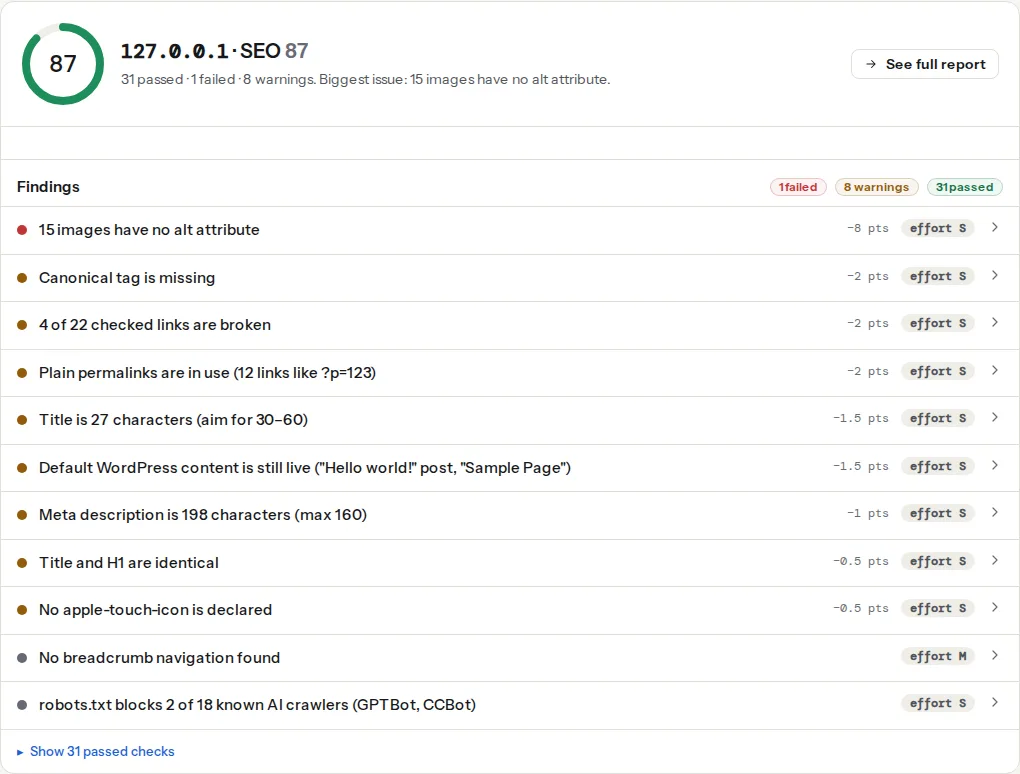
Read the share with the page in mind. A cookie banner, chat widget and "recently viewed" strip add a few dozen words after JavaScript on any site. The number to act on is when the H1, product description or article body are among the words only the renderer found.
The canonical and indexability findings read the raw HTML, so a tag injected by JavaScript is reported as missing, exactly as Google's crawl phase sees it:
With Search Console
URL Inspection → paste the URL → Test live URL → View tested page. The HTML tab shows the rendered HTML Google produced; the Screenshot tab shows whether it rendered the content or a spinner; More info lists resources that could not be loaded, which is where blocked scripts and failed API calls show up. "View crawled page" on the indexed result shows the version Google actually stored.
From the command line
# Is the product name in the raw HTML at all?
curl -sL https://example.com/products/red-runner/ | grep -c "Red Runner"
0 means the text exists only after JavaScript. Compare with Chrome: DevTools → Ctrl/Cmd+Shift+P → "Disable JavaScript" → reload. What remains is what non-rendering crawlers get.
How to make JavaScript content reliably indexable
Google renders JavaScript, but the safest page does not depend on it. Put everything that has to rank in the HTML the server sends, and use JavaScript to add interaction:
- Render the main content on the server: server-side rendering, static generation or incremental regeneration. SSR vs CSR for SEO compares them.
- Put the head tags in the server HTML: title, description, canonical, robots and Open Graph.
- Use real links:
<a href="/products/red-runner/">, which routerLinkcomponents already render. - Use real paths, not hash routes, and return real status codes.
- Allow the resources: never disallow the script folders or API endpoints the page renders from.
- Load content on page load, or with
IntersectionObserver, rather than on click or scroll events.
If the stack cannot change soon, prerendering is a stopgap. Google calls dynamic rendering (serving bots a different, prerendered version) a workaround rather than a recommended solution; dynamic rendering and prerendering explains when it still makes sense.
Other crawlers are less capable than Google. Bing renders JavaScript but less predictably, and most AI crawlers and link previews do not run it at all; see can AI crawlers render JavaScript.
Common mistakes
- Blocking the API or bundle in robots.txt.
Disallow: /api/orDisallow: /static/breaks the render on every page. - Links without
href. The click works; Google never follows it. - Rendering only the shell on the server. SSR that outputs the header and footer and fetches the body in the browser behaves like a pure SPA.
- Setting
noindexor the canonical with JavaScript. Google's crawl phase and render phase then see different instructions. - Trusting your browser. It has your cookies, your location and unlimited patience. Test with the checker,
curland URL Inspection. - Content that waits for a scroll or click. Googlebot does neither.
Questions people ask
Does Googlebot render every page it crawls?
Google's documentation says it queues pages that return a 200 status for rendering, so most crawlable pages are rendered. It may skip rendering when the server HTML carries noindex, and error pages are not the target of rendering. Rendering only covers one fresh page load, so content that needs a click, scroll or login is still missed even when the page itself is rendered.
Which browser does Googlebot use to render pages?
A headless version of Chromium, the engine behind Chrome, which Google has kept "evergreen" since 2019 by updating it to track the stable Chrome release. That means modern JavaScript, ES modules and web components run without polyfills. The Chrome version in Googlebot's user agent string changes as the renderer is updated, so do not match on an exact version.
Can Google see content that loads after a click?
No, not if the content is fetched only when someone clicks. Googlebot does not click buttons, tabs or "load more" links. Content that is already in the page but hidden, such as a closed accordion or an inactive tab, is rendered and indexed. Load important content on page load, and make "load more" a real link to a paginated URL.
Does Google index JSON-LD added with JavaScript?
Yes. Google supports structured data that JavaScript adds to the page, including JSON-LD injected by a tag manager, and reads it from the rendered HTML. It is still safer in the server HTML: it is available on the first crawl, the Rich Results Test and URL Inspection show it either way, and most other crawlers, including AI crawlers, only read the raw HTML.
Does Google index content in the shadow DOM?
Yes, when it is rendered on page load. Google flattens shadow DOM and light DOM content when it renders a page, so text inside web components is indexed like any other text. The same limits apply as elsewhere: content added only after interaction is missed, and links must still be <a href> elements to be followed.