Search Console tells you what Google did on your site days later, sampled. Your web server wrote down every request as it happened: who asked, for which URL, what the answer was, how long it took. This guide shows how to get that file into a browser tool and come out, in about twenty minutes, with three answers: where Googlebot wastes its visits, which AI crawlers read your content, and which "Googlebots" in your log are not Google at all.
Quick answer
- Download the access log from your host (cPanel → Metrics → Raw Access, Plesk → Logs, or
/var/log/nginx/access.log) including the rotated.gzfiles. - Drop the file into the log analyser. It is parsed in your browser; nothing is uploaded.
- Read the tiles; a Googlebot 404 share above 5% turns amber.
- Click Verify Googlebot & Bingbot addresses. Anything marked fake is a scraper in a costume: block it at the firewall or CDN, not in robots.txt.
- Open Where Googlebot's hits went and fix the wastes: 404s (410, drop from sitemap), redirects (link to the final URL), parameter URLs (canonical or
Disallow). - Check the AI crawlers panel against your robots.txt. Export the CSV, fix, compare next month.
Why server logs matter
Every other SEO tool guesses. A crawler you run simulates a bot; Search Console shows a sample; analytics only sees visitors who run JavaScript, which bots do not. The access log is the record itself: one line per request, from every crawler, with the real status code. Three things only it can show you:
- Crawl waste. Google crawls a site with a budget that depends on how fast your server answers and how much of what it finds is worth indexing. Every fetch that ends in a 404, a redirect hop or a
?orderby=priceduplicate is not spent on a page you want ranked. On a 300-page site this does not matter; on a shop with 20,000 products and faceted filters it decides whether new products get crawled this week or next month. - AI crawlers. GPTBot, ClaudeBot, PerplexityBot and a dozen others fetch pages for training, for AI search indexes, or because a user asked an assistant to open your URL. robots.txt is where you say what you allow; the log is where you see whether they listened.
- Impostors. "Googlebot" is just a string in a request header. Scrapers put it there because many sites let Googlebot through their rate limits. The only way to know is to check the address.
How getReport checks it
The tool is a page in your browser, not a server-side job. A Web Worker streams the file line by line, so a 300 MB log does not freeze the tab, and only totals are kept; under the drop zone it says "Processed in your browser. Your file is never uploaded." A Try the sample log button shows the result before you find your own file. It reads Apache and Nginx common and combined formats (vhost prefix and request-time fields included), JSON lines and W3C extended logs with a #Fields: header (IIS); gzipped files are unpacked in the browser.
Every line is attributed by user agent: the Googlebot family (Googlebot, Image, Video, News, Google-InspectionTool, GoogleOther, AdsBot, Mediapartners, Storebot, FeedFetcher), Bingbot, Applebot, DuckDuckBot, Yandex, Baidu, Seznam and Qwant as search; 17 AI crawlers from GPTBot, ClaudeBot and PerplexityBot to Bytespider, CCBot and YouBot; SEO tools (Ahrefs, Semrush, Majestic, Moz, Screaming Frog, our own GetReportBot); social link previews; uptime monitors. Anything else with "bot", "crawl", "spider" or a library name in its user agent is an unknown bot, listed by name. The rest is human.
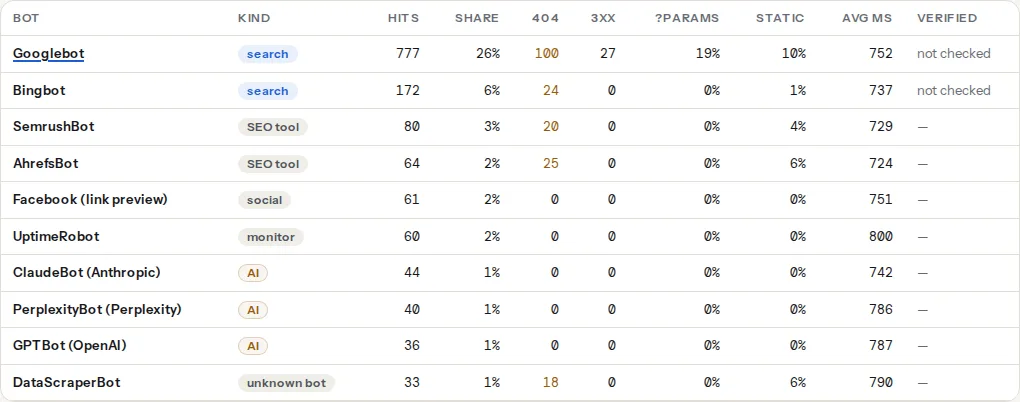
Below the table: per-day charts, the Where Googlebot's hits went panel, per-bot tables of most fetched URLs and 404s, an AI crawlers panel, an Unknown bots disclosure and CSV downloads.
The log shows what crawlers did; the report checks show what your site asks them to do. The ones you will cross-check most:
Step by step
1. Get the log, including the rotated files
Where it lives depends on who runs the server:
| Hosting | Where |
|---|---|
| cPanel | Metrics → Raw Access; current log plus archived months |
| Plesk | Websites & Domains → Logs → download |
| Kinsta, WP Engine, SiteGround | A "Logs" screen in the host dashboard with a download; SiteGround under Site Tools → Statistics |
| Your own Nginx | /var/log/nginx/access.log plus access.log.1, access.log.2.gz, … |
| Your own Apache | /var/log/apache2/access.log (Debian, Ubuntu) or /var/log/httpd/access_log (RHEL) |
| Cloudflare | Edge logs need Logpush on a paid plan; the origin log is still yours |
Logs are rotated daily or weekly and older files are compressed to .gz. Most hosts keep between two weeks and a few months, so download now and keep a copy for later comparison. Combine a month into one file:
# On the server, in the log directory: current + rotated, newest first does not matter
cat access.log access.log.1 > /tmp/month.log
zcat access.log.*.gz >> /tmp/month.log

# Quick sanity checks before you open the tool
grep -c Googlebot /tmp/month.log
grep Googlebot /tmp/month.log | awk '{print $1}' | sort | uniq -c | sort -rn | head
The last line prints the ten addresses that claimed to be Googlebot most often.
2. Drop the file in
Open the log analyser and drop the file in; gzipped files work as they are, and a few hundred megabytes is fine in a desktop browser. The summary line says how many lines were read and how many did not parse. A handful of unparsed lines is normal; thousands mean a custom log format (see the platform notes for Nginx).
3. Read the tiles and the bots table
Six tiles first: human visits, bot hits, Googlebot hits with distinct URLs, Googlebot 404s (amber above 5% of its hits), AI crawler hits, and 5xx answers (red if any). Bots outnumbering humans is normal for a small site; one unknown bot outnumbering Googlebot is not.
In the table, a high share of parameter URLs means the crawler is stuck in your filters. A high 404 count means it follows links that no longer exist, usually from an old sitemap or other sites. A slow average response time means your server is throttling the crawl: Google crawls less when answers take long.
4. Verify Googlebot and Bingbot, then deal with the fakes
Click Verify Googlebot & Bingbot addresses. The tool sends only the IP addresses (at most 200 per bot, ranked by hits) to our API, which runs the check Google and Microsoft document: reverse DNS on the address, then a forward lookup of the returned name, which has to resolve back to the same address. Real Googlebot resolves under googlebot.com or google.com; real Bingbot under search.msn.com. Verification is rate limited to 20 requests per 10 minutes. The same check for one address by hand:
host 66.249.66.1
# 1.66.249.66.in-addr.arpa domain name pointer crawl-66-249-66-1.googlebot.com.

host crawl-66-249-66-1.googlebot.com
# crawl-66-249-66-1.googlebot.com has address 66.249.66.1
Both directions have to agree: anyone can point an address's reverse record at any name, so only the forward lookup closes the loop. Google also publishes its address ranges as JSON (googlebot.json, special-crawlers.json, user-triggered-fetchers.json) on the verifying Googlebot page, the better route for a firewall allow-list.
After the check, the verification column reads "N real / N fake / N unknown" hits per bot. Unknown means no reverse record, common for cloud ranges and not proof of anything. Fake means the reverse record points outside Google or Microsoft, and those addresses are listed in a red panel:
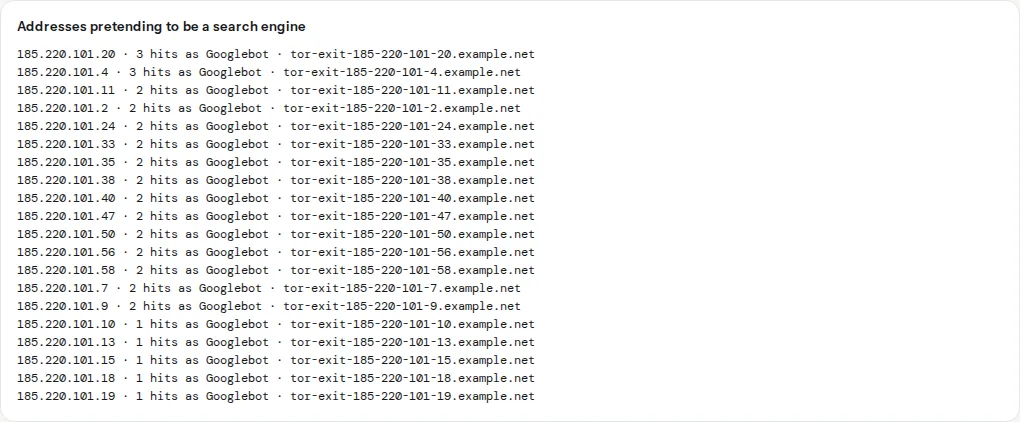
Block or rate-limit them at the firewall or CDN: on Cloudflare, a WAF rule matching a Googlebot user agent that is not a verified bot; on the server, deny 185.220.101.0/24; in the Nginx server block. Never in robots.txt: a fake bot ignores it, and a User-agent: Googlebot block there hides the site from the real one.
5. Open "Where Googlebot's hits went" and fix the wastes
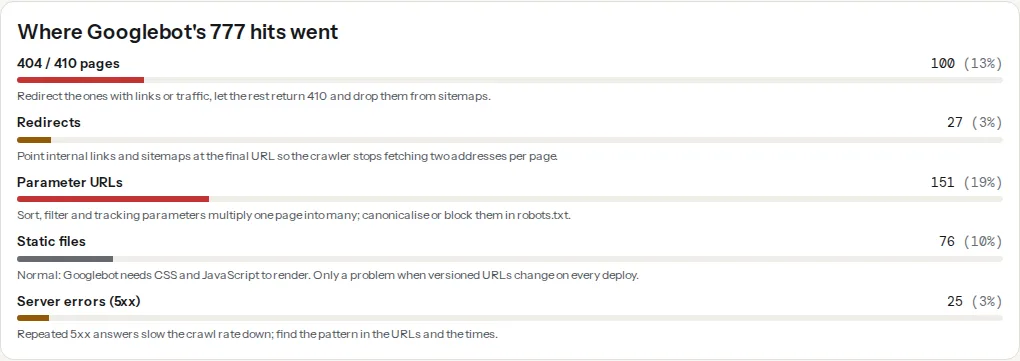
Bars turn amber above 3% and red above 10%, except static files, which stay grey because Googlebot needs your CSS and JavaScript to render pages. Take the wastes in order:
404 and 410 pages. Select Googlebot in the URL tables and read "404s hit by Googlebot". Paste the list into the bulk URL checker to see which still answer 404. Pages that had links or traffic get a 301 to the closest live equivalent. Pages gone for good answer 410, which Google retries less often, and come out of the sitemap:
# Nginx server block: gone for good
location = /summer-sale-2023/ { return 410; }
Redirects. A crawler sent from /product to /product/ has spent two fetches on one page. Point internal links and sitemap entries at the final URL, and collapse stacked rules (http → https → www → trailing slash) into one hop, as in redirects without chains.
Parameter URLs. Sort, filter and tracking parameters multiply one category into hundreds of URLs. Set the canonical tag on every variant to the clean URL, then block the parameters that never produce a page worth indexing:
# robots.txt at the site root
User-agent: *
Disallow: /*?orderby=
Disallow: /*&orderby=
Disallow: /*?replytocom=
Blocking in robots.txt stops crawling, not the indexing of URLs already known; keep the canonical for those. The robots.txt learn page covers the matching rules.
5xx answers. The panel shows the share; the daily chart shows when. A burst at the same hour every night is a backup or cron job competing with the crawler, and Google crawls less for days afterwards.
6. Check the AI crawlers against your policy
The AI crawlers panel shows each one with hits, days active, distinct URLs and its three most fetched paths. Three kinds show up, each deserving its own answer:
- Training crawlers (GPTBot, ClaudeBot, CCBot, Meta-ExternalAgent, Bytespider) feed models. Allowing them brings nothing back directly.
- Search crawlers (OAI-SearchBot, PerplexityBot, Claude-SearchBot) feed answer engines that cite and link.
- User-triggered fetchers (ChatGPT-User, Claude-User, Perplexity-User) open one page because a person asked; blocking them blocks that person.
Decide per kind, write it into robots.txt, and confirm it with the AI crawler check. The full decision guide, with the robots.txt group for each token, is AI crawlers and robots.txt.
Note
robots.txt only governs crawlers that read it. A crawler you blocked last month that still gets 200 answers this month is not obeying; the fix is a firewall rule, not another robots.txt line. One that fetches only /robots.txt is respecting your rules.
7. Export, fix, compare next month
Download the bots CSV and the selected bot's URLs CSV; they are your baseline and the spec you hand to the developer with the fixes from step 5. In four weeks, run the new log and compare the bots tables: Googlebot's 404 and redirect shares should fall and its distinct URL count rise while hits hold. That is crawl budget moving from waste to pages.
Platform notes
WordPress
Managed hosts expose the access log in their dashboard (see step 1); shared cPanel hosts under Raw Access. Two parameters are almost always near the top of a WordPress log: ?replytocom= on comment reply links (one URL per comment) and ?add-to-cart= on WooCommerce listings (one per product). Both belong in robots.txt as in step 5.
Page caches (WP Rocket, LiteSpeed Cache, W3 Total Cache) do not change what the log shows: a cached page is still a request to your server, so every bot hit is logged and only PHP is skipped. A CDN that caches HTML is different (see common mistakes).
Shopify
Shopify does not give merchants raw access logs, and no app can add them. The closest source is Search Console → Settings → Crawl stats: Googlebot's requests by response, file type and purpose for the last 90 days, sampled. It shows neither AI crawlers nor fake Googlebots; for those you would need your own proxy in front of the store.
Static sites and custom servers
Make sure the log carries the response time so the tool's average response column fills. On Nginx, in nginx.conf inside the http block:
log_format main '$remote_addr - $remote_user [$time_local] "$request" '
                '$status $body_bytes_sent "$http_referer" "$http_user_agent" '
                '$request_time';
access_log /var/log/nginx/access.log main;
$request_time is seconds with three decimals; the tool converts it to milliseconds. Behind a proxy or load balancer, log the visitor's address rather than the proxy's, or every Googlebot will verify as unknown: real_ip_header X-Forwarded-For; with set_real_ip_from for the proxy's range makes $remote_addr the real client. Static hosts (Netlify, Vercel, GitHub Pages) expose logs only on higher plans or not at all; fall back to Search Console as for Shopify.
Verify
- Search Console → Settings → Crawl stats agrees in shape: the same daily pattern and a similar split between 200, 301 and 404. Exact numbers differ because Google samples and counts all its crawlers together.
- Next month's log shows fewer Googlebot 404 hits and a lower redirect share in Where Googlebot's hits went; the 404 tile drops below 5% and loses its amber.
- The verification column shows no fake hits, or the fake addresses now get 403 instead of 200.
- The 410 URLs leave the "404s hit by Googlebot" table within a few weeks.
Common mistakes
- Trusting the user agent string. Symptom: "Googlebot" from an address that also probes
/wp-login.phpand/.env. Fix: verify, then block at the firewall. Real Googlebot does not guess admin paths. - Blocking Googlebot's own ranges by accident. Symptom: crawl stats collapse the day after a firewall change;
66.249.x.xgets 403 in the log. Fix: allow-list Google's published ranges before any user-agent rule. - Reading the origin log behind a CDN that caches HTML. Symptom: Googlebot hits look tiny and static files are missing entirely. Cloudflare with "Cache Everything" or APO, like any CDN that caches pages, answers bots at the edge without touching your server, so the origin log undercounts. Fix: use the CDN's log export where the plan allows it, or read the origin log as misses only.
- Forgetting the rotated
.gzfiles. Symptom: the charts cover three days and every share is noise. Fix: combine the month as in step 1, or drop the.gzfiles one by one. - Analysing a single day. Googlebot's behaviour varies with the day of the week and with your deploys. Fix: read at least two weeks, and compare the same span month to month.