ChatGPT, Claude, Perplexity and Google's Gemini all fetch web pages, and each operator runs several crawlers with different jobs. Some collect text to train models, some build an index for AI answers that link back to you, and some fetch one page because a person asked about it right now. robots.txt can treat each of them differently, but most sites either say nothing or block everything by accident. This guide shows what your site currently says to 18 AI crawlers, how to choose per crawler, and how to write it down. Allow 30 minutes, including an llms.txt.
Quick answer
| You want | Do this |
|---|---|
| To be cited in AI answers | Allow the search and user crawlers (OAI-SearchBot, Claude-SearchBot, PerplexityBot, ChatGPT-User, Claude-User …) |
| To stay out of model training | Give the training tokens (GPTBot, ClaudeBot, Google-Extended, CCBot …) a group with Disallow: / |
| To stay in Google Search | Never block Googlebot; Google-Extended only controls Gemini use |
| A real block, not a request | Block at the edge: Cloudflare's AI bot setting or a WAF rule |
| An index for assistants | Add /llms.txt in the llmstxt.org format, served as text |
Run the AI crawler check before and after you change anything.
Why AI crawlers matter
AI answers are a new front door. When someone asks an assistant "which shop in Split makes leather bags to order", the answer is built from pages the operator's crawlers fetched, and the good ones cite and link those pages. If your robots.txt blocks the crawler that feeds that answer, a competitor gets the citation.
The opposite worry is just as legitimate. A publisher whose articles are the product may not want them used to train a model that then answers readers' questions without sending them to the article. That is a business decision, and robots.txt is where it is recorded.
The problem is that the decision is usually made by accident. A robots.txt copied from a blog post in 2023 blocks GPTBot but not OAI-SearchBot; a security plugin blocks "all bots" at the firewall; a Disallow: / meant for AI lands in the * group and takes Googlebot with it. The check exists to make the current state visible so the next change is deliberate.
Three kinds of AI crawler
| Purpose | Tokens | What happens to your page |
|---|---|---|
| Training | GPTBot, ClaudeBot, Google-Extended, Applebot-Extended, Meta-ExternalAgent, Bytespider, CCBot, cohere-ai | Collected to train or improve models. No link back. |
| AI search | OAI-SearchBot, Claude-SearchBot, PerplexityBot, Amazonbot, DuckAssistBot, YouBot | Indexed for AI answers, which cite and link sources. |
| User fetches | ChatGPT-User, Claude-User, Perplexity-User, MistralAI-User | Fetched once because a person asked the assistant about this page or topic. |
These are the 18 tokens the tool lists, taken from the operators' own documentation. Two of them are not crawlers at all. Google-Extended and Applebot-Extended are control tokens: nothing fetches your site with those names. Googlebot and Applebot fetch as usual, and the extended token only tells Google or Apple whether that content may be used for their AI models. Blocking Google-Extended does not affect Google Search, and it does not keep you out of AI Overviews, which are part of Search. Blocking Googlebot itself removes you from Google Search entirely.
Microsoft Copilot answers from Bing's index, so your Bingbot rules decide it; it has no separate token in the list.
How getReport checks it
The tool fetches /robots.txt and asks, for each of the 18 tokens, the same question a crawler asks: may I fetch this URL? It uses a standard robots.txt parser, so it picks the group for each token the way the crawlers do. It also fetches /llms.txt and checks /llms-full.txt, reads the page for AI opt-out tags, and compares the raw HTML with the rendered page, because most AI crawlers do not run JavaScript.
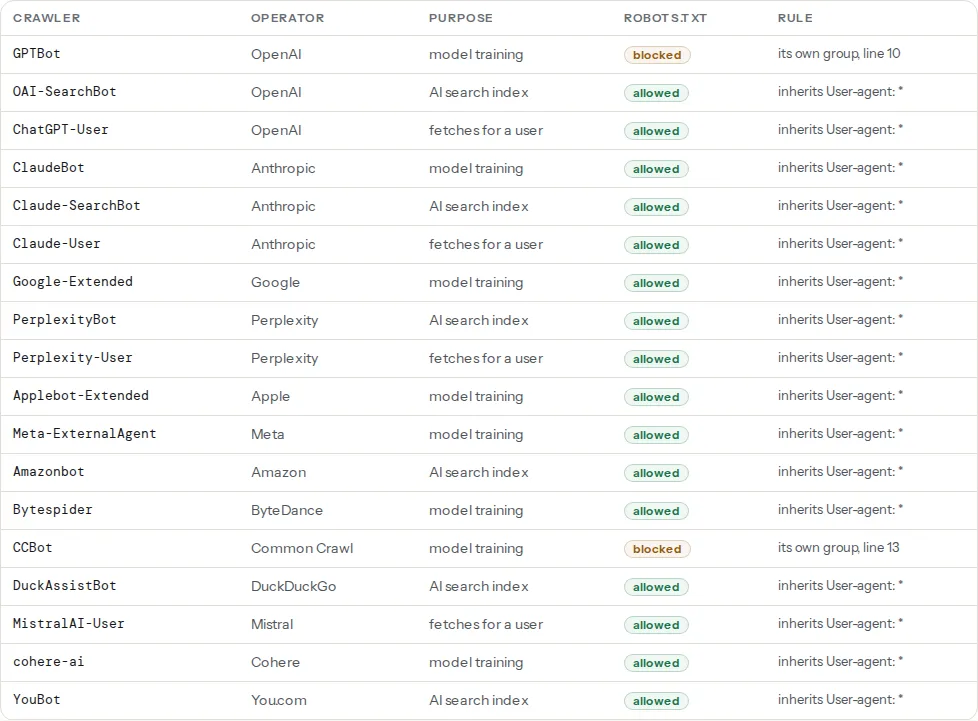
The Rule column is the one to read. When it says "its own group", robots.txt names the token, and a blocked crawler gets the line number of the matching Disallow. When it says "inherits User-agent: *", the crawler fell back to the generic rules, so any change to the * group changes its answer too.
The answer is for the URL you tested. A crawler blocked only from /members/ shows as allowed on the home page, so test a page from each section you care about.
This is information, not a warning, and it carries no weight in the score: blocking is a valid choice. If the site has no robots.txt at all, every crawler is allowed by convention and this finding does not appear.
Step by step
1. Know how robots.txt groups work
A crawler reads robots.txt, finds the group whose User-agent line names its token (case does not matter), and follows only that group. If no group names it, it follows the User-agent: * group. It never combines its own group with *.
That has two consequences people miss:
- A token with its own group ignores every rule in
*. If*blocks/checkout/and you addUser-agent: GPTBotwithAllow: /, GPTBot may now fetch/checkout/. Repeat any path rules the crawler should still respect. - A rule in
*hits every crawler without its own group, including Googlebot and Bingbot.Disallow: /under*is how sites vanish from search.
Several User-agent lines in a row share one group, which keeps the file short. Sitemap: lines belong to no group and apply to everyone. Google's robots.txt specification has the details, and robots.txt: test it before it hides your site covers the file in general.
2. Decide per purpose, not per company
Each pattern below is a complete file for /robots.txt at the root of the host. Replace the paths in the * group with your own.
A publisher: out of training, in AI answers. Articles are the product, but citations send readers.
# https://example.com/robots.txt
# No model training
User-agent: GPTBot
User-agent: ClaudeBot
User-agent: Google-Extended
User-agent: Applebot-Extended
User-agent: Meta-ExternalAgent
User-agent: Bytespider
User-agent: CCBot
User-agent: cohere-ai
Disallow: /

# Everyone else: search engines, AI search, user fetches
User-agent: *
Disallow: /wp-admin/
Allow: /wp-admin/admin-ajax.php

Sitemap: https://example.com/sitemap.xml
A shop: cited everywhere. Product pages that an assistant can quote are free advertising. No AI groups at all, so every crawler follows the same rules.
# https://example.com/robots.txt
User-agent: *
Disallow: /cart/
Disallow: /checkout/
Disallow: /my-account/

Sitemap: https://example.com/sitemap.xml
A SaaS documentation site: open, including training. When a model has read your docs, it answers questions about your API correctly. Keep the app itself out.
# https://example.com/robots.txt
User-agent: *
Disallow: /app/
Disallow: /account/

Sitemap: https://example.com/sitemap.xml
A personal blog: out of AI entirely. Every AI token, search and user fetchers included. You leave AI answers, but Google Search and Bing are unaffected.
# https://example.com/robots.txt
User-agent: GPTBot
User-agent: OAI-SearchBot
User-agent: ChatGPT-User
User-agent: ClaudeBot
User-agent: Claude-SearchBot
User-agent: Claude-User
User-agent: Google-Extended
User-agent: PerplexityBot
User-agent: Perplexity-User
User-agent: Applebot-Extended
User-agent: Meta-ExternalAgent
User-agent: Amazonbot
User-agent: Bytespider
User-agent: CCBot
User-agent: DuckAssistBot
User-agent: MistralAI-User
User-agent: cohere-ai
User-agent: YouBot
Disallow: /

User-agent: *
Allow: /

Sitemap: https://example.com/sitemap.xml
3. Enforce it where it has to hold
robots.txt is a request. The large operators document that their crawlers honour it, and the check shows what you asked for, not what every bot does. Some crawlers ignore it, and some user-triggered fetchers are documented as not applying it, because a person asked for the page (Perplexity says so for Perplexity-User).
If you need a wall, block at the edge. Cloudflare has a setting that blocks known AI crawlers, available on the free plan, and a WAF can match user agents and the IP ranges operators publish. On nginx, in the server block:
# Refuse training crawlers with a 403 (Google-Extended and
# Applebot-Extended never fetch, so they cannot be blocked this way)
if ($http_user_agent ~* "(GPTBot|ClaudeBot|CCBot|Bytespider|Meta-ExternalAgent|cohere-ai)") {
    return 403;
}
Keep robots.txt in step with the edge rules. The check reads robots.txt only; it cannot see a firewall that answers 403, so a site that allows OAI-SearchBot in robots.txt but blocks it at Cloudflare shows as "allowed" and still never gets cited.
4. Add opt-out tags only as documentation
noai and noimageai started on art platforms as a way to say "do not train on this". The TDM reservation protocol, from a W3C community group, expresses the text-and-data-mining opt-out that EU copyright law allows. In the page <head>:
<meta name="robots" content="noai, noimageai">
<meta name="tdm-reservation" content="1">
Neither is part of Google's documented robots rules, and support among the other operators is patchy at best. They cost nothing and record your intent, which may matter legally, but robots.txt and the edge do the actual work. The check reports them from the robots, googlebot, gptbot and claudebot meta tags, the X-Robots-Tag header and the tdm-reservation meta tag.
5. Write an llms.txt
llms.txt is a proposal from llmstxt.org: a Markdown file at /llms.txt that gives an assistant a short, curated map of the site. The format is strict in its order:
- An H1 with the site or project name (the only required part).
- A blockquote with a one-paragraph summary.
- Optional plain paragraphs with details.
##sections, each a list of- [Title](URL): descriptionlinks.
A section called ## Optional marks links an assistant can skip when it is short of space. A complete file for a shop, uploaded as /llms.txt next to robots.txt:
# Example Shop

> Handmade leather bags and accessories from Split, Croatia. Shipping across the EU in 2–4 working days; all prices include VAT.

Every bag is made to order in our workshop. Returns are free within 30 days of delivery.

## Products

- [Bags](https://example-shop.hr/bags/): every bag with dimensions, colours and prices in euros
- [Wallets and small goods](https://example-shop.hr/wallets/): wallets, card holders and key rings
- [Care guide](https://example-shop.hr/care/): how to clean, condition and store leather

## Buying

- [Shipping](https://example-shop.hr/shipping/): countries, costs and delivery times
- [Returns](https://example-shop.hr/returns/): the 30-day policy and how to start a return
- [Size guide](https://example-shop.hr/size-guide/): bag sizes in centimetres and what fits inside

## Optional

- [Our workshop](https://example-shop.hr/about/): who makes the bags and how
- [Journal](https://example-shop.hr/journal/): articles on leather and craft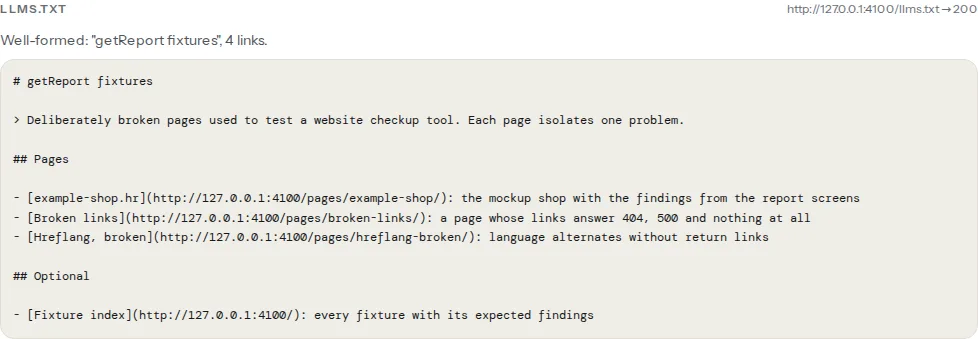
/llms-full.txt is a common companion: the full text of those pages in one Markdown file, useful for documentation sites. The check notes when it answers 200.
Be realistic about what the file does. Support is thin: it is used mostly by documentation sites and developer tools that load a site's docs into an assistant, and no search engine has said it ranks or cites pages because of it. It takes ten minutes, so it is worth having; it is not worth more than that. Our learn page on writing an llms.txt has the short version.
6. Give assistants something they can quote
Allowing a crawler is half the job. What it cites depends on what it can read, and the same basics help search engines:
- Text in the HTML. Most AI crawlers do not run JavaScript. If the rendered-content finding above shows a large share of text appearing only after scripts, server-render the main content. See JavaScript rendering.
- A meta description and a canonical on every page, so the summary and the URL an assistant cites are the ones you chose.
- Structured data that states facts plainly: prices, availability, opening hours, authors. JSON-LD basics covers the markup.
- A sitemap listed in robots.txt, so new pages are found without waiting for links.
Platform notes
WordPress
WordPress generates a virtual robots.txt when no file exists at the web root. Edit it through your SEO plugin (Yoast SEO: Tools → File editor; Rank Math: General Settings → Edit robots.txt) or upload a physical robots.txt, which replaces the virtual one. Without a plugin, the robots_txt filter appends to it, in a small plugin such as wp-content/mu-plugins/ai-robots.php:
<?php
// Appends a training-crawler group to WordPress's virtual robots.txt
add_filter('robots_txt', function ($output, $public) {
    $output .= "\nUser-agent: GPTBot\nUser-agent: ClaudeBot\nUser-agent: CCBot\nDisallow: /\n";
    return $output;
}, 10, 2);
Upload llms.txt to the same folder as wp-config.php. Recent versions of Yoast SEO and Rank Math can also generate one. Check two other places that decide for you: Cloudflare's AI bot setting, if the site sits behind Cloudflare, and the bot-blocking lists some security and firewall plugins ship. Either one can refuse a crawler that robots.txt allows.
Shopify
robots.txt is generated from the robots.txt.liquid theme template (Online Store → Themes → Edit code → Add a new template → robots). Add AI groups there; leave Shopify's default rules in place.
Static sites / custom
Put robots.txt and llms.txt in the folder your build copies to the web root (public/ in most frameworks). Most servers send .txt as text/plain already; confirm the content type, because a route that answers /llms.txt with the site's HTML 404 page fails the format check.
Verify
- Re-run the AI crawler check. Each crawler's badge matches your decision, and the Rule column reads "its own group" for every token you named.
- Test a page with the robots.txt tester: Googlebot must still be allowed.
- The llms.txt finding reads "llms.txt follows the llmstxt.org format".
- If you blocked at the edge, request the page with a blocked user agent (
curl -A "GPTBot" -I https://example.com/) and expect 403.
Common mistakes
- Blocking Googlebot by accident.
User-agent: *withDisallow: /, written to stop AI crawlers, stops every crawler without its own group. Name the AI tokens in their own group instead and keep*for your normal rules. - Listing a bot twice. Crawlers that follow RFC 9309 merge both groups, and for Google an
Allowand aDisallowof equal length resolve to the less restrictive one, so an oldAllow: /quietly cancels a newDisallow: /. Keep one group per token. - Blocking Google-Extended to leave AI Overviews. It only controls Gemini training and grounding. AI Overviews follow your Search settings, such as
nosnippet; see the robots directives reference. - Expecting llms.txt to help rankings. It does not. Spend the time on server-rendered text and structured data.
- Forgetting the sitemap. A rewritten robots.txt often loses its
Sitemap:line. Put it back; it helps every crawler, AI or not.