A breadcrumb trail is the row of links near the top of a page that reads "Home › Shoes › Trail running › Red Runner". It does two jobs with one piece of markup: it shows a visitor who arrived from a search where they landed and where to go next, and it tells Google how the page sits in your site, which Google then prints in your listing instead of the raw URL. This guide builds both halves, the visible <nav> and the BreadcrumbList structured data, and shows how to check that they agree.
Quick answer
- One visible trail per page, at the top, as
<nav aria-label="Breadcrumb">around an<ol>; every crumb but the last is a link, the last one carriesaria-current="page"and is not a link. - The trail reflects the site's hierarchy (home › category › subcategory › page), not the path the visitor happened to click through.
- Describe the same trail in JSON-LD as a
BreadcrumbListofListItems withposition,nameanditem; theitemURL may be left off the last element. - Keep the visible trail and the JSON-LD identical: same crumbs, same names, same order.
- In WordPress, Yoast, Rank Math and WooCommerce generate both halves from a setting.
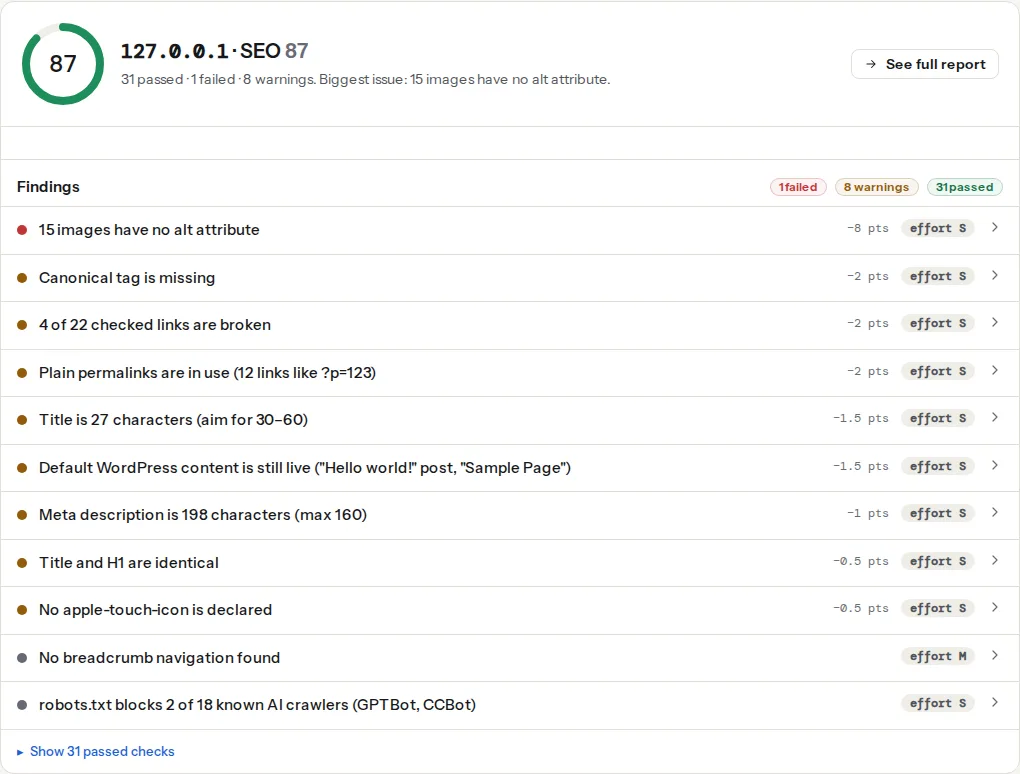
- Validate with the schema validator and Google's Rich Results Test, then check the SEO audit reads "Breadcrumb navigation found".
Why breadcrumbs matter
Most visitors do not enter through the home page. They land on a product or an article from a search, a shared link or an ad, and the first question is "where am I, and is there more like this?". A breadcrumb answers it in one glance and gives a one-tap route to the category, which on a shop is where the browsing starts. Sites with more than two levels of depth see this most: a blog with categories, a shop with subcategories, a documentation site.
For Google, the trail is a map of the hierarchy. It shows in the result itself: instead of example.com › shoes › trail-running › red-runner, the listing prints "example.com › Shoes › Trail running", using the names from your structured data. That is more readable, it shows the category a searcher was looking for, and it takes no extra space. Google documents this as the breadcrumb rich result, and it depends on the BreadcrumbList markup being complete.
The links themselves are ordinary internal links, and they matter as such: every product links to its category and to the home page with a descriptive anchor, on every page, consistently. On a large site that is the strongest internal linking pattern you have, which is why internal links: how many, where, with what anchor text treats breadcrumbs as a baseline rather than a nice-to-have.
How getReport checks it
The SEO audit looks for four signals of a breadcrumb trail and reports which it found: a <nav> whose aria-label contains "breadcrumb", an element with a class containing "breadcrumb", BreadcrumbList microdata (an itemtype attribute), or a JSON-LD script mentioning BreadcrumbList. Any one of them makes the finding pass; the technical detail names the ones it saw ("Breadcrumb found via nav[aria-label*="breadcrumb"], BreadcrumbList JSON-LD"). The finding is informational with no weight, so a page without a trail loses no points; a home page or a landing page legitimately has none. The one-paragraph version is on the breadcrumbs learn page.
The structured-data half is checked by the schema module. It parses every JSON-LD block, and for a BreadcrumbList it checks that each ListItem has a position and a name (a name on the nested item object also counts) and that every element except the last has an item URL. A list that fails any of these is reported under "required properties missing" and the eligibility finding lists BreadcrumbList as not eligible.
Step by step
1. Decide the hierarchy, once
Write down the levels of your site as a tree: home, then the top-level sections, then their children. Every page gets exactly one parent. A product that appears in two categories still has one primary category; that is the trail it shows everywhere, whichever way the visitor arrived. Trails that change with the click path ("Home › Sale › Red Runner" for one visitor, "Home › Shoes › Red Runner" for another) confuse Google, which sees two hierarchies for one URL, and confuse visitors who share links.
2. Write the visible trail
The pattern from the WAI-ARIA Authoring Practices, which screen readers announce as "Breadcrumb navigation":
<nav aria-label="Breadcrumb">
  <ol class="breadcrumb">
    <li><a href="/">Home</a></li>
    <li><a href="/shoes/">Shoes</a></li>
    <li><a href="/shoes/trail-running/">Trail running</a></li>
    <li aria-current="page">Red Runner</li>
  </ol>
</nav>
Rules the sample follows:
<nav>with anaria-label, so it is a landmark distinct from the main menu.- An ordered list, because the order carries meaning.
- The current page is text, not a link; a link to the page you are already on is a dead click.
aria-current="page"marks it for assistive technology. - The separators (›, /, chevrons) are added with CSS
::beforeon the<li>, not typed into the HTML, so screen readers do not read "greater than" three times.
<style>
  .breadcrumb { display: flex; flex-wrap: wrap; gap: .25rem .5rem; list-style: none; padding: 0; }
  .breadcrumb li + li::before { content: "›"; margin-right: .5rem; }
</style>
Put the trail above the H1, where people look for it. It should be the first thing after the header, with the page's own link hierarchy visible before anything else.
3. Add the BreadcrumbList JSON-LD
The same trail, as data, in a <script type="application/ld+json"> anywhere in the page:
{
  "@context": "https://schema.org",
  "@type": "BreadcrumbList",
  "itemListElement": [
    { "@type": "ListItem", "position": 1, "name": "Home", "item": "https://example.com/" },
    { "@type": "ListItem", "position": 2, "name": "Shoes", "item": "https://example.com/shoes/" },
    { "@type": "ListItem", "position": 3, "name": "Trail running", "item": "https://example.com/shoes/trail-running/" },
    { "@type": "ListItem", "position": 4, "name": "Red Runner" }
  ]
}
position starts at 1 and increases by one. item is the absolute URL of each crumb and can be omitted on the last element, since the last element is the page itself. Google's own examples start the list below the home page; including "Home" is fine either way, as long as the visible trail matches. Google's reference is the breadcrumb structured data documentation. If the page already has a JSON-LD graph (Organization, Product, Article), the list can be one more node in it; see JSON-LD basics for how graphs are put together.
4. Keep the two halves identical
Google compares the structured data with what the page shows and can ignore markup that describes something the visitor cannot see. Generate both from the same array rather than maintaining them separately. A minimal example in vanilla JavaScript for a static site, run at build time or on the server, never in the browser:
const crumbs = [
  { name: 'Home', url: 'https://example.com/' },
  { name: 'Shoes', url: 'https://example.com/shoes/' },
  { name: 'Red Runner', url: 'https://example.com/shoes/red-runner/' },
];

const html = `<nav aria-label="Breadcrumb"><ol class="breadcrumb">${crumbs
  .map((c, i) =>
    i === crumbs.length - 1
      ? `<li aria-current="page">${c.name}</li>`
      : `<li><a href="${c.url}">${c.name}</a></li>`,
  )
  .join('')}</ol></nav>`;

const jsonLd = {
  '@context': 'https://schema.org',
  '@type': 'BreadcrumbList',
  itemListElement: crumbs.map((c, i) => ({
    '@type': 'ListItem',
    position: i + 1,
    name: c.name,
    ...(i < crumbs.length - 1 ? { item: c.url } : {}),
  })),
};
5. Mobile
On a 360 px screen a five-level trail wraps into three lines. Two approaches work: let it wrap (the flex-wrap above), which is honest and still tappable; or show only the parent as a "‹ Trail running" back link and keep the full list in the JSON-LD. Do not hide the trail on mobile with display: none while keeping the structured data: that is exactly the mismatch Google warns about, and it removes the most useful navigation on the smallest screen.
6. Validate
Run the schema validator on one page per template. The eligibility finding should list BreadcrumbList as eligible and "required properties missing" should be empty. Then paste the URL into Google's Rich Results Test, which shows a "Breadcrumbs" item with the crumbs it parsed. Both tools read the same JSON-LD; the validator also scores it and keeps the report link, which is handy when a developer is doing the fix. The rest of the validation workflow is in Schema markup validation.
Platform notes
WordPress
Yoast SEO: Yoast SEO → Settings → Advanced → Breadcrumbs, switch "Enable breadcrumbs" on and choose the separator and the home text. To show the trail, add the "Yoast Breadcrumbs" block to the template in the Site Editor, or in a classic theme call it from the template where the trail should appear:
<?php if (function_exists('yoast_breadcrumb')) {
    yoast_breadcrumb('<nav aria-label="Breadcrumb" class="breadcrumb">', '</nav>');
} ?>
With breadcrumbs enabled, Yoast adds the BreadcrumbList node to the JSON-LD graph it already prints, so the two halves come from one setting. Yoast marks the last crumb with aria-current="page" itself.
Rank Math: Rank Math SEO → General Settings → Breadcrumbs, enable, then place [rank_math_breadcrumb] as a shortcode or call rank_math_the_breadcrumbs() in the template. Rank Math outputs a <nav> with an aria-label and the matching BreadcrumbList.
WooCommerce: the shop, category and product templates print a trail by default through the woocommerce_breadcrumb hook, as a <nav class="woocommerce-breadcrumb">, and WooCommerce describes it with BreadcrumbList structured data. If your theme removed the hook, re-add it in the child theme:
add_action('woocommerce_before_main_content', 'woocommerce_breadcrumb', 20);Block themes without an SEO plugin: WordPress core has no breadcrumbs block. Use the Yoast or Rank Math block, or a small plugin, rather than typing trails into each page.
Two plugins printing trails (WooCommerce's and Yoast's, for example) give two visible trails and two BreadcrumbList nodes; Yoast has a setting to replace the WooCommerce trail, or remove the WooCommerce hook as above.
Shopify
Most themes have a breadcrumb section or snippet (snippets/breadcrumbs.liquid in many free themes) that prints the collection › product trail from collection.title and product.title; enable it in the theme editor. Structured data for breadcrumbs is theme-dependent; check with the validator.
Static sites and custom code
Generate from the page's path or from front matter (parent:) with the array pattern above. Hugo, Eleventy and Astro all have a way to compute ancestors at build time; the important part is that the URL structure and the trail agree, so /shoes/trail-running/red-runner/ really is inside /shoes/trail-running/.
Verify
- The SEO audit reads "Breadcrumb navigation found" and the detail lists at least the
nav[aria-label]and the JSON-LD signals. - The schema validator reads "Eligible for rich results: BreadcrumbList" (with your other types) and no
itemListElement[…]path under required properties missing. - Google's Rich Results Test shows a Breadcrumbs item with the same names as the visible trail.
- With a screen reader (VoiceOver, NVDA), the trail is announced as "Breadcrumb navigation" and the last crumb as "current page".
- After Google recrawls, the listing shows "example.com › Shoes › Trail running" instead of the URL.
Common mistakes
- Structured data without a visible trail. The rich result depends on the page showing the same path. Add the
<nav>. - Missing
itemon a middle element. The fixture that fails this in our tests is exactly that: the first crumb has a name but no URL, andBreadcrumbListbecomes ineligible. Every element except the last needsitem. - The current page as a link. A link to itself is a dead click and a common accessibility finding. Text with
aria-current="page". - Trails that follow the click path. One URL, one trail, from the primary category. Sessions are not hierarchies.
- Two trails from two plugins. WooCommerce plus an SEO plugin, or a theme plus a plugin. Keep one source and one
BreadcrumbListper page. - Home › Home › Page. A theme that prefixes the site name and a plugin that adds "Home" produce a doubled first crumb. Turn one off.