Structured data is the part of the page written for machines: a small JSON block that says "this is a Product, it costs €129, it is in stock, 84 people rated it 4.6". Google uses it to show rich results (prices, stars, FAQs, breadcrumbs) and to understand entities it would otherwise guess at. It fails quietly: a missing comma makes the whole block invalid, a missing price makes the product ineligible, and two plugins writing the same entity confuse the parser. This guide validates what you have, explains the properties each type needs, and shows working examples.
Quick answer
- Use JSON-LD in a
<script type="application/ld+json">block; it is what Google recommends and the easiest to generate. - Every page:
Organization(orLocalBusiness) andWebSiteon the home page,BreadcrumbListeverywhere. - Per type, the required properties decide eligibility: Product needs
name,image, andoffers(withprice,priceCurrency,availability) or a rating; Article needsheadline,image,author,datePublished. - One generator per entity. Two Organization blocks from two plugins get both ignored.
- Run the schema validator; it parses the blocks, lists the types and the missing properties, and says which rich results the page qualifies for.
Why structured data matters
Rich results take more space on the result page and get more clicks: a product with a price and stars, a recipe with a photo and a cook time, a FAQ that expands under the result. Google only shows them when the markup is valid and complete, and it checks the values against the visible page (a price in the schema that is not on the page is a policy violation).
Beyond rich results, structured data is how Google connects pages to entities in its knowledge graph: your Organization to its logo and social profiles, an author to their other articles, a local business to its map listing. That understanding shows up in ways that are hard to attribute but real: knowledge panels, "from your site" links, correct business hours in Maps.
How getReport checks it
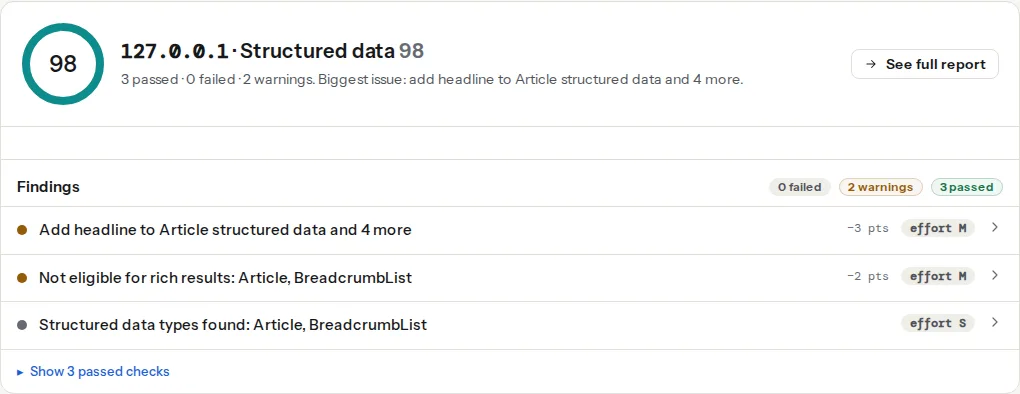
The schema module extracts every JSON-LD block (and microdata, for legacy sites), parses it strictly, resolves the @graph and @id references, and checks each entity against the required and recommended properties for the common types (Product, Article, BlogPosting, Organization, LocalBusiness, WebSite, BreadcrumbList, FAQPage, HowTo, Event, Recipe). The rich-result eligibility finding says which results the page can get as it stands.
The types most sites need
Organization and WebSite (home page)
<script type="application/ld+json">
{
  "@context": "https://schema.org",
  "@graph": [
    {
      "@type": "Organization",
      "@id": "https://example.com/#organization",
      "name": "Outdoor Shop Zagreb",
      "url": "https://example.com/",
      "logo": { "@type": "ImageObject", "url": "https://example.com/img/logo-600.png", "width": 600, "height": 600 },
      "sameAs": ["https://www.instagram.com/outdoorshopzg", "https://www.facebook.com/outdoorshopzg"]
    },
    {
      "@type": "WebSite",
      "@id": "https://example.com/#website",
      "url": "https://example.com/",
      "name": "Outdoor Shop Zagreb",
      "publisher": { "@id": "https://example.com/#organization" }
    }
  ]
}
</script>
The logo should be at least 112 × 112 px on a plain background; sameAs links the social profiles. A LocalBusiness (or a subtype like Dentist, Store) replaces Organization for a physical business and adds address, telephone, openingHoursSpecification and geo.
Product
<script type="application/ld+json">
{
  "@context": "https://schema.org",
  "@type": "Product",
  "name": "Alpina Pro trekking shoe",
  "image": ["https://example.com/img/alpina-pro-1.webp", "https://example.com/img/alpina-pro-2.webp"],
  "description": "Waterproof trekking shoe with a Vibram sole.",
  "sku": "ALP-PRO-42",
  "brand": { "@type": "Brand", "name": "Alpina" },
  "offers": {
    "@type": "Offer",
    "url": "https://example.com/shoes/alpina-pro/",
    "price": "129.00",
    "priceCurrency": "EUR",
    "availability": "https://schema.org/InStock",
    "itemCondition": "https://schema.org/NewCondition"
  },
  "aggregateRating": { "@type": "AggregateRating", "ratingValue": "4.6", "reviewCount": "84" }
}
</script>
Without offers or a rating, a Product is not eligible for any rich result. price is a string with a dot decimal; availability is the full schema.org URL. Variants (sizes, colours) each get an Offer, or use ProductGroup. See Product schema: price, availability, reviews.
Article and BlogPosting
Required: headline (under 110 characters), image, author (a Person or Organization with a name, ideally a url), datePublished; recommended dateModified and publisher. The dates are ISO 8601 with a timezone.
BreadcrumbList
{
  "@context": "https://schema.org",
  "@type": "BreadcrumbList",
  "itemListElement": [
    { "@type": "ListItem", "position": 1, "name": "Shoes", "item": "https://example.com/shoes/" },
    { "@type": "ListItem", "position": 2, "name": "Trekking", "item": "https://example.com/shoes/trekking/" },
    { "@type": "ListItem", "position": 3, "name": "Alpina Pro" }
  ]
}
The last item has no item; positions start at 1.
FAQPage and HowTo
Google limited FAQ rich results in 2023 to government and health sites, and removed HowTo rich results. The markup is still valid and still helps understanding, but do not add FAQs to pages for the rich result alone; a FAQ block must be real questions visible on the page.
Step by step
1. Run the validator and read the parse finding first
"JSON-LD does not parse" means a syntax error: a trailing comma, a missing quote, an unescaped quote inside a description, or two blocks concatenated. The finding shows the position. Everything else waits until it parses.
2. Check the types and the missing properties
The types finding lists what was found (Product, BreadcrumbList, Organization). The required-properties finding lists, per entity, what is missing for eligibility. Fix required first, then recommended; recommended properties (sku, brand, dateModified) improve the result but do not gate it.
3. Remove duplicates
Two Organization entities with different @ids, or two Product blocks (one from the shop, one from the SEO plugin), are a common WordPress and Shopify problem. Keep the one that is complete and turn the other off in its plugin's settings. The report's WordPress Doctor names the generators when it can. See Duplicate entities: two plugins, one graph.
4. Make the values match the page
The price in the schema must be the price on the page; the rating must be visible; the author must be named. Mismatches are a manual-action risk, and they are the most common reason a valid page gets no rich result.
5. Connect entities with @id
publisher: { "@id": "…#organization" } on an Article, "@id" on the Organization: the references let Google build one graph instead of guessing which Organization is which. Keep the @id values stable across pages (the home URL plus #organization is the convention).
Platform notes
WordPress: Yoast and Rank Math generate Organization, WebSite, Article, BreadcrumbList and (with WooCommerce) Product automatically, in one @graph; fill in the site's organisation details, logo and social profiles in the plugin's settings and the graph completes itself. Do not add a second schema plugin. Shopify: themes print Product and Organization; check the theme's product.json section for the aggregateRating from your review app. Static sites: generate the JSON from the front matter in the layout; keep one helper so every page uses the same @id values.
Verify
- The validator shows every block parses, the expected types, no missing required properties and no duplicate entities.
- Google's Rich Results Test agrees (it is the source of truth for eligibility; the validator follows its documented requirements).
- Search Console → Enhancements shows the item types with zero errors after the next crawl; rich results can take weeks to appear.
Common mistakes
- Copying the example with the placeholders in it. "Your Company Name" in the live schema is more common than you would think.
- Prices as numbers with a currency sign (
"€129"). Use"129.00"andpriceCurrency. - Ratings without visible reviews. Ineligible, and a policy violation.
- Markup for content that is not on the page (a FAQ in the schema, no FAQ visible).
- Microdata and JSON-LD for the same entity. Pick JSON-LD and remove the
itemscopeattributes from the theme. - Expecting a rich result for every page. Eligibility is per type and Google decides per query; valid markup is necessary, not sufficient.