A category page with filters for colour, size, price and a sort order is one page to a visitor and thousands of URLs to a crawler: every combination of every value is a new address. Left alone, Googlebot spends its visits on ?colour=red&size=42&sort=price variants while new products wait, and the index fills with near-duplicates that compete with the category itself. This guide gives a decision per parameter type, the three controls and what each one does and does not do, the platform specifics for WooCommerce, Shopify and Magento, and the way to see what Googlebot really crawls. Plan half a day for the decisions, and a deploy for the fixes.
Quick answer
| Parameter type | Example | What to do |
|---|---|---|
| Sort, view, items per page | ?sort=price, ?view=grid, ?per_page=48 | Canonical to the base URL; optionally block in robots.txt |
| Pagination | ?page=3 | Keep crawlable and self-canonical; do not canonical to page 1 |
| Single filter with search demand | /shoes/red/ or ?colour=red | Make it a real landing page: unique title, H1, text, self-canonical, in the sitemap |
| Multi-select combinations | ?colour=red&size=42&brand=x | noindex, or canonical to the single-facet page; block crawling once the good pages are indexed |
| Tracking and session parameters | ?utm_source=, ?sessionid= | Canonical to the clean URL; strip them at the server or CDN where possible |
Rules that hold everywhere: one parameter order, one value spelling, rel="canonical" on every variant, and never both noindex and a robots.txt block on the same URL, because a blocked page cannot be read and so cannot be de-indexed.
Why parameter URLs matter
Three things go wrong, in order of how fast they hurt.
Crawl waste. Google allocates a crawl rate to a site based on how fast it answers and how useful its pages have been. A shop with 200 categories, five facets of ten values each and four sort orders has, in theory, tens of millions of URLs. Googlebot does not crawl them all, but it does crawl a lot of them, and the log analyser shows the result on real shops: half of Googlebot's visits on parameter URLs, while new products and updated prices wait days for a fetch.
Duplicate content. /shoes/?sort=price shows the same products as /shoes/, in a different order. Google is good at picking one, but the pick is not always yours, and each duplicate splits the links and signals that should go to the category. On a large site the "Duplicate without user-selected canonical" row in Search Console is where the category's authority went.
Index bloat. Thousands of thin filter pages in the index dilute the site's overall quality signal and produce results nobody wants: a visitor searching for red shoes lands on ?colour=red&size=36&sort=newest with two products. Google's own guidance on faceted navigation is direct about it: decide which facets deserve to be indexed and keep the rest from being crawled at all.
The opposite mistake exists too. Some facets are queries people type: "red running shoes", "size 46 boots", "waterproof jackets under 100". A single-facet page with real content is a landing page for a query the category alone cannot answer. Blocking every filter throws those away.
How getReport checks it
Run the audit on three URLs: the plain category, one single-facet URL you want indexed, and one multi-facet URL you do not. The SEO panel shows the findings that matter for each, and the three panels side by side tell you whether the controls are doing what you decided:
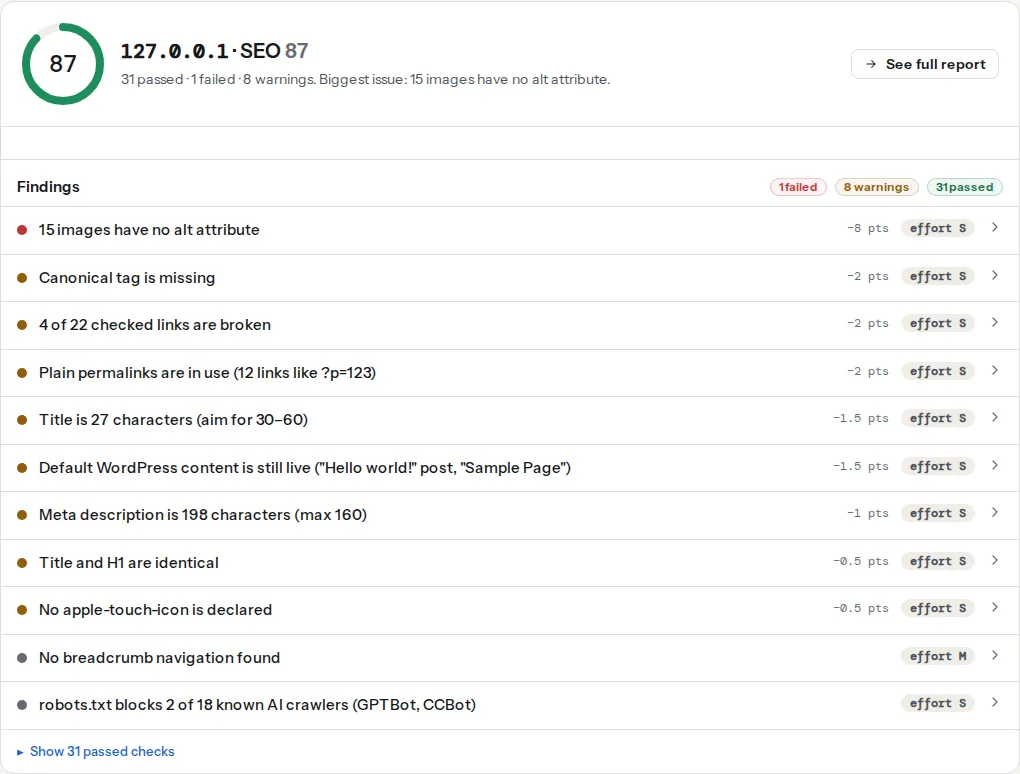
The check reads the <link rel="canonical"> on the final URL. On a filter page the companion canonical-self-or-valid finding tells you where it points and whether that target answers 200; a canonical on ?sort=price should point at the category, and a canonical on /shoes/red/ should point at itself.
On the multi-facet URL you decided to keep out, this finding should fail: a fail here is the confirmation that the noindex is in place. On the single-facet landing page it must pass. The check reads both the meta tag and the X-Robots-Tag header, so a noindex added at the web server for ? URLs is seen.
Reports the robots.txt line that blocks the URL, and for which user agents. Run it on the multi-facet URL after adding a Disallow rule to confirm the pattern matches, and on the category and the single-facet page to confirm it does not. The classic wildcard mistake, Disallow: /*?, blocks every URL with a query string, including ones you want.
Warns above 100 characters. Multi-facet URLs get there fast (?colour=red&size=42&brand=acme&sort=price-desc&page=2), and long URLs are cut off in results and unshareable; the check is a hint that the URL should not be indexable at all, or that the single-facet form should be a short path.
Step by step
1. List the parameters
Open the category in a browser, click every filter, sort and view control, and write down each parameter name that appears in the address bar. Then check a day of access logs in the log analyser: the "parameter URLs" share for Googlebot and the most-fetched URLs show which parameters the crawler actually spends time on, which is often a parameter you forgot (an old ?replytocom=, a ?add-to-cart=, a ?ref=).
2. Classify each one
Use the table in the quick answer. The only judgement call is which single facets have search demand. Look at the queries the category already ranks for in Search Console; if "red shoes" and "shoes size 42" appear, those facets deserve pages. Brand and material usually qualify; sort order, price ranges and page size never do.
3. Fix the parameters themselves
Before adding any control, make the URLs consistent, or the controls multiply:
- One order.
?colour=red&size=42and?size=42&colour=redare two URLs. Generate them in a fixed order, and canonicalise the other. - One spelling.
red,RedandREDare three URLs. Lower-case values. - No empty parameters.
?colour=&size=42is a fourth URL for the same page. Drop empty keys when building links. - No defaults in the URL.
?sort=relevanceis the base page; the link should be/shoes/.
Filters applied with JavaScript that update the URL with pushState still produce URLs Google can find if they appear in href attributes. Filters that use URL fragments (/shoes/#colour=red) do not create new URLs for the crawler, which is the approach Google recommends when you do not want facets crawled at all.
4. Canonical: for sorts, views and tracking
Every variant that shows the same set of products as another URL gets a canonical pointing at that URL. For sorts and views that is the category; for tracking parameters it is the clean URL of whatever page carries them. The canonical is a strong hint, not a command, but for parameter variants Google follows it reliably because the content matches.
<!-- on /shoes/?sort=price and /shoes/?view=list -->
<link rel="canonical" href="https://example.com/shoes/">
Pagination is the exception: ?page=2 shows different products, so it is self-canonical, and blocking it hides the products only reachable from page 2 onwards. Pagination after rel=prev/next covers the details.
5. noindex: for combinations that must stay crawlable for now
Multi-select combinations show a unique product set, so a canonical to the category is a lie Google may ignore. noindex is the honest control: the page is crawled, its links (to products) are followed, and it stays out of the index.
<!-- on any URL with two or more facet parameters -->
<meta name="robots" content="noindex, follow">
Or at the web server, which covers every response including ones the CMS does not render. On nginx, inside the category location:
# Two or more facet parameters → noindex header
if ($args ~ "(colour|size|brand)=[^&]+&.*(colour|size|brand)=") {
    add_header X-Robots-Tag "noindex, follow" always;
}
noindex does not save crawl budget; Google has to fetch the page to read it. It is the right tool while single-facet pages are still being discovered through the combination pages, and the wrong tool as the only control on a very large shop.
6. robots.txt: for what should not be crawled at all
Once the pages you want indexed are linked from the category and listed in the sitemap, block the rest from being crawled. Google's robots.txt parser supports * and $; the patterns must allow the single-facet pages and block the combinations:
# /robots.txt
User-agent: *
# sort, view and page-size variants: never useful to crawl
Disallow: /*?*sort=
Disallow: /*&sort=
Disallow: /*?*view=
Disallow: /*?*per_page=
# two or more facets in one URL
Disallow: /*?*colour=*&size=
Disallow: /*?*size=*&colour=
Disallow: /*?*brand=*&
# tracking
Disallow: /*?*utm_
Sitemap: https://example.com/sitemap.xml
A blocked URL can still appear in results as a bare address if other pages link to it, and a blocked URL cannot be de-indexed with noindex because the tag is never read. So the order is: noindex first, wait until the combinations have dropped out of the index (Search Console's Pages report shows it), then block. The robots.txt patterns guide has the matching rules in detail.
7. Build the single-facet pages properly
A filter page that should rank needs what any landing page needs: a short path (/shoes/red/ rather than ?colour=red), a unique title and H1 ("Red shoes" not "Shoes"), a paragraph of text that a visitor would read, a self-canonical, breadcrumb links, internal links from the category and the sitemap entry. Without those it is a duplicate with a nicer URL, and Google will fold it into the category.
8. Check what Googlebot does with it
Two weeks after the change, run the log analyser again: the parameter share of Googlebot's visits should fall, and the most-fetched URLs should be categories and products. Then paste a sample of 100 filter URLs of each type into the bulk URL checker: the noindex column reads yes for the combinations, the canonical column shows the category for sorts and views, and single-facet pages show no and a self-canonical.
Platform notes
WordPress and WooCommerce
WooCommerce's own controls produce ?orderby=price, ?min_price=10&max_price=50 and, with the layered navigation widget, ?filter_colour=red&query_type_colour=or. Filter plugins add their own names. Yoast SEO and Rank Math build the canonical from the category's permalink, so sorted and filtered URLs already canonicalise to the base category; check one in the report to confirm your theme prints it. For noindex on combinations, a small filter in the theme's functions.php covers both plugins' output:
// Add noindex on product category URLs that carry two or more filter parameters.
add_action('wp_head', function () {
    if (!is_product_category()) return;
    $facets = array_filter(array_keys($_GET), fn ($k) => str_starts_with($k, 'filter_'));
    if (count($facets) >= 2) {
        echo '<meta name="robots" content="noindex, follow">' . "\n";
    }
}, 1);
WooCommerce also emits ?add-to-cart=123 links on category pages; these should be blocked in robots.txt (Disallow: /*?*add-to-cart=) since each one is a crawlable URL that performs an action.
Shopify
Collection filters use ?filter.v.option.color=Red, ?filter.v.price.gte=10 and ?filter.p.vendor=Acme; sorting uses ?sort_by=price-ascending. The canonical_url object that themes print points filtered and sorted collection URLs at the plain collection, which handles sorts and combinations in one go; check a filtered URL in the canonical checker on your theme. Shopify's robots.txt is editable through the robots.txt.liquid template if you want to add Disallow rules for filter combinations. Single-facet landing pages are best built as separate collections (/collections/red-shoes) with their own description, since filter URLs cannot carry unique text.
Magento
Layered navigation produces ?color=52&price=10-20. Under Stores → Configuration → Catalog → Catalog → Search Engine Optimization, "Use Canonical Link Meta Tag For Categories" makes every filtered URL canonical to the category. Combine with robots.txt rules for the attribute parameters you never want crawled.
Verify
- The report on a sort or view URL shows a canonical pointing at the category, and
indexable-statuson the category itself passes. - The report on a multi-facet URL fails
robots-meta-noindex(intended) or, after the block, failsrobots-txt-blocks-pagewith the line you wrote; never both at once. - The report on a single-facet landing page passes canonical, noindex and robots.txt, and lists the page in the sitemap.
- The log analyser shows Googlebot's parameter-URL share falling week over week.
- Search Console's Pages report: "Duplicate without user-selected canonical" and "Excluded by noindex" stop growing, and the single-facet pages appear under "Indexed".
Common mistakes
- Blocking everything with
Disallow: /*?. It also blocks pagination, search, and the single-facet pages you wanted. Write patterns per parameter. noindexand a robots.txt block on the same URLs. The block prevents the tag from being read, so the URLs stay indexed as bare addresses.noindexfirst, block later.- Canonical from a combination page to the category. The product sets differ, so Google may ignore the canonical and index both. Use
noindexfor combinations. - Relying on
nofollowon filter links. Google treatsnofollowas a hint and still discovers the URLs; Google's faceted navigation guidance says not to rely on it. Use the controls above. - Canonicalising page 2 to page 1. Products on later pages lose their only crawl path. Pagination is self-canonical.
- Fixing the controls but not the URL generation. Two parameter orders and mixed case double every rule. Fix the links first. For the URL side of the problem, URL length and structure is the companion guide.