Most robots.txt problems are not typos. They are a rule that matches more than the author thought, an Allow that loses to a Disallow, or a Crawl-delay line that has never done anything for the one crawler it was written for. This guide explains the matching rules as Google implements them (RFC 9309, which Google co-wrote and published its parser for), gives patterns you can paste for the usual jobs, and ends with a policy for the AI crawlers. Testing a URL against the result takes one run of the tester.
Quick answer
- The file is groups: one or more
User-agent:lines, thenAllow:andDisallow:rules. A crawler uses the one group that names it most specifically, or the*group if none does. Groups do not add up. - Rules match by prefix. The longest matching rule wins; if an
Allowand aDisallowmatch with the same length,Allowwins. *matches any run of characters,$anchors the end. Paths are case-sensitive.- One file per scheme, host and port at
/robots.txt; Google reads the first 500 KiB. Crawl-delayis ignored by Google.Sitemap:lines apply to every group.- robots.txt controls crawling, not indexing and not access. A blocked URL can still appear in results.
- Test the page with the robots.txt tester: it names the matching line for Googlebot and for
*.
Why the parsing rules matter
Disallow: /p blocks /pricing/, /products/ and /press-releases/, because rules are prefixes, not paths. Disallow: /*? blocks every URL with a query string, including the ones your JavaScript-rendered pages depend on. An Allow: /wp-admin/admin-ajax.php placed under User-agent: Googlebot while the Disallow: /wp-admin/ sits under User-agent: * does nothing for Googlebot, because Googlebot only reads its own group.
None of these produce an error. The file is valid, the site works for people, and the effect shows up weeks later as pages missing from search or a rendering problem in Search Console. Knowing the four rules (group selection, longest match, wildcards, case) is what makes the file predictable. If you are starting from no file at all, or from Disallow: / on production, read robots.txt: test it before it hides your site first; the robots.txt page has the short version of what the file can and cannot do.
How getReport checks it
The report fetches /robots.txt (up to 512 KB), parses it with a parser that implements the RFC (wildcards, $, Allow precedence, group selection) and asks, for the exact URL you entered, whether Googlebot and the generic * agent may fetch it. When either is blocked, the finding names the agent and the 1-based line number of the rule that matched, so you can go straight to it.
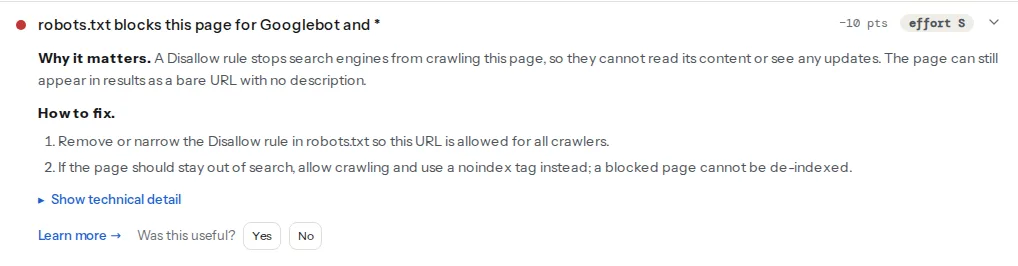
The verdict is for one URL. A rule that blocks /members/ shows as allowed on the home page, so test a page from each section the rule could touch. The same parser drives the AI crawler check, which asks the same question for 18 AI user-agent tokens and shows whether each was decided by its own group or inherited the * group:
The rules, as Google applies them
Groups and which one a crawler uses
User-agent: *
Disallow: /search/

User-agent: Googlebot
Disallow: /search/
Disallow: /drafts/
Googlebot reads only the second group. If the second group were only Disallow: /drafts/, Googlebot would be allowed into /search/, because the * group is not consulted once a specific group matches. Repeat the common rules in every specific group, or avoid specific groups unless you need them. Several User-agent lines directly above one set of rules form one group that applies to all of them. Token matching is case-insensitive and matches the crawler's product token (Googlebot), not its full user-agent string.
Longest match wins, Allow wins ties
User-agent: *
Disallow: /wp-admin/
Allow: /wp-admin/admin-ajax.php
For /wp-admin/admin-ajax.php, both rules match. The Allow is longer (33 characters against 10), so it wins and the file is allowed; everything else under /wp-admin/ stays blocked. Order in the file does not matter; length does. When an Allow and a Disallow are exactly the same length, the Allow applies.
Wildcards and the end anchor
* matches any sequence, including nothing and including /. $ matches only at the end of the URL. Without $, every rule is a prefix:
User-agent: *
# Block sorted and filtered listings, keep the base category pages
Disallow: /*?orderby=
Disallow: /*&orderby=
# Block PDFs anywhere on the site, but not /pdf-guide/ pages
Disallow: /*.pdf$
# Block one folder but allow one file in it
Disallow: /private/
Allow: /private/press-kit.zip
Disallow: /*.pdf without $ would also block /whitepaper.pdf?download=1 and /downloads/report.pdfs/, which may be what you want; with $, only URLs that end in .pdf are matched. A ? in a rule is literal, so /*?orderby= only matches when orderby is the first parameter; the & variant on the next line catches it in any other position.
Case and empty rules
Paths are compared case-sensitively: Disallow: /Admin/ does not block /admin/. An empty Disallow: allows everything for that group, and is a valid way to say "this crawler may go anywhere" without the Allow: / line that some older parsers did not recognise.
One file per host, size, comments
https://example.com/robots.txt applies to https://example.com/ only. http://example.com/, https://www.example.com/ and https://example.com:8443/ each look for their own file. Redirecting the variants to one canonical host means one file. Google follows at least five redirect hops when fetching robots.txt, so a file that redirects works, but a file on a host that then serves a different robots.txt does not.
Google reads the first 500 KiB and ignores the rest, so a rule after that point is invisible. Comments start with # and run to the end of the line. Unknown lines are ignored, which is why a typo like Dissallow: silently allows everything it was meant to block.
What robots.txt is not
Not a noindex. A Disallow stops Google fetching the page; it does not stop Google indexing the URL if other pages link to it. The result then shows the URL with no description. To keep a page out of results, allow crawling and add <meta name="robots" content="noindex"> or an X-Robots-Tag: noindex header, so Google can see it. A page that is both blocked and noindex stays indexed, because the tag is never read. See noindex, nofollow, robots meta and X-Robots-Tag.
Not access control. The file is public and only voluntary crawlers read it. Listing /admin/ or /backup/ in it tells everyone where to look. Use authentication for anything private.
Not a speed limit for Google. Crawl-delay: 10 is honoured by Bingbot and some smaller crawlers, and ignored by Googlebot entirely; it has never been part of Google's implementation or of RFC 9309. Google's Search Console crawl-rate setting was retired in January 2024 as well. If Googlebot is too fast for your server, answer with 503 or 429 for a short period and it backs off on its own; a persistent overload is a reason to file the report form Google links from its crawling documentation, or to fix the server.
Step by step
1. Write the * group first
Start with the rules every crawler should follow, and keep the list short:
# https://example.com/robots.txt
User-agent: *
Disallow: /wp-admin/
Allow: /wp-admin/admin-ajax.php
Disallow: /cart/
Disallow: /checkout/
Disallow: /my-account/
Disallow: /*?s=
Disallow: /*&s=
Disallow: /*?orderby=
Disallow: /*&orderby=

Sitemap: https://example.com/sitemap.xml
Do not block CSS, JavaScript or image folders; Google renders pages and needs them.
2. Add specific groups only for crawlers you treat differently
The AI crawlers are the usual case. Each token you name gets its own group, and because groups do not inherit, a named token with only Disallow: / is fully blocked and a named token with only Allow: / is fully allowed regardless of the * rules:
# Model-training crawlers: no
User-agent: GPTBot
User-agent: ClaudeBot
User-agent: Google-Extended
User-agent: Applebot-Extended
User-agent: CCBot
User-agent: Bytespider
User-agent: Meta-ExternalAgent
Disallow: /

# AI search and user-requested fetches: yes, same limits as everyone
User-agent: OAI-SearchBot
User-agent: Claude-SearchBot
User-agent: PerplexityBot
User-agent: ChatGPT-User
User-agent: Claude-User
Disallow: /cart/
Disallow: /checkout/
Disallow: /my-account/
The second group repeats the private paths on purpose: a named crawler does not see the * group's Disallow lines. Google-Extended and Applebot-Extended are control tokens rather than crawlers; blocking them keeps content out of Gemini and Apple's models without touching Googlebot or Applebot. Which bots to allow is a business decision covered in AI crawlers and robots.txt.
3. Test a URL from each section
Run the tester on the home page, a product, a filtered listing and a page you meant to block. The finding for the blocked page should name the line you expect; the others should read "robots.txt allows this page". Then run the AI crawler check on the same pages to confirm each token's answer and whether it came from its own group.
4. Check the file in Search Console
Search Console → Settings → robots.txt shows the file Google last fetched for each host, when, and any lines it could not parse. A host you did not expect to see there (the www variant, http) has its own file that may say something different.
Platform notes
WordPress
There is no physical file by default; WordPress answers /robots.txt with a generated one (Disallow: /wp-admin/, the admin-ajax exception and the sitemap line). Yoast SEO and Rank Math let you edit it under their Tools section, which writes a physical file to the web root; from then on, the physical file wins. A file in the root that a developer created years ago is the usual reason an SEO plugin's edits "do not work". The robots_txt filter changes the generated version from a plugin if you prefer no file at all.
Shopify
The file is generated from the robots.txt.liquid theme template. Add rules in that template inside the existing Liquid loop; adding a raw User-agent: GPTBot group works too. Shopify's default already blocks cart, checkout, account and search parameter URLs.
Static sites and custom
Serve public/robots.txt as a static file with Content-Type: text/plain. In Next.js, app/robots.ts generates it; make it environment-aware so preview deployments get Disallow: / and production does not. On Netlify and Vercel, a per-branch file or environment variable does the same job.
Verify
- The tester reports "robots.txt allows this page" for pages that should rank, and names the intended line for pages that should not.
- The AI crawler check shows each token with the answer you decided on, and "its own group" in the Rule column for the tokens you named.
curl -s https://example.com/robots.txt | head -c 600prints the file you edited, not an older physical file or a redirect page; trywwwandhttptoo.- Search Console → Settings → robots.txt shows the current file with no parse warnings, and Pages → "Blocked by robots.txt" lists only URLs you meant to block.
Common mistakes
- A specific group with fewer rules than
*.User-agent: Googlebotwith one line silently lifts every*rule for Googlebot. Repeat the shared rules in every group. - Prefix rules that are too short.
Disallow: /porDisallow: /admin(no slash) match far more than the folder. Add the trailing slash for folders and$for exact files. - Blocking a page to remove it from search. It stays indexed as a bare URL. Unblock it and use noindex.
Crawl-delayas the fix for a slow server. Google ignores it. Fix the server, or return 503 briefly.- Wildcard parameter rules that catch rendered pages.
Disallow: /*?blocks every query-string URL, including/?p=123permalinks and AJAX endpoints. Target the parameter by name. - The wrong host's file. Rules edited on
example.comwhile Google indexeswww.example.com. Redirect the variants and keep one file.