A site migration is any change that alters URLs: a new domain, the move to https, a new CMS with new slugs, or all three at once. Done well, traffic dips for a week or two and recovers; done badly, it halves and stays there. The difference is almost never the new site; it is whether every old address lands, in one hop, on the right new page, and whether the new site is allowed to be indexed on day one. This checklist covers before, during and after, with the verification that catches the mistakes while they are still cheap.
Quick answer
- Before: export every URL you have (sitemap, Search Console, analytics, backlinks), build the redirect map (old → new, one hop, no home-page catch-all), benchmark rankings, traffic and the report on key pages, freeze content, test on staging, lower the DNS TTL.
- During: the 301s go live at the same moment as the new site; canonicals, hreflang and sitemaps name the new URLs; robots.txt does not block; the staging
noindexis removed; Search Console gets the sitemap and, for domain moves, the Change of Address. - After: run the old URL list through the bulk URL checker and expect every row to be one 301 to a 200; crawl the new site; watch Search Console and Core Web Vitals; keep the redirects for at least a year.
- The three classic failures: staging
noindexleft on, redirect chains, and a redirect map that sends everything to the home page.
Why migrations lose traffic
Google's index is a list of URLs with everything it knows about each one. When the URL changes, that knowledge has to be transferred, and the only mechanism is the 301 redirect from the old address to the new one, discovered when Google re-crawls the old URL. Every old URL without a redirect is knowledge thrown away; every redirect to the wrong page is knowledge attached to the wrong thing; every chain slows the transfer and leaks a little.
The transfer takes time. Google recrawls popular URLs within days and obscure ones within months, so a migration is "finished" from Google's side only when every old URL has been fetched once and its redirect followed. During that window rankings wobble. Google's own guidance for site moves with URL changes is to keep the redirects in place for at least one year.
The rest of the losses are self-inflicted and instant: a noindex copied from staging, a robots.txt that still says Disallow: /, canonicals pointing at the old domain, a sitemap of old URLs. One report on one page finds all of them, which is why the checklist runs it so often.
How getReport checks it
The single-page report is the "is this page right?" tool; the bulk checker is the "did every old address land?" tool. Paste the old URL list (up to 1,000 per run; split larger lists), and each row comes back with the final status, the final URL, the number of hops, the redirect type, the time to first byte and, for HTML, the title, the canonical and whether the page says noindex:
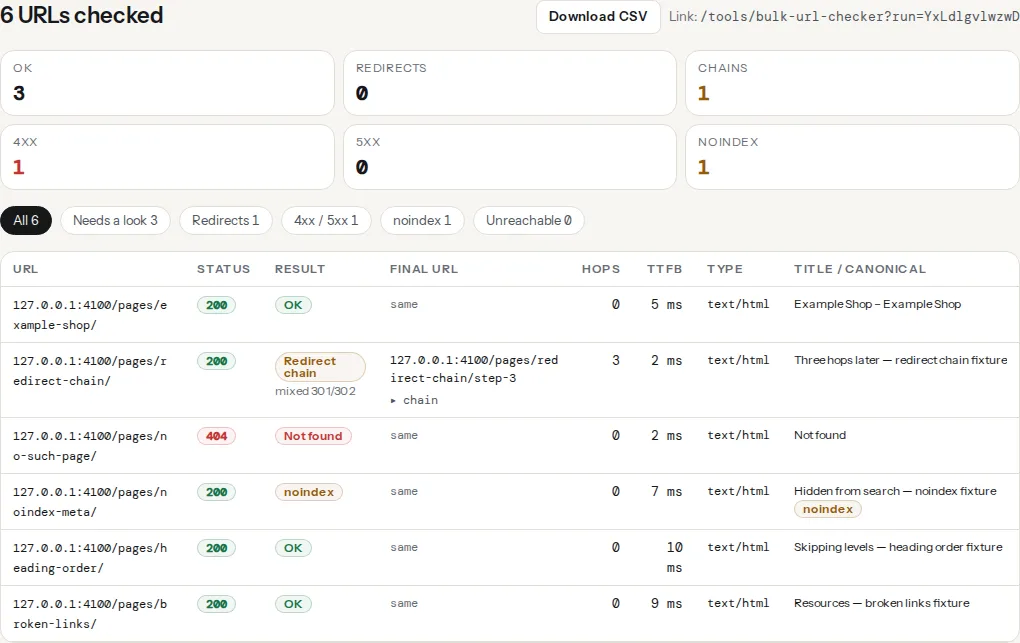
Four report findings are the migration classics; run the SEO audit on the new home page, one product or post, one category and one deep page, on staging and again after launch:
Staging sites are set to noindex on purpose, and the setting rides along with the database or the theme into production. This finding is a fail and costs the most points in the SEO module for that reason. It reads both the meta tag and the X-Robots-Tag header, so a noindex added at the web server level for staging is caught too.
After a domain move, canonicals are the tags most often left pointing at the old host, because the CMS stored absolute URLs. The companion canonical-self-or-valid finding checks where the tag points and what that URL answers; a canonical to the old domain hands the new page's signals to a redirect.
The finding passes at one hop and warns at two or more, listing each hop with its status and target. On a migration that combines https and a domain change, two hops (http → https, then old host → new host) is the default result of two separate rules; the redirect chains guide shows how to make it one.
The new robots.txt must name the new sitemap with a full URL, and the sitemap must list only new URLs. This finding checks the first; the sitemap validator's sampled status check confirms the second.
Step by step
Before the move
1. Inventory every URL. Export the sitemap, the Search Console Pages report (indexed and not indexed), the landing pages of the last 12 months from analytics, and the top pages by links from your backlink tool. Merge and de-duplicate into one sheet; it is both the redirect map's left column and the after-launch test list.
2. Build the redirect map. One row per old URL, with the new URL in the next column. Rules:
- Every old URL has a specific target with the same intent: the same product, the same article, the same category. Pages that no longer have an equivalent get the closest parent, or are marked
410. - The target is the final form of the new URL: right scheme, right host, right trailing slash, no parameters. A target that itself redirects is a chain.
- No catch-all to the home page: Google treats those as soft 404s; a category is always the better fallback.
- Where old and new structures are regular (
/blog/2021/03/slug/→/blog/slug/), one pattern rule replaces hundreds of rows; keep the rows anyway for testing.
3. Benchmark. Record for the top 50 pages: rankings for their main queries, sessions from search, and a getReport link for each (the report URL is permanent for 12 months, so it is the before picture). Save the origin's 40-week field data from the Core Web Vitals history tool as the before picture.
4. Freeze content. From the moment the inventory is exported until launch, no new URLs on the old site. Anything published in that window will not be in the map.
5. Test on staging. With the new site at a staging address and set to noindex, run the report on the four key pages. Expect exactly one failing SEO finding (robots-meta-noindex, the intended one) and fix everything else now: canonicals, titles, headings, structured data, security headers. The report can only reach public addresses; staging on a private network or localhost fails with "That address is not allowed", and staging behind HTTP basic authentication cannot be fetched either. Make staging reachable with an obscure hostname plus noindex for the test, or run the report the first minutes after launch instead.
Watch out
Do not protect staging with a robots.txt that says Disallow: /; that file gets copied to production. Use noindex on staging (the meta tag, or X-Robots-Tag: noindex at the web server) and keep robots.txt identical to production.
6. Test the redirect map on staging. Load the rules on the staging server and run the old URL list against a hosts-file override, or against the staging host with the old paths. Every row should answer 301 with the mapped target. Fix the rules now, not on launch day.
7. Lower the DNS TTL. A week before a domain or host move, set the TTL of the records that will change to 300 seconds, so the switch propagates in minutes instead of a day.
Launch day
8. Switch and redirect at the same moment. The new site goes live and the old addresses start answering 301 in the same deploy. A gap of hours where old URLs answer 404 is a gap Google may crawl.
9. Run the report on the four key pages. The staging noindex is gone; the canonical names the new URL; robots.txt allows crawling and declares the new sitemap; the redirect chain finding passes; https is enforced. Then check the WordPress-specific one: Settings → Reading → "Discourage search engines" is unticked (the WordPress Doctor's wp-discourage-search finding catches it).
10. Point every signal at the new URLs. Canonical tags, hreflang alternates, the XML sitemap, Open Graph og:url, structured data @id and url values, internal links. In WordPress, run a search-and-replace of the old host over the database (Better Search Replace, with a backup) so that content links, menus and widgets stop routing through the redirects.
11. Tell Google. Submit the new sitemap in Search Console for the new property. For a domain move, use Settings → Change of Address on the old property; it applies to domain changes only, not to https or path changes, which Google picks up from the redirects. Keep the old property; its reports show the old URLs draining.
12. Move the measurement. The analytics tag, the consent banner, the tag manager container and any conversion pixels must be on the new site with the new hostname in their configuration.
After the move
13. Bulk-check the old URL list. Paste the inventory into the bulk URL checker the hour after launch. In the CSV, every row should have status 301 (or 308), hops = 1, redirect_type = permanent, and a final_url that answers 200; the row label reads Redirect, not Redirect chain, Not found or noindex. Filter "Needs a look" and work through the exceptions.
14. Crawl the new site. Any crawler: it should find only new URLs, no links to the old host, no 404s, no pages marked noindex that should be indexed.
15. Watch, weekly. Search Console Pages: "Page with redirect" rising on the old property, "Indexed" rising on the new one, "Not found" and "Excluded by noindex" flat. Analytics: search sessions against the benchmark. Core Web Vitals history: the new origin against the old after four to six weeks of field data.
16. Update the links you control. Google Business Profile, social profiles, directories, email signatures, ad campaigns, partner sites that link to you.
17. Keep the redirects. At least a year, and in practice for as long as the domain exists.
The printable version
| When | Item | Done |
|---|---|---|
| Before | URL inventory from sitemap, Search Console, analytics, backlinks | ☐ |
| Before | Redirect map, one hop, no home-page catch-all, 410 rows marked | ☐ |
| Before | Benchmark: rankings, sessions, report links, CWV history | ☐ |
| Before | Content freeze | ☐ |
| Before | Report on 4 staging pages: only noindex fails | ☐ |
| Before | Redirect rules tested on staging with the old URL list | ☐ |
| Before | DNS TTL lowered to 300 s | ☐ |
| Launch | New site and 301s live in the same deploy | ☐ |
| Launch | Report on 4 live pages: noindex gone, canonical, robots.txt, sitemap, one hop | ☐ |
| Launch | Canonicals, hreflang, sitemap, og:url, structured data, internal links on new URLs | ☐ |
| Launch | Sitemap submitted; Change of Address for domain moves | ☐ |
| Launch | Analytics, consent and tags on the new host | ☐ |
| After | Bulk check of the old list: every row 301 → 200, hops = 1 | ☐ |
| After | Crawl of the new site: no old-host links, no 404s, no stray noindex | ☐ |
| After | Weekly Search Console, analytics and CWV review for 8 weeks | ☐ |
| After | External links you control updated | ☐ |
| After | Redirects kept for ≥ 1 year | ☐ |
Platform notes
WordPress
The database stores absolute URLs in content, options and serialised theme settings, so a domain change needs a serialisation-aware search-and-replace (Better Search Replace, or wp search-replace old.example new.example --all-tables with WP-CLI). Set the new address under Settings → General first. Redirects live in the web server config or in the Redirection plugin; on a CMS change from another platform, the plugin's CSV import loads the map in one step. Yoast and Rank Math rebuild the sitemap and canonicals from the new permalinks automatically once the address is right.
Shopify
Shopify handles https and the primary domain itself; your part is the redirect map (Online Store → Navigation → URL Redirects, CSV import) for the old paths, and product and collection handles that match the map. Shopify's URLs follow a fixed pattern (/collections/, /products/), so a move onto Shopify always changes paths.
Verify
- The bulk check of the old list shows every row as a single permanent redirect to a 200, and the "Needs a look" filter is empty except for the rows you marked 410.
- The SEO audit on the four key pages passes
robots-meta-noindex,canonical-present,redirect-chain-lengthandsitemap-declared, andindexable-statusreads "The page can be indexed". - Search sessions return to the benchmark within four to eight weeks, and the CWV history for the new origin is at least as good as the old.
Common mistakes
- Staging
noindexin production. The single most expensive migration mistake, and it is found by one report on the home page. Run it in the first ten minutes after launch. - Redirecting to the home page. Fast to set up, useless to Google, confusing to visitors. Every old URL gets its own target or a 410.
- Two-hop redirects by design. http → https at the CDN, old host → new host at the origin. Combine them; the bulk checker guide for migrations shows how the Hops column exposes it.
- Canonicals on the old host. The new pages tell Google to index the old URLs, which redirect to the new pages. Search-and-replace the database and check one page in the report.
- Removing the old property from Search Console. It is the only place that shows the old URLs draining. Keep it, and keep the redirects. For the checks that apply to any launch, migration or not, see the pre-launch website checklist.