Launches go wrong in predictable ways: the staging noindex comes along to production, old URLs stop working, the contact form sends mail nowhere, the share image is the theme's placeholder. None of these is hard to fix; they are hard to notice in the rush of launch week. This checklist turns them into thirty items you can tick off, each with how to verify it. Most are covered by one getReport run; where getReport does not look (backups, error tracking, DNS), it says so and tells you how to check yourself. Plan an afternoon the week before launch and an hour on the day.
Quick answer
- A week before: run the full report on the new site's home page, one product or article page and one page with a form. Fix everything in Top fixes.
- The night before: back up, freeze content, confirm the redirect map, and lower the DNS TTL if the domain is moving (a day or two earlier if the current TTL is long).
- Launch day: remove every staging protection (noindex, password, "Discourage search engines"), re-run the report, test redirects from the old URLs, submit the sitemap, place a test order or send a test form.
- One week later: re-run the same pages and compare in the history strip; check Search Console for 404s and pages not indexed.
- Copy the Markdown checklist at the end of the step-by-step section into your ticket or project board.
Why a pre-launch checklist matters
A launch changes everything at once: domain, server, theme, URLs, plugins. The things that break are rarely the things anyone was working on. A designer checks the pages look right; nobody checks that the old /shop/socks.html still leads somewhere, or that the robots meta tag changed. Search engines and returning visitors find these problems within days, and some of them (a whole site set to noindex, 500 old URLs returning 404) cost weeks of traffic to recover from.
The fix is boring on purpose: the same list, every launch, in the same order. Items that fail on launch day are much cheaper than items found a month later in a traffic report.
How getReport checks it
The SEO audit covers the indexing and content items. For the rest, run the full report (paste the URL on the getreport.app home page): it runs all seven modules on one page, including Speed, Security, Accessibility, Structured data, Social and Best practices, and ranks what to fix first.
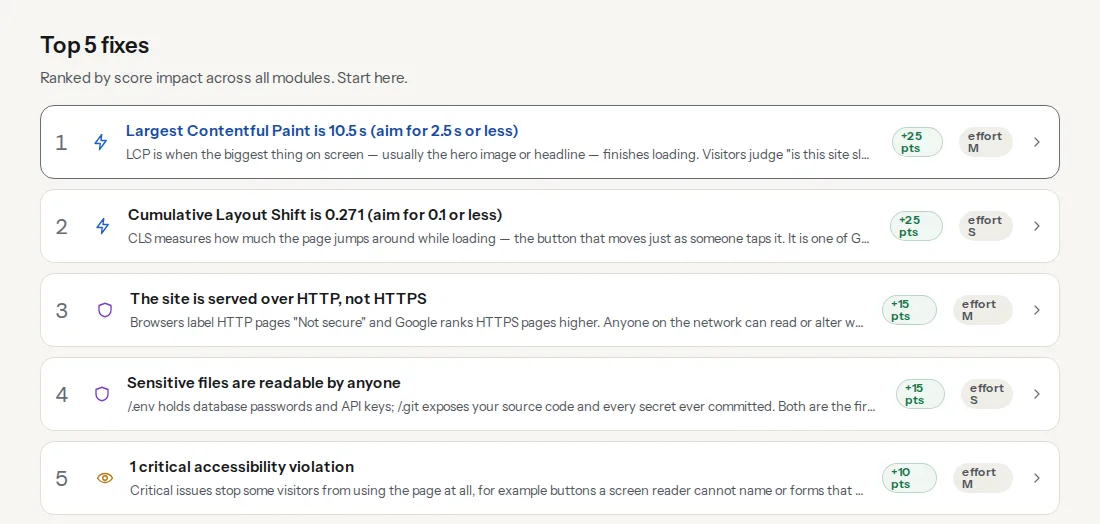
Top fixes is where a pre-launch run starts: the five findings that cost the most points, each with an effort of S, M or L. Reading a getReport report explains the scoring. Four findings on this list are launch blockers that should never go live:
getReport checks one page per run and has no site crawl or monitoring yet, so run it on at least three page types: the home page, a typical content page (a product or article) and a page with a form.
Step by step
Indexing
- No noindex anywhere. Check the robots meta tag and the
X-Robots-Tagheader on every page type. Verify: SEO audit, "The page is not set to noindex". - robots.txt allows the site. No
Disallow: /from staging. Verify: the robots.txt tester on the home page and one deep page. - The sitemap is live, declared and submitted. Verify: "XML sitemap is reachable" and "robots.txt declares a sitemap" in the SEO audit. getReport cannot see whether you submitted it: do that in Search Console → Sitemaps.
- Canonical tags point at the live domain. A canonical to
staging.example.comgives your rankings away. Verify: the canonical finding fails with "points to another host". - Old URLs redirect in one hop, and unknown URLs answer 404. Build a redirect map from the old sitemap and your analytics' top landing pages. Verify: the redirect checker on your 10–20 most important old URLs, one at a time (getReport has no bulk check yet); "Missing pages get a proper 404 page" in Best practices. More in a proper 404 page.
Security
- HTTPS everywhere, with a valid certificate, and
http://redirecting tohttps://with one 301. Verify: the SSL check (HTTPS, redirect, certificate chain, expiry, mixed content). - HSTS is set. Start with
max-age=86400, raise it to a year once every subdomain works over HTTPS. Verify: security headers checker. - Security headers are set.
X-Content-Type-Options, frame protection,Referrer-Policy,Permissions-Policy, a CSP in report-only mode. Verify: security headers checker; the guide to security headers in the reading list has configs for each server. - Cookies carry Secure, HttpOnly and SameSite. Verify: security headers checker; it sees the cookies set on the page you test, so also test the login or cart page.
- No exposed files.
/.envand/.gitmust not be readable, and directories must not list their files. Verify: the Security module of the full report. - CMS, plugins and theme are up to date; staging is locked away. Verify: the Security module flags an outdated CMS version when the page reveals it, and the WordPress checker flags abandoned plugins and public staging copies. getReport only sees versions the page reveals, so also check the admin's update screen.
Speed
- The LCP image is light and loads early. The hero image in WebP or AVIF, sized for the screen, not lazy-loaded. Verify: speed test, the LCP finding names the element.
- Text files are compressed and static files are cached. Brotli or gzip for HTML, CSS and JS; long cache lifetimes for versioned files. Verify: speed test and Best practices ("Text files are compressed", "Static files have a cache lifetime").
- A CDN is in front of the site. Verify: "A CDN is in front of the site" in Best practices.
- Fonts show text while loading.
font-display: swap, self-hosted where you can, one or two preloaded. Verify: speed test, "Web fonts show text while loading".
Content and SEO
- Every page has its own title and description. Verify: SEO audit for length and presence, page by page. getReport does not compare pages with each other yet, so spot-check that product pages do not all share the shop's title.
- One H1 per page, headings in order. Verify: SEO audit, "exactly one H1 heading".
- Images have alt text. Descriptive for content images, empty
alt=""for decoration. Verify: SEO audit and accessibility checker. - Structured data is valid. Organization on the home page, Product or Article on content pages. Verify: schema validator, including rich result eligibility.
- Every page type has a real share image. 1200×630 px, not the theme default. Verify: link preview tool, which renders how the link looks when shared.
- Favicons are in place. A favicon and an apple-touch-icon. Verify: SEO audit.
Accessibility
- Text has enough colour contrast. 4.5:1 for body text, 3:1 for large text. Verify: accessibility checker, contrast finding with each failing element.
- Every form field has a label. Contact, newsletter, search, checkout. Verify: accessibility checker on each page with a form.
- The site works with a keyboard, and landmarks are in place. Verify: the accessibility checker flags missing landmarks, a missing skip link and changed tab order. It cannot use your site the way a person does, so spend five minutes pressing Tab through the menu, a form and the checkout: every control reachable, focus always visible.
Legal and trust
- Privacy policy and contact page are linked from every page. Verify: Best practices, "links to a privacy policy" and "links to a contact page".
- Cookie consent where the law requires it. In the EU, non-essential cookies need consent first. Verify: Best practices names the cookie banner it detects and whether Google Consent Mode runs, but cannot tell whether trackers wait for consent. Check it yourself: open the site in a private window and, before clicking anything, look at DevTools → Application → Cookies. Only essential cookies should be there.
Operations
- Backups run, and a restore works. getReport does not check this. Restore last night's backup to a staging copy once before launch; a backup you have never restored is a guess.
- Someone is told when the site goes down or the certificate is about to expire. getReport does not monitor sites yet. The SSL check shows the days left on the certificate today; use your host's monitoring or an uptime service for alerts.
- Analytics records visits, and error tracking receives errors. Verify: Best practices lists the analytics it detects, and "JavaScript errors while loading the page" catches front-end errors during one load. Server errors and errors after interaction are not visible to getReport: open the analytics real-time view while you browse, and throw a test error to confirm your error tracker receives it.
- Forms and checkout deliver. getReport cannot submit forms. Send every form once and place a real order (then refund it) on the live domain.
The night before
Freeze content changes on the old site; take a full backup of old and new (files and database).
Confirm the redirect map covers every old URL with traffic or backlinks.
If the domain moves to a new server, lower the DNS record's TTL to 300 seconds, at least one old-TTL period before the switch. getReport does not check DNS; see the current TTL in the second column of:
Shell dig +noall +answer example.com AWrite down who does what tomorrow, and how to roll back.
Launch day
- Switch DNS or deploy, then remove every staging protection: password, noindex header, "Discourage search engines".
- Run the full report on the home page, a content page and a form page. Top fixes should hold nothing from the Indexing or Security groups.
- Run the robots.txt tester on the home page and a deep page.
- Run the redirect checker on the top old URLs.
- In Search Console, submit the sitemap and use URL Inspection → Request indexing on the home page. If a page stays out of Google, the indexability checklist finds the cause.
- Send every form, place a test order, and watch analytics' real-time view.
- Send the report link (or its fixes view) to whoever fixes the rest: send fixes to your developer.
One week later
Re-run the same three pages with "Re-run" (reports are cached for 12 hours). A history strip appears under the score row with the change since the previous report for Overall, Speed, SEO and Security; anything that dropped is a regression from launch week. In Search Console, check Pages → "Not found (404)" for old URLs you missed and add redirects. Field Core Web Vitals come from 28 days of real Chrome visits and need enough traffic to appear; until then, the lab numbers are what you have.
The checklist to copy
## Pre-launch checklist

### Indexing
- [ ] 1. No noindex (meta tag or X-Robots-Tag) on any page type
- [ ] 2. robots.txt allows the site (no Disallow: / from staging)
- [ ] 3. Sitemap live, declared in robots.txt, submitted in Search Console
- [ ] 4. Canonicals point at the live domain
- [ ] 5. Old URLs 301 in one hop; unknown URLs return a real 404 page

### Security
- [ ] 6. HTTPS everywhere, valid certificate, http → https in one 301
- [ ] 7. HSTS set (short max-age first, then a year)
- [ ] 8. Security headers set (CSP in report-only to start)
- [ ] 9. Cookies Secure, HttpOnly, SameSite
- [ ] 10. No readable /.env or /.git, no directory listings
- [ ] 11. CMS, plugins, theme updated; staging locked or deleted

### Speed
- [ ] 12. LCP image compressed, sized, not lazy-loaded
- [ ] 13. Brotli/gzip on; long cache lifetimes for static files
- [ ] 14. CDN in front of the site
- [ ] 15. Fonts: font-display swap, self-hosted, preloaded

### Content and SEO
- [ ] 16. Unique title and description per page
- [ ] 17. One H1, headings in order
- [ ] 18. Alt text on content images
- [ ] 19. Structured data valid (Organization, Product/Article)
- [ ] 20. Share image 1200×630 on every page type
- [ ] 21. Favicon and apple-touch-icon

### Accessibility
- [ ] 22. Colour contrast 4.5:1 for body text
- [ ] 23. Every form field labelled
- [ ] 24. Keyboard walk-through done; landmarks and skip link in place

### Legal and trust
- [ ] 25. Privacy policy and contact page linked from every page
- [ ] 26. Cookie consent blocks trackers until the visitor agrees (where required)

### Operations
- [ ] 27. Backups run; one restore tested
- [ ] 28. Uptime and certificate expiry alerts go to a person
- [ ] 29. Analytics records visits; error tracker receives a test error
- [ ] 30. Every form sent and a test order placed on the live domain
Platform notes
WordPress
The classic launch mistakes cluster here: Settings → Reading → "Discourage search engines" still ticked, plain ?p=123 permalinks, the "Hello world!" post and sample page still live, the default tagline, an author called "admin". The WordPress checker flags each of them, and the WordPress Doctor panel in the full report groups them after Top fixes. Also check Settings → General: both "WordPress Address" and "Site Address" should use the live https:// domain.
Shopify
The storefront password (Online Store → Preferences → Password protection) keeps search engines and getReport out; remove it before the final run. Set the primary domain under Settings → Domains so every other domain redirects to it, and replace the theme's default social sharing image in the theme settings.
Static sites and custom builds
Staging protections usually live in the build or host config: an environment variable that adds noindex, a _headers rule, a basic-auth setting. Make sure the production build does not inherit them, and that the production host serves the custom 404 page with status 404.
Verify
- The full report on all three page types shows no failures in the Indexing and Security items, and Top fixes contains only speed or content work you have planned.
- The robots.txt tester reads "The page can be indexed" on the home page and a deep page.
- Search Console shows the sitemap as "Success", and URL Inspection on the home page reads "URL is available to Google".
- The ticked checklist is saved in the launch ticket with the report links, as your before-and-after record.
Common mistakes
- Running the checks on staging only. Staging and production differ in exactly the things that matter (headers, robots, DNS, CDN). Run the report again on the live domain within an hour of launch.
- Launching on a Friday afternoon. Redirect gaps and form failures show up with real traffic. Launch early in the week with the people who can fix things available.
- Redirecting every old URL to the home page. Google treats it as a soft 404 and visitors are lost. Map each old URL to its closest new page.
- Forgetting the old sitemap. Google keeps crawling old URLs for months. Keep the redirects in place for at least a year.
- Testing only the home page. Product pages, forms and the checkout break differently. Three page types is the minimum.