"Make the site faster" is not a ticket. Neither is a screenshot of a score, or a 40-item export pasted in one go. A ticket a developer can act on names one problem, shows where it is, says what done looks like, and fits on one screen. A getReport finding already contains most of those parts; this guide shows how to lift them out, what to add, what to leave out, and how the loop closes when the developer re-runs the report. Ten minutes per ticket the first time, three afterwards.
Quick answer
A good ticket has five parts, and the report supplies four of them:
| Part | Where it comes from |
|---|---|
| Title: the finding's title, with its real value | The finding card ("Render-blocking resources delay the first paint (saves 1.2 s)") |
| Impact: one line, in visitor terms | "Why it matters" on the card, shortened |
| Where: the exact URLs, files or headers | "Show technical detail" on the card |
| What to do: the numbered steps | "How to fix" on the card, plus the learn page link |
| Done when: the acceptance test | Re-run the same report; the finding passes |
Add the page and device tested, the effort label (S, M, L) and the points as the priority hint. Leave out the rest of the report. One finding per ticket, grouped by owner.
Why the shape of a ticket matters
A developer's first hour on a vague ticket is spent turning it into a precise one: opening the site, running a tool, guessing which of the twelve slow things you meant. If the guess is wrong, the work is wasted and the ticket comes back "done" with the problem still there. That hour is the most expensive hour in the whole fix, and it is entirely avoidable, because the report has already done the investigation.
The other cost is a wrong sense of scale. A screenshot of a C grade reads as "the site is broken"; a ticket that says "three scripts block rendering, moving them saves about 1.2 s" reads as an afternoon. Developers plan afternoons well. They do not plan grades.
How getReport checks it
Any report will do; the SEO audit is a common starting point because most tickets come from the SEO and Speed modules. Every finding on the report opens into the five parts you need:
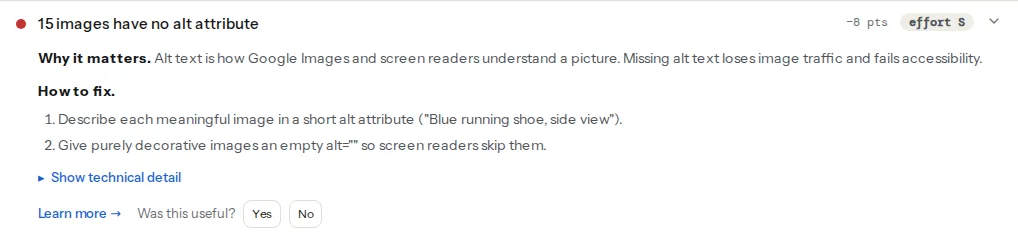
Three findings that turn into three quite different tickets:
The technical detail lists each blocking file with its URL, which is the "where"; the savings in the title are the impact in seconds. Owner: whoever controls the theme or the tag manager.
The technical detail lists the image sources. This is often a content ticket, not a developer one: the alt text is written in the CMS by the person who knows what the picture shows.
One header, one line of server or CDN config. The fix steps include the header value, so the ticket is nearly complete as copied. Owner: whoever has access to the server or Cloudflare.
Step by step
1. Start from one finding, not from the score
Open the report, read Top fixes, pick one finding, open it. Each finding has the same five sections: the title with the real value, "Why it matters", "How to fix", "Show technical detail" and "Learn more". The whole ticket is a rearrangement of those. If you have not read a report before, how to read a getReport report takes ten minutes and makes the rest of this faster.
2. Title: the finding, with its number
The finding's title is already a good ticket title because it contains the measurement: "Largest Contentful Paint is 4.1 s (aim for 2.5 s or less)". Keep the number; it is the difference between a complaint and a task. Add the page in brackets if the developer works across many: "… on /pricing (mobile)".
3. Impact: one line, in visitor terms
Shorten "Why it matters" to a sentence a project manager would accept as a reason: "visitors see a blank page for the first 1.2 s", "screen readers and Google Images cannot tell what 14 product photos show", "the first request to the site can be intercepted on public Wi-Fi". Do not add the score. Points are the priority hint, not the impact.
4. Where: paste the technical detail
Expand "Show technical detail" and paste it. It is the evidence: the header we received, the element Lighthouse picked, the list of files with their sizes. This is the part a developer cannot get from your description and the part that makes the ticket reproducible. For a long list, paste the first five and the count; the report link has the rest.
5. What to do: the steps, plus the learn page
Copy the numbered "How to fix" steps as a starting point, and add the "Learn more" link so the developer can read the background without asking you. Do not turn the steps into instructions about how to do them in their codebase; the steps say what, the developer decides how. If a guide exists for the finding, link it: for the render-blocking example, render-blocking resources.
6. Done when: the acceptance test
Every ticket ends with the same line, which is what makes the loop close:
Done when: a re-run of https://getreport.app/r/AbC123xYz0 (same page, mobile)
shows this finding as passed.
The developer presses Re-run on that report after the deploy, and the finding either passes or it does not. No argument about which tool, which device or which day, because it is the same report.
7. Effort and priority from the report
The finding shows an effort label (S, M or L) and, in Top fixes and the fixes view, the points it would give back to its module. Put both in the ticket's fields: effort as the estimate, points as the priority hint. Severity is the third signal: a failed check outranks a warning at the same points, and info-level items are not tickets at all.
8. Group by owner, then by effort
Before you send anything, sort the findings by who can act on them:
- Server / CDN: headers, redirects, compression, caching, certificates.
- Theme / template: render-blocking files, image markup, fonts, headings, canonical tags.
- Plugins / apps: a heavy widget, a duplicate SEO plugin, a chat script.
- Content: alt text, titles, descriptions, broken links in posts.
Then within each owner, small effort first. One ticket per finding; one batch of up to ten per owner. The batch order and the two sentences of context that go on top of it are in send the fixes to your developer.
9. Let the export do the typing
The fixes view (the report link plus /fixes, or "Fixes for your developer" in the header) lists every open finding grouped by effort with its steps and evidence, and exports it:
- Copy as Markdown for a GitHub or GitLab issue, where each
- [ ]line becomes a checkbox; delete the items that are not this batch. - Trello / Jira CSV for one card per finding, with Title, Description, Priority, Labels, Effort, Points, Module, Check, Guide and Report columns; Jira's importer maps them to fields.
- Open as GitHub issue for a pre-filled issue; long lists are cut to fit a link, so paste the Markdown for those.
The export gives you the raw ticket per finding; steps 3 and 6 (the impact line and the acceptance test) are what you add by hand.
Two tickets, rewritten
Before
Title: Site speed
The site is slow on mobile, PageSpeed says 54. Client is unhappy.
Can you fix this week? Report attached (PDF, 38 pages).
After
Title: Render-blocking resources delay the first paint on /pricing (mobile), saves ~1.2 s

Impact: visitors on phones see a blank page for the first 1.2 s while three
scripts and a stylesheet download before anything renders.

Where (from the report's technical detail):
- https://www.example.com/wp-content/plugins/chat-widget/widget.js (84 KB)
- https://www.example.com/wp-content/themes/shop/js/slider.js (61 KB)
- https://www.googletagmanager.com/gtm.js?id=GTM-XXXX (92 KB)
- https://www.example.com/wp-content/themes/shop/style.css (210 KB)

What to do (from the report; the how is yours):
1. Add defer or async to the scripts not needed before the first paint, or
   move them to the end of <body>.
2. Inline the CSS for the first screen and load the rest asynchronously.
Background: https://getreport.app/learn/render-blocking-resources

Effort: M (report label). Priority: +8 Speed points, warning.
Done when: a re-run of https://getreport.app/r/AbC123xYz0 shows
"No render-blocking resources delay the first paint".
Before
Title: Security
Our security score is a B. Please make it an A.
After
Title: Add the Strict-Transport-Security header (www.example.com)

Impact: without HSTS, the first http:// request from a visitor can be
intercepted before the redirect to https:// happens.

Where: the response headers of https://www.example.com/ contain no
strict-transport-security (report technical detail). Site is behind Cloudflare.

What to do:
1. Send Strict-Transport-Security: max-age=86400 first; after a day with
   every subdomain confirmed on HTTPS, raise to max-age=31536000; includeSubDomains.
   (Cloudflare: SSL/TLS → Edge Certificates → HSTS.)
Background: https://getreport.app/learn/hsts

Effort: S. Priority: +5 Security points, warning.
Done when: a re-run of https://getreport.app/r/AbC123xYz0 shows
"Strict-Transport-Security header is set".
Same information as the report, in the order a developer reads it.
When the answer is "that is not a bug"
Sometimes it is not. The report has three levels, and they deserve three responses:
- Failed: something is wrong for visitors or search engines now. This is a bug in the normal sense; if the developer disagrees, ask them to write why in the ticket, and keep it open.
- Warning: a real cost, not an outage. "We chose to keep
'unsafe-inline'because the tag manager needs it" is a valid answer; record it and close the ticket as "won't fix, reason noted". It stays in the report as a known item. - Info: a measurement or an observation (real-user numbers, a detected CDN, a plugin's weight). Not a ticket. If you sent one, withdraw it.
Platform limits get the same treatment as warnings: a header that a hosted platform cannot set is not a bug; it is a note in the sheet so nobody files it again next month.
Verify
- The ticket fits on one screen and has all five parts; the technical detail is pasted, not described.
- The developer did not have to ask which page or which device.
- After the deploy, the re-run of the same report shows the finding as passed, and the ticket closes with the new report link in it.
- Tickets closed as "won't fix" carry a one-line reason.
Common mistakes
- One ticket for the whole report. Nobody can estimate it and nothing gets done first. One finding per ticket, batched by owner.
- Describing the evidence instead of pasting it. "Some scripts block rendering" costs the developer the hour the technical detail would have saved.
- Acceptance by score. "Get Speed to 90" depends on Lighthouse variance and on items outside the ticket. Accept by the finding passing on the same report.
- Instructions on how, in a codebase you do not know. Say what to achieve; the steps from the report are the starting point, not the specification.
- Tickets for info items. Real-user metrics and detections are context, not work.