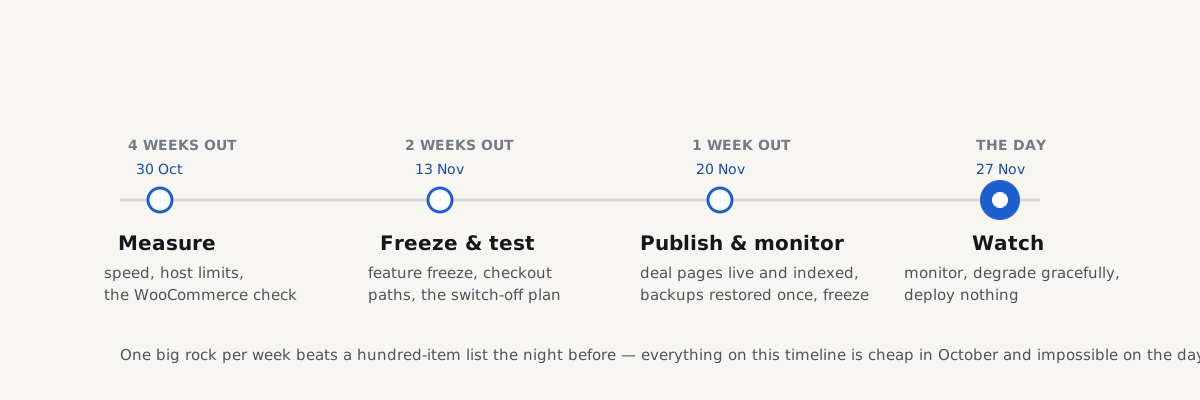
A Black Friday website checklist is a countdown, not a shopping list: the useful work happens in a fixed order, and most of it cannot be done in the last week. Black Friday 2026 is Friday 27 November, which makes today (four weeks out) the right day to start. Each week gets one big job: measure and fix, freeze and test, publish and confirm, then watch and degrade gracefully. It works for any shop; WooCommerce stores get their own checks along the way and the full WooCommerce store checklist as the year-round companion. Plan half a day per week, and the day itself gets boring; which is the goal.
Quick answer
- Four weeks out (30 October): find your normal peak hour in your analytics, measure the speed of your money pages, and learn what your hosting plan does when it runs out.
- Two weeks out (13 November): freeze new features, test the checkout end to end including a failed payment, and write down what gets switched off first if the site struggles.
- One week out (20 November): publish the deal pages at their final URLs so they are indexed before the day, and confirm a backup actually restores.
- The day before and the day: deploy freeze, watch the numbers, turn things off in the agreed order, and if you must answer 503, send an honest
Retry-After. - After: keep the deal URLs alive for next year, and write down what broke.
- Estimate the spike from your own history, not from a multiplier in a blog post.
Four weeks out: measure, and learn your limits
Know your normal, estimate the spike honestly
Open your analytics and find two numbers: your busiest hour of a normal week, and your busiest hour of the last year; usually last year's Black Friday weekend or your biggest campaign day. The ratio between them is your own, measured spike, and the only estimate worth planning around.
The common advice to "expect 5× or 10× normal traffic" is folklore: nobody who writes it knows your shop, your email list or your ads budget. For a first Black Friday, start from your biggest campaign day so far and add the reach of the promotion you have planned (emails going out, ads spend). An honest rough number beats a confident invented one, because it decides everything below.
Measure the money pages now
Run the speed test on the pages that earn the money: the home page, your busiest category, a typical product page, and the cart.
Fix the worst findings now, while there are four weeks to do it calmly. Two findings matter most for a traffic spike:
Time to First Byte is your server's headroom made visible: a server that needs 1.5 s to answer one quiet-day request has nothing in reserve for a hundred at once (what a slow server looks like). Caching is the biggest capacity lever you have: every product and category page served from a cache is a request your PHP workers never see. To make the fixes stick past the season, a speed budget held in CI catches the December weight gain in January.
Watch out
A CDN added the week before Black Friday is not a capacity plan. It multiplies what is already cacheable; the cart, the checkout and everything personalised still hit your server, one request each.
Ask your host the overload question
Find out, from the plan page or a support ticket: your plan's concurrency limit (PHP workers, connections, or a resource allowance), what the server answers when the limit is hit, and what an upgrade costs and how fast it takes effect. Most shared and managed hosts answer the cap with a 503; deliberately, instead of queueing forever; the overload section of the 503 service unavailable guide shows how to recognise it: fine at quiet hours, errors at peaks, and no restart fixes it.
If the answers worry you, four weeks is enough to upgrade or move. One week is not.
WooCommerce: run the store check
The check fetches /cart/ and /checkout/ as an anonymous visitor and reads the cache headers, catching the two configurations that ruin a Black Friday: product pages not cached (every visitor costs a PHP worker) and a cart or checkout that is cached (shoppers see each other's baskets, orders fail with "session expired").
The exclusion rules for every layer (plugin, host, Varnish, CDN) are in keeping cart, checkout and account pages out of the cache. Get this right now, because a "cache everything" rule added in a panic on the day is exactly how checkouts break.
Hosted platforms, one line each. Shopify, BigCommerce, Squarespace, Wix: capacity is the platform's job, not yours. Your checklist shrinks to the content, the apps and scripts you added, and the tests below; start at two weeks out.
Two weeks out: freeze and test
Freeze features, not fixes
From 13 November, nothing new ships: no theme swap, no new plugin, no checkout redesign. Bug fixes and content still flow. Freezing two weeks out rather than the day before means whatever the last change broke has two weeks of normal traffic to show itself.
Test the checkout like it matters
Place a test order, logged out, in a private window, with your payment provider's test mode. Then test the paths that embarrass you under load:
- A declined payment, with the test card your gateway documents for declines. The shopper should land back on the checkout with the basket intact and a plain error, not a blank page.
- The back button after paying. Confirm the order is not placed twice.
- An expired discount code and a wrong one. Both should say so clearly, next to the field.
- The confirmation email, to an address you can check, with the right totals in it.
Be a first-time visitor
Open the site in a private window, on your phone, and buy something the way a stranger would: search, pick, pay. You will find things no checklist lists; a cookie banner covering Add to cart, a newsletter popup on the checkout. On Black Friday most visitors are first-time visitors with no cache, no account and no patience.
Write the overload plan
Decide now, in writing, what gets switched off if the site struggles: the person watching the dashboards at 09:00 on the day should execute a list, not invent one. The order that works for most shops:
- Non-critical third-party scripts first: chat, heatmaps, A/B tests, social pixels. They cost weight and blocking time on every page and sell nothing.
- Product recommendations and "recently viewed": uncached, per-visitor database work.
- Site search, if yours queries the database per keystroke; leave a plain search that submits on Enter.
- Never the checkout, never the cart. Everything else is switched off so these two can breathe.
The third-party finding names each vendor with its weight: your switch-off list pre-written. For each item, note who can turn it off and where (a tag manager, a plugin toggle, a theme setting); a plan that needs the one developer who is skiing is not a plan.
Monitoring: someone must be woken
Confirm that something checks the site from outside every minute and tells a human when it fails: your host's monitoring or an uptime service. Daily monitoring with alerts is a getReport funded unlock, so set this up elsewhere for now. Then write down who is on watch in which hours and who gets called: one name per time slot beats a group chat where everyone assumes someone else saw it.
One week out: publish and confirm
Deal pages go live now, not the night before
A page created the night before Black Friday will not rank on Black Friday. Google has to discover, crawl and index a new URL first, and that takes days to weeks, with no guaranteed schedule: the website launch checklist covers the same truth for whole sites. So publish the deal page a week early at its final URL, with its real title and description, indexable, in a "deals go live on 27 November" state with a signup or reminder instead of the prices, and link it from the home page and the main menu. On the morning itself you change the content of an already-indexed page; the only part that can safely happen at the last minute.
Use an evergreen URL (/black-friday/, not /black-friday-2026/) so the links and history it earns this year work for you next year.
Backups: tested means restored
Confirm backups run daily, and restore one (files and database) to a staging copy. A backup that has never been restored is a hope, not a backup; backups that actually restore is the longer version. Note how long the restore takes: that number is your worst-case downtime.
Agree the deploy freeze
From 26 November until the end of Cyber Monday (30 November), nothing deploys except a fix for an active outage, and that only with a second person watching. Put it in writing where the whole team sees it. Most self-inflicted Black Friday outages are deploys that could have waited until Tuesday.
The day before, and the day
26 November: the freeze starts. Re-run the speed test on the money pages and the WooCommerce check; both should look like last week. Purge caches once, in the right order (plugin, then host, then CDN), then leave them alone. Confirm the on-watch names and that the overload plan is where they can find it.
27 November: watch, don't tinker. Keep three things open: the uptime monitor, the host's resource graphs, and live orders. If pages slow down, execute the overload plan in its written order and note the time. If the server starts answering 503, a short 503 is the correct, Google-documented answer for overload (Googlebot slows down and comes back) but keep the Retry-After header honest and the window short, as the 503 guide shows. What costs you is not a 20-minute wobble; it is a checkout that silently fails all day because nobody was watching orders.
After: keep what you built
- Keep the deal URLs alive. Swap the content to a "sale ended" state with paths into the shop: don't delete the page, don't let it 404. If you used a dated URL anyway, redirect it permanently to the evergreen one, in one hop, as the redirects guide explains. Next year starts with a page that already ranks.
- Measure what broke. Within a week: the peak hour against the estimate, what was switched off and when, every error that reached a customer, what the host's graphs peaked at. That page of notes is next year's four-weeks-out starting point.
- Unfreeze deliberately. Queued changes go out one at a time after Cyber Monday, not in one festive batch.
The checklist to copy
## Black Friday countdown: 27 Nov 2026

### Four weeks out (30 Oct)
- [ ] Normal peak hour vs last year's peak, from analytics
- [ ] Speed test: home, category, product, cart; worst findings fixed
- [ ] Host: concurrency limit, behaviour at the limit, upgrade path
- [ ] Product/category pages cached; cart/checkout excluded

### Two weeks out (13 Nov)
- [ ] Feature freeze
- [ ] Checkout tested: order, declined card, back button, bad code, email
- [ ] First-time-visitor walk-through, private window, phone
- [ ] Overload plan written: switch-off order, who, where
- [ ] Uptime alerts reach a named person; watch rota agreed

### One week out (20 Nov)
- [ ] Deal pages live at evergreen URLs, indexable, linked
- [ ] Backup restored to staging; restore time known
- [ ] Deploy freeze agreed in writing (26-30 Nov)

### The day before / the day
- [ ] Re-run checks; purge caches once (plugin → host → CDN)
- [ ] Watch uptime, server graphs, live orders
- [ ] Degrade in the written order; honest Retry-After if 503

### After
- [ ] Deal URLs kept alive; notes written; slow unfreeze
Questions people ask
When should I start preparing my website for Black Friday?
Four weeks before: for 2026 that means starting by 30 October. Measuring your real capacity, fixing slow pages and changing hosting if the limits are wrong cannot be compressed into the last days, and new deal pages need a week or more to be indexed before the sale. Started four weeks out, each week has one manageable job; started the week before, you can only test and hope.
Should I freeze deployments before Black Friday?
Yes. Freeze new features two weeks out so the last change has real traffic time to show its bugs, and freeze all deploys from the day before until the end of Cyber Monday, excepting only fixes for an active outage. A deploy is the one risk entirely under your control, and most self-inflicted Black Friday outages are changes that could have waited until Tuesday.
How do I know if my hosting can handle Black Friday traffic?
You can't know from the plan's name, so measure and ask. Compare last year's busiest hour with a normal hour to get your real spike, check the Time to First Byte of uncached pages like the cart for headroom, and ask the host what the plan's concurrency limit is and what it answers at the limit: usually a 503. If the numbers are tight, upgrade four weeks out, not during the sale.
Should Black Friday deal pages be published early?
Yes, at least a week early, at their final URLs. Google has to discover, crawl and index a new page before it can rank it, and that takes days to weeks with no guaranteed schedule. Publish the page indexable with a "deals go live on 27 November" state, link it from the home page, and swap in the prices on the morning itself.
What should I turn off if my site struggles on Black Friday?
In this order: non-critical third-party scripts (chat, heatmaps, A/B tests, pixels), then per-visitor features like product recommendations, then database-heavy live search. Never the cart or the checkout; everything else is switched off so those two keep working. Write the order down two weeks early, with who can switch each item off and where, so the person on watch executes a list instead of improvising under load.
Should I keep my Black Friday page up after the sale?
Yes, permanently. Swap the content to a "sale ended" state with links into the shop, and keep the same evergreen URL (such as /black-friday/) year after year, so the links and ranking history it earns compound instead of resetting. A dated URL gets one permanent redirect to the evergreen one. Deleting and recreating the page each November restarts the indexing clock every year.