A 503 service unavailable error means the server is running and answering, and deliberately refusing to serve the page right now. The HTTP standard (RFC 9110) reserves 503 for a server temporarily unable to handle requests because of overload or scheduled maintenance, so unlike most errors it is often sent on purpose. Nothing on the visitor's device is broken; on the owner's side the question is not "what crashed?" but "what is refusing, and when will it stop?". This guide gives visitors the one-minute version, then shows site owners the three causes (maintenance mode, overload and rate limiting) and how to run each so it costs nothing in Google. For where 503 sits among all the others, see the guide to HTTP status codes.
Quick answer
- Visitor: wait a minute and reload once; nothing on your side is broken. Don't hammer refresh; if it's a rate limit, that extends it.
- Site owner: a 503 is deliberate. Find which mechanism sent it: a maintenance switch, an overloaded worker pool, the host's throttling, or a rate limiter.
- Maintenance done right is a 503 with a
Retry-Afterheader on every page: never a 200 "back soon" page and never a redirect. - WordPress stuck in maintenance: delete the hidden
.maintenancefile in the site root, then re-run the interrupted update. - Google treats 503 as "come back later": the right code for short downtime. Kept up beyond a day or two, crawling drops and URLs can fall out of the index.
- 503 is not a 502: a 502 means a proxy got a broken answer from the server behind it; a 503 means the server itself says "not now".
What does a 503 error mean?
RFC 9110, the current HTTP standard, defines 503 Service Unavailable as a server "currently unable to handle the request due to a temporary overload or scheduled maintenance": temporary being the operative word. The server process is up, reachable and healthy enough to answer; it has chosen, or been configured, to refuse.
That choice has three common faces:
- Maintenance. Someone flipped a switch (a deploy script, a hosting panel's toggle, or WordPress installing an update) and every request gets the maintenance page with status 503.
- Overload protection. The server or host caps concurrent work (PHP workers, connections, a shared plan's resource limits) and answers 503 at the cap instead of queueing forever.
- Rate limiting. You, your office's shared IP, or a bot sent requests faster than the limit allows, and the limiter answers 503 (or 429) until the rate drops.
The standard also gives 503 an honest companion: the Retry-After header, which says when to try again, either as seconds (Retry-After: 3600) or as an exact date. A 503 with Retry-After is a server keeping its word; unavailable, and telling you for how long.
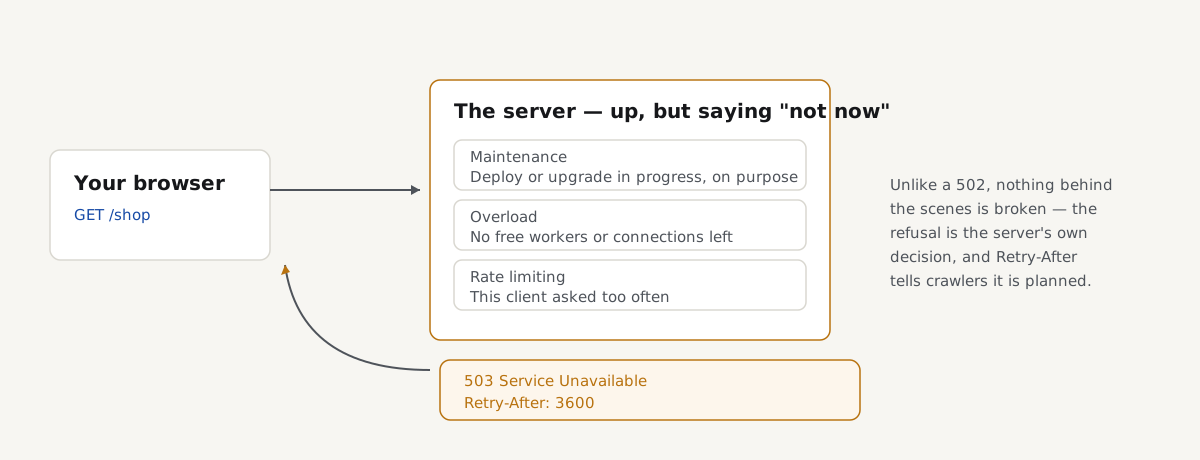
503 or 502: who is saying no
The two codes look alike on screen and mean opposite things. A 502 bad gateway comes from a middleman (a reverse proxy, CDN or load balancer) that asked the real server for the page and got no valid answer back: something behind the proxy is broken. A 503 comes from a server that is working and refusing on purpose: nothing gave an invalid answer, the answer is "not now".
That difference decides where you look: a 502 sends you hunting for a crashed process behind the proxy; a 503 sends you looking for the mechanism that refuses (a maintenance flag, a limit, a throttle. (One wrinkle: proxies also emit 503 when every backend is taken out of rotation) still a deliberate answer, just one level up.)
If you're a visitor: the quick fix
A 503 is the most self-fixing error on the web, because the server itself expects to be back:
- Wait a minute, then reload once. Most 503s are maintenance windows or load spikes measured in seconds or minutes.
- Don't hold down refresh. If the 503 comes from a rate limit, rapid retries keep you locked out longer.
- Check the site's status page or social accounts. Planned maintenance is usually announced, with an end time.
- Don't clear or reset anything. The server received your request fine and declined it; your device and connection are not involved.
- Tell the site owner if it lasts hours, with the time and the page. A 503 that persists has stopped being temporary, and only they can end it.
If you own the site: find which 503 it is
The page itself usually names the mechanism. WordPress's maintenance page says "Briefly unavailable for scheduled maintenance. Check back in a minute." A hosting panel's throttle page names the host. Your own maintenance page is one you made. A bare "503 Service Unavailable" from nginx often means a rate or connection limit fired, and the error log confirms it: nginx writes limiting requests, excess … by zone when limit_req refuses a request, and limiting connections by zone for limit_conn. Then fix the cause, not the symptom, section by section below.
Maintenance mode done right
For planned work, a 503 on every content page is exactly right: it tells browsers and crawlers the outage is temporary. Two rules make it clean: send a Retry-After header with your best estimate, and never serve the maintenance page with status 200 or via a redirect; a 200 "back soon" page gets indexed as your content, and a redirect looks like the whole site moved to one URL.
On nginx, a flag file makes a reversible switch. In the server block of your site's config (for example /etc/nginx/sites-available/example.com):
# Serve maintenance.html with 503 while the flag file exists.
# Enter maintenance: touch /var/www/example.com/maintenance.on
# Leave it:          rm /var/www/example.com/maintenance.on
location / {
    if (-f $document_root/maintenance.on) {
        return 503;
    }
    # ... your normal location config ...
}
error_page 503 @maintenance;
location @maintenance {
    add_header Retry-After 3600 always;
    rewrite ^ /maintenance.html break;
}
Test and reload with sudo nginx -t && sudo systemctl reload nginx.
On Apache, the same switch goes in the .htaccess file in the site root (requires mod_rewrite and mod_headers, enabled on almost every host). Remove the block to end maintenance:
# .htaccess in the site root: serve maintenance.html with 503
ErrorDocument 503 /maintenance.html
RewriteEngine On
RewriteCond %{REMOTE_ADDR} !^203\.0\.113\.7$
RewriteCond %{REQUEST_URI} !^/maintenance\.html$
RewriteRule ^ - [R=503,L]
Header always set Retry-After "3600"
The REMOTE_ADDR line lets your own IP through so you can test the site while it is closed: replace 203.0.113.7 with yours, or delete the line to close it to everyone. During maintenance every answer is a 503, so setting Retry-After unconditionally is fine; remove the Header line together with the rest.
WordPress: "Briefly unavailable for scheduled maintenance"
While WordPress installs a core, plugin or theme update, it creates a hidden file named .maintenance in the site root (the folder with wp-config.php) and answers every request with its maintenance page and status 503. Normally the file is deleted seconds later. If the update is interrupted (a PHP timeout, a dropped connection, a closed tab) the file stays, and the site stays locked.
Two exits:
- Wait up to 10 minutes. WordPress ignores a
.maintenancefile older than 10 minutes, so most "stuck" sites unstick themselves. - Delete the file. Over SFTP or your host's file manager, show hidden files, find
.maintenancein the site root and delete it. With WP-CLI:wp maintenance-mode deactivate(andwp maintenance-mode statusto confirm).
Then finish the job: the update that was interrupted did not complete. Go to Dashboard → Updates and run it again, or you may be left with a half-copied plugin that turns the 503 into a 500 error.
Overload: the server protecting itself
Under too much load, answering 503 quickly is healthier than queueing until everything times out, and several layers do it deliberately. Reverse proxies and load balancers answer 503 when all backends are marked down or the queue is full. Shared and managed hosts cap concurrent PHP processes per account and answer 503 at the cap: on CloudLinux servers the same throttle often shows as "508 Resource Limit Is Reached". The pattern to recognise: fine at quiet hours, 503s at peaks.
No restart fixes this, because nothing is broken. The levers are capacity and work per request: page caching so most requests never reach PHP, fewer or lighter plugins, more workers or a bigger plan. The TTFB guide covers reading the signs of a server running near its edge.
Rate limiting: 503 or 429?
The precise code for "you are asking too fast" is 429 Too Many Requests (RFC 6585). But nginx's limit_req and limit_conn modules answer 503 by default, so a great many sites rate-limit with 503 without ever choosing to. One line changes it:
# In the http or server block, next to your limit_req settings
limit_req_status 429;
limit_conn_status 429;
429 is the better answer: it tells the client, and your own monitoring, that this is a limit, not an outage; Retry-After is valid on both. For search engines the distinction barely matters (Google treats 429 like a server error and slows down, same as 503) but set your limits so normal crawling never trips them on ordinary pages. The rate limiting guide covers sizing them.
Google, SEO and the 503 error
For short downtime, 503 is not just acceptable to Google: it is the documented right answer. Three pages of Google Search Central's documentation set the rules:
- "How HTTP status codes and network errors affect Google Search": 5xx and 429 answers make Googlebot slow its crawling, in proportion to how many URLs fail. Indexed pages are kept at first, but URLs that persistently return a server error are removed from the index. Once the site answers 2xx again, crawling gradually ramps back up.
- "Temporarily pause or disable a website": to urgently disable a site, return an error page with status 503 and use the
Retry-Afterheader with a best-effort date or duration; for 1 to 2 days. It also warns never to answer 503 forrobots.txtitself, because that blocks crawling of the whole site. - "Reduce the Google crawl rate": in an emergency, answering 500, 503 or 429 is Google's own lever for slowing Googlebot; again for no more than a day or two, because a URL showing these codes for multiple days may be dropped from the index.
So the timeline is forgiving and firm: a maintenance window of minutes or hours costs nothing; a 503 that stands for days starts costing crawl rate, then indexed URLs. Search Console shows the damage under Indexing → Pages as "Server error (5xx)". For long downtime (a rebuild, a migration) keep the site up in reduced form instead; Google's pause documentation is blunt that a fully dropped site takes far longer to recover than the outage lasted.
How to check your site for 503 errors
A 503 from overload or a rate limit rarely shows while you watch one page at a quiet moment. Check in bulk, at your busiest hour.
Paste your sitemap URLs or top pages into the bulk URL checker: it requests up to 1,000 addresses, labels each row (OK, redirect, not found, server error, noindex or unreachable) with each answer's response time, so you can filter straight to the server errors. Rows that fail only at peak time point to capacity, not configuration.
For a single page, a getReport report answers it too: the indexability finding reports the HTTP status the page returned, and the server response time finding shows how close the server runs to its limits.
After maintenance ends, run the same list again and confirm every row is back to 200: a forgotten flag file or .maintenance is the classic way a window becomes a weekend.
Common mistakes
- A maintenance page with status 200. Google indexes "we'll be back soon" as your content. Serve it with 503.
- Redirecting every page to the maintenance URL. That looks like a site-wide move; the redirects guide explains why. Answer 503 in place.
- No
Retry-Afterheader. It costs one line and tells crawlers and clients when to come back. - Leaving the 503 up for days. Beyond a day or two, Google's documentation says URLs can drop from the index.
- Answering 503 for robots.txt. Google treats that as "do not crawl anything": keep robots.txt on 200 even during maintenance.
- Treating overload 503s as an outage to restart away. Nothing crashed. Cache more, trim work per request, or buy capacity.
Questions people ask
What does a 503 error mean?
It means the server is up and deliberately refusing to handle the request right now: the HTTP standard defines 503 Service Unavailable as temporary overload or scheduled maintenance. The three usual causes are a maintenance mode switch, a server or hosting plan at its concurrency limit, and a rate limiter. Well-behaved 503s carry a Retry-After header saying when to come back.
How do I fix a 503 service unavailable error?
As a visitor, wait a minute and reload once: the server expects to be back, and rapid retries can extend a rate limit. As the site owner, find the mechanism that refused: a maintenance flag someone forgot, WordPress's leftover .maintenance file, a worker or connection limit hit at peak traffic, or your host's throttling. Each has its own fix; restarting services helps none of them, because nothing crashed.
Is a 503 error temporary?
By definition, yes: the standard reserves 503 for temporary conditions, and most clear within minutes. In practice it is only as temporary as its cause: a forgotten maintenance flag lasts until someone removes it, and an undersized server throws 503s at every traffic peak until it gets caching or capacity. Treat any 503 lasting more than an hour as a problem to fix, not weather to wait out.
Why does my WordPress site say briefly unavailable for scheduled maintenance?
Because WordPress is installing an update, or an update was interrupted. During core, plugin and theme updates WordPress creates a hidden .maintenance file in the site root and answers 503 until it finishes. If PHP timed out mid-update, the file lingers; WordPress ignores it after 10 minutes, or you can delete it over SFTP (or run wp maintenance-mode deactivate). Then re-run the interrupted update from Dashboard → Updates.
Does a 503 hurt SEO?
Not when it is short: it is Google's own recommended code for brief downtime, ideally with a Retry-After header. Google Search Central's documentation says 5xx answers make Googlebot slow its crawling, keep indexed pages at first, and drop URLs that persistently fail; its pause-a-website page puts the safe window at 1 to 2 days. Never serve 503 for robots.txt, which halts crawling of the whole site.
What is the difference between a 503 and a 429 error?
Both say "come back later", and Google slows its crawling for either. A 429 Too Many Requests specifically means this client exceeded a rate limit; a 503 means the server as a whole is unavailable: maintenance or overload. Many sites send 503 for rate limits anyway because nginx's limit_req answers 503 by default; set limit_req_status 429 to use the precise code, and send Retry-After with either.