A 502 bad gateway error means a server in the middle (a reverse proxy, a CDN or a load balancer) asked the real web server for the page and got no valid answer back, so it reported the failure. The address is right and nothing on the visitor's device is broken; the chain of servers behind the site is. This guide gives visitors the one-minute version, then shows site owners where the 502 is born, the log lines that name the cause, and the commands that fix the common ones. For where 502 sits among all the others, see the guide to HTTP status codes.
Quick answer
- Visitor: reload once, try again in a few minutes, and try another device or network. You cannot cause or fix a 502.
- Site owner: the proxy is answering, the application behind it is not. Check the app first:
systemctl status php8.3-fpm(or your app's service), then restart it. - The log names the cause. In
/var/log/nginx/error.log,connect() failedmeans the app is down or the socket path is wrong;upstream prematurely closed connectionmeans it crashed mid-request. - 502 vs 504: a 502 means the answer was broken or refused; a 504 means the proxy gave up waiting. Raising timeouts fixes 504s, never 502s.
- Behind Cloudflare, a branded 502 page points at your origin; a bare unbranded one points at Cloudflare itself: check status.cloudflare.com.
- Brief 502s cost nothing in Google; URLs that keep answering 5xx are eventually dropped from the index.
What does 502 bad gateway mean?
Most websites are not one server. A reverse proxy such as nginx sits in front and passes requests to the application behind it: PHP-FPM on a WordPress server, a Node.js or Python process, or another machine entirely. A "gateway" is exactly that middleman, and the HTTP standard (RFC 9110) defines 502 as a gateway or proxy that received an invalid response from the server it contacted on your behalf.
So a 502 always involves at least two servers, and it tells you which one failed: the one in front answered (that is where the error page comes from) and the one behind it crashed, refused the connection, closed it halfway through, or answered with something that is not valid HTTP.
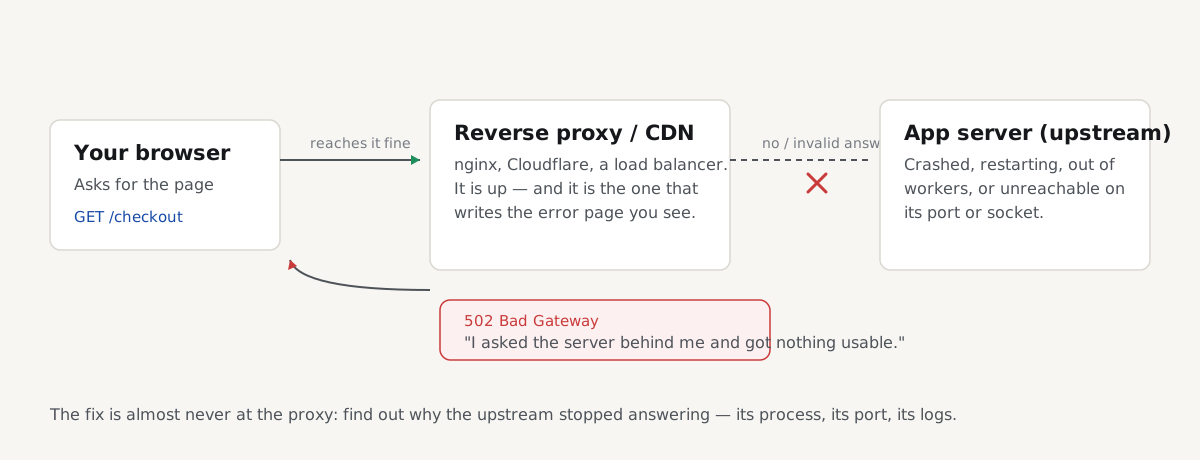
Who hands you the page tells you where to look:
- "502 Bad Gateway" with "nginx" under it: nginx is the proxy, and its upstream (usually PHP-FPM or an app process on the same machine) failed.
- A Cloudflare-branded 502: the request got through Cloudflare, and your origin returned the error or an invalid answer.
- A cloud load balancer (AWS, Google Cloud, Azure): one of its targets answered with a malformed response or reset the connection.
- A hosting panel's generic 502: the host's front proxy could not reach your site's PHP processes.
A 502 is not a 500 Internal Server Error, even though visitors lump them together. A 500 means the application ran and failed while building the page; a 502 means the proxy never got a usable answer from the application at all. If your error page says 500, start with that guide instead.
If you're a visitor: the quick fix
A 502 is a problem between the website's own servers. Your browser, device and connection are fine, so the honest list is short:
- Reload once after a few seconds. Many 502s last moments: an app restarting after a deploy, or one overloaded backend out of several.
- Wait a few minutes and try again. If a process crashed, monitoring usually restarts it or wakes someone who will.
- Try another device or network, or a site-status checker that tests from outside. That tells you whether the site is down for everyone; if it loads elsewhere, clear the browser's cached files for the site.
- Don't resubmit a payment or form. Check your email or account for a confirmation first; the request may have gone through before the answer broke.
- Tell the site owner if it lasts, with the time and the exact page. A 502 always needs a fix on their side.
If you own the site: check the upstream first
Before touching any configuration, find out whether the application behind the proxy is alive. On a typical Linux server:
# Run on the server, over SSH. Pick the service that applies.
systemctl status php8.3-fpm     # WordPress / PHP (name matches your PHP version)
systemctl status myapp          # a Node.js, Python or other app service
journalctl -u php8.3-fpm -n 50  # why it stopped, if it did
sudo tail -n 50 /var/log/nginx/error.log
If systemctl status shows "inactive (dead)" or "failed", you have found the cause: the proxy forwards requests to a process that is not there. journalctl shows why it stopped; commonly an out-of-memory kill, a broken configuration edit, or a PHP update that renamed the service, so the old name no longer exists.
Read the nginx error log
Every 502 that nginx serves writes a line to /var/log/nginx/error.log naming what went wrong with the upstream. Reload the failing page, then read the newest lines:
| What the log says | What it means | The fix |
|---|---|---|
connect() failed (111: Connection refused) while connecting to upstream | Nothing is listening at the upstream address or port | Start the app service, or correct the address in the nginx config |
connect() to unix:/run/php/php8.3-fpm.sock failed (2: No such file or directory) | The socket file does not exist: PHP-FPM is down, or nginx points at the wrong path | Start PHP-FPM, or make the paths match (below) |
upstream prematurely closed connection while reading response header from upstream | The app accepted the request, then crashed mid-answer | Find the crash in the app's own log; often memory |
recv() failed (104: Connection reset by peer) while reading response header from upstream | The app process died abruptly, often a segfault or OOM kill | Check journalctl and dmesg, then fix memory |
no live upstreams while connecting to upstream | Every server in the upstream group failed recently, so nginx stopped trying | Fix the backends; nginx retries after fail_timeout |
upstream sent too big header while reading response header from upstream | The answer's headers overflow nginx's buffer, often huge cookies | Raise the buffers (below): the only 502 that buffers fix |
The fixes
Restart the crashed application
The single most common 502 fix is bringing the upstream back:
# Run on the server. Use the service name systemctl status showed you.
sudo systemctl restart php8.3-fpm && sudo systemctl status php8.3-fpm
If the site comes back, you are not done: find out why it died, or it will die again. journalctl -u php8.3-fpm -n 100 and dmesg | grep -i "out of memory" show whether the kernel killed it for memory. A PHP-FPM pool that repeatedly dies under load needs fewer pm.max_children or more RAM, not more restarts; the same capacity story as a slow time to first byte.
Fix a wrong socket path
After a PHP upgrade, nginx often still points at the old version's socket. The fastcgi_pass line must match what PHP-FPM actually listens on, set by the listen line of its pool configuration:
# /etc/nginx/sites-available/example.com: inside the server block
location ~ \.php$ {
    include snippets/fastcgi-php.conf;
    # Must match the "listen" line in /etc/php/8.3/fpm/pool.d/www.conf
    fastcgi_pass unix:/run/php/php8.3-fpm.sock;
}
Check what exists with ls /run/php/, correct whichever side is wrong, then test and reload: sudo nginx -t && sudo systemctl reload nginx.
Raise buffers only when the log says so
If (and only if) the error log says upstream sent too big header, nginx's default header buffer is too small for what your app sends, commonly a setup with very large cookies. In the http or server block:
# /etc/nginx/nginx.conf or the site's server block: only for "too big header"
fastcgi_buffer_size 16k;
fastcgi_buffers 8 16k;
# For a proxied app (proxy_pass) use proxy_buffer_size / proxy_buffers instead
Reload nginx after the change. Raising buffers for any other 502 does nothing except hide the real question of why the upstream died.
502 or 504: crash or timeout
The two codes come from the same place and point at different failures. The proxy answers 502 when the connection was refused or reset, or the response was invalid: the upstream is broken. It answers 504 Gateway Timeout when the upstream accepted the request and had not answered when the proxy's clock (proxy_read_timeout or fastcgi_read_timeout, 60 seconds by default in nginx) ran out; the upstream is too slow.
That distinction decides the fix. Raising timeouts can be right for a genuinely long-running request behind a 504; it never fixes a 502, because that answer was broken, not late. Errors that mix both codes under load usually mean capacity: processes being killed and queues timing out at once.
Cloudflare 502: your origin or theirs?
With Cloudflare in front, two proxies are stacked: Cloudflare talks to your server, and your server's own nginx talks to your app. Cloudflare's documentation on 502 and 504 errors says the error page itself tells you which link broke. A Cloudflare-branded 502 page means Cloudflare reached your origin and got the error or an invalid response from it; typically your own nginx-to-app chain failed, so diagnose on your server exactly as above. A bare, unbranded 502 means the problem is within Cloudflare; check status.cloudflare.com and wait, because nothing on your server is at fault.
A completely dead origin usually shows Cloudflare's own codes instead: 521 when your server refuses the connection, 522 when it times out. Whatever the code, test the origin from the server itself (curl -I http://localhost) before changing anything in the Cloudflare dashboard.
Does a 502 hurt SEO?
Briefly, no; persistently, yes. Google Search Central's documentation on HTTP status codes and network errors says Googlebot treats all 5xx errors alike: it lowers the crawl rate for the site in proportion to how many URLs fail, keeps already-indexed pages at first, and removes URLs that persistently return a server error from the index. Once the site answers 2xx again, crawling ramps back up.
So an outage of minutes or hours does not move rankings; a backend that 502s for days does, and intermittent 502s under load quietly cost crawling on your busiest pages. Search Console shows the damage under Indexing → Pages as "Server error (5xx)". The 500 guide's SEO section covers the neighbouring cases (planned maintenance with 503, and robots.txt) which apply to 502s unchanged.
How to check your site for 502s
A 502 that comes and goes will not show itself while you watch the home page. Check in bulk, at busy times.
Paste your sitemap URLs or top pages into the bulk URL checker: it requests up to 1,000 addresses, labels each row (OK, redirect, not found, server error, noindex or unreachable) and filters to the server errors, with each answer's response time. Run it again at your busiest hour; capacity problems only appear under load.
For a single page, a getReport report answers it too: the indexability finding reports the HTTP status the page returned, and the server response time finding shows a back end running close to the edge before it starts failing.
Over time, your own logs are the truth: count 502s per hour and alert on the rate, not on single occurrences.
Common mistakes
- Restarting nginx instead of the upstream. The proxy is the healthy half; restart PHP-FPM or the app service.
- Raising timeouts to fix a 502. Timeouts produce 504s. A 502's answer was broken, not slow.
- Raising buffers without the log line.
fastcgi_buffershelps exactly one error:upstream sent too big header. - Restarting in a loop and never reading
journalctl. A process the kernel kills for memory will be killed again tonight. - Blaming Cloudflare by default. A branded 502 page means Cloudflare reached your server and your server failed; only an unbranded one is theirs.
- Serving the error with status 200. A "something went wrong" page that answers 200 gets indexed as your content.
Questions people ask
What does 502 bad gateway mean?
It means a server in the middle (a reverse proxy, CDN or load balancer) asked the real web server for the page and got no valid answer: the connection was refused, reset, or the response was not valid HTTP. The server in front produced the error page; the one behind it failed, most often a crashed PHP-FPM or application process.
Is a 502 error my fault?
No. As a visitor you cannot cause a 502: it happens between the website's own servers, after your request has already arrived intact. Reload once, try again in a few minutes, and try another device or network to rule out a cached error page. If the error appeared after you submitted a payment or form, check for a confirmation before submitting again.
How long does a 502 bad gateway last?
Anywhere from seconds to hours, because the code does not say why the backend failed. A restart during a deploy clears in under a minute; a crashed process that monitoring restarts takes a few minutes; a server out of memory or a broken release stays down until a person intervenes. A site that shows 502s on and off at busy times has an undersized backend, and the errors will keep returning.
What causes 502 errors on nginx?
nginx answers 502 when its upstream (usually PHP-FPM over a Unix socket, or an app on a local port) refuses the connection, is not there at all, closes the connection mid-answer, or sends headers too big for nginx's buffer. The error log names which: connect() failed, No such file or directory on the socket path, upstream prematurely closed connection, or upstream sent too big header. Each line maps to one fix.
Can Cloudflare cause a 502 bad gateway?
Rarely, and the error page says so when it does: a 502 caused inside Cloudflare is a bare, unbranded page, and Cloudflare's status page will usually show the incident. The Cloudflare-branded 502 page means the opposite; Cloudflare reached your origin server and the origin returned the error, so the fix is on your server, not in the Cloudflare dashboard.
Does a 502 error affect SEO?
Only when it persists. Google treats a 502 like any 5xx: it lowers its crawl rate for the site in proportion to the failing URLs, keeps indexed pages at first, and drops URLs that keep answering server errors from the index, as described in Google Search Central's documentation on HTTP status codes. A brief outage costs nothing; fix lasting or recurring 502s and crawling recovers on its own.