A 403 forbidden error means the server received your request, understood it, and refuses to serve the page. Unlike a 404 error, the page is not missing; something decided you are not allowed to see it: usually a firewall rule, a security plugin, a server rule or file permissions, and it often blocks people it was never meant to block. This guide gives visitors the fixes worth trying first, then walks site owners through every common cause. For how 403 fits among the other HTTP status codes a server can answer with, start with the overview guide.
Quick answer
- Visitor: reload once, check the URL, log out and back in, clear the site's cookies, and turn off your VPN; many firewalls block VPN and datacenter IP addresses.
- Site owner: a 403 comes from a rule, not a crash. Find which layer refuses: CDN or WAF, server configuration, or file permissions.
- File permissions: directories 755, files 644, owned by the right user. Never 777.
- Check your rules: Apache
Require/Denylines, nginxdenyand missing index files, WordPress security plugins, Cloudflare WAF events. - Watch for Googlebot: a WAF that answers Googlebot with 403 gets your pages dropped from Google's index over time.
- Test a list of URLs, your sitemap included, with the bulk URL checker.
What does 403 forbidden mean?
Every answer a web server sends starts with a status code, and 403 is "Forbidden". RFC 9110, the HTTP standard, defines it precisely: the server understood the request but refuses to authorize it. The wording varies ("403 Forbidden", "Access Denied", "You don't have permission to access this resource", Cloudflare's "Error 1020") but the code underneath is the same.
The standard draws a sharp line between 403 and its neighbour 401. A 401 means the request lacks valid authentication credentials: the server does not know who you are, and logging in may fix it. A 403 means the server may know exactly who you are and still says no. In short, 401 is about authentication, 403 about authorization.
The line between 403 and 404 is blurrier in practice. A 404 says "there is nothing at this address"; a 403 says "there is something here, and you can't have it": which confirms the thing exists. Because that confirmation can leak information, RFC 9110 allows a server to answer 404 instead of 403 to hide that a forbidden page exists at all. Many hosts do exactly that, and some do the reverse, answering 403 for paths that do not exist. Treat the two codes as overlapping: a 403 on an address you expected to work deserves the same look as a 404.
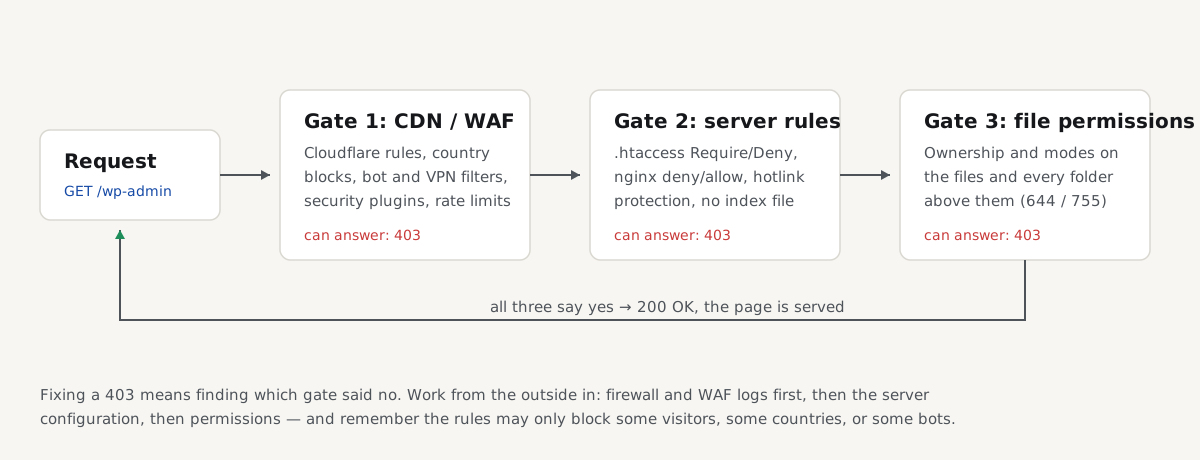
That is the map for the rest of this guide: a request passes through up to three gates, any one of which can answer 403. The error page rarely says which gate refused, so fixing a 403 means checking them in order.
How to fix 403 forbidden as a visitor
If the 403 appears on someone else's site, the block is on their side, but it is often triggered by something about your request. Try these in order and stop when the page loads.
- Reload the page once. Firewalls make one-off wrong decisions, and a block that was just lifted can still show a cached error.
- Check the URL. A path that points at a folder instead of a page, or at a protected area such as
/wp-admin/, gets a 403 by design. Go to the home page and navigate to the content instead. - Log out and log back in. An expired or half-logged-in session can produce a 403 where a fresh login works.
- Clear the site's cookies. A corrupted session cookie keeps answering for you until it is gone. Clear them for that one site, not the whole browser: in Chrome, click the icon left of the address bar, then Cookies and site data.
- Turn off your VPN or proxy. One of the most common causes: many firewalls block VPN and datacenter IP addresses wholesale, because abuse comes from the same ranges. If the page loads without the VPN, the firewall is filtering your exit address.
- Try another network. Switching from Wi-Fi to mobile data gives you a different IP address. If that works, your previous address, or your whole office or ISP range, is on a blocklist.
- Wait, if you were clicking fast. Some sites answer 403 rather than 429 when they rate-limit; a few minutes of patience clears it.
If none of that helps, the block is aimed at everyone or at something you cannot change, and only the site owner can fix it.
Fix a 403 on your own site
A 403 on your own site is a rule doing what it was told, somewhere you may not expect. Work from the outside in: the CDN or firewall first, the web server configuration second, the files on disk last.
File permissions and ownership
The web server process must be able to read every file it serves and enter every directory on the path. If it cannot, Apache and nginx answer 403. The sane numbers are 755 for directories and 644 for files:
find /var/www/example -type d -exec chmod 755 {} \;
find /var/www/example -type f -exec chmod 644 {} \;
Never use 777. It makes every file writable by every process on the machine and fixes nothing that 755 and 644 do not; the problem 777 appears to solve is usually ownership. Files uploaded over SFTP as one user and served as another need chown to the user the web server or PHP runs as (www-data on Debian and Ubuntu) or group-read access for it.
A missing index file
A request for a directory, such as https://example.com/photos/, is served from its index file, usually index.html or index.php. If there is none and directory listings are off (Options -Indexes in Apache, autoindex off in nginx, both the correct setting) the server has nothing to show and answers 403. Add an index file, or link to the files directly. Do not turn listings on to make the error go away; an open listing shows visitors every file in the folder.
Apache: .htaccess and Require rules
Apache access rules live in the configuration and in .htaccess files, and one leftover line blocks everything below it:
# Apache 2.4 syntax
Require all denied        # blocks everyone
Require ip 203.0.113.0/24 # blocks everyone outside this range

# Apache 2.2 syntax, still found in old snippets
Deny from all
Search the site root and every parent directory for .htaccess files and read them top to bottom. The usual finds are rules copied from blog posts and old IP allowlists for a maintenance window. On any current Apache, use only the Require form; mixing both syntaxes in one block produces access errors of its own.
nginx: deny rules and try_files
nginx has no .htaccess; its rules sit in the server configuration:
location /admin/ {
    allow 203.0.113.5;
    deny all;            # everyone else gets 403
}
Check every location block that matches the failing path for deny lines; allow and deny rules are evaluated in order and the first match wins. Two more nginx causes: a try_files chain whose final fallback is a directory can end in 403 when the index is missing, and nginx answers 403 whenever its worker user cannot read the file, which points back to permissions and ownership.
WordPress: plugins and .htaccess
On WordPress, three causes account for most 403s:
- A broken or stale
.htaccess, usually written by a security or caching plugin and left behind after it was removed. Rename.htaccessto.htaccess.offover SFTP; if the site comes back, go to Settings → Permalinks and click Save Changes so WordPress writes a clean file, then re-add only rules you understand. - A security plugin blocking IPs. Wordfence, Solid Security and similar plugins block addresses after failed logins or suspicious requests, and you can lock yourself out. Each has a lockout screen, and documented recovery steps if you cannot reach the admin at all.
- Hotlink protection misfiring. Rules that answer 403 for images requested with a foreign referer also hit visitors whose browsers send none, and crawlers. If images are 403 while pages work, test with
curl -Iwithout a Referer header and allow empty referers.
Cloudflare and other WAFs
With Cloudflare in front, the 403 may never reach your server. Custom WAF rules, IP access rules, country blocks, managed rulesets and Bot Fight Mode all answer with HTTP 403, many as the branded "Error 1020: Access Denied" page. Start with evidence: open Security → Events in the Cloudflare dashboard, filter to the time of the failure, and the log names the exact rule that fired. Then edit or add an exception to that one rule instead of loosening everything. Other WAFs (AWS WAF, hosts' own firewalls, mod_security on shared hosting) work the same way: find the matching log entry first, because guessing at rules wastes hours. On shared hosting without a visible log, support can read mod_security's and allowlist the rule ID.
S3 and static hosts
A static site on Amazon S3 answers 403 Access Denied when the bucket policy does not allow public reads, when "Block Public Access" is still on, or when CloudFront lacks access to the bucket. One S3 behaviour catches everyone: if the requester may not list the bucket, S3 answers 403 for files that simply do not exist, because saying "not found" would confirm bucket contents. An S3 403 may really be a 404 with a typo in the file name, so check the object exists and the key matches exactly, then the bucket policy and public-access settings.
Check your site for 403s
A 403 that hits only some visitors is easy to miss, because your IP, your login or your cookie passes the rule that others fail. Test from outside your own setup, and test many addresses at once.
Paste up to 1,000 URLs (your sitemap, your most-linked pages) and every row comes back labelled with its status, so blocked addresses stand out. The wider guide on finding and fixing broken links covers the rest of the results, and a full getReport report shows whether the checked page answered with a status that keeps it out of search:
A 403 is not the only way a request fails: a 500 Internal Server Error means the server broke rather than refused. The label tells you which guide to open.
When Googlebot gets the 403
Firewall rules that block "bots" catch Googlebot too, and the damage is slow and silent: your browser shows the site working while Google is turned away at the door.
Google's documentation on HTTP status codes and network errors in Google Search spells out what happens. Content from URLs that answer 4xx codes is not used, and a URL that keeps answering 403 is removed from the index if it was indexed before. Google also asks you directly not to use 401 or 403 to slow crawling down; for crawl load, the documented answer is 429 or 503, which say "come back later" instead of "go away".
To see whether it is happening to you, open Search Console and go to Settings → Crawl stats, then the "By response" breakdown. A rising share of "Client error (4xx)" responses, or 403s in your server or CDN logs for Googlebot's verified IP ranges, means a rule is blocking the crawler; pages disappearing from the index follow weeks later. The fix is the same event-log hunt as above: find the rule that matches Googlebot's requests and add an exception for verified search crawlers, which Cloudflare and most WAFs offer as a built-in list.
Questions people ask
What does 403 forbidden mean?
It means the server received and understood the request but refuses to serve the page. The address exists, or at least is not reported missing; a rule decided the requester is not allowed. The rule can sit in a firewall or CDN, in the web server's configuration, in a security plugin, or in the file permissions on disk, and the error page rarely says which.
How do I fix 403 forbidden on my own site?
Work from the outside in. Check your CDN or firewall's event log first; it names the exact rule that blocked the request. Then read the web server's rules: .htaccess and Require lines on Apache, deny lines on nginx. Last, check the files: directories 755, files 644, owned by a user the web server can read, and an index file in every served directory.
Why do I get 403 forbidden with a VPN?
Because many firewalls block or challenge traffic from VPN and datacenter IP ranges wholesale: a lot of automated abuse comes from the same addresses, and the site cannot tell you apart from a bot sharing your exit IP. Turn the VPN off, switch to a server in another location, or use another network for that one site. The block is against the address range, not against you.
Why does Googlebot get a 403 when I can open the page?
Because the rule that blocks it matches something about the request, not the page: the user agent, the IP range or a bot score. Your browser passes the rule; the crawler fails it. Check Search Console's crawl stats under Settings for 4xx responses, find the firewall rule in your WAF's event log, and add an exception for verified search engine crawlers.
Can a 403 error hurt SEO?
Yes, if search engines receive it. Google does not use the content of URLs answering 4xx codes, and a page that keeps answering 403 is dropped from the index if it was indexed before. A 403 only humans see is an access control working as intended; a 403 served to Googlebot by an over-eager firewall quietly removes pages from search. Google also warns against using 403 to reduce crawl rate: answer 429 or 503 instead.
Why does my WordPress site say 403 forbidden?
Usually one of three things: a broken or leftover .htaccess, a security plugin that blocked your IP, or wrong file permissions after a migration or upload. Rename .htaccess and re-save permalinks to rebuild it, check your security plugin's lockout list, and set directories to 755 and files to 644. If the site is behind Cloudflare, check Security → Events for a rule match first.