A redesign is judged a month after launch by one question: did traffic and sales go up or down? If you did not measure before, you cannot answer it, and if they went down you cannot say why. This guide sets up the measurement: a baseline of your ten most important pages before any design work starts, gates on staging, the launch-day order, and the comparison at 7 and 28 days. Setting up the baseline takes about two hours; the rest fits into the project's existing milestones.
Quick answer
- Before design starts: run a report (the speed test or the full report) on the 10 pages that matter most and keep the permanent links in a spreadsheet with the scores, speed metrics, indexability and structured data types. Save the Core Web Vitals history for the origin and export Search Console's pages and queries.
- During design: agree a speed budget and a components checklist (headings, alt text, labels, focus, target size), and a URL plan: keep URLs, or map every change.
- On staging: run the same reports per template; anything that appears on staging and not in the baseline is a regression.
- Launch day: redirects live first, noindex removed, sitemap updated, cache purged, then re-run the 10 reports and check the changed URLs for redirect chains.
- After launch: re-run on days 1, 2 and 3, then weekly; judge speed on the field data 28 days after launch, not on day one's lab score.
Why redesigns lose traffic
The design is rarely the cause. The usual culprits are mechanical, and every one of them is measurable:
- URLs change and some old ones get no redirect, so links from other sites and Google's index point at 404s.
- Templates drop things the old ones had: an H1, a text block on category pages, internal links in the footer, breadcrumbs, structured data.
- Pages get heavier. Bigger hero images, a video background, a new font family, a slider library.
- A new theme brings new scripts: a page builder's runtime, animation libraries, a chat widget someone added on staging.
- Staging settings ship. The
noindexthat kept staging out of Google comes along to production, or the robots.txt that blocked everything. - Redirects are "for later", and later is after Google has recrawled the old URLs and found 404s.
Each of these shows up in a report, if you have one from before to compare with.
How getReport checks it
A getReport report is a snapshot of one URL on one device with a permanent link kept for 12 months, which is exactly what a baseline needs. The speed module holds the lab and field numbers; the SEO module holds indexability and redirects; the other modules cover what templates usually drop.
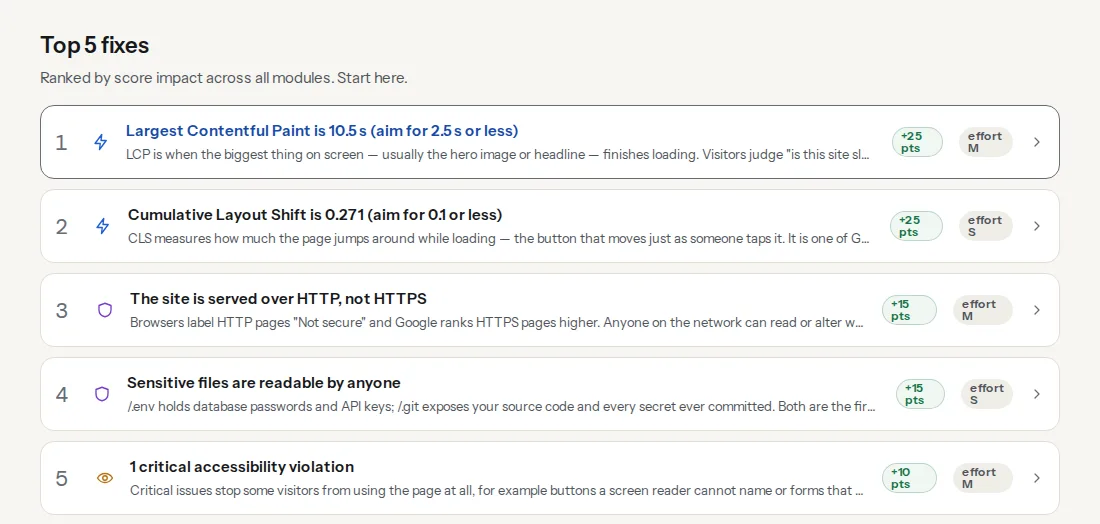
The lab score moves a few points between runs of the same unchanged page, so compare it across several pages, not one. The Lighthouse performance score learn page explains how it is weighted.
Field data is a rolling 28-day window of real Chrome visits, page-level where Google has enough visits and origin-level otherwise. On launch day it still describes the old site. It becomes a fair judge of the new one 28 days later.
These two catch the launch-day disasters. A page that cannot be indexed after launch is usually the staging noindex; a URL that redirects twice is usually a new redirect stacked on an old http → https rule.
Step by step
1. Pick the ten pages
Choose them from data, not from the sitemap: the top landing pages from analytics for the last 12 months, the pages with the most clicks in Search Console, and one of each template (home, category, product or service, article, contact). Ten is enough to catch template regressions and small enough to repeat by hand.
2. Record the baseline
For each page, run a report on mobile, the default, and add a desktop run for the home page. Record in a spreadsheet:
| URL | Report link | Overall | Speed | SEO | Access. | LCP (lab) | CLS (lab) | LCP (field) | Indexable | Schema types | Findings |
|---|---|---|---|---|---|---|---|---|---|---|---|
| /shoes/running/ | /r/… |
Also save, once for the whole site:
- The Core Web Vitals history for the origin, phone and desktop, as a screenshot or a note of the last few weekly values. Core Web Vitals history: 40 weeks explains how to read it.
- A Search Console export of Performance by page and by query for the last three months, and the Pages report's indexed count.
- Analytics landing pages with sessions and conversions for the same period.
- A list of every URL on the site, from the sitemap or a crawl if you have one; this is the source of the redirect map.
- Screenshots of the key templates, for the design review and for the "what did we drop" question later.
3. Set the gates for the design phase
Three agreements before anyone opens a design tool:
- A speed budget for the new templates: for example, LCP under 2.5 s in the lab on mobile, total page weight under 1.5 MB, no more third-party scripts than today. Speed budgets: setting one and holding to it shows how to pick the numbers.
- A components checklist each template must pass: one H1, a sane heading order, alt text on product images, labels on every field, a visible focus state, tap targets of at least 24×24 px.
- A URL plan. Keeping URLs is the single biggest protection a redesign has. If they must change, every old URL gets a row in a redirect map with its new address, before launch.
4. Test every template on staging
getReport tests public URLs only, so the staging site needs a public hostname for the minutes you test; staging sites: testing changes before they go live covers the setup. On staging:
- Run a report per template and compare with the baseline row for the same template. The indexability finding should fail on staging because of the
noindexthat keeps it out of Google; that is the one expected difference. - Any finding that appears on staging and not in the baseline is a regression: fix it before launch or accept it in writing.
- Run the accessibility checker on every template, the schema validator on product and article templates, and the link preview checker on the home page and one article. Each is a slice of the same report, so the baseline already has their findings.
5. Launch in this order
- Redirects live, tested on a handful of old URLs.
noindexremoved: meta tag,X-Robots-Tagheader and, in WordPress, Settings → Reading → Search engine visibility unticked.- robots.txt checked: no leftover
Disallow: /. - XML sitemap regenerated with the new URLs and resubmitted in Search Console.
- Page and CDN caches purged.
- The ten reports re-run with the Re-run button (a report cached in the last 12 hours would otherwise be shown), and the redirect checker run on a sample of changed URLs.
To check a whole list of old URLs at once, the bulk URL checker takes up to 1,000; from a terminal, this prints the final status, the number of hops and the final URL for each line of a file:
while read -r url; do
  printf '%s ' "$url"
  curl -s -o /dev/null -L -w '%{http_code} %{num_redirects} %{url_effective}\n' "$url"
done < old-urls.txt
Every line should read 200 1 followed by the new URL: one hop, and the final page answers. A 404 means a missing redirect; 2 or more hops means a chain. To confirm that no noindex header survived on production:
curl -sI https://www.example.com/ | grep -i x-robots-tagNo output is the right answer.
6. The week after
- Days 1–3: re-run the ten reports daily. Most launch bugs appear here: a plugin that was disabled on staging, a cache rule, a missing redirect.
- Weekly after that: the ten reports, Search Console's Pages report (watch "Not found (404)" and "Excluded by noindex tag"), and the Performance report by page against the baseline export.
- 404s: drop a week of access logs into the log analyser, which runs in your browser, and look at the 404s Googlebot keeps hitting. Each one is a missing row in the redirect map.
7. Compare at 28 days
Extend the spreadsheet with four column groups per URL: baseline, launch (day 1), +7 days and +28 days, each with the overall score, LCP, CLS and the findings count. Fill the field LCP only from day 28, when the Chrome UX Report window covers the new site alone; the CWV history tool shows the weekly line crossing from old to new. If the report for a domain has earlier runs, the history strip at the top of the report shows the overall, speed, SEO and security scores over time, which is a quick visual; the spreadsheet stays the record per URL.
Judge the redesign on the +28 column and on Search Console clicks for the same pages, same period length. When you present it, explaining a score to a client covers what the numbers mean and what they do not.
Platform notes
WordPress
The staging copy made by a host or a plugin usually has "Discourage search engines from indexing this site" ticked, and push-to-live can carry it to production; WordPress: discourage search engines covers the trap. The Redirection plugin can import a CSV redirect map, so the map from step 3 goes live in one step.
Shopify
Changing the theme keeps product and collection URLs, which removes the biggest risk. Redirects for changed pages are managed in the admin's URL redirects list, which accepts a CSV import. Compare app scripts between the old and the new theme: apps inject into the theme, and a new theme can load them differently.
Static sites and custom builds
The redirect map lives in the host's config or the web server. Put the ten URLs and the budget into CI so every pull request after launch is measured against the same numbers.
Verify
- The ten reports after launch show "The page can be indexed" and "The URL loads without a redirect chain" on every URL.
- No finding in Top fixes is new compared with the baseline, or each new one is accepted in writing.
- Every old URL from the list answers with one redirect to a live page.
- At 28 days, field LCP for the origin is no worse than in the baseline history.
Common mistakes
- No baseline. Symptom: traffic drops and nobody can say which pages or why. Fix: run the ten reports before design starts; even a late baseline from the old site's last week is better than none.
- Comparing only the home page. The home page is rarely where a redesign loses traffic; category and product templates are. Fix: one report per template.
- Judging on day one's lab score. A single lab run swings by several points, and field data still describes the old site. Fix: compare ten pages at +7 days and field data at +28.
- Redirects "later". Google recrawls old URLs within days and finds 404s. Fix: redirects go live before or with the new site, never after.
- Staging noindex shipped. Symptom: the indexability finding fails on production and Search Console's excluded count climbs. Fix: make removing it a named launch step and verify with the report and
curl.