Redirect mapping is the job of pairing every URL of the old site with the URL on the new site that should replace it, so each old address can get a one-hop 301 to its closest equivalent. The result, the redirect map, is usually a spreadsheet with an old URL column and a new URL column; developers turn it into server rules, and you use it again after launch to prove every rule works. This guide shows how to build a map that misses nothing: where to find the old URLs, how to clean and match them, what to do with pages that have no equivalent, when to use pattern rules, and how to test the map before and after launch. It is the core step of any website migration that changes URLs.
Quick answer
- Collect old URLs from every source: sitemaps, a crawl, Search Console, analytics landing pages, backlinks, server logs and existing redirect rules.
- Clean them: one protocol and host, consistent trailing slashes, tracking parameters removed, identifying parameters kept.
- Match by slug or ID first, then by title, then by hand, starting with the URLs that have the most traffic and links.
- No equivalent? Redirect to the closest relevant page if one exists; otherwise let it answer 404 or 410. Never map everything to the home page.
- Flatten chains: every row points at a final URL that answers 200, including rows from older migrations.
- Test the map three times with the migration redirect validator: on staging, on launch day and a week later.
What a redirect map looks like
At minimum, two columns. In practice a few more make the work manageable:
| Column | Example | Why |
|---|---|---|
| Old URL | https://example.com/shop/red-runner/ | The address being replaced |
| New URL | https://example.com/products/red-runner | Where it should go |
| Status | 301 | Almost always 301; 410 for removed pages |
| Source | sitemap, Search Console, backlinks | Shows why the URL is on the list |
| Clicks or sessions | 1,240 | Sets the order of work |
| Referring domains | 18 | Pages with links need the most care |
| Match method | slug, manual | Lets a reviewer check the risky rows |
| Verdict after launch | correct, chain, wrong target | Filled in by testing |
Keep it in one shared spreadsheet. The developer who writes the rules, the person matching URLs and the person testing after launch all work from the same file.
Step 1: collect every old URL
No single source has every URL that matters. Combine these:
- XML sitemaps of the old site, including image, video and news sitemaps.
- A crawl of the old site with an SEO crawler, to find pages the sitemap missed, such as old landing pages still linked from somewhere.
- Google Search Console, Performance report, pages with impressions over the last 16 months, the longest it keeps. The web interface exports up to 1,000 rows; for larger sites, use the Search Console API or a connected reporting tool.
- Analytics landing pages over at least 12 months, so seasonal pages are included.
- Backlinks: the URLs other sites link to, from Search Console's Links report or a backlink tool. These often include very old addresses that no longer appear anywhere on the site.
- Server or CDN logs, which show URLs that crawlers and visitors still request.
- Existing redirect rules from earlier migrations, in
.htaccess, nginx, a CMS plugin or the CDN. Their source URLs are old URLs too. - Files: PDFs and important images that get search traffic or links.
Put everything in one column and remove duplicates. Expect the list to be longer than the number of pages on the site; that is normal.
Step 2: clean the list
Mismatched formats cause most false "no match" results. Normalise before matching:
- One protocol and host. Convert
http://andwwwvariants to one form, because the site-wide rules already handle those variants. - Consistent trailing slashes and case, following what the old server treated as the same page.
- Remove tracking parameters such as
utm_sourceorgclid; they do not identify a page. - Keep identifying parameters, such as
/index.php?id=12or/product.php?sku=RR-01. These URLs need rules that match the query string. - Drop junk: URLs that were never real pages, such as spam-injected paths, internal search results or random 404s from bots. Check a few before deleting a group.
Step 3: match old URLs to new URLs
Work from the cheapest method to the most expensive:
- Unchanged URLs. If the path exists on the new site, no redirect is needed. Mark those rows and move on.
- Slug or ID match. On a platform change, most products, posts and categories keep their slug or ID. A spreadsheet lookup, such as
XLOOKUPon the slug, matches most rows automatically. - Title or content match. For pages whose slug changed, match on title, or on the H1 from a crawl of both sites.
- Manual matching for what remains, sorted by traffic and links, so the important rows get the attention.
The rule for every row: the closest equivalent. A product goes to the same product, or its direct successor; a category to the new category; an article to its new address; a merged page to the page it was merged into. Relevance matters, because Google's site move documentation warns against redirecting many old URLs to one irrelevant destination, such as the home page, and may treat those like missing pages.
Pages with no equivalent
Some old pages have no new home: discontinued products, cut services, outdated articles. Decide per row:
- A close relevant page exists, such as the parent category of a discontinued product or an updated article on the same topic: redirect there.
- Nothing relevant exists and the page has no traffic or links: let it answer 404, or 410 to say the removal is deliberate.
- Nothing relevant exists, but the page has valuable links: consider keeping or recreating the content rather than losing the links.
404 vs 410 vs redirect for removed pages walks through the decision.
Step 4: patterns or exact rules
When URLs change by a fixed pattern, one rule can cover thousands of rows. For example, a blog moving from /blog/2023/05/post-name/ to /blog/post-name/:
# nginx: one pattern rule for dated blog URLs
rewrite ^/blog/\d{4}/\d{2}/([^/]+)/?$ /blog/$1/ permanent;
Pattern rules are efficient, but they fail silently on exceptions: a post whose slug also changed, or a URL that matches the pattern by accident. Two practices keep them safe:
- Put exact rules first, pattern rules after, so exceptions win.
- Still list every important URL in the map, even when a pattern covers it, so you can test each one after launch.
Most sites end up with a mix: a handful of pattern rules for systematic changes and exact rules for everything else.
Step 5: check the map itself
Before a single rule is deployed, check the spreadsheet for these problems:
- Chains: A → B while another row sends B → C. Point A straight at C.
- Loops: A → B and B → A, often from rows added by different people.
- Duplicates and conflicts: the same old URL mapped to two different new ones.
- Targets that do not exist on the new site, or that redirect again.
- Old redirects from earlier migrations still pointing at URLs that now move. Rewrite them to the newest address; redirect chains after a migration shows how to find every hop.
- Rows that point at the home page. Look at each one again.
The generator does the mechanical part and writes the rules:
Paste the two columns, up to 10,000 rows. It runs in your browser, flags duplicates, conflicting rows, targets that are not URLs and redirects to themselves, removes loops, points chains straight at their final page, and writes exact-match 301 rules for Apache, nginx, Cloudflare Bulk Redirects, Netlify, Vercel or Caddy, with the right construct for URLs that carry a query string.
Step 6: test the map before and after launch
A map is only as good as its test. Run every row, not a sample:
Paste old and new URL pairs, up to 1,000 per run; paths are resolved against your site. The validator requests each old URL, follows every hop, compares where it really lands with where it should go, and gives each pair one verdict: correct, wrong target, not redirected or gone, chain, temporary redirect, or a target that is broken or set to noindex. Each run keeps its own link for 30 days, filterable by verdict, with a CSV your developer can work from.
Run it three times:
- On staging, if the redirects can be tested there, before launch.
- On launch day, as soon as the new site and rules are live.
- A week later, when caches and CDNs have caught up and any late changes are in.
Check a plain list of old URLs with the bulk URL checker
Some lists have no expected targets: the old sitemap, a backlink export, Search Console's "Not found" rows. Keep them exactly as Google and the backlinks request them (http://old.example.com/page, not the new address), and paste up to 1,000 into the bulk URL checker.
Each URL is requested with GET, following up to 10 redirects, at most 4 at a time per host. Every row gets one label: OK, Redirect (one hop), Redirect chain (two or more), Not found (4xx), Server error (5xx), noindex, or Unreachable. The redirect type reads permanent when every hop is 301 or 308, temporary when every hop is 302, 303 or 307, and mixed otherwise. Filter to "Needs a look" to see everything that is not a plain OK.
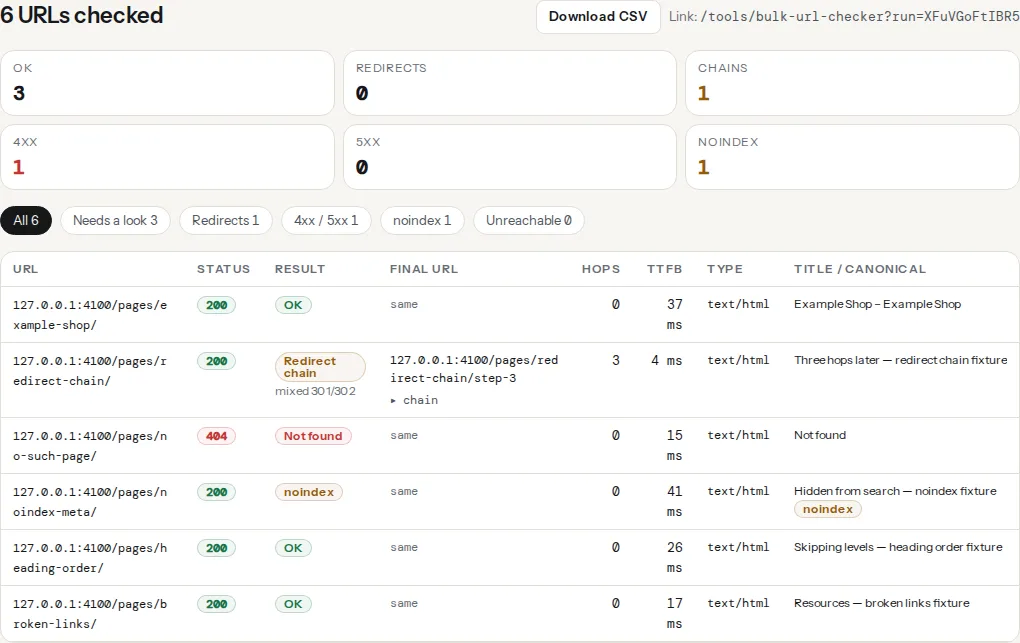
The tool cannot know which page is your home page, so it has no "redirects to home" label. Sort the CSV by final_url: a block of rows ending at / is the pattern, and Google counts those as soft 404s.
To compare the results with the map, download the CSV and put the map on a second sheet (old URL in column A, intended new URL in column B). In the CSV, url is column B and final_url column D:
=IF(VLOOKUP(B2, map!A:B, 2, FALSE)=D2, "ok", "wrong target")Fill it down and filter for "wrong target"; trailing slashes are the usual mismatch. After fixing, run the same list again and keep both run links as before and after.
Keep watching after launch
Keep watching for URLs the map missed: Search Console's "Not found (404)" list, the 404 log of your CMS or server, and backlinks that suddenly break. Add rows for each and test again. The full getReport report on key new pages also flags links in your own content that still go through a redirect:
Keep the map
Store the final map with the project documentation. At the next migration, its new URLs become the old URLs, and its rows tell you which redirects already exist and must be pointed at the newest addresses. Keep the redirects themselves for at least a year, as Google's site move guidance says, and ideally for good.
For a platform change, the CMS migration guide covers the URL patterns each platform forces; for a new domain, changing domain name without losing SEO covers the rest of the move.
Common mistakes
- Building the map from the sitemap alone. Old landing pages, backlink targets and PDFs are often missing from it.
- Mapping everything that did not match to the home page.
- Forgetting query-string URLs, which simple rules ignore.
- Pattern rules without exceptions, sending some pages to URLs that do not exist.
- Not flattening old redirects, so the oldest URLs take three or four hops.
- Testing a sample, or only the home page, after launch.
- Starting the map after the new site is built, when URLs can no longer be changed to make matching easier.
Questions people ask
What is a redirect map?
A redirect map is a list that pairs every old URL with the new URL it should redirect to, usually a spreadsheet with an old column, a new column and notes. It is built before a migration from sitemaps, Search Console, analytics and backlink data, turned into 301 rules for the server, and used after launch to check that every old address lands where it should.
How do I create a redirect map for a migration?
Collect every old URL from sitemaps, a crawl, Search Console, analytics, backlinks, logs and existing redirects. Clean them into one format, then match each to its closest new page, by slug or ID first and by hand for the rest, starting with the URLs that have the most traffic and links. Check the list for chains, loops and duplicates, then test it after launch.
What should go in a redirect mapping spreadsheet?
At minimum, the old URL and the new URL. Useful extra columns are the status code, where the old URL came from, its traffic and referring domains, how it was matched, and a verdict column filled in after testing. Traffic and link counts tell you which rows need careful manual matching; the verdict tells you which rules still need fixing.
Should every old URL be in the redirect map?
Every old URL that has traffic, links, rankings or appears in your sitemaps, yes. Junk URLs, such as internal search results or bot-generated addresses, can be left to answer 404. Pages with no equivalent and no value can also answer 404 or 410. What matters is that each decision is deliberate rather than a gap in the list.
When should I start redirect mapping?
Before the new site's URLs are final. Starting early lets you keep more old URLs unchanged, choose new URLs that match old slugs, and spot pages that need a new home before they are cut. A map built after launch is a rescue job: some traffic is already lost by the time the redirects go live.