A redirect chain is a URL that redirects to a URL that redirects again. One hop is normal; after a migration, three or four is common, and each one was added by someone who did not know the others existed. This guide explains how chains form, how to find every one of them (for one URL and for a list of a thousand), and how to rewrite the rules so each old address reaches its final page in a single 301. Finding takes minutes; fixing takes an afternoon on most sites.
Quick answer
- Chains are stacked rules: http → https, then non-www → www, then the old slug → new slug, then no slash → slash. Each rule was correct alone.
- Every hop is a full round trip before the page can start loading, 100–300 ms on mobile per hop. Google follows at most 10 hops and passes a little less signal with each one.
- One URL: the redirect checker lists every hop with its status code. A list: paste the old URLs into the bulk URL checker and sort by the Hops column.
- Fix at the source: make every rule point straight at the final URL, put host and scheme normalisation in a rule that also applies the path change, and update internal links and sitemaps so nothing needs the redirect at all.
- Verify by re-running the list. Every row should show Hops ≤ 1 and
redirect_typepermanent.
Why redirect chains matter
The visitor's browser cannot ask for the page until the last redirect has answered. On a phone on a mobile network each hop is a new request, often on a new connection when the host changes (a DNS lookup, a TCP handshake and a TLS handshake before the first byte). Three hops can add a second to the time a visitor stares at a blank screen, and that second is charged to your Largest Contentful Paint.
For search engines the cost is crawl and signal. Googlebot follows up to 10 hops, then gives up and reports the URL as a redirect error. Each hop it does follow is a fetch not spent on a page, and long chains are the classic reason a migrated site's crawl rate drops for weeks. The ranking signal that a link passes shrinks slightly with each hop; for a single hop that is negligible, for a chain of four on a URL with good backlinks it is not.
Chains also hide bugs. A 302 in the middle of a chain tells Google the move is temporary, so the old URL keeps ranking. A hop that drops the query string breaks tracked links. A hop that changes the path before the https hop leaves the visitor on an insecure page for a moment. None of this is visible when you click through the site, because the browser hides the hops.
How chains form
Each rule below is fine alone. Together they make a four-hop chain for http://old-site.com/products/red-shoes:
- Scheme. A rule from the https migration sends every
http://request tohttps://on the same host. - Host. A rule from the domain change sends
old-site.comtowww.new-site.com. - Path. The CMS migration changed slugs, so
/products/red-shoesredirects to/shop/red-shoes. - Slash. The new CMS wants a trailing slash, so
/shop/red-shoesredirects to/shop/red-shoes/.
The old rules were kept "in case something still uses them". They do still work, which is the problem: nobody notices four hops when the page eventually appears.
How getReport checks it
The checker requests the URL you enter and follows every redirect the way a crawler would, up to 10 hops, recording the status code and the Location of each. It then requests the http:// version and the other www variant to see whether those redirect permanently to the final host, and checks the final page's canonical tag against the URL it landed on.
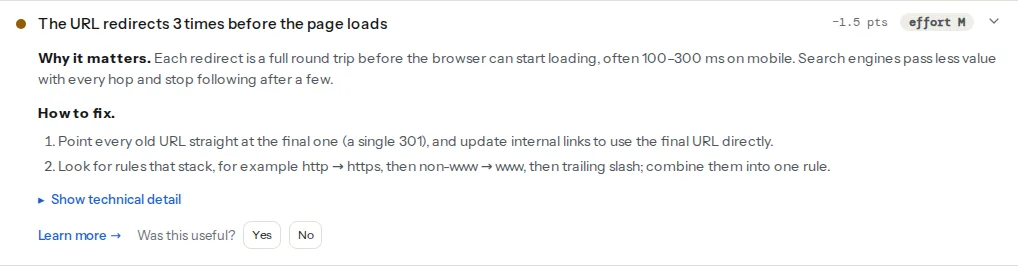
The finding passes at zero or one hop and warns from two hops up; the fixture used for the screenshot below has three. The hop list is the part to keep: each line is the status code, the URL that answered it and where it sent the browser, so you can see exactly which rule fired at each step and in what order.
This is the speed module's view of the same chain, measured by Lighthouse: how many milliseconds the redirects cost before the page could start. Where the SEO finding counts hops, this one prices them. If the first one warns, this one is usually red as well.
After a migration, the links on your own pages are the biggest source of redirect hits, because every menu, footer and body link still uses the old address. This finding lists the ones on the page you ran; the broken link checker shows the same list with the final URL and hop count per link.
Step by step
1. Check the URLs that matter first
Run the redirect checker on five addresses: the old home page over http://, the old home page with the other www variant, one old product or post URL, one old category and one URL with a query string. Those five cover the four rule types and the query-string edge case, and the hop lists tell you the order in which the rules fire on your server.
2. Check the whole old URL list
Collect every old URL you can: the old sitemap (from the Wayback Machine if the old site is gone), the top landing pages from analytics before the move, the pages with backlinks from your backlink tool, and Search Console's "Page with redirect" table on the old property. Paste up to 1,000 of them into the bulk URL checker.
Each row shows the final status, the final URL, the number of hops and the time to first byte, and the row is labelled "Redirect chain" from two hops up. Use the Redirects filter, then download the CSV: the hops column sorts the worst first, and the redirect_type column reads permanent, temporary or mixed for the whole chain, so a stray 302 in the middle stands out as mixed.
Tip
Group the CSV by final_url. Twenty old URLs that all land on the same page through the same hops share one cause, usually one rule, and one fix.
3. Find who else is hitting the chains
Search Console's Pages report lists URLs under "Page with redirect"; that is Google's view. For the complete picture, drop a day of access logs into the log analyser: for each bot it shows how much of its crawl went to redirects and which URLs. If Googlebot still spends a third of its visits on http:// addresses two months after the move, some list somewhere (a feed, a partner, an old sitemap) still publishes them.
4. Rewrite the rules so each address moves once
The principle: the first rule that matches a request must know the final destination. In practice that means applying the path change inside the scheme and host rules, not after them.
nginx. Keep the path map in one place with map, and use it from every server block, so a request to the old host with an old path goes straight to the new host with the new path:
# /etc/nginx/conf.d/redirects.conf — old path → new path, one entry per moved URL
map $uri $new_path {
    default                       "";
    ~^/products/red-shoes/?$      /shop/red-shoes/;
    ~^/blog/2021/launch-post/?$   /blog/launch-post/;
}

# http, any host → final https URL in one hop
server {
    listen 80;
    server_name old-site.com www.old-site.com new-site.com www.new-site.com;
    location / {
        if ($new_path != "") { return 301 https://www.new-site.com$new_path; }
        return 301 https://www.new-site.com$request_uri;
    }
}

# https on the old host or the wrong www variant → final host, one hop
server {
    listen 443 ssl;
    server_name old-site.com www.old-site.com new-site.com;
    # ssl_certificate lines as before
    location / {
        if ($new_path != "") { return 301 https://www.new-site.com$new_path; }
        return 301 https://www.new-site.com$request_uri;
    }
}

# the final host: only the path moves remain
server {
    listen 443 ssl;
    server_name www.new-site.com;
    location / {
        if ($new_path != "") { return 301 $new_path; }
        try_files $uri $uri/ /index.php?$args;
    }
}
return inside if is one of the two things that are safe to do there. The map matches $uri, which has no query string; $request_uri keeps it for the generic case. Reload with nginx -t && nginx -s reload.
Apache. In .htaccess on the final host, list the specific moves first with absolute final URLs, then the generic scheme-and-host rule. The L flag stops after the first match, so a moved path never reaches the generic rule and never needs a second hop:
RewriteEngine On

# 1. Specific moves, straight to the final https URL
RewriteRule ^products/red-shoes/?$      https://www.new-site.com/shop/red-shoes/   [R=301,L]
RewriteRule ^blog/2021/launch-post/?$   https://www.new-site.com/blog/launch-post/ [R=301,L]

# 2. Everything else: https + www in one hop, path kept
RewriteCond %{HTTPS} off [OR]
RewriteCond %{HTTP_HOST} !^www\.new-site\.com$ [NC]
RewriteRule ^(.*)$ https://www.new-site.com/$1 [R=301,L]
If the old domain is served by a different host, its config needs the same rules, pointing at the final absolute URLs; a bare "redirect the whole domain" rule there is what makes the host hop come first.
Trailing slash. Decide once and make the path rules emit the final form. A rule that adds slashes as a separate step is a guaranteed extra hop for every moved URL; the trailing slash guide walks through that decision.
5. Collapse temporary into permanent
A 302 or 307 in a chain means "keep the old URL indexed". If the move is final, change it to 301 (or 308 if the request method must survive, which matters for forms and APIs, not pages). The bulk CSV's redirect_type column finds them: filter for temporary and mixed.
6. WordPress: rules in plugins, not files
In WordPress most path redirects live in the Redirection plugin or the redirect manager of Yoast SEO Premium or Rank Math. Open each rule whose target is itself an old address (the "Redirects to" value starts with the old domain, uses http://, or is a slug that has since changed) and change the target to the final URL. The plugin's Site tab holds the https and preferred-domain settings; if those are also set at the web server or the CDN, the same hop can be added twice by two layers, so keep one.
WordPress core adds one more source of hops: the "canonical redirect" that fixes capitalisation, missing slashes and old slugs (_wp_old_slug). It is useful, but it runs after your rules, so a rule that points at a slug without the trailing slash WordPress wants gets one more hop from core. Point at the exact final form.
7. Remove the need for the redirect
Redirects are for the addresses you do not control. For the ones you do, update the source:
- Internal links. Search the database for the old host and old paths; Better Search Replace does this in one pass (back up first). Menus and widgets are separate from post content and are the ones most often missed.
- Sitemaps. They must list final URLs only. A sitemap of redirecting URLs is what the sitemap validator's sampled-status finding flags.
- Canonicals and hreflang. Every
<link rel="canonical">and everyhreflangalternate must name the final URL; a canonical pointing into a chain sends Google through the chain on every page. - Everything outside the site. Google Business Profile, social profiles, ad destination URLs, email templates, app deep links. Each of these is a redirect hit per click until updated.
Platform notes
Cloudflare and other CDNs
Redirect Rules (or Page Rules on older plans) run before the origin sees the request, so a rule there plus a rule at the origin is a two-layer chain by design. Choose the layer: either the CDN handles scheme and host and the origin handles paths (accepting one hop for moved URLs), or the CDN holds the full map with bulk redirects, and the origin has none.
Shopify
Shopify's URL Redirects (Online Store → Navigation → URL Redirects) accept a CSV import and always redirect to a path on the current domain; the platform handles https and the primary domain itself. Chains appear when a redirect target is a product handle that was later renamed, because Shopify adds a second automatic redirect for the rename. Point the imported rule at the new handle.
Static sites and hosts with a redirects file
Netlify's _redirects and Vercel's vercel.json process rules top to bottom, first match wins, exactly like Apache. Put specific paths first and the catch-alls last, and make each target absolute when the host changes.
Verify
- Re-run the redirect checker on the five URLs from step 1. The finding should read "The URL loads without a redirect chain" or list exactly one 301.
- Re-run the bulk list. Sort by
hops: the maximum should be 1,redirect_typeshould bepermanentfor every redirected row, andfinal_urlshould answer 200 (no redirects to a 404). curl -sIL http://old-site.com/products/red-shoes | grep -i -E "^(HTTP|location)"prints one301, oneLocation:with the final URL, then a200.- Over the following weeks, "Page with redirect" in Search Console for the old property falls, and the log analyser shows Googlebot's redirect share dropping.
Common mistakes
- Fixing the chain by adding a rule. A new rule at the front that sends the old URL to the final one, on top of the existing rules, works until someone reorders the file. Rewrite the existing rules instead.
- Redirecting the old domain to the new home page. One rule, zero chains, and every deep link on the web lands on the home page, which Google treats as a soft 404. The map is the work; do the map.
- Keeping a 302 "until we are sure". Google keeps ranking the old URL, and the eventual switch to 301 restarts the move. Make it 301 on launch day.
- Forgetting the query string. Tracked links (
?utm_source=) and paginated URLs (?page=2) must survive the hop. Test one of each;$request_uriin nginx and[QSA]in Apache keep them. - Testing from inside the network. A CDN, a corporate proxy or a hosts-file entry can hide a hop. Test from outside, with the tools above or
curl -IL. - Declaring victory after the first week. Old URLs keep arriving for years from links you do not control. Keep the redirects for at least a year (Google's own minimum for site moves), and re-run the bulk list after every server change; Redirects without chains covers the maintenance side.