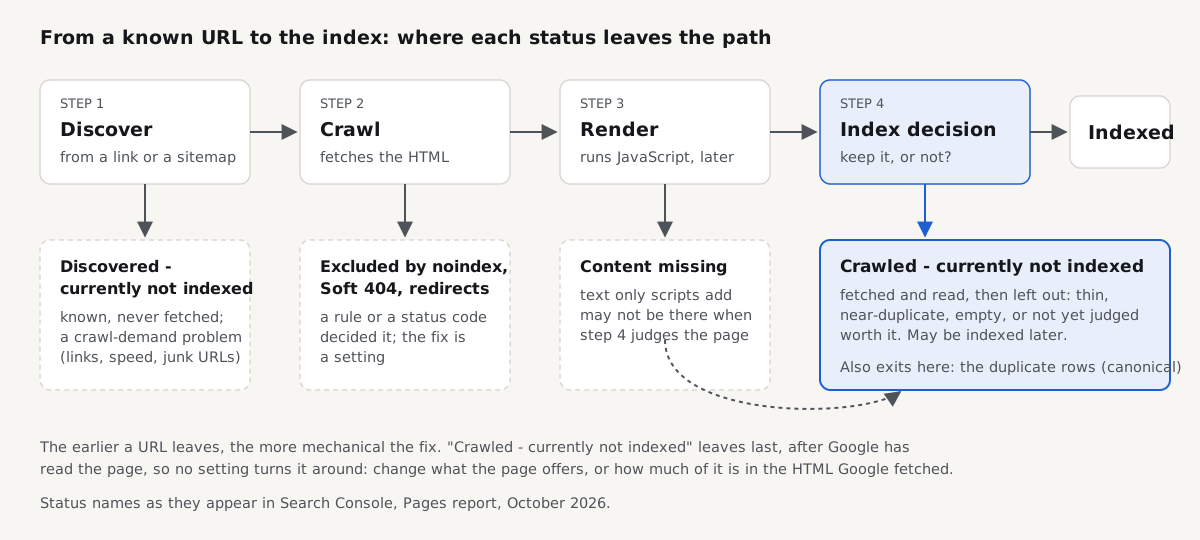
"Crawled - currently not indexed" means Googlebot fetched the page, read it, and decided not to add it to Google's index for now; nothing technical blocked it, so the fix is almost always in what the page offers or in how much of it is in the HTML Google fetched. Its sibling, Discovered - currently not indexed, is a crawl-priority problem with a different fix; this one is a judgement about the page, and the last indexing step a technical SEO check covers.
Quick answer
- What it says: Google crawled the URL and chose not to index it. It is not a penalty, not an error, and not a queue you can jump with the Request indexing button.
- The usual causes, most likely first: little added value, thin or near-identical template pages, nearly empty pages, filter or parameter URLs, and main text that only appears after JavaScript runs.
- Diagnose one URL at a time: URL Inspection shows what Googlebot got; the SEO audit, the JavaScript rendering check and the canonical checker show word count, raw versus rendered text and canonical signals.
- Fix the page, not the plumbing: add what a visitor came for, merge near-copies, noindex archives you never meant to rank, and serve main content in the HTML.
- Leave it alone for feeds, sort and filter URLs, old URLs and pages you would noindex anyway.
- Verify: re-run the checks, inspect the URL, request indexing for a handful of key pages, then use Validate fix in the report and wait about two weeks.
What does "Crawled - currently not indexed" mean in Search Console?
The status sits in Search Console under Indexing → Pages, in the table "Why pages aren't indexed". As of October 2026, Google's help for the Page indexing report says the page was crawled by Google but not indexed, "may or may not be indexed in the future", and there is no need to resubmit it for crawling. That carries three facts. Google got the page, so robots.txt, server errors and redirects are ruled out. It found no noindex, or the row would say "Excluded by 'noindex' tag". And it may change its mind on a later crawl.
So the row is a decision about what deserves a place in the index. Google does not index everything it crawls, and its guidance on helpful, people-first content says what it values: original information, a complete answer, analysis beyond the obvious. A page that repeats the category above it, or holds three lines of template text, is the page that gets crawled and left out.
The report also lags by a few days. Before you work on a URL, paste it into URL Inspection; if it says "URL is on Google", the report is stale and there is nothing to fix.
How is it different from the other "not indexed" reasons?
Each reason in the report names the step where the URL left the path in the diagram above. These are the ones people confuse.
| Status in the Pages report | Has Google fetched the page? | What Google decided | Where the fix is |
|---|---|---|---|
| Discovered - currently not indexed | No | Postponed the crawl | Crawl demand: internal links, server speed, fewer junk URLs |
| Crawled - currently not indexed | Yes | Read it and left it out, for now | The page: value, duplication, content in the HTML |
| Excluded by 'noindex' tag | Yes | Obeyed your noindex | Remove the noindex if it is a mistake; otherwise nothing |
| Soft 404 | Yes | Treated a 200 page as missing | Return 404 or 410, or give the page real content |
| Duplicate without user-selected canonical | Yes | Grouped it with another URL and indexed that one | Declare a canonical, or merge the copies |
| Duplicate, Google chose different canonical than user | Yes | Overrode your canonical | Point links, sitemap and redirects at one URL |
| Alternate page with proper canonical tag | Yes | Followed your canonical | Nothing; this is working as intended |
| Page with redirect | Yes | Indexes the target instead | Nothing, unless the target is wrong |
Every other row has a mechanical cause you can read off the page or its headers; this is the one where the mechanics passed and the content did not. The indexability checklist covers the mechanical rows.
Why is my page crawled but not indexed? The causes, most likely first
- The page adds little that Google does not already have. A service page that repeats the home page, a post that restates the top results, a product with the manufacturer's description pasted in. On most small sites this is the bulk of the row.
- It is one of many thin or near-identical template pages. City pages with the city name swapped, colour variants published as separate products with the same text, tag archives that list the same three posts as the category. Thin content is about value, not length, but a page under 300 words built from a template is usually both.
- It is nearly empty. An empty category, a search results page with no results, an out-of-stock product reduced to a title. When Google is confident, it says Soft 404; pages that come close without being labelled one often end up here instead.
- It is a filter, sort or parameter URL.
?sort=price,?color=red&size=42, session or tracking parameters, showing a subset or reordering of the clean URL. With a canonical to the clean URL they belong in "Alternate page with proper canonical tag"; without one they land here or under "Duplicate". - The main content only appears after JavaScript runs. Google crawls the HTML first and renders JavaScript later, in a separate step. If the server sends a shell, the page may be judged with nothing worth indexing in it.
- The canonical signals disagree. The page declares itself canonical, but internal links, the sitemap or a near-copy point elsewhere, or a script rewrites the canonical after load. Google then has two candidates and may index neither version you meant.
- It is simply recent. A page first crawled last week may be indexed on the next crawl. If the page is good and the row is small, give it two to four weeks.
How to check which cause you have
Start in Search Console, because only Google knows what it decided. In URL Inspection, read the last crawl date, "Crawl allowed" and "Indexing allowed" (both Yes, or you are in another row) and the user-declared canonical. Then click Test live URL and View tested page: the HTML tab is what Googlebot rendered, and the screenshot shows whether the main content was there. Then run getReport on the same URL; each finding maps to a cause.
The count excludes header, navigation, footer, scripts and styles, and warns under 300 words. A warning points to cause 2 or 3; a pass on a page Google still leaves out points to cause 1: the words are there, the value is not.
The rendering check loads the page as the server sends it and after Chromium runs its scripts, and counts the text that exists only in the second. A high share is cause 5; a changed canonical or noindex is worse, because Google may act on either version.
Paste the affected URL, then a parameter version of it: both should point at the original. A canonical that redirects, errors or disagrees with og:url and the www and http variants is cause 6.
A test you can repeat: what a crawler sees in the raw HTML
To show causes 2, 4 and 5 without a live site, we measured what a crawler's first pass gets from getReport's fixtures: the thin-content and js-rendered pages, and our fixture of the example-shop.hr demo shop, all served locally (see fixtures/README.md). The counter strips what the word-count check strips:
# words.py: count body words the way the word-count check does (approximation)
import sys, re
h = sys.stdin.read()
b = re.search(r'<body.*?</body>', h, re.S).group(0)
b = re.sub(r'<(script|style|header|nav|footer)\b.*?</\1>', ' ', b, flags=re.S)
t = re.sub(r'<[^>]+>', ' ', b)
print(len([w for w in t.split() if re.search(r'\w', w)]), 'words in <body>;', len(re.findall(r'<h1\b', b)), '<h1>;', 'robots meta:', 'yes' if re.search(r'name="robots"', h) else 'none')$ curl -s http://localhost:4100/pages/thin-content/ | python3 -I words.py
37 words in <body>; 1 <h1>; robots meta: none
$ curl -s http://localhost:4100/pages/js-rendered/ | python3 -I words.py
200 words in <body>; 0 <h1>; robots meta: none
$ curl -s http://localhost:4100/pages/js-rendered/ | grep -o '<title>.*</title>'
<title>Loading…</title>The thin-content page is a 37-word "About us": fetched fine, almost nothing to index. That is cause 2, and the word-count check warns on it.
The js-rendered page is the instructive one. Its raw HTML has the title "Loading…", no H1 and 200 words, all of them the fixture server's generic "About this fixture" note; none of the shop's copy is there. We then ran the page's inline script in Node against a stub DOM (not a real browser) to count what it adds:
// render.js: run the page's inline script against a stub DOM and count what it adds
const html = require('fs').readFileSync(0, 'utf8');
const src = html.match(/<script>([\s\S]*?)<\/script>/)[1];
let added = '', head = [];
const document = { title: '', head: { appendChild: (n) => head.push(n) }, createElement: () => ({}),
  querySelector: () => ({ href: '' }), getElementById: () => ({ insertAdjacentHTML: (_, h) => { added = h; } }) };
new Function('document', src)(document);
const words = (s) => s.replace(/<[^>]+>/g, ' ').split(/\s+/).filter((w) => /\w/.test(w)).length;
const nav = (added.match(/<nav[\s\S]*?<\/nav>/) || [''])[0];
console.log(`added by JavaScript: ${words(added) - words(nav)} words of body text, ${(added.match(/<h1/g) || []).length} <h1>, ${(added.match(/<a /g) || []).length} links, robots meta: ${head.filter((n) => n.name === 'robots').map((n) => n.content)}`);$ curl -s http://localhost:4100/pages/js-rendered/ | node render.js
added by JavaScript: 1206 words of body text, 1 <h1>, 8 links, robots meta: noindexSo 1,206 of 1,406 words, about 86%, exist only after JavaScript runs, along with the heading, every internal link and a noindex. Judged on the HTML, it is a loading shell; rendered, it says do not index. The rendering check reports exactly this pair.
Cause 4 on the demo shop: the shop page links to a sorted version of itself, which answers 200 with the shop's canonical.
$ curl -s http://localhost:4101/shop/?sort=price | grep -o '<link rel="canonical"[^>]*>'
<link rel="canonical" href="http://localhost:4101/shop/">
That is the correct setup: Google should file the sorted URL as "Alternate page with proper canonical tag". Remove that canonical and it becomes a crawled duplicate with nothing of its own. The same run counted 11 to 16 words on each of the demo shop's four product pages; the fixture is deliberately bare, and a real product page that short is a cause 2 candidate.
How to fix it, cause by cause
Cause 1, little added value. Rewrite the page around the visitor's question, with what only you can say: your prices, process, photos, measurements. Merge two pages that answer the same question and 301 the other. Link to it from two or three related indexed pages with descriptive anchor text.
Cause 2, thin or near-identical pages. Decide per template. Pages that should rank get real, distinct content. Pages that exist for navigation (tag, date and author archives, internal search) get noindex and leave the sitemap. Sets that differ only by a word get merged.
Cause 3, nearly empty pages. Return 404 or 410 for things that are gone, fill or hide empty categories, and keep out-of-stock products with their full description and alternatives.
Cause 4, parameter URLs. Give every filter and sort template a canonical to the clean URL, stop linking parameter combinations you do not want crawled, and never list them in the sitemap. The faceted navigation guide covers which filters deserve their own indexable page.
Cause 5, JavaScript-only content. Serve the title, headings, main text, links, canonical and robots tags in the HTML the server sends, through server-side rendering or static generation; keep JavaScript for interaction. How Googlebot renders JavaScript has the framework settings.
Cause 6, mixed canonical signals. One canonical per page, pointing at a URL that answers 200; internal links, sitemap and redirects all using that same URL.
WordPress
The row is usually archives: tag pages with one or two posts, author archives on a one-author blog, date archives, and attachment pages on sites older than WordPress 6.4. Noindex tag, author and date archives in your SEO plugin (the Yoast SEO and Rank Math switches are in the thin content guide) and redirect attachment pages to the file. Keep categories indexable, with a short introduction in the Description field. /feed/ URLs often appear here too; leave them.
Shopify
Shopify serves the same products at several addresses: collection-scoped product URLs (/collections/shoes/products/sava-low), ?variant= URLs, tag-filtered collections and filter parameters. Themes that use Shopify's canonical_url point these at the main product or collection, so they should be alternates; paste one of each into the canonical checker to confirm. The default robots.txt also blocks some sort and tag-combination patterns (open /robots.txt on your store). What you can improve is the collection itself: a description, not just a grid.
Ecommerce variants on any platform
If each colour is its own product with the same description, Google sees near-copies and indexes one or none. Prefer one product with variants; otherwise give each its own text and photos, or canonicalise them to the main product.
When should you leave it alone?
Google is often right to skip a URL. Leave feeds, sort and filter URLs with a correct canonical, paginated pages beyond page 1, print versions, old URLs that now redirect or 404, and archives you would noindex anyway. Ask of each URL: "would I want a searcher to land here?" If not, the row is doing your work for you. Group the export by URL pattern and fix templates, not single URLs.
How to verify the fix
Re-run the checks first. Passing looks like this: the word-count finding reads "The page has N words of body text" with no warning, the rendering check reads "The visible text is present without JavaScript" and "JavaScript leaves the title, canonical and robots tags alone", and the canonical finding reads "Canonical tag points to a valid URL".
Then, in URL Inspection, run Test live URL, confirm the rendered HTML holds the content, and click Request indexing for the few pages that matter most; the button has a daily quota and asking twice does not help. For a template fix, open the row in the Pages report and click Validate fix. Google's help says validation typically takes up to about two weeks, sometimes much longer. "Passed" means the sampled URLs left the row; "Failed" can mean Google still judges a page not worth indexing, so go back to cause 1.
How we tested
Written by the getReport team. On 2026-10-16 we fetched the thin-content and js-rendered fixture pages (http://localhost:4100/) and the shop and product pages of our example-shop.hr fixture (http://localhost:4101/) with curl 8.5.0, counted words with the Python 3.11 script above, and ran the js-rendered page's script in Node 22.22 against a stub DOM. The outputs above are copied from that run.
Not tested: no real browser ran for this article (the JavaScript rendering check uses Chromium), we did not watch real URLs move between Search Console rows, and the Shopify and WordPress settings come from their documentation, not a live store. How long Google takes to reconsider a page varies, and we have no data to put a number on it.
Questions people ask
How long does "Crawled - currently not indexed" usually last?
There is no fixed time. A good page on a new site often moves into the index within two to four weeks, on a later crawl, without any change. A page that stays for months is usually there for a reason in the page itself: thin, near-duplicate or JavaScript-only content. If nothing has changed after a month, stop waiting and work through the causes in order of likelihood.
Is "Crawled - currently not indexed" a penalty?
No. A penalty is a manual action, listed under Security & Manual Actions in Search Console, and it affects the site. This status is an ordinary decision about one URL: Google crawled it and chose not to index it yet. It does not lower the ranking of your other pages, although a large share of low-value URLs can make Google crawl the rest of the site less eagerly.
Can an indexed page drop back to "Crawled - currently not indexed"?
Yes. Google reassesses pages on later crawls, so a page that was indexed can leave the index when a newer, fuller page covers the same topic, when the page lost content in a redesign, or when its traffic and links faded. The fix is the same as for a new page: make it the best answer on your site for its question, then request indexing once.
Should I delete pages that Google crawled but did not index?
Only the ones with no reason to exist. Pages a visitor would never want to land on, such as empty tag archives, test pages and old duplicates, can be removed with a 404 or 410, or merged with a 301 redirect into a better page. Pages you want to rank should be improved, not deleted. Pages that exist for navigation can stay with a noindex.
Why does URL Inspection say "URL is on Google" when the report lists the page as not indexed?
Because the Page indexing report is updated in batches and runs a few days behind, while URL Inspection reads the current index. When the two disagree, trust URL Inspection: the page has been indexed since the report was last refreshed, and it should drop out of the not indexed row on a later update without any action from you.
How many crawled but not indexed pages is normal?
There is no healthy number, because the row holds every URL Google fetched and skipped, including feeds, parameters and old addresses. Judge it by content, not by count: export the list, group it by URL pattern, and check whether any page you want visitors to find from search is in it. If none is, the count can be large and still harmless.
Does resubmitting the sitemap help pages that were crawled but not indexed?
No. These pages have already been fetched, so they do not need to be found again, and Google's help says there is no need to resubmit them. A sitemap is a discovery signal; this status is a judgement made after discovery. Change the page, then use Request indexing in URL Inspection for the most important URLs to ask for a fresh look.
Sources
- Page indexing report, Search Console Help (accessed October 2026)
- Validation details, Search Console Help (accessed October 2026)
- URL Inspection tool, Search Console Help (accessed October 2026)
- Understand the JavaScript SEO basics, Google Search Central (accessed October 2026)
- How to specify a canonical URL, Google Search Central (accessed October 2026)
- Creating helpful, reliable, people-first content, Google Search Central (accessed October 2026)