"Crawl budget" is the phrase people reach for when new pages take weeks to appear in Google. For a site with a few hundred or a few thousand pages, it is almost never the cause. Googlebot can fetch your whole site in a morning; when it skips a page, it either did not think the page was worth the trip, or the trip went to the wrong URLs. This guide shows how to tell the two apart with your server log and your sitemap, and what to fix in which order. About 30 minutes, once a quarter.
Quick answer
- Google's own guidance: crawl budget is a concern for sites with over a million pages, sites with over 10,000 pages that change daily, and sites where a large share of URLs sit in "Discovered – currently not indexed". Under that, you are not budget-limited.
- Check it in Search Console → Settings → Crawl stats: if Google requests more URLs per day than your site has pages, budget is not your problem.
- What does waste Googlebot's visits on a small site: sitemap entries that 404 or redirect, redirect chains, parameter and filter URLs, calendar archives, feeds, search result pages, WordPress attachment pages and staging copies.
- Run the sitemap validator and the log analyser; fix the sitemap first, then the chains, then the parameter URLs, then internal links to the pages you want found.
- Do not add
Crawl-delay, do not block CSS, JavaScript or images, and do not install anything called a crawl budget plugin.
Why crawl budget matters, and when it does not
Google's crawl budget has two halves: how much your server can take without slowing down (the capacity limit) and how much Google wants to fetch (the demand, driven by how popular and how often updated your URLs are). The documentation on managing crawl budget for large sites says who it is for: sites with over a million unique pages that change weekly, sites with over 10,000 pages that change daily, and sites where Search Console reports a large portion of URLs as "Discovered – currently not indexed". A 2,000-page site with a healthy server is not on that list.
What small sites experience as a budget problem is nearly always one of three other things:
- Google does not consider the page worth crawling yet. It is only in the sitemap, nothing links to it, or it looks like a hundred others. Demand, not capacity.
- The server was slow or erroring when Googlebot came. Google backs off when responses take long or return 5xx.
- The crawls it did make went to junk. Redirect chains, filter combinations,
?replytocom=links, calendar pages. Plenty of URLs fetched, the wrong ones.
The third is the only real "budget" issue on a small site, and it is visible in the log. The other two are covered in Discovered – currently not indexed: what to do.
How getReport checks it
The validator finds the sitemaps declared in robots.txt and at /sitemap.xml, parses them, and then requests up to 25 of the listed URLs, spread evenly across the file, to see whether each answers 200 and lands on itself. Every entry that does not is a fetch Google will also waste. (When the file is a sitemap index, as on most WordPress sites, the sampled rows are the child sitemap files it lists; to check pages, declare a child sitemap directly in robots.txt or open it and spot-check by hand.)
The report's SEO module adds two findings about the one page you entered:
One redirect passes; two or more hops is the warning, and the technical line lists every hop. The internal-links finding counts unique same-host links on the page and warns under 3 or over 300. Neither check crawls the site, so run them on a few representative pages: the home page, a category, an old post.
The log analyser is the other half. It reads an access log in your browser (nothing is uploaded) and, for Googlebot, splits its hits into pages it could index and answers it could not:
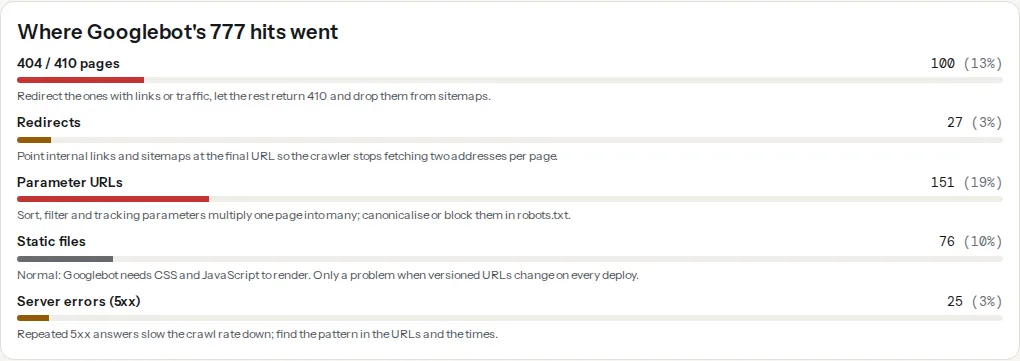
Static files are normal (Googlebot renders pages and needs the CSS and JavaScript); the red and amber bars are the ones to work on. The bots table above the panel gives the same numbers per crawler, plus the average response time when the log carries it; a rising response time beside a falling Googlebot hit count is the capacity limit in action.
Step by step
1. Find out whether you are budget-limited at all
Open Search Console → Settings → Crawl stats and compare total crawl requests per day with your page count (the sitemap validator prints the number of URLs in each file). If Google fetches 1,500 URLs a day and your sitemap lists 900, it crawls your whole site more than once a day; slow indexing is then a demand or quality question, and the rest of this guide is about making those crawls count. If Google fetches far fewer URLs than you have pages and "By response" shows server errors or a climbing response time, the server is throttling the crawl.
2. Get a month of logs into the analyser
Download the access log from your host (see server log analysis for where each host keeps it) and drop it in. Read Googlebot's shares of 404s, redirects and parameter URLs, then open "Where Googlebot's hits went" and the URL lists behind each bar. What a small site typically shows, in the order it usually shows up:
| Waste | How it looks in the log | Where it comes from |
|---|---|---|
| Redirects | 301/302 answers for URLs that other pages still link to | A migration, an https or www change, renamed slugs |
| 404s | Old product and post URLs, hit month after month | Old sitemaps, links from other sites, Google's own memory |
| Parameter URLs | ?sort=, ?color=, ?utm_, ?replytocom=, ?add-to-cart= | Filters, comment reply links, shop buttons |
| Archives | /2019/03/, /page/47/, /tag/misc/ | Calendar and tag archives nobody visits |
| Search results | /?s=, /search/anything/ | Site search forms that produce a page per query |
| Feeds and trackbacks | /feed/, /comments/feed/, /trackback/ per post | WordPress defaults |
| Attachment pages | /photo-name/ returning a page with one image | WordPress media |
| Staging copies | A second host in the log, or /staging/ paths | A test copy that was never protected |
Each is a near-infinite space: a few templates generating thousands of URLs. Googlebot cannot tell from outside that page 47 of a tag archive has nothing new, so it keeps checking.
3. Fix the sitemap first
The sitemap is your statement of what matters. Every entry that answers 404, 410 or a redirect is a wasted fetch and a sign the file is not maintained, and Google weights an unmaintained sitemap less. Run the validator, open the "Listed URLs, sampled" table and fix every row whose status is not 200 or whose "Lands on" column is not "itself":
- Deleted pages: remove them. If they had links or traffic, redirect them too, but a redirect does not belong in a sitemap.
- Redirected pages: list the final URL instead.
lastmod: keep it honest. A date that changes on every request teaches Google to ignore it; a real date lets Google skip unchanged pages, the cheapest crawl saving there is. Sitemap lastmod: when to set it has the rules.
CMS sitemaps regenerate from the live page list and only go wrong when the file is static or built by hand.
4. Kill the redirect chains
A redirect is a fetch that returns no page; two in a row is two. After a migration, internal links, menus and the sitemap often still point at the old addresses, so every crawl pays the hop twice. The log's redirect list names the URLs; update the links to the final URL and make each old address redirect once, straight to the end:
# nginx: one hop from every old address to the final one
location = /old-slug/ { return 301 https://example.com/new-slug/; }
# not: /old-slug/ → http→https → www→bare → /new-slug/
Redirect chains after a migration walks through finding every hop.
5. Canonicalise or block the parameter URLs
Sort, view and tracking parameters produce copies of a page; a canonical on every variant pointing at the clean URL tells Google which to keep, but Google still fetches the variant to read the tag. For parameters that never produce a page worth indexing, stop the fetch in robots.txt:
User-agent: *
Disallow: /*?*sort=
Disallow: /*?*replytocom=
Disallow: /*?*add-to-cart=
Disallow: /?s=
Disallow: /search/
Two cautions. Never block a URL that carries noindex or a canonical you want Google to read; a blocked page cannot be read. And do not block a filter page with search demand of its own; make it a real landing page. Faceted navigation and parameter URLs sorts the parameters into keep, canonicalise, noindex and block.
6. Close the infinite spaces
Site search result pages, calendar archives and paginated comment pages are noindex candidates (crawlable until Google has seen the tag, then blockable). Keep the main feed and drop the per-post comment feeds. Attachment pages should redirect to the file or the parent post: the WordPress attachment pages guide has the setting. A staging copy needs a password, not a robots rule; see staging sites: testing changes before they go live.
7. Link to the pages you want crawled
Crawl demand follows links. A page that only exists in the sitemap gets fetched eventually; one linked from the home page and three related articles gets fetched at the next visit. Run the report on the pages that should link to it; the internal-links finding warns when a page is a dead end (fewer than 3 same-host links) or a link dump (over 300). Internal links: how many, where, with what anchor text covers the placement.
8. Keep the server fast
Google lowers the crawl rate when responses get slow or 5xx errors appear, and raises it again slowly. Run the TTFB test on a few pages; a first byte over 800 ms on a page that should be cached comes before anything else in this list. The log's "Server errors (5xx)" bar shows whether Googlebot met errors, and the times show when (a nightly backup, a cron burst, a plugin update are the usual patterns).
What not to do
Crawl-delayin robots.txt. Googlebot ignores it, and the crawlers that honour it crawl less, which is the opposite of what you want. If Googlebot genuinely overloads the server, Google's documented lever is a temporary 503 or 429 answer; the crawl rate then recovers on its own.- Blocking CSS, JavaScript or images "to save budget". Google renders pages; without the CSS and scripts it sees a broken page and may treat the content as hidden. Images are fetched by a separate crawler (Googlebot-Image); blocking it removes you from image search and saves nothing you would notice.
- Blocking Googlebot from paginated category pages. Page 2 onward is how the products on page 2 onward get found.
- "Crawl budget optimiser" plugins. They flip the same feed and archive switches your SEO plugin already has, and some block resources you need. Make each change yourself.
- Deleting old content to shrink the site. A 200-page site has no more budget than a 2,000-page one; it just has fewer pages that can rank. Redirect or improve instead.
Platform notes
WordPress
The defaults generate most of the infinite spaces in step 2: ?replytocom= on every comment reply link, a comment feed per post, date and author archives, attachment pages, ?s= search. Yoast and Rank Math have switches for archives, feeds and attachment redirects; ?replytocom=, and WooCommerce's ?add-to-cart= and ?orderby=, belong in robots.txt. The WordPress rookie mistakes guide lists the defaults to turn off.
Shopify
Shopify's robots.txt already blocks /search, /cart, /checkout and sorted collection variants, and its sitemap is generated. Crawl waste on Shopify is mostly old products that were deleted rather than archived; keep their URLs redirected from Navigation → URL redirects.
Static sites
No infinite spaces unless you build them (a search page with query URLs, a tag taxonomy with hundreds of one-page tags). The sitemap comes from the build, so 404s in it mean the build and the deploy disagree; run the validator after every deploy that removes pages.
Verify
- The validator's sampled URLs all answer 200 and land on themselves; the
lastmodrange looks like real dates, not today. - Next month's log: Googlebot's 404, redirect and parameter shares fall and its distinct URL count rises while total hits stay level. That is budget moving from waste to pages.
- Search Console → Crawl stats: response time flat or falling, no 5xx, total requests per day comfortably above your page count.
- New pages linked from existing ones show up in the log as fetched within days.
Common mistakes
- Treating "Discovered – currently not indexed" as a budget problem. On a small site it means Google has not decided the URL is worth a fetch. Links and content fix that; robots.txt rules do not.
- Blocking a parameter in robots.txt after adding a canonical or noindex to it. The directive is never read. Block what should never be fetched; canonicalise what should be fetched and merged.
- A sitemap that lists everything the CMS knows. Tags with one post, attachment pages. The sitemap is a curated list, not an export.
- Fixing the links but leaving the chain. Old URLs live on in Google's memory and other sites' links for years; each needs a single-hop redirect.
- Looking at one day of logs. Googlebot's pattern shows over weeks. Analyse a month, compare month to month.
A 30-minute quarterly routine
- Sitemap validator on the home page URL; fix every sampled row that is not "200, itself" (10 minutes).
- Last month's log into the log analyser; read Googlebot's 404, redirect and parameter shares; export the 404 and parameter URL lists (10 minutes).
- Redirect the 404s with links, add robots.txt rules for the parameter patterns, update the internal links behind the redirects (10 minutes, more the first time).
- Note the three shares next to your monthly site health routine so next quarter has something to beat.