<lastmod> is the one optional field in a sitemap that Google acts on. When it is right, a changed page is recrawled sooner and an unchanged one is left alone, which is exactly the budget you want on a site with thousands of pages. When it is wrong, Google notices within a few reads and stops trusting the file, and then the field does nothing for the pages that did change. This guide explains what lastmod should say, the format, how the common CMSs set it, and how to tell from one report whether yours is honest. It takes ten minutes to check and usually one setting to fix.
Quick answer
- Set
<lastmod>to the date of the last significant change to the page's content. Not the time the sitemap was generated, not the last comment, not a theme update. - Format is W3C datetime:
2026-09-25or2026-09-25T14:30:00+02:00. A time needs a timezone. - Google ignores
<changefreq>and<priority>. Leave them out. - If you cannot produce an honest date, omit
<lastmod>; a missing value is neutral, a fake one costs trust. - Never stamp every URL with "now". If the lastmod range in the validator's files table is a single date equal to today, that is what your generator does.
- Run the sitemap validator to see the date range, the format problems and whether the listed pages answer 200.
Why lastmod matters
Google's documentation is direct about the three optional fields. priority and changefreq are ignored. lastmod is used, for crawl scheduling and as a signal for which version of a page is current, on one condition: that it is consistently and verifiably accurate. Google compares the date you give with what it finds when it fetches the page. If the sitemap says the page changed yesterday and the content is identical to last month's fetch, that is one strike. A file where every URL changed "today" on every read is a hundred strikes, and the field is discounted for the whole file.
The cost of an honest lastmod is zero. The benefit shows on the pages people forget: an updated price on a product from 2022, a corrected address on the contact page, a rewritten article. Without a date, Google recrawls those on whatever schedule it settled on years ago, which for a quiet page can be months. With a date that moved, they are queued sooner.
The cost of a dishonest one is quieter but real. A site that stamps now on every generation, and whose new pages therefore look no different from old ones, gets its new pages found by links and by luck rather than by the file it built for the purpose (how sitemaps feed discovery). On a large site that is one of the reasons behind why a page is not in Google.
How getReport checks it
The report fetches the sitemaps declared in robots.txt (the first three) and /sitemap.xml, gunzips them when needed, and parses each with a strict XML parser. Every <lastmod> value is checked against the W3C datetime grammar; values that do not fit are counted in the problems list. The valid values are reduced to a range, oldest to newest, which is shown in the files table and in the passing finding's evidence line ("lastmod up to 2026-09-24").
Then up to 25 listed URLs, spread evenly through the file, are requested with HEAD to confirm they answer 200 and land on themselves:
And the page you tested is looked up in the file, which is also how you find out that a page you updated last week is not listed at all and so cannot carry a lastmod:
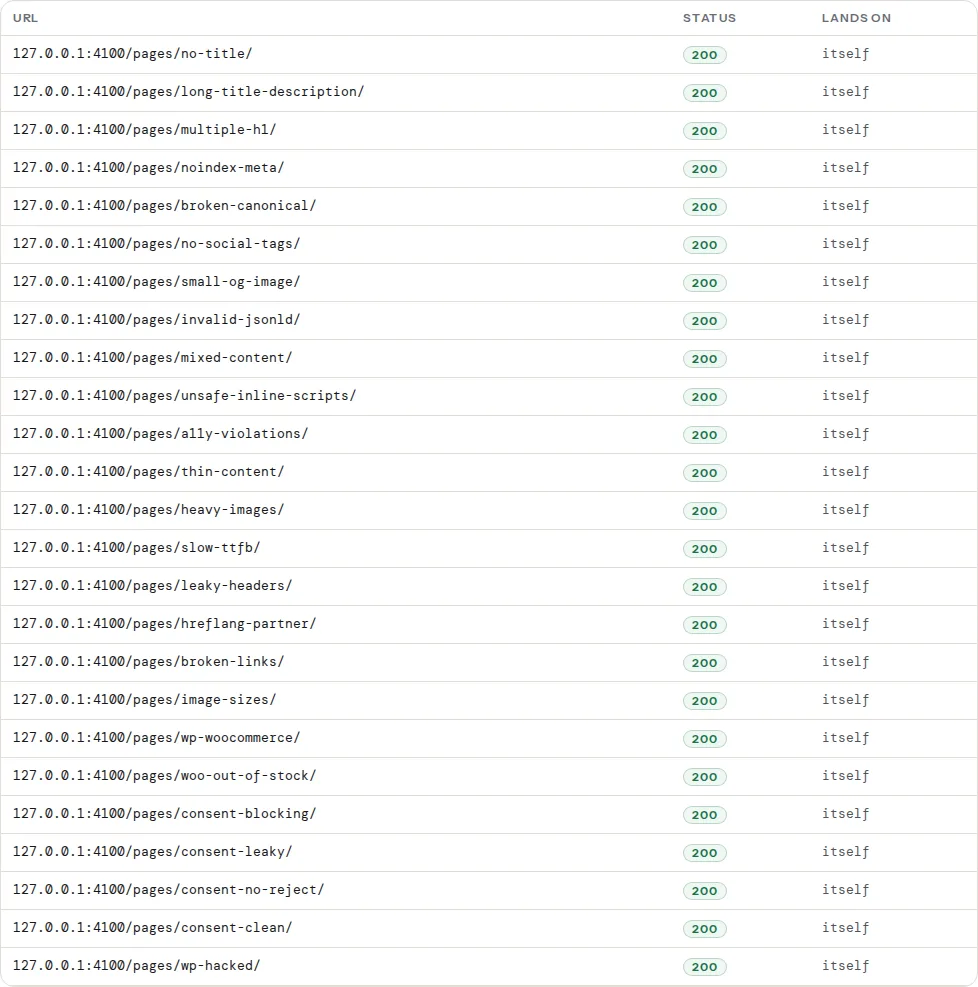
Read the range first. A healthy sitemap on an established site shows a spread of months or years, with the newest date near the last time someone published. A range that collapses to one date, especially today's, means the generator writes the current time. A range whose newest date is a year ago on a site that publishes weekly means the generator reads a field nobody updates.
Step by step
1. Decide what "changed" means for your pages
The date should move when a reader would notice a difference: text, price, availability, images, the title. It should not move for:
- A new comment (comments are not the page's content in Google's sense).
- A theme or template change that touched every page's markup identically.
- A change to the footer, the menu or a sidebar widget.
- A resave without edits, a bulk category change, a plugin "touching" posts on activation.
- The sitemap being regenerated.
Where the CMS stores one "modified" timestamp per page, that timestamp is usually the honest source, as long as nothing bumps it for cosmetic reasons (step 4). On a site split into several files, the same rule applies to the <lastmod> on each <sitemap> entry of the index: the newest date inside that child, never the generation time. See Sitemap index files.
2. Use the format Google reads
W3C datetime, which is ISO 8601 with a fixed shape. Both of these are valid:
<lastmod>2026-09-25</lastmod>
<lastmod>2026-09-25T14:30:00+02:00</lastmod>
These are not: 25/09/2026, Sep 25 2026, 2026-09-25 14:30:00 (space instead of T, no zone), 1758803400 (a Unix timestamp), 2026-09-25T14:30:00 (a time without a zone). The validator lists each of them as "not W3C dates". A date without a time is enough for almost every site; use the full timestamp only when pages change several times a day and the time is real.
In PHP, the constant that prints the right shape:
<?php
// Emit lastmod in W3C datetime with the site's timezone, from a real modified time.
$modified = new DateTimeImmutable('2026-09-25 14:30:00', new DateTimeZone('Europe/Zagreb'));
echo '<lastmod>' . $modified->format(DATE_W3C) . '</lastmod>';
// <lastmod>2026-09-25T14:30:00+02:00</lastmod>
In JavaScript, toISOString() gives the UTC form with a Z, which is valid:
// lastmod from the content's own modified date, not from Date.now()
const lastmod = new Date(page.modifiedAt).toISOString(); // 2026-09-25T12:30:00.000Z
3. Drop changefreq and priority
They cost bytes and can only make the file invalid (a changefreq of sometimes or a priority of 5 are both reported). A <url> needs <loc> and, when honest, <lastmod>:
<url>
  <loc>https://example.com/products/leather-tote/</loc>
  <lastmod>2026-09-18</lastmod>
</url>
4. Find what bumps the modified date
In most CMSs the modified timestamp moves on every save of the record, whether or not content changed. The usual culprits:
- Bulk edits. Changing a category on 300 posts in one operation updates 300 modified dates.
- Page builders and plugins that resave. Some builders regenerate CSS and save the post on every editor open; some migration and "regenerate" tools touch every post.
- Scheduled or automated updates: stock syncs that write to the product record even when nothing changed, translation plugins re-syncing.
- Cache warmers or import scripts that update every record nightly.
The test is the range in the files table. If it moves to today on a day nobody published, something bumped every record. Find it by checking the modified dates of a few pages in the CMS after each suspected operation.
5. Fix the generator, not the file
Editing the XML by hand lasts until the next generation. Fix the source:
- If the generator writes the generation time, switch it to the page's modified field (most sitemap plugins already do; a custom script may call
now()). - If the modified field is unreliable, either stop the operations that bump it, or track content changes separately (a hash of the content compared on save) and expose that date to the sitemap.
- If neither is possible, remove
<lastmod>entirely. Google treats a missing date as "unknown", which is better than "wrong".
6. Re-run and compare
After the change, re-run the validator on a page you know was edited recently and on one that was not. The range should span the real history of the site, the edited page's date should be recent, and the quiet page's date should be old. The sampled URLs still need to answer 200: a lastmod on a URL that redirects is a date on a page Google will not index at that address.
Platform notes
WordPress
Core's sitemap (/wp-sitemap.xml) writes <lastmod> from each post's post_modified_gmt, and gives the home page entry the newest modified date among posts. Yoast SEO and Rank Math also use the post's modified date, and set an archive's lastmod to that of its newest member. That makes all three honest by default, and the problems come from what moves post_modified: any save in the editor, Quick Edit, bulk edit, and any plugin that calls wp_update_post(). A site that "updates" every post nightly through a sync plugin will show the whole sitemap dated today.
Two settings to know. Comments do not change post_modified, so they are safe. A theme or plugin update does not either. If you need a page's date to stay put while fixing a typo, there is no core switch for that; the honest answer is that a typo fix is a content change, and the date can move.
Attachment pages and tag archives in the sitemap carry dates too, but the fix for those is not to list them; see XML sitemap validation.
Shopify
Shopify writes lastmod into its generated sitemaps and offers no setting for it. If the dates look too fresh across the whole catalogue, the cause is usually an app that writes to every product on a schedule; pause it and watch the range in the validator.
Static sites and custom
Build tools default to the wrong thing more often than CMSs do. A generator that writes new Date() at build time dates every page to the deploy. Use the content's own date from front matter (updated:, lastmod:) or the file's last commit date from git:
# Last commit that touched the content file, in W3C form (git ≥ 2.x)
git log -1 --format=%cI -- content/products/leather-tote.md
# 2026-09-18T09:12:44+02:00
Reformatting the whole content tree in one commit moves every date; do such commits knowingly, or read the date from front matter that only humans change.
News sitemaps
A Google News sitemap is a different file with its own news: namespace, listing only articles published in the last two days, up to 1,000 of them, with <news:publication_date> rather than relying on <lastmod>. Update it whenever an article is published and keep the ordinary sitemap for everything else.
Verify
- The files table shows a lastmod range that matches the site's real publishing history, with no "not W3C dates" problem.
- Edit a page, regenerate (or wait for the cache), and re-run: only that page's date moved. Check its entry with
curl -s https://example.com/sitemap-posts.xml | grep -A1 "leather-tote". - Search Console → Sitemaps shows a "Last read" date that keeps moving, which means the file stays trusted enough to be read.
- The sampled URLs all answer 200 and land on themselves, so the dates are attached to pages Google can index.
Common mistakes
- Stamping the generation time on every URL. Symptom: one date for the whole file, always today. Fix: read the page's modified field, or drop the tag.
- A timestamp without a timezone.
2026-09-25T14:30:00is reported as invalid. Add the offset or use the date only. - Modified dates bumped by automation. A nightly sync updates every product. Make the sync skip unchanged records, or stop using the modified field for lastmod.
- Dates on redirecting or deleted URLs. A fresh lastmod on a URL that now 301s or 404s is a fetch wasted. The sampled table shows them; remove or update the entries.
- Trusting
priorityto do the same job. It is ignored. Only the date and the URL list matter. - Editing the XML by hand. It works until the next regeneration overwrites it. Fix the generator.