HSTS is one line of server configuration that tells browsers "this site is HTTPS only, do not even try HTTP". Done in the right order it takes a week of waiting and ten minutes of work. Done in the wrong order it can lock visitors out of a subdomain for a year. This guide walks through the safe order, the configs for nginx, Apache, Caddy and Cloudflare, and the extra step of joining the browser preload list.
Quick answer
- Fix HTTPS first: a valid certificate on every host, and every
http://URL redirecting tohttps://in one hop. - Send
Strict-Transport-Security: max-age=300for a day, thenmax-age=86400for a week, thenmax-age=31536000. - Add
includeSubDomainsonly after checking every subdomain, internal ones included, over HTTPS. - For the preload list:
max-age=31536000; includeSubDomains; preloadon the bare domain, then submit at hstspreload.org. Treat it as permanent. - Check each stage with the security headers checker.
Why HSTS matters
Most people type example.com, not https://example.com, and many old links, bookmarks and printed flyers still say http://. Each of those visits starts with one unencrypted request that your server answers with a redirect to HTTPS. On a café or hotel network, that first request is the moment someone in the middle can answer instead of you: keep the visitor on plain HTTP and read or change everything they send, including the login form.
HSTS closes that gap after the first visit (the HSTS learn page has the short definition). Once a browser has seen the header over HTTPS, it rewrites every http:// request for that host to https:// itself, before anything leaves the device, for the next max-age seconds. It also removes the "continue anyway" button on certificate warnings for that host, so a visitor cannot be talked into clicking past a fake certificate.
Two limits are worth knowing:
- The first visit is still exposed. The browser has never seen the header, so it has nothing to remember. The preload list fixes that: browsers ship with a built-in list of HTTPS-only domains.
- The header is ignored over HTTP. Browsers only accept HSTS from an HTTPS response, otherwise an attacker could inject it. Sending it from port 80 does nothing.
How getReport checks it
The tool requests the page as a browser would, follows redirects and reads the headers of the final HTTPS response. It shows the two HSTS findings. Every getReport report also requests the http:// version of the same address to see whether it redirects, and the SSL / TLS checker shows those two HTTPS findings next to the HSTS ones. All four matter here:
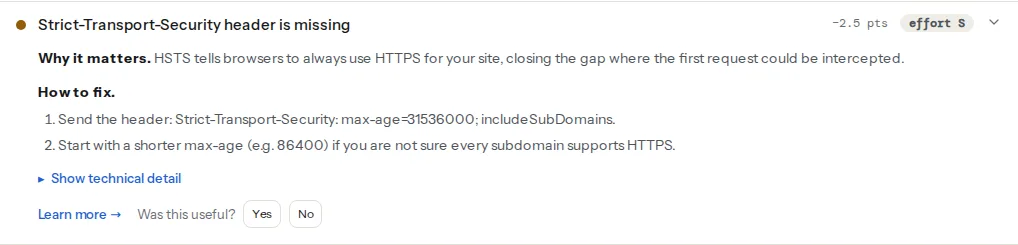
What the checks accept, precisely:
hstspasses whenever the header is present with anymax-ageabove zero. A header withmax-age=0is flagged, because it tells browsers to forget the policy.hsts-preload-readyonly runs when the header is present. It is "ready" whenmax-ageis at least 31,536,000 seconds and bothincludeSubDomainsandpreloadappear. It is informational and costs no points: joining the list is a choice, not a requirement.- It reads the header on the page you tested. The preload list reads it on the bare domain (
example.com, notwww.example.com), so test that address too. - It does not probe your subdomains. Whether
intranet.example.comworks over HTTPS is something only you can confirm.
Step by step
1. Get HTTPS right on every host
HSTS enforces whatever state HTTPS is in. If a certificate expires while HSTS is active, visitors see a warning they cannot click through. Before adding the header:
- The
https-enforcedandhttp-to-https-redirectfindings pass on the main host. - The certificate is valid and renews automatically (the SSL / TLS checker shows days to expiry and whether the chain validates).
- No page loads
http://resources; see mixed content after moving to HTTPS.
2. Send a short max-age
Start with five minutes. If something breaks, browsers forget the policy almost immediately.
nginx, in the server block that listens on 443:
add_header Strict-Transport-Security "max-age=300" always;always makes nginx send it on error pages too. One nginx trap: a location block with its own add_header does not inherit the ones from the server block. If you set headers in a location (a cache header for images, for example), repeat the HSTS line there.
Apache, inside the <VirtualHost *:443> block, with mod_headers enabled:
Header always set Strict-Transport-Security "max-age=300"Caddy redirects HTTP to HTTPS automatically but does not add HSTS by itself. In the Caddyfile:
example.com {
    header Strict-Transport-Security "max-age=300"
    reverse_proxy app:3000
}Cloudflare: SSL/TLS → Edge Certificates → HTTP Strict Transport Security (HSTS). The dashboard only offers long max-age values (months, not minutes), so run the short test stages from the origin (or a Modify Response Header rule) and switch to the dashboard setting for the final value, with "Apply HSTS policy to subdomains" and "Preload" off until steps 4 and 5. Keep a single source: if Cloudflare sends the header, remove it from the origin.
WordPress without server access can send it from a small plugin or functions.php on the send_headers hook, as shown in security headers from zero to A. The server or CDN is better, because cached pages served without PHP will not carry it.
3. Raise it in stages
| Stage | Header | How long to wait |
|---|---|---|
| Test | max-age=300 | A day of normal traffic |
| Settle | max-age=86400 | A week |
| Commit | max-age=31536000 | Permanent setting |
Every raise is a promise to returning visitors: a browser that saw max-age=31536000 today will insist on HTTPS until this date next year, even if you remove the header tomorrow. The waiting time is there so you find problems while the promise is short.
4. Decide about includeSubDomains
includeSubDomains extends the policy to every subdomain of the host that sends it. On example.com, that means shop., mail., staging., intranet., printer. and anything else under it, including hosts that are not public.
Before adding it, list your subdomains. Your DNS zone is the most complete source. Check each one in a browser over https://. Typical casualties:
- An internal tool or router admin page with a self-signed certificate, reached on the office network as
nas.example.com. - A mailing or marketing platform with a custom tracking domain (
click.example.com) that only works over HTTP. - An old subdomain pointing at a service that was never given a certificate.
If any of them cannot do HTTPS, fix it or move it to a different domain first. Once a visitor's browser has the policy, that subdomain is unreachable for them until the policy expires.
add_header Strict-Transport-Security "max-age=31536000; includeSubDomains" always;5. Join the preload list, if you mean it
The preload list is compiled into Chrome, and Firefox, Safari and Edge use lists based on it. A preloaded domain is HTTPS-only from the very first visit, on every device, with no header seen yet.
The requirements published at hstspreload.org:
- A valid certificate.
- Redirect from HTTP to HTTPS on the same host:
http://example.commust go tohttps://example.comfirst, not straight tohttps://www.example.com. - All subdomains served over HTTPS, in particular
www.if it has a DNS record. - The HSTS header on the base domain's HTTPS response, with
max-ageof at least 31,536,000 seconds,includeSubDomainsandpreload. - If the HTTPS base domain redirects (to
www., say), the redirect response itself carries the header.
add_header Strict-Transport-Security "max-age=31536000; includeSubDomains; preload" always;Then enter the domain at hstspreload.org. The site checks the requirements live and lists anything missing. After acceptance it takes weeks to months before the entry ships in browser releases.
Watch out
Preloading is effectively permanent. Removal is possible through the same site, but the removal has to ship in new browser versions, and people update slowly. Plan for every subdomain you will ever create under that domain to need HTTPS from day one, for years. If that is not realistic, stop at step 4.
For reference, getreport.app sends max-age=31536000; includeSubDomains; preload from Caddy, and .app is a top-level domain that is preloaded as a whole, so every .app site is HTTPS-only by design.
Platform notes
WordPress
Hosts that manage the web server often have an HSTS switch in their control panel; use it rather than a plugin when it exists. Security plugins can also send the header. Whichever you use, confirm with curl that only one Strict-Transport-Security line comes back, and that cached pages carry it.
Shopify
Shopify serves every store over HTTPS and controls the response headers, so there is no HSTS setting to change. Run the checker to see what your store sends; preloading needs control of the header on the bare domain, which the platform keeps.
Static sites / custom
On Netlify and Cloudflare Pages, add the header in a _headers file in the publish directory; on Vercel, in headers in vercel.json; or set it once at the CDN. Check the result with the tool, since some hosts already send their own value.
Verify
- Run the security headers checker on the bare domain and on
www.. Thehstsfinding passes, and at the final stagehsts-preload-readyreads "HSTS is ready for the browser preload list" if you chose to preload. - From a terminal, check the HTTPS response and the HTTP redirect:
curl -sI https://example.com/ | grep -i strict-transport
curl -sI http://example.com/ | grep -i -E "^HTTP|^location"
The first prints the header once. The second shows a 301 or 308 to https://example.com/, the same host.
- In Chrome,
chrome://net-internals/#hsts→ "Query HSTS/PKP domain" shows whether your browser has stored the policy and its expiry. The same page can delete a dynamic entry while testing. - For the preload list, hstspreload.org shows the status of the domain: pending, preloaded, or the list of unmet requirements.
Common mistakes
- Going straight to a year. A subdomain you forgot about breaks for a year for everyone who visited. Use the 300 → 86400 → 31536000 ladder.
- includeSubDomains on a domain with internal hosts. The office NAS or a vendor's tracking subdomain stops working in browsers. Inventory the DNS zone before adding it.
- Header only on
www., preload requested for the bare domain. hstspreload.org rejects it. Send the header onhttps://example.com, including on its redirect towww.. - Redirecting
http://example.comstraight tohttps://www.example.com. Visitors get there, but the preload check fails because the bare domain never set HSTS over HTTPS. Redirect tohttps://example.comfirst, then towww.; the redirect checker shows each hop. - Turning HSTS off by deleting the header. Browsers keep the old policy until it expires. To retract it, send
max-age=0over HTTPS for a while (thehstscheck flags that value on purpose, so it is visible), then remove the header.