The most common hacks today are built not to be noticed by the site owner. They show spam only to Googlebot, or redirect only visitors who arrive from a Google result, and serve the normal page to everyone who types the address. So the owner sees nothing wrong while Google indexes a pharmacy. This guide shows how to see your site the way Google sees it, how to confirm what you find, and how to clean a WordPress site so the spam does not come back. Checking takes five minutes; a cleanup takes an afternoon to a day.
Quick answer
- Run the hacked site checker. It fetches the page as a normal visitor, as Googlebot and as a visitor from Google, and compares them.
- Differences with pharma, casino or loan links, text in a script you do not publish in, or a redirect to a site you do not own mean an injection.
- Confirm it in Search Console (URL Inspection → View crawled page) and with
curl. - Clean in order: back up the hacked state, update, verify core files, find and remove the injection and the backdoor, change every password and key.
- Only then request a review under Security Issues in Search Console.
Why a hacked site matters
These are the symptoms owners actually report:
- Google results for the site show titles about Viagra, casinos or loans, or whole lines of Japanese text, often on URLs the site never had.
- The result carries the label "This site may be hacked".
- Customers say that clicking the site in Google took them to a casino or a "you won a phone" page.
- Organic traffic drops sharply within a few days, while direct traffic looks normal.
- Search Console sends an email about security issues, or lists owners you never added under Settings → Users and permissions.
The cost is rankings first, then trust. Google demotes or labels hacked pages, and if the attacker also serves malware, browsers show a red warning page to every visitor. The attacker's goal is usually your domain's reputation: their links on your pages help their sites rank.
Why your own browser shows a clean page
The injected code checks who is asking before it answers. User-agent cloaking looks for "Googlebot" in the request and serves spam only then. Referrer cloaking looks at where the visitor came from: arriving from google.com triggers a redirect, typing the address does not. Many injections also skip logged-in WordPress users, or fire once per visitor and set a cookie. The one person guaranteed never to see it is the owner checking the home page from a bookmark.
How getReport checks it
The tool fetches the page three times: with our own user agent as a normal visit, with Googlebot's user agent, and with a Chrome user agent plus a Referer header from https://www.google.com/. It does not run JavaScript; it compares the HTML each fetch returns.
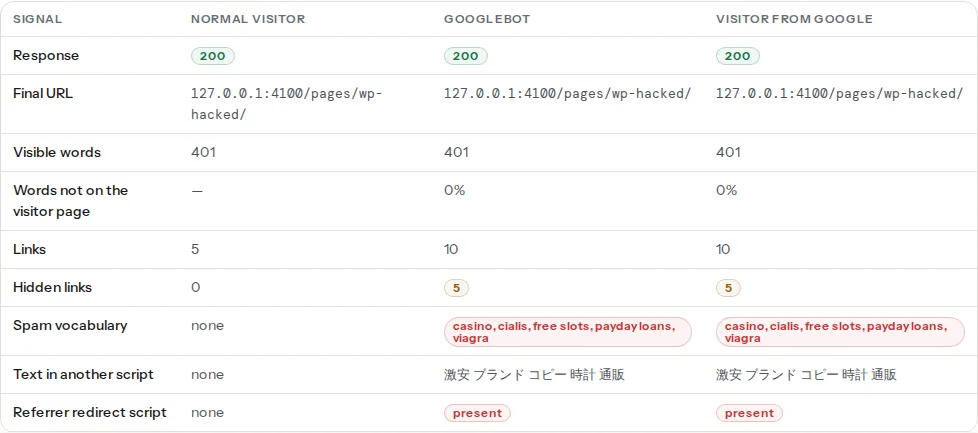
What each row compares:
- Words not on the visitor page. The most frequent words of each copy are compared. When at least 30% of the Googlebot or Google-visitor copy is missing from the visitor copy and at least 20 words are new, the cloaking finding fires.
- Spam vocabulary. A fixed list of 36 words and phrases that injections use and legitimate navigation almost never does: pharma (viagra, cialis, tramadol), gambling (casino, slots, betting), payday loans, replica goods, essay mills, adult terms and crypto giveaways. Matched as whole words in visible text, hidden text and link URLs.
- Hidden links. Links to other sites inside an element hidden with the
hiddenattribute,aria-hidden="true"or an inline style:display:none,visibility:hidden, zero opacity or font size, or a position far off-screen. - Text in another script. Runs of Chinese, Japanese, Korean or Cyrillic characters on a page whose
langsays it is in another language. This is how the Japanese keyword hack shows up. - Referrer redirect script. An inline script that reads
document.referrer, looks for Google, Bing or Yahoo, and changeslocation. - Final URL. A redirect to another host that happens for one fetch and not the others.
The panel is headed "differences are evidence, not a verdict", and it means it. A sports blog that links to a betting guide, a booking page with "free slots", a site that serves a lighter page to bots: all of them match. You know which links and words are yours.
The tool also shows the usual ways in: an out-of-date CMS version, plugins closed or abandoned on wordpress.org, a readable .env or .git and open directory listings. Google's own verdict comes from Safe Browsing: the Web Risk finding carries it once the lookup runs in your report. Until then, look the domain up on the Safe Browsing site status page in Google's Transparency Report.
Watch out
"No differences" covers this URL, fetched from our servers, once. It cannot see injections on other pages, spam loaded by external JavaScript, links hidden by a stylesheet class, or code that checks Google's real IP addresses. If Google shows spam for your site, trust Google and test the exact URLs it lists.
Step by step
1. Read the evidence
Open the spam links finding first. Each line names the fetch that received the link, the anchor text and the target.
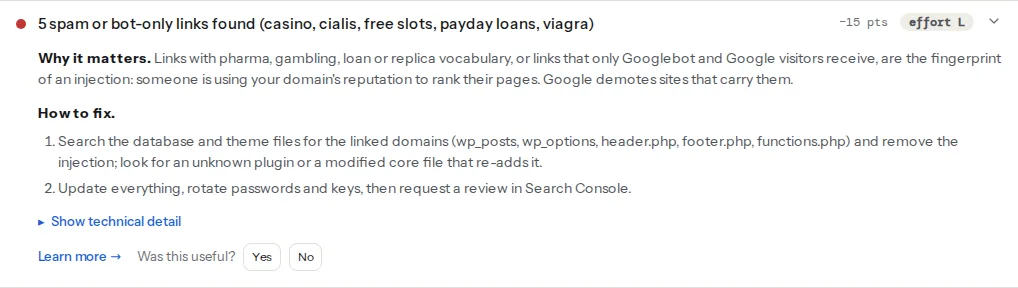
Write down the domains the links point to and any words that stand out. They are your search terms for step 5.
2. Confirm it by hand
Search Console. URL Inspection → enter the URL → Test live URL → View tested page → HTML. That is the page as Googlebot fetches it, from Google's own addresses, so it also catches IP-based cloaking. View crawled page shows the copy Google has indexed. Search the HTML for the spam domain.
Google itself. Search site:example.com viagra, site:example.com casino or just site:example.com and scroll. Pages you never created, especially with Japanese titles, are generated by the hack.
curl, to compare the copies yourself:
# Normal visitor and Googlebot, saved to two files
curl -s -A "Mozilla/5.0 (Windows NT 10.0; Win64; x64) AppleWebKit/537.36 (KHTML, like Gecko) Chrome/120.0.0.0 Safari/537.36" https://example.com/ -o visitor.html
curl -s -A "Mozilla/5.0 (compatible; Googlebot/2.1; +http://www.google.com/bot.html)" https://example.com/ -o googlebot.html

# Links only one copy has
diff <(grep -o 'href="[^"]*"' visitor.html | sort -u) <(grep -o 'href="[^"]*"' googlebot.html | sort -u)

# A visitor from Google: a Location header to another site is a server-side redirect
curl -sI -e "https://www.google.com/" -A "Mozilla/5.0 (Windows NT 10.0; Win64; x64) AppleWebKit/537.36 (KHTML, like Gecko) Chrome/120.0.0.0 Safari/537.36" https://example.com/
A JavaScript redirect only fires in a browser: open a private window, search for your site on Google and click the result.
3. Freeze the evidence and take the site offline
Before changing anything, copy the hacked state somewhere outside the web root. You will want it to find the way in and to compare later.
# Run in the WordPress folder (WP-CLI)
wp db export ~/hacked-$(date +%F).sql
tar -czf ~/hacked-files-$(date +%F).tar.gz .
wp maintenance-mode activate
Tell your host. Many have a malware team, and on shared hosting the infection may have come from, or spread to, a neighbouring account.
4. Update everything
Dashboard → Updates: core, every plugin, every theme. Delete plugins and themes you do not use, including inactive ones; their files are still reachable. Plugins closed on wordpress.org get no more fixes, so replace them (see abandoned WordPress plugins).
5. Find the injection
Start with core files, which WP-CLI can compare with the official checksums:
wp core verify-checksums
wp plugin verify-checksums --all
Any file reported as modified, or "should not exist", in wp-admin or wp-includes is suspect. Premium plugins have no public checksums and show as unverifiable, which is not a finding.
Then search the files, using the domains from step 1:
# The spam domain anywhere in the site's files
grep -rl "spam-domain.example" wp-content/ wp-config.php index.php .htaccess

# Obfuscated PHP: legitimate plugins use these too, so review each hit
grep -rlE "eval\(|base64_decode|gzinflate|str_rot13" --include=*.php wp-content/

# PHP files do not belong in uploads
find wp-content/uploads -name "*.php"

# Must-use plugins run without appearing under Plugins
ls -la wp-content/mu-plugins/

# PHP files changed in the last 30 days, newest last
find . -name "*.php" -mtime -30 -printf "%TY-%Tm-%Td %p\n" | sort
Check .htaccess at the site root and in wp-content/uploads. A referrer redirect often looks like this:
# Injected: sends visitors from search engines elsewhere
RewriteCond %{HTTP_REFERER} (google|bing|yahoo) [NC]
RewriteRule ^(.*)$ https://spam-domain.example/ [R=302,L]
Then the database, where spam links and scripts hide in posts, widgets and options:
wp db search "spam-domain.example"
wp db search "document.referrer"
wp option get siteurl
wp option get home
wp user list --role=administrator --fields=ID,user_login,user_email,user_registered
wp cron event list --fields=hook,next_run_relative
Delete administrator accounts you do not recognise (reassign their content), and cron hooks that belong to no plugin you run.
6. Change every key
The attacker may have copied credentials. Change the passwords of every WordPress administrator, the hosting panel, SFTP/SSH and the database (then update DB_PASSWORD in wp-config.php). New salts log everyone out, including any stolen session:
wp config shuffle-saltsRotate API keys stored on the site: payment gateways, SMTP, backups, CDN.
7. Reinstall from clean sources
Removing the visible spam is not enough; a backdoor elsewhere puts it back within hours. Replace code you did not write with fresh copies:
wp core download --force --skip-content
wp plugin list --field=name | xargs -n1 wp plugin install --force
Reinstall premium plugins and the theme from the vendor's download, and review your child theme's files by hand. A scanner plugin (Wordfence, Sucuri, MalCare and others) is a useful second opinion afterwards, not a replacement for these steps.
Tip
Restore a backup instead when you have one from before the hack and can tell when that was. Check the backup for the injection before you restore it. If the site is complex, the injection keeps returning, or you are not comfortable on the command line, a professional cleanup service is money well spent.
8. Stop the next one
- Update weekly, or turn on automatic updates for plugins you trust. The checker's CMS version finding flags an old core.
- Give each person their own account with the lowest role that works, and two-factor login for administrators. The admin user and author archives covers the "admin" account.
- Remove plugins you no longer use.
- Put a WAF in front: your host's, Cloudflare's or a security plugin's.
- Stop file edits from the dashboard, in
wp-config.phpabove "That's all, stop editing!":
define('DISALLOW_FILE_EDIT', true);- Watch for file changes (most security plugins can alert you) and keep daily off-site backups with at least 30 days of history, so a clean copy exists when you notice late.
9. Ask Google to review
When the site is clean, open Search Console → Security & Manual Actions → Security issues, tick that you fixed the issues and request a review. Describe what you found and removed. Malware reviews usually take a few days; reviews for spam can take several weeks. Pages Google dropped come back as it recrawls them; the steps in why your page is not in Google help after that.
Platform notes
Shopify
Shopify runs the servers, so file-level injections are rare. Spam usually arrives through a compromised staff account or an app: review Settings → Users and permissions, remove apps you do not recognise, and compare the theme's code with an older theme version in Online Store → Themes.
Static sites / custom
The injection sits in the server config, the deploy pipeline or a compromised dependency. Redeploy from your repository to a clean server, compare the live files with the build, and check nginx.conf or .htaccess for rules matching Googlebot or HTTP_REFERER.
Verify
- Re-run the hacked site checker: all three columns show the same words and links, and the four findings pass.
- Test the URLs Google listed with spam, not only the home page.
- URL Inspection's crawled HTML contains none of the spam domains.
- Search Console's Security issues report shows no issues after the review.
- A week later, re-run it; a returning injection means a backdoor survived.
Common mistakes
- Cleaning the symptom, not the backdoor. Deleting the spam links from the footer works until the hidden file re-adds them tonight. Verify checksums and reinstall code (steps 5 and 7).
- Restoring an infected backup. The attacker was often inside weeks before the spam appeared. Search the backup for the spam domain before restoring it.
- Requesting a review too early. A failed review makes the next one slower. Wait until the checker, URL Inspection and a
site:search are all clean. - Trusting "no differences" alone. The tool tests one URL; injections often target old posts or generated pages. Test the URLs Google shows, and read the hacked site learn page for the patterns.
- Changing only the WordPress password. Hosting, SFTP, database and API keys are all in reach of the attacker. Change them all, and shuffle the salts.