Security headers are instructions your server sends with every page: "always use HTTPS", "do not let other sites frame me", "only run scripts from these places". They cost nothing, take a few lines of configuration, and close whole classes of attacks (clickjacking, MIME sniffing, many cross-site scripting cases). They are also what every security scanner grades first, which is why a site with none gets an F regardless of how carefully it was built. This guide goes from nothing to an A, one header at a time, with configs you can paste.
Quick answer
The set that earns an A on a typical site:
Strict-Transport-Security: max-age=31536000; includeSubDomains
Content-Security-Policy: default-src 'self'; img-src 'self' data: https:; script-src 'self'; style-src 'self' 'unsafe-inline'; frame-ancestors 'none'; base-uri 'self'; form-action 'self'
X-Content-Type-Options: nosniff
X-Frame-Options: DENY
Referrer-Policy: strict-origin-when-cross-origin
Permissions-Policy: camera=(), microphone=(), geolocation=(), payment=()
Add them at the web server or CDN, never in the HTML (<meta http-equiv> only works for a few of them). Start CSP in report-only mode. Run the security headers checker after each change.
Why security headers matter
Browsers are conservative by default because the web is old: they will happily load your page inside another site's iframe, guess a file's type from its bytes, and run any script the HTML asks for. Each header opts out of one of those behaviours. Together they mean that a single mistake elsewhere (a vulnerable plugin, an injected script, a mistyped link) does far less damage.
They also matter for trust. Browsers, scanners and some corporate proxies read them; an F on a public scanner shows up in sales calls. And two of them (HSTS and CSP) are part of what "scores A" means in getReport's own security module.
How getReport checks it
The checker fetches the page like a browser (following redirects) and grades the response headers against the MDN HTTP Observatory rules plus cookie flags:
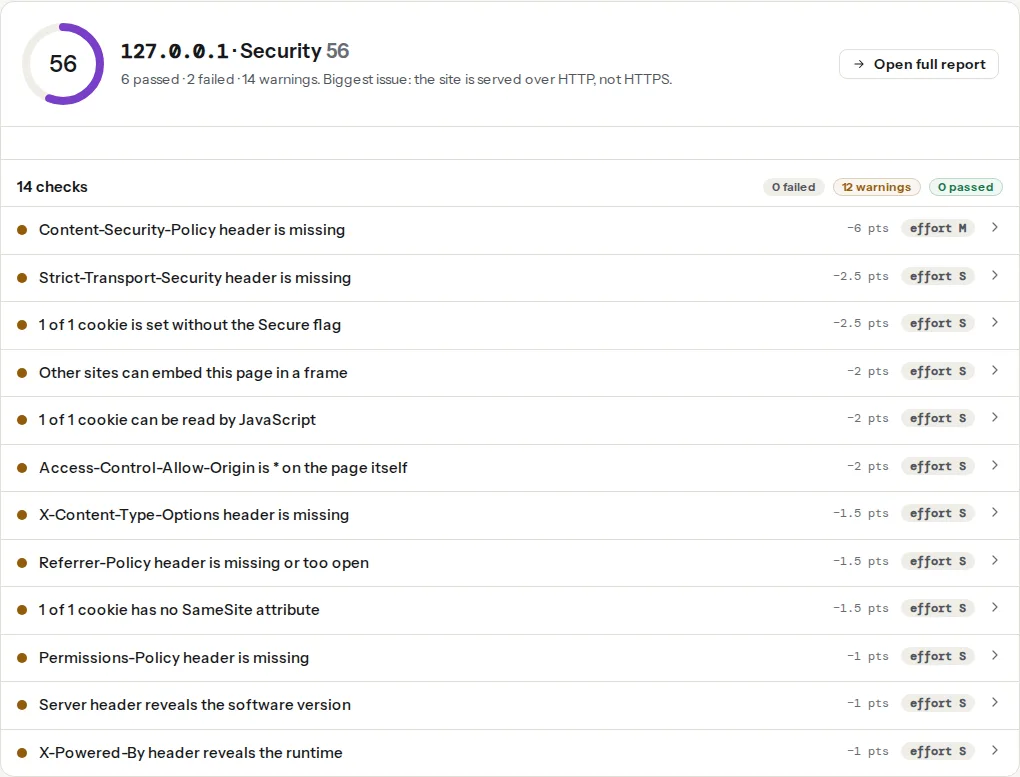
The headers, one by one
Strict-Transport-Security (HSTS)
Tells the browser to use HTTPS for this host for the next max-age seconds, without asking. After the first visit, even a typed http:// link goes straight to HTTPS, which closes the window where a network attacker can intercept the redirect. Start with a short max-age (a day) while you confirm every subdomain works over HTTPS, then raise it to a year:
Strict-Transport-Security: max-age=31536000; includeSubDomainspreload lets you submit the domain to the browser preload list so even the first visit is HTTPS; it is permanent for practical purposes, so read HSTS: enabling it safely first.
Content-Security-Policy (CSP)
Lists where scripts, styles, images, fonts and frames may come from. A script injected by a compromised plugin or a comment field cannot run if its source is not on the list. It is the most powerful header and the one that breaks things, so it gets its own rollout: start with Content-Security-Policy-Report-Only, watch what would be blocked, then enforce. The full procedure is in Content-Security-Policy from report-only to enforced.
A policy most sites can start from:
Content-Security-Policy: default-src 'self'; script-src 'self'; style-src 'self' 'unsafe-inline'; img-src 'self' data: https:; font-src 'self'; connect-src 'self'; frame-ancestors 'none'; base-uri 'self'; form-action 'self'; object-src 'none''unsafe-inline' for styles is a common compromise (inline style="" attributes are everywhere); for scripts it defeats the purpose, which is why the csp-unsafe-inline check warns about it. Sites with inline scripts move to nonces or hashes.
X-Content-Type-Options
nosniff stops the browser from guessing a file's type from its content. Without it, a file uploaded as an image that contains JavaScript can be executed as a script. One value, no downside:
X-Content-Type-Options: nosniffX-Frame-Options and frame-ancestors
Both stop other sites from embedding your pages in an iframe, which is how clickjacking works (an invisible frame over a fake button). frame-ancestors in CSP is the modern one and supports a list; X-Frame-Options covers old browsers. Send both:
X-Frame-Options: DENY
Content-Security-Policy: …; frame-ancestors 'none'
Use SAMEORIGIN / frame-ancestors 'self' if your own site frames its pages (some page builders' previews do).
Referrer-Policy
Controls what the Referer header says when a visitor follows a link away from your site. The default in modern browsers is already strict-origin-when-cross-origin; setting it explicitly covers older ones and documents the choice:
Referrer-Policy: strict-origin-when-cross-originMeaning: same-site links get the full URL, cross-site links get only your origin, and nothing is sent from HTTPS to HTTP. Private URLs (password reset links, admin pages with tokens in the query string) stay private.
Permissions-Policy
Turns off browser features your site does not use, for your page and for anything embedded in it. A compromised third-party script then cannot turn on the camera or read the location:
Permissions-Policy: camera=(), microphone=(), geolocation=(), payment=(), usb=()Add geolocation=(self) if you use it yourself. Unknown features are ignored, so listing more is harmless.
Step by step
1. Get HTTPS right first
HSTS on a site with a broken subdomain locks visitors out of that subdomain. Before HSTS: every host has a valid certificate, http:// redirects to https:// in one hop, no mixed content. The report's https-enforced and mixed-content findings cover this.
2. Add the four safe headers
X-Content-Type-Options, X-Frame-Options, Referrer-Policy and Permissions-Policy break nothing on a normal site. Add them together.
nginx (in the server block, always so error pages get them too):
add_header X-Content-Type-Options "nosniff" always;
add_header X-Frame-Options "DENY" always;
add_header Referrer-Policy "strict-origin-when-cross-origin" always;
add_header Permissions-Policy "camera=(), microphone=(), geolocation=(), payment=()" always;
Apache (.htaccess or the virtual host, mod_headers enabled):
Header always set X-Content-Type-Options "nosniff"
Header always set X-Frame-Options "DENY"
Header always set Referrer-Policy "strict-origin-when-cross-origin"
Header always set Permissions-Policy "camera=(), microphone=(), geolocation=(), payment=()"Caddy:
example.com {
    header {
        X-Content-Type-Options "nosniff"
        X-Frame-Options "DENY"
        Referrer-Policy "strict-origin-when-cross-origin"
        Permissions-Policy "camera=(), microphone=(), geolocation=(), payment=()"
        -Server
    }
    reverse_proxy app:3000
}Cloudflare: Rules → Transform Rules → Modify Response Header, one rule per header, applied to all requests. Or the "Managed Transforms" toggle for the common set.
WordPress without server access: a small plugin or the theme's functions.php:
add_action('send_headers', function () {
    header('X-Content-Type-Options: nosniff');
    header('X-Frame-Options: DENY');
    header('Referrer-Policy: strict-origin-when-cross-origin');
    header('Permissions-Policy: camera=(), microphone=(), geolocation=(), payment=()');
});
Headers set in PHP only cover pages PHP serves; static files and cached pages served by a cache plugin or the host may not get them. The server config is better when you can reach it.
3. Add HSTS with a short max-age, then raise it
add_header Strict-Transport-Security "max-age=86400" always;Wait a day, check every subdomain over HTTPS, then set max-age=31536000; includeSubDomains.
4. Roll out CSP in report-only mode
add_header Content-Security-Policy-Report-Only "default-src 'self'; script-src 'self'; style-src 'self' 'unsafe-inline'; img-src 'self' data: https:; font-src 'self'; connect-src 'self'; frame-ancestors 'none'; base-uri 'self'; form-action 'self'" always;Open the site in the browser with the console visible: each "would be blocked" message names a source to add (your analytics host, a font CDN, an embedded map). After a week with no unexpected messages, rename the header to Content-Security-Policy.
5. Re-run the checker
Each change is one reload. The score ring goes up as findings pass; leaked versions (Server: Apache/2.4.29) and cookie flags are in the same panel and worth the extra ten minutes. See Cookie flags: Secure, HttpOnly, SameSite.
Platform notes
Cloudflare in front of anything: set the headers at the edge with Transform Rules; the origin's headers are passed through, so avoid setting the same header in two places (two X-Frame-Options values confuse browsers).
Netlify: _headers file in the publish directory. Vercel: headers in vercel.json or next.config.js. Shopify, Wix, Squarespace: the platform sets its own; you cannot add a CSP, but HSTS and framing protection are already present.
Verify
- The security headers checker shows every header finding as passed and the score ring at 90+.
curl -sI https://example.com/ | grep -i -E "strict|content-security|x-frame|x-content|referrer|permissions"prints all six.- Nothing on the site broke: forms submit, embedded videos play, the payment page works. CSP problems show in the browser console as "Refused to …".
Common mistakes
- HSTS with
includeSubDomainswhile a subdomain is still HTTP. Visitors cannot reach it untilmax-ageexpires. Check every subdomain first. - CSP enforced on day one. Something breaks (usually the tag manager or a font); start in report-only.
- Headers only in
.htaccesswhile Cloudflare or a cache serves the page. Check withcurlfrom outside, not from the server. - Setting headers in HTML meta tags. Only CSP and Referrer-Policy work that way, and CSP via meta cannot use
frame-ancestorsor report-only. - Duplicated headers from the server and a plugin, with different values. Keep one source.
X-Frame-Options: ALLOW-FROM. Obsolete and ignored; useframe-ancestorswith a list.