Every time a browser leaves one of your pages, it tells the destination where the visitor came from. Without a policy, that message is the full address of your page: the path, the search term in the query string, the password-reset token, the order number. This guide explains what the Referer header carries, who receives it, which policy value to pick, and how to set it on every common server in about ten minutes.
Quick answer
- Send
Referrer-Policy: strict-origin-when-cross-originfrom the server. Other sites then see onlyhttps://example.com/, your own pages still see the full URL, and nothing is sent from HTTPS to HTTP. - Use
same-originorno-referrerfor areas whose URLs can carry something private: logged-in dashboards, password resets, search results with personal data. - Override single links with
referrerpolicy="no-referrer"orrel="noreferrer"when one page needs to be stricter than the site. - The header beats the
<meta name="referrer">tag: it covers every response, including files and error pages, and the security headers checker reads only the header. - Verify in DevTools: Network, click a request to another site, Request Headers,
Referer.
Why the Referer header matters
The header is spelled Referer (a typo from 1996 that stuck) and the policy that controls it is spelled Referrer-Policy. What it carries is the URL of the page the request was made from. "Request" is the important word: not only the link the visitor clicks, but every image, script, font, iframe and tracking pixel your page loads from another domain. Each of those requests arrives at a third party with your page URL attached.
Take a page like https://example-shop.hr/account/orders?order=48213&token=7f3a…. With no policy in place, and in a browser old enough to use the old default, that entire string is sent to:
- every advertising or analytics script on the page, and every domain they in turn load from;
- the site behind any link the visitor clicks, and that site's analytics;
- the CDN serving your fonts and images.
Search terms are the everyday case. An internal search page at /search?q=divorce+lawyer+zagreb hands the query to every third party on the results page. Order confirmation pages, e-mail unsubscribe links, calendar links with an access key and "magic link" logins are the expensive cases: a token in the query string that reaches a third party can be replayed.
Since 2020 (Chrome 85) and 2021 (Firefox 87), the browser default is strict-origin-when-cross-origin, which trims cross-site referrers to the origin. So the leak is smaller than it used to be. It is not gone: older browsers, embedded webviews and some corporate builds still send the full URL, and any page can widen the policy with a meta tag or an attribute, on purpose or by accident. An explicit header pins the behaviour, documents your choice, and lets you go stricter than the default where it matters.
How getReport checks it
The checker fetches the page like a browser, follows redirects, and reads the Referrer-Policy response header of the final page. Three things are worth knowing about how it judges the value:
- Only the header counts. A
<meta name="referrer">tag in the HTML is not read, so a site that relies on the meta tag still gets the warning. That is deliberate: the meta tag does not cover files, redirects or error pages. - Any recognised value except
unsafe-urlpasses. That includesno-referrer-when-downgrade, the old browser default, which still sends the full URL to other HTTPS sites. Passing the check means "a policy is set and it is not the worst one", not "the best policy for your site is set". The table below helps you pick. - Lists are read the way browsers read them. The header may contain several comma-separated values as a fallback for old browsers (
no-referrer, strict-origin-when-cross-origin). The last value the browser recognises wins, and the check uses the same rule.
The same panel grades the neighbouring headers. Two of them matter for the same reason, controlling what third-party code on your page can do:
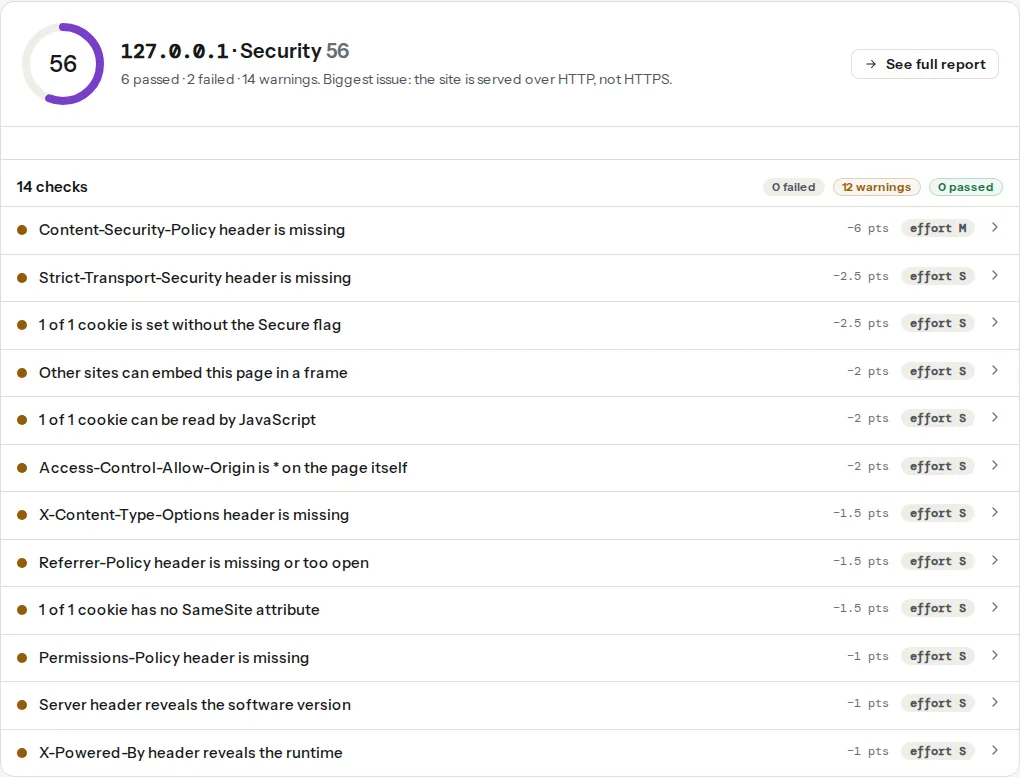
The evidence line under the finding shows the raw value, for example referrer-policy: (absent) or referrer-policy: unsafe-url, so you can see exactly what the server sent.
The policy values
| Value | Same-origin request | Cross-origin, HTTPS to HTTPS | HTTPS to HTTP |
|---|---|---|---|
no-referrer | nothing | nothing | nothing |
same-origin | full URL | nothing | nothing |
strict-origin | origin only | origin only | nothing |
strict-origin-when-cross-origin (browser default) | full URL | origin only | nothing |
origin | origin only | origin only | origin only |
origin-when-cross-origin | full URL | origin only | origin only |
no-referrer-when-downgrade (old default) | full URL | full URL | nothing |
unsafe-url | full URL | full URL | full URL |
"Origin only" means https://example.com/: scheme and host, no path, no query string. "Full URL" means path and query string too, but never the #fragment and never a username or password in the URL.
Which one to pick
strict-origin-when-cross-origin for almost every public site. Your own analytics still sees which page a visitor came from (same-origin requests get the full URL), and other sites learn only that the visitor came from your domain. This is what the check recommends and what the MDN Referrer-Policy reference documents as the default.
same-origin for logged-in areas, account pages, admin panels and internal tools. Other sites learn nothing at all, not even that the visitor came from you. Your own pages keep working as before.
no-referrer for pages whose URL is itself a secret: password resets, e-mail confirmation links, magic-link logins, unsubscribe pages, shared documents with a key in the path. Nothing is sent anywhere, including to your own site.
origin and strict-origin are the choice when you want other sites to see your domain (for partner attribution) but do not want even your own pages to see full URLs, for example when a third-party script runs on your site with the same origin. Rare.
Avoid unsafe-url and no-referrer-when-downgrade. The first sends everything everywhere; the second is what the web had before 2020 and the reason this guide exists.
The analytics trade-off
Under strict-origin-when-cross-origin, a site you link to sees https://example.com/ in its referrer reports rather than https://example.com/blog/best-hiking-boots/. If you run a publisher or affiliate site and your partners want page-level attribution, that is a real loss for them, not for you. Two ways to give it back selectively:
- put
referrerpolicy="no-referrer-when-downgrade"on the specific outbound links where page-level detail is wanted, and keep the strict site-wide header; - or use UTM parameters on those links, which carry the attribution explicitly and survive any referrer policy.
Your own analytics is not affected: requests to your analytics endpoint on the same origin get the full URL, and a hosted analytics script reads location.href from the page, not the referrer.
Step by step
1. Decide per area, not per site
Most sites need two values: the default for public pages and a stricter one for the private area. Write down which paths hold anything sensitive in the URL. A typical list: /account/, /admin/, /wp-admin/, /reset-password, /search, /unsubscribe.
2. Set the header on the server
The header applies to every response the server sends, including images, PDFs and 404 pages, which a meta tag cannot reach. Use always (nginx) or always set (Apache) so error pages get it too.
nginx, in the server block, with a stricter value for the private area:
add_header Referrer-Policy "strict-origin-when-cross-origin" always;

location /account/ {
    add_header Referrer-Policy "same-origin" always;
    # nginx add_header does not inherit: repeat every other header you set at server level here
}Apache, in .htaccess at the site root or in the virtual host (mod_headers enabled):
Header always set Referrer-Policy "strict-origin-when-cross-origin"

<If "%{REQUEST_URI} =~ m#^/account/#">
    Header always set Referrer-Policy "same-origin"
</If>Caddy, in the Caddyfile:
example.com {
    header Referrer-Policy "strict-origin-when-cross-origin"
    header /account/* Referrer-Policy "same-origin"
    reverse_proxy app:3000
}Cloudflare: Rules, Transform Rules, Modify Response Header, "Set static", header name Referrer-Policy, value strict-origin-when-cross-origin. Add a second rule with a URI path filter for the private area. If the origin already sends the header, choose "Set" rather than "Add" so the browser does not receive two.
Next.js, in next.config.js:
module.exports = {
  async headers() {
    return [
      {
        source: '/:path*',
        headers: [{ key: 'Referrer-Policy', value: 'strict-origin-when-cross-origin' }],
      },
      {
        source: '/account/:path*',
        headers: [{ key: 'Referrer-Policy', value: 'same-origin' }],
      },
    ];
  },
};
3. Override single links and elements where needed
Per-element attributes win over the header and the meta tag. Two forms:
<!-- One link that must not reveal where it was clicked from -->
<a href="https://partner.example/offer" referrerpolicy="no-referrer">Partner offer</a>

<!-- rel="noreferrer" also implies noopener; use it for links that open a new tab -->
<a href="https://partner.example/offer" target="_blank" rel="noreferrer">Partner offer</a>

<!-- Works on images, scripts and iframes too -->
<img src="https://cdn.example/pixel.gif" referrerpolicy="no-referrer" alt="">
rel="noreferrer" is the older, more widely supported form and also blocks window.opener, which is why WordPress adds rel="noopener" to new-tab links by default. referrerpolicy gives you the finer choice of value.
4. Use the meta tag only when you cannot touch headers
<head>
  <meta name="referrer" content="strict-origin-when-cross-origin">
It must come early in <head>: requests started before the parser reaches it (a stylesheet in the first line, a preloaded font) go out under the header or the browser default. It does not cover files served without HTML, and the checker does not read it, so treat it as a stopgap on a platform where headers are out of reach.
Note
If the header and the meta tag disagree, the meta tag wins for requests made after it is parsed, because it is applied later. Keep one source of truth. Two values that differ are the most common reason a site "has the header" but still leaks.
Platform notes
WordPress
If you can edit the server config, do it there; the header then also covers pages served from a cache plugin or the host's page cache, which PHP never touches. Without server access, a small must-use plugin works for everything PHP renders. Save this as wp-content/mu-plugins/referrer-policy.php:
<?php
/**
 * Plugin Name: Referrer-Policy header
 */
add_action('send_headers', function () {
    header('Referrer-Policy: strict-origin-when-cross-origin');
});
Several security plugins also add the header from a settings screen; use one place only. WordPress itself has sent Referrer-Policy: strict-origin-when-cross-origin on wp-admin pages since version 4.9, so the admin, where URLs carry post ids, nonces and search terms, is covered before you add anything; the front end is not.
Shopify, Wix, Squarespace
You cannot add response headers. Shopify sends its own security headers, including a referrer policy, on storefronts; check yours with the tool rather than assuming. Where the platform allows theme HTML edits, the meta tag in theme.liquid (or the equivalent header include) is the only option.
Static sites
Netlify: a _headers file in the publish directory with /* then Referrer-Policy: strict-origin-when-cross-origin indented on the next line. Vercel: the headers key in vercel.json with the same shape as the Next.js sample. GitHub Pages: no custom headers; use the meta tag.
Verify
- Re-run the security headers checker. The finding should read "Referrer-Policy header is set" with your value on the evidence line.
- From a terminal, from outside your network so a CDN or cache is included:
curl -sI https://example.com/ | grep -i referrer-policy
curl -sI https://example.com/account/ | grep -i referrer-policy
curl -sI https://example.com/does-not-exist | grep -i referrer-policy
All three should print a value; the third confirms error pages carry it too.
- In the browser: open DevTools, Network tab, load a page, click any request to a different domain (a font, an analytics call) and look at Request Headers.
Referershould showhttps://example.com/only. Click a same-origin request: the full page URL. Then follow an outbound link and check the first request on the destination the same way. - On a private page,
document.referrertyped into the console on the destination page should be an empty string when the policy isno-referrerorsame-origin.
Common mistakes
- Setting it in nginx at
serverlevel, then losing it in alocationblock.add_headerin a location replaces all inheritedadd_headerlines, so alocation /account/that sets one header silently drops the others. Repeat every header in each location that sets any. - Header and meta tag with different values. The meta tag wins for later requests. Remove one.
- Relying on the meta tag on a site with early-loading assets. Fonts and stylesheets requested before the tag is parsed leak under the old rules. Move the header to the server.
no-referrersite-wide, then wondering why analytics lost all internal navigation paths. Same-origin referrers are how many analytics tools attribute page-to-page flow. Usestrict-origin-when-cross-originpublicly and reserveno-referrerfor URLs that are secrets.- Treating the header as a fix for tokens in URLs. It reduces where they travel; it does not stop them appearing in server logs, browser history and bookmarks. Move secrets out of the query string when you can (a POST body, a short-lived one-time code) and keep the policy as the safety net. Cookie hygiene is the other half: see Cookie flags: Secure, HttpOnly, SameSite, and for what third-party scripts may do once they are on your page, Content-Security-Policy from report-only to enforced. The full header set is in Security headers from zero to A.