A hacked WordPress site is rarely destroyed. It is borrowed: the attacker keeps it working so you do not notice, and uses its reputation to rank spam, redirect visitors or send email. Cleaning it is an afternoon of careful, ordered work, and the order is what decides whether the spam is back in a week. This guide is that order, eight steps from containment to monitoring, with the commands for each. If you are still at the "is it hacked?" stage, start with is my website hacked? and come back here once you have seen the evidence.
Quick answer
- Contain: maintenance mode or offline, every password and key changed, extra admin users removed.
- Preserve: a full copy of files and database as they are now, plus 30 days of access logs.
- Find the entry: outdated core, plugin or theme; an abandoned or closed plugin; a nulled theme; a weak password; a neighbour on the same server.
- Clean by reinstalling: fresh core, fresh plugins and themes from their source, keep only uploads (scanned), review
wp-config.phpand.htaccess, query the database for injected scripts. - Verify with the hacked site checker: the Googlebot and Google-referrer fetches must match the visitor fetch.
- Harden, request review in Search Console, and re-check in a week.
Why order matters
Two things go wrong in almost every failed cleanup. The first is cleaning before finding the entry: the injected files are removed, the hole they came through is not, and the same script writes them back overnight, often via a cron entry or a backdoor file in the uploads folder that the cleanup did not touch. The second is restoring a backup that is itself infected, because the injection had been there for weeks before anyone noticed, and every backup in the rotation contains it.
Both are avoided by doing the boring steps first: preserving the evidence so you can find the entry, and reinstalling from sources you trust rather than editing the infected copy. Reinstalling feels drastic and is, in practice, faster than reading every PHP file on the server.
How getReport checks it
The checker fetches the page three times: with getReport's normal user agent, with Googlebot's user agent, and with a desktop Chrome user agent plus a Referer of https://www.google.com/. Each copy is reduced to the same fingerprint: the visible text (scripts, styles, noscript, hidden and aria-hidden elements and anything with an inline display:none, visibility:hidden, zero font size or off-screen position removed), the outbound links, spam vocabulary hits, runs of Japanese, Chinese, Korean or Cyrillic text on a page whose lang says otherwise, and whether an inline script reads document.referrer and redirects. The three fingerprints are then compared.
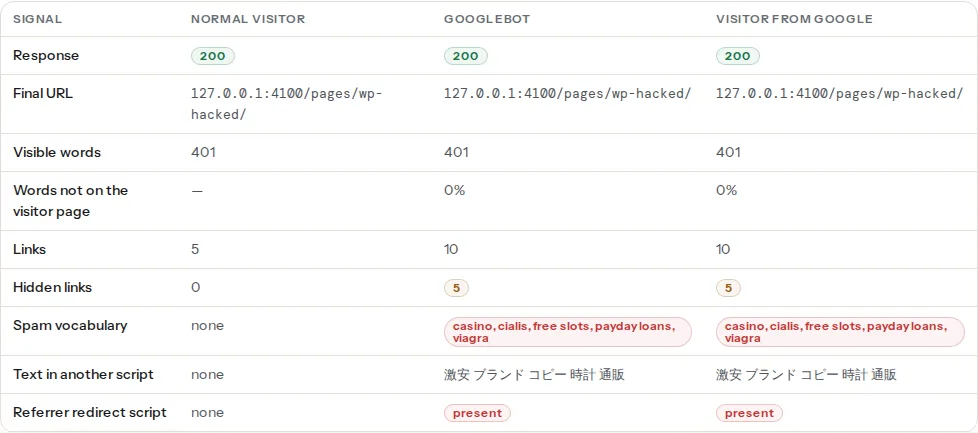
Cloaking is reported when at least 30% of the most frequent words in the Googlebot or Google-referrer copy are missing from the visitor copy and at least 20 new words appeared, or when foreign-script text appears only in the bot copy. Some sites vary content by user agent on purpose, which is why the finding shows the new words as evidence instead of a verdict.
The redirect check compares the final URL of each fetch: if Googlebot or the Google visitor ends on another host while the direct visitor stays, that is reported, as is an inline script that redirects when the referrer contains google, yahoo or bing. It does not fetch with a mobile user agent, so a redirect that fires only on phones has to be checked by hand (step 5). The hacked site learn page summarises all four findings; the two guides on the Japanese keyword hack and pharma and casino injections cover the two common shapes in detail. Alongside these, the ordinary security findings point at the likely entry:
Step by step
1. Contain
Take the site out of circulation before you touch anything else, so the attacker's script cannot keep serving spam or stealing form input while you work. A maintenance page from the host panel, or a deny rule that lets only your IP through, both work; leaving the site fully online while you clean gives the attacker a live view of what you are doing.
Then change every password that touches the site, in this order: hosting panel, SFTP or SSH, the database user (update wp-config.php to match), every WordPress administrator, and the API keys and tokens stored in plugins (payment gateways, mail services, CDN). Revoke and reissue rather than reuse. Then look for administrators you did not create:
wp user list --role=administrator --fields=ID,user_login,user_email,user_registeredUsernames that look like real people but were registered on a date you cannot explain are the attacker's. Delete them and reassign their content to you (wp user delete 17 --reassign=1). Force every remaining user to log in again by rotating the salts in wp-config.php (wp config shuffle-salts).
2. Preserve the evidence
Before deleting a single file, copy everything: the complete web root and a database dump, to a folder that is not web-accessible, plus the access and error logs for the last 30 days from the host panel. You will need them in step 3, and if customer data may have been read, you will need them for the disclosure you are legally required to make.
mkdir -p ~/evidence-$(date +%F)
wp db export ~/evidence-$(date +%F)/db.sql
tar czf ~/evidence-$(date +%F)/files.tgz -C /var/www/example.com .
cp /var/log/apache2/access.log* ~/evidence-$(date +%F)/
3. Find the entry
Most WordPress compromises come through one of five doors, and the report shows three of them:
- Outdated core, plugin or theme. The
outdated-cms-versionfinding reads the generator tag; the plugin detector table lists plugins with the version their assets carry, and flags plugins closed on wordpress.org or not updated in over two years. A closed plugin is closed for a reason, often a published vulnerability. Look those up first. - A nulled theme or plugin. Premium software downloaded from a "free" site almost always ships with a backdoor. If one is installed, that is the entry.
- Weak or reused passwords. The
wp-admin-author-slugfinding shows whether the defaultadminlogin name is public; a login called admin with a short password is brute-forced within days. - A neighbour on shared hosting. If your files are clean and the entry is still unexplained, another site on the same account may be the door. Ask the host.
- A compromised computer. Saved SFTP passwords on an infected laptop hand over every site at once.
The access log narrows it down. Look for POST requests to files that should never receive them, and for the first request to a file you did not create:
# POSTs to anything under uploads, or to PHP files that are not the normal entry points
grep -E 'POST .*(wp-content/uploads/.*\.php|\.php)' access.log | grep -v -E 'wp-login\.php|admin-ajax\.php|wp-cron\.php|xmlrpc\.php' | head -50

# When did a suspicious file first appear in the log?
grep 'wp-content/uploads/2024/07/class-cache.php' access.log | head -3
xmlrpc.php and wp-login.php get thousands of POSTs on any site; a spike in the days before the injection, then a 200 instead of a 401, is a successful guess.
4. Clean by reinstalling
Do not hunt for injections in 10,000 PHP files. Replace the files with known-good copies and keep only what cannot be reinstalled.
- Compare first, to see the scale. WP-CLI checks every core and plugin file against the checksums wordpress.org publishes:
wp core verify-checksums
wp plugin verify-checksums --all
Every line it prints is a modified or added file. Note them (they tell you where the attacker worked), then move on; you are replacing them all anyway.
Fresh core.
wp core download --force --skip-contentoverwriteswp-adminandwp-includesand the root files with the current release. Files that do not belong to WordPress in those folders are not removed by this, so list them:wp core verify-checksumsafter the download reports anything extra with "should not exist".Fresh plugins and themes. Reinstall each one from wordpress.org (
wp plugin install <slug> --force) or from the vendor's download for paid ones. Delete plugins and themes you do not use, including the default themes you are not running; an inactive plugin is still executable code.Uploads. Keep
wp-content/uploads, after scanning it for anything that is not media. There is no legitimate PHP file in uploads:
find wp-content/uploads -type f \( -name '*.php' -o -name '*.phtml' -o -name '*.php5' \) -print
# Recently modified PHP anywhere, excluding the freshly reinstalled folders
find . -name '*.php' -mtime -14 -not -path './wp-admin/*' -not -path './wp-includes/*' -print
wp-config.php and .htaccess, line by line. Attackers add an
includeof a file in uploads towp-config.php, and rewrite rules to.htaccessthat send Googlebot elsewhere. Compare.htaccessagainst the standard WordPress block; anything that mentions a user agent, a referrer or a.phpfile you do not recognise goes. Checkwp-content/mu-pluginstoo; files there run on every request and never appear in the plugin list.The database. Injections live in posts, options and cron:
-- Scripts or iframes inside post content
SELECT ID, post_title, post_type FROM wp_posts
WHERE post_content LIKE '%<script%' OR post_content LIKE '%<iframe%' OR post_content LIKE '%eval(%';

-- Options that carry HTML or scripts: widgets, theme settings, rewrite rules
SELECT option_name FROM wp_options
WHERE option_value LIKE '%<script%' OR option_value LIKE '%base64_decode%' OR option_value LIKE '%eval(%';

-- The two addresses that a redirect hack rewrites
SELECT option_name, option_value FROM wp_options WHERE option_name IN ('siteurl', 'home');
Then the scheduled jobs the attacker uses to re-add files:
wp cron event list --fields=hook,next_run_relative,recurrenceHooks with random names, or a recurrence you cannot map to a plugin, are deleted with wp cron event delete <hook>.
5. Verify
Run the hacked site checker on the home page and on three deep pages: an old blog post, a category page and a page that Google listed with spam in it, if you have one. Read the comparison table: the "Words not on the visitor page" share should be low in both right-hand columns, "Hidden links", "Spam vocabulary", "Text in another script" and "Referrer redirect script" should read 0 or none across the row, and the panel of links only bots receive should be absent.
For the mobile-only redirect the checker does not test, fetch as a phone yourself:
curl -sI -A 'Mozilla/5.0 (iPhone; CPU iPhone OS 17_0 like Mac OS X) AppleWebKit/605.1.15 Mobile/15E148 Safari/604.1' -e 'https://www.google.com/' https://example.com/ | grep -i -E '^(HTTP|location)'Then Search Console → Security Issues, and a site:example.com search for the spam terms the report listed (viagra, casino, and for Japanese spam 激安 or 通販). Pages that are gone from the server but still in the index are step 7.
6. Harden
- Updates on: core minor releases automatically, plugins and themes weekly, and no plugin that is closed or abandoned.
- Two-factor authentication for every administrator; a unique login name (delete
admin). - Least privilege: editors do not need administrator; the contractor's account is removed when the work ends.
- File permissions: directories 755, files 644,
wp-config.php600 or 640, owned by the account, not by the web server user where the host allows it. - File editing off, so a stolen admin login cannot write PHP through the dashboard:
// wp-config.php
define('DISALLOW_FILE_EDIT', true);- No PHP execution in uploads, at the server:
# wp-content/uploads/.htaccess (Apache 2.4)
<FilesMatch "\.(php|phtml|php5|phar)$">
    Require all denied
</FilesMatch># inside the server block, before the PHP location
location ~* /wp-content/uploads/.*\.(php|phtml|php5|phar)$ {
deny all;
}- A web application firewall in front (the host's or a CDN's) to slow brute force and block known exploit payloads.
- Backups on a schedule, kept off the server, and restored once to prove they work; backups that actually restore is the checklist.
7. Request review and clean the index
In Search Console, Security Issues → Request Review, with two sentences on what was found and what was done. If Chrome shows a red warning, the same review clears Safe Browsing; expect a few days. For spam URLs that no longer exist, make sure they answer 404 or 410 (not a redirect to the home page), and use Removals for the worst ones so they disappear from results within about a day while the recrawl catches up.
8. Monitor for re-infection
Re-run the hacked site checker on the same four pages after a week and after a month; keep the report links as your record. In the access log, watch for the pattern from step 3 returning: POSTs to PHP files outside the normal entry points, or requests for a file you deleted. The log analyser reads the log in your browser and lists the 404s and the bots; a crawler that keeps requesting the deleted spam directory is normal for a while, a 200 for it is not.
When to pay someone
Do the cleanup yourself when the site is a brochure or a blog and you have a clean backup or the patience to reinstall. Pay a specialist when the site is a shop or holds customer data (you may have a disclosure obligation and a deadline), when the infection returns after a full reinstall (the entry is somewhere you have not looked: the host account, another site, a computer), or when there is no backup and no one who can read PHP. Most host support teams will also confirm whether the entry was on their side.
Verify
- The hacked site checker on four pages: "Visitors and Googlebot see the same page text", "No spam links and no links served only to bots", "No redirect that fires only for Googlebot or Google visitors", "No hidden outbound links".
wp core verify-checksumsandwp plugin verify-checksums --allprint nothing.find wp-content/uploads -name '*.php'prints nothing.wp user list --role=administratorlists only people you know;wp cron event listshows only hooks you can name.- Search Console → Security Issues reads "No issues detected" after the review.
Common mistakes
- Cleaning without finding the entry. The files come back within days, from the cron job or the backdoor you left. Steps 2 and 3 are not optional.
- Restoring the newest backup. It is often infected too. Restore the oldest clean one only if you can date the compromise from the log; otherwise reinstall.
- Deleting the evidence first. Once the infected files are gone you cannot find out how they arrived, and you cannot answer a customer or regulator who asks what was exposed.
- Trusting a security plugin's scan on the compromised install. The scanner runs on the same PHP the attacker controls; a modified install can hide files from it. Verify with checksums from outside WordPress.
- Changing the WordPress passwords only. The database password, the SFTP login and the API keys are usually what the attacker kept. Rotate all of them.
- Redirecting the removed spam URLs to the home page. Google treats it as a soft 404 and keeps the URLs around longer. Let them 404 or 410.