Nobody breaks into a dental clinic's website to read its blog. They break in because the site has ten years of links pointing at it, and a link from a trusted domain to "buy cialis online" is worth money to whoever sells that ranking. The injection is built to be invisible to the owner and visible to Google, which is why it can sit on a site for a year. This guide explains the economics in a paragraph, then the six shapes an injection takes, where each one lives in a WordPress install, which finding in the report shows it, and a detection routine that takes about an hour. Removal and hardening are in the recovery guide.
Quick answer
| Injection shape | What it looks like | Report finding that shows it |
|---|---|---|
| Hidden links | Links in a display:none div, off-screen, zero font size | hack-hidden-links |
| Bot-only links and text | Spam only in the Googlebot or Google-referrer fetch | hack-spam-links ("googlebot only"), hack-cloaking |
| Spam vocabulary in visible links | Pharma, casino, loan, replica terms in link text or URL | hack-spam-links |
| Conditional redirect | Google visitors sent to another host; document.referrer script | hack-conditional-redirect |
| Doorway pages | Thousands of new URLs with spam content | site: search and Search Console; the checker on those URLs |
| Title and description swap | Spam title only in Googlebot's copy | hack-cloaking (word comparison), the meta tags checker as Googlebot |
Run the hacked site checker on the home page and three deep pages, read the comparison table, then grep the file system and the database for the loaders.
Why the spam is hidden from you
SEO spam is a business with a product: rankings for terms that legitimate sites will not sell links for. Pharma (erectile dysfunction drugs, tramadol, adderall), gambling (casino, slots, sportsbook), payday loans, replica watches and handbags, essay mills, adult and crypto giveaways. A link from an aged domain with real backlinks moves those rankings, so the attacker's asset is your domain's reputation, and the asset is only worth something while the site keeps working and the owner keeps not noticing. That is why a pharma injection never defaces the home page. It adds links you cannot see, or shows them only to Googlebot, or redirects only visitors who arrive from a Google result, and it leaves everything you look at every day untouched.
The cost is deferred and then sudden. Google's ranking systems demote sites that carry the links; Safe Browsing may flag the domain; visitors from Google land on a casino and tell their friends; and the day you find out is often the day a client or a customer sends you a screenshot.
How getReport checks it
The checker fetches the page three times, as a normal visitor, as Googlebot and as a browser visitor with a Referer of https://www.google.com/, and reduces each copy to a fingerprint: visible text, outbound links with a hidden flag, spam vocabulary hits in text and links, foreign-script text, and whether an inline script redirects on the referrer. The comparison table on the result page has one column per fetch and one row per signal, and the findings below it read from the same data.
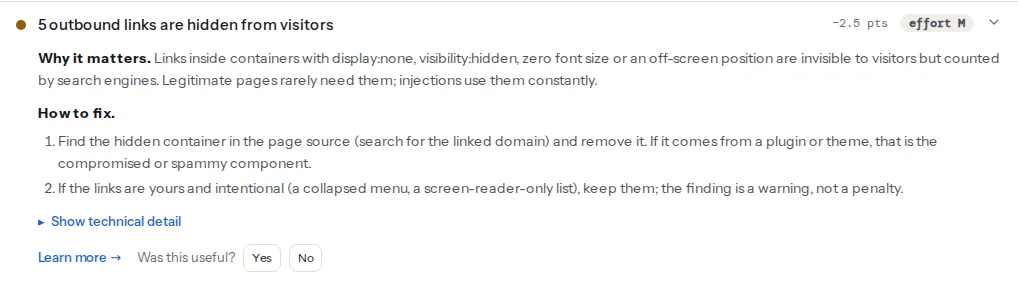
A link is hidden if it, or one of its eight nearest ancestors, has the hidden attribute, aria-hidden="true", or an inline style matching display:none, visibility:hidden, opacity:0, a zero font size, left, top or text-indent of −100 px or more, or zero height with overflow:hidden. Only links to another host count, and only inline styles are inspected: a container hidden by a CSS class in the stylesheet, or by colour matching the background, is not detected this way. Such links still show up in the spam-vocabulary pass, which reads all text including hidden text, and in the site: search.
Two groups of links land in this finding. Links whose text or URL contains a word from the spam list (whole words, case-insensitive; the list covers the drug names, casino and slots terms, payday loans, replica and outlet phrases, essay services, adult terms and crypto giveaways). And links to another host that exist in the Googlebot or Google-referrer copy but not in the visitor copy, labelled "googlebot only" or "google-referer only", spam vocabulary or not.
This one compares where each fetch ended. If the Googlebot or the Google-referrer fetch finished on a different host than the visitor fetch, that is a conditional redirect. It also flags an inline script that reads document.referrer, tests it for google, yahoo or bing and then sets location, in any of the three copies. What it does not do is fetch with a mobile user agent, so a redirect that fires only for phones needs the manual check in step 5. The hacked site learn page has the short form of every finding, and is my website hacked? shows how to confirm each one with curl.
The six shapes, and where each one lives
1. Hidden links
The oldest shape and still the most common. A <div style="position:absolute;left:-9999px"> with twenty links, or a footer widget with display:none, or links in <span style="font-size:0">. In WordPress the container is written by code in one of five places: the theme's footer.php or header.php, functions.php (an add_action('wp_footer', ...) that echoes the block), a widget stored in wp_options, a fake plugin in wp-content/plugins, or a file in wp-content/mu-plugins, which loads on every request and never appears in the plugin list.
2. Links and text only Googlebot sees
The injection checks $_SERVER['HTTP_USER_AGENT'] and HTTP_REFERER and prints the spam only when the request looks like Googlebot or a Google visitor. This is cloaking, and the comparison table is built for it: "Words not on the visitor page" and the panel "Links only bots or Google visitors receive" show exactly what your browser never gets. The code is the same five places as above, plus .htaccess rules that rewrite bot requests to a generator script.
3. Doorway pages
Thousands of new URLs, each a page of spam about one product, generated on the fly by a PHP file with an innocent name in wp-content/uploads or a theme folder, wired in through .htaccess or a rewrite rule saved in wp_options. They are usually cloaked too. You find them from the outside (site:example.com viagra, Search Console's Pages report listing URLs you never created), then run the checker on those URLs to see the content. The Japanese keyword hack is the best known variant.
4. Conditional redirects
Visitors who arrive from a Google result (or only on a phone) are sent to the casino; direct visitors see the site. Server-side, this is a rule in .htaccess matching %{HTTP_REFERER} or %{HTTP_USER_AGENT}, or PHP at the top of index.php or wp-config.php. Client-side, it is a <script> that tests document.referrer and calls location.replace(), often obfuscated, injected into wp_posts content, a widget, or every page through wp_head. The database's siteurl and home are also targets: change them to the attacker's host and every asset and link on the site points there.
5. Title and description swaps
The page's <title> and meta description are replaced with spam only for Googlebot, so the search result reads "Buy Cheap Viagra Online" under your domain while your page looks unchanged. The cloaking finding catches it through the word comparison when the swap comes with body text; for a title-only swap, fetch the page as Googlebot and compare the head with what the meta tags checker shows for a normal fetch.
6. JavaScript loaders
A <script src="https://cdn.example-stats.com/js.js"> that looks like analytics and loads the redirect or the links at runtime. It is in functions.php, a widget, the header script box of an SEO or "insert headers" plugin, or every post via a search-replace the attacker ran. The comparison table's link and script data come from the raw HTML, so the loader URL is visible in the page source even when what it loads is not.
Step by step: the detection routine
1. Run the checker on four pages
Home page, the oldest blog post you have, a category or archive page, and any page Google shows with a spam snippet. Read each comparison table: the two right-hand columns should match the visitor column on words, links, hidden links, spam vocabulary and the redirect script. Any highlight there is your first piece of evidence; copy the domains it lists, you will grep for them in step 3.
2. Look from the outside
site:example.com in Google, then site:example.com viagra, site:example.com casino, site:example.com loans. In Search Console: Security Issues, and Pages for URLs you did not create. In your analytics, a spike of landing pages or of traffic from a country you do not serve.
3. Grep the file system for the loaders
Injected PHP hides itself with encoding. The functions it needs to decode itself are rare in legitimate plugin code and easy to grep for:
cd /var/www/example.com
# The classic obfuscation functions, with file names and line numbers
grep -rn -E 'eval\s*\(|base64_decode\s*\(|gzinflate\s*\(|str_rot13\s*\(|gzuncompress\s*\(' \
  --include='*.php' wp-content/themes wp-content/plugins wp-content/mu-plugins wp-content/uploads wp-config.php index.php

# The spam domains the checker listed, anywhere in the code
grep -rn -E 'cheap-pills-online|best-casino-bonus' --include='*.php' --include='*.js' .

# Files that echo links into the footer or head from a theme or plugin
grep -rn -E "add_action\s*\(\s*'wp_(footer|head)'" --include='*.php' wp-content/themes wp-content/mu-plugins

# User-agent or referrer checks in PHP: legitimate in a caching plugin, suspicious anywhere else
grep -rn -E 'HTTP_USER_AGENT|HTTP_REFERER' --include='*.php' wp-content/themes wp-content/uploads wp-content/mu-plugins
Some legitimate plugins use base64_decode (for icons, licence checks). What you are looking for is a single very long line, a file in uploads or mu-plugins, or a file whose name does not match the plugin it sits in.
4. Compare with clean copies
wp core verify-checksums
wp plugin verify-checksums --all
Every modified or extra file is listed. For themes there is no checksum command; download a fresh copy from the source and diff -r the two folders.
5. Query the database
-- Spam or scripts inside posts and pages
SELECT ID, post_title, post_type, post_modified FROM wp_posts
WHERE post_content LIKE '%<script%' OR post_content LIKE '%display:none%'
   OR post_content LIKE '%viagra%' OR post_content LIKE '%casino%';

-- Widgets, theme options, header/footer script boxes, rewrite rules
SELECT option_name, LENGTH(option_value) FROM wp_options
WHERE option_value LIKE '%<script%' OR option_value LIKE '%<a href%'
   OR option_value LIKE '%base64_decode%';

-- The two addresses a redirect hack rewrites
SELECT option_name, option_value FROM wp_options WHERE option_name IN ('siteurl', 'home');
Then the scheduled jobs: wp cron event list. A hook with a random name that runs hourly is the thing that re-creates the files after you delete them.
For the mobile-only redirect the checker cannot test, fetch the page as a phone arriving from Google:
curl -sI -e 'https://www.google.com/' \
  -A 'Mozilla/5.0 (Linux; Android 14) AppleWebKit/537.36 (KHTML, like Gecko) Chrome/120.0 Mobile Safari/537.36' \
  https://example.com/ | grep -i -E '^(HTTP|location)'
A 301 or 302 to a host you do not own is the redirect.
6. Remove and recover
Everything found goes, and then the recovery guide takes over: contain, preserve the evidence, find the entry, reinstall core, plugins and themes from their sources, clean the database, harden, request a review in Search Console. Deleting the injection without finding the entry is how a site gets cleaned four times in a year.
Platform notes
WordPress
All six shapes and all the locations above. wp-content/mu-plugins and wp-content/uploads are the two folders most owners never open and most injections use.
Joomla, Drupal, custom PHP
The shapes are identical; the folders differ (Joomla's images/ and tmp/, Drupal's sites/default/files/). The grep commands work unchanged with the paths swapped, and the checker does not care what runs the site.
Static sites and JavaScript frameworks
No PHP means no server-side cloaking, so an injection is either in the build (a compromised dependency or deploy token) or in a third-party script the page loads. The comparison table shows the links; git log and the deploy history show when they arrived.
Verify
- The hacked site checker on the four pages: "No hidden outbound links", "No spam links and no links served only to bots", "No redirect that fires only for Googlebot or Google visitors", "Visitors and Googlebot see the same page text".
- The grep for
eval(,base64_decode(,gzinflate(andstr_rot13(returns only lines you can attribute to a known plugin. wp core verify-checksumsandwp plugin verify-checksums --allprint nothing;find wp-content/uploads -name '*.php'prints nothing.site:example.com casinoand the pharma equivalents return nothing after a few weeks; Search Console → Security Issues reads "No issues detected".
Common mistakes
- Searching the page in the browser and concluding it is clean. The injection is hidden or served only to Googlebot; view the comparison table or fetch as Googlebot.
- Deleting the links from
footer.phpand stopping. The loader in mu-plugins or the cron job writes them back. Grep for the loader and list the cron events. - Ignoring
wp_options. Widgets, header-script boxes and rewrite rules live there; a clean file system with a dirty database is still hacked. - Assuming every
base64_decodeis malware. Some plugins use it legitimately. Judge by the file's location and the length of the line, then compare against a fresh copy. - Checking the home page only. Injections often target old posts and archive pages, where nobody looks. Test the oldest post and a category page too.