One morning a site: search for your domain returns hundreds of results with Japanese titles: brand names, "激安" (cheap), "通販" (mail order), "コピー" (replica). Open any of them in your browser and you land on a normal page of your site, or on a 404. Google is not confused. Your server is showing those pages to Googlebot and hiding them from you. This is the Japanese keyword hack, the name Google uses for it, and this guide covers how to recognise it, where the files and rules hide, how the checker sees through the cloaking, and the recovery steps that are specific to it. Recognising it takes five minutes; the cleanup is an afternoon.
Quick answer
- The hack injects thousands of auto-generated Japanese pages selling counterfeit goods into your site, under new directories or URL parameters, and cloaks them so only Googlebot sees the spam.
- Symptoms, in the order owners notice: Japanese titles in
site:results, a Search Console "Security issues" notice, an owner or sitemap in Search Console you did not add, traffic from Japan, visitors reporting a redirect. - Run the hacked site checker: the Googlebot column shows text in another script and links the visitor column does not have.
- Recover in this order: remove the attacker's Search Console verification and owners, delete the generated pages and their sitemap, clean
.htaccess, the theme and the database, then follow the general recovery guide. - Make the removed URLs answer 404 or 410, request a review, and block PHP execution in uploads so it cannot come back the same way.
Why this hack is different
Most injections add a few links to pages that already exist. The Japanese keyword hack adds pages: a generator script on your server produces new URLs on demand, each with a Japanese title, a block of product text and links to the counterfeit shop, and returns them only when the request looks like Googlebot. Because the pages are new, your existing content is untouched and the site looks fine to you. Because they are cloaked, clicking a result from your own browser shows the normal page or a 404. And because the attacker wants the pages indexed fast, they submit a sitemap for them, which requires being a verified owner in Search Console, so they upload a verification file to your web root and add themselves. That last step is the fingerprint: a new owner in Search Console is the surest sign this is the Japanese keyword hack and not a generic spam injection.
The damage is to reputation and rankings. Google's index fills with thousands of spam URLs on your domain, your real pages are diluted and demoted, and Safe Browsing may flag the site. Visitors from Japan who click the results are sometimes redirected to the shop, which is why the first human report is often "your site sent me to a store".
How getReport checks it
The checker fetches the page three ways, as a normal visitor, as Googlebot and as a browser visitor with a Referer from google.com, and compares them. Two of its signals were written for this hack. The first is foreign-script text: runs of Japanese, Chinese, Korean or Cyrillic characters in the page are noted for each fetch, and if they appear only in the Googlebot or Google-referrer copy while the page's lang attribute says something else (en, de, hr), the cloaking finding fires with the text as evidence. The second is the word comparison: when 30% or more of the most frequent words in the bot copy are missing from the visitor copy, and at least 20 new words appeared, the finding fires even for spam written in Latin script.
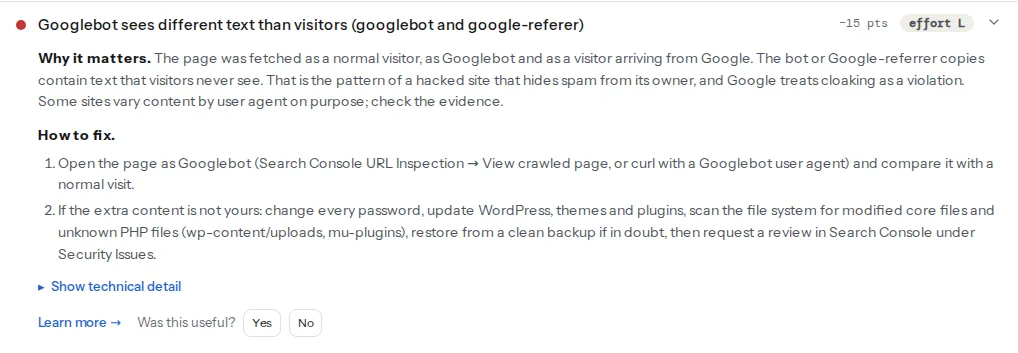
The spam-link finding lists links carrying the spam vocabulary (the list covers pharma, gambling, loan, replica and outlet terms) and, separately, any link to another host that only the Googlebot or Google-referrer copy received. The counterfeit shop's links fall into the second group even when their anchor text is Japanese.
Hidden links are reported when the link, or one of its eight nearest ancestors, has the hidden attribute, aria-hidden="true", or an inline style with display:none, visibility:hidden, opacity:0, zero font size, a large negative left, top or text-indent, or zero height with hidden overflow. Only inline styles are read, so a link hidden by a class in a stylesheet is not caught; the site: search in step 1 is your second net.
One limit to know: the checker tests the URL you give it. The generated spam pages live at URLs you do not know yet, so run it on the home page and on the URLs Google shows in the site: results, and treat "no differences" on the home page as one data point, not a clean bill. The hacked site learn page has the short form of each finding, and is my website hacked? covers confirming any of them by hand.
Step by step
1. Confirm it from outside
Search Google for site:example.com and scan for Japanese titles; add site:example.com 激安 or site:example.com 通販 to see only the spam. Note three of the URLs. In Search Console, open Security Issues (a notice reads "Hacked content" or similar), then Settings → Users and permissions for an owner you did not add, and Sitemaps for a sitemap you did not submit. Then fetch one of the spam URLs as Googlebot:
curl -s -A 'Mozilla/5.0 (compatible; Googlebot/2.1; +http://www.google.com/bot.html)' \
  'https://example.com/shop/item-4821.html' | head -40
curl -s 'https://example.com/shop/item-4821.html' | head -40
Japanese text and a shop link in the first output, a 404 or your normal page in the second, is the confirmation.
2. Contain and preserve
The first two steps of the general recovery guide apply unchanged: maintenance mode, every password and key rotated, extra administrators deleted, and a full copy of files, database and 30 days of logs before anything is removed. Do not skip the copy; the access log is how you will find the generator file, and the generator file is how you find the entry.
3. Take back Search Console
This is the step specific to this hack, and it goes before the file cleanup, because the attacker can re-verify as long as their verification file is on the server.
- In the web root, list the verification files:
ls -la google*.html. Keep the one whose name matches your own Search Console verification token; delete the others. Check.htaccessfor a rewrite rule that fakes a verification file (RewriteRule ^google[a-z0-9]+\.html$ ...) and remove it. Also look for a<meta name="google-site-verification">tag you did not add in the theme'sheader.phpor the SEO plugin's settings. - In Search Console → Settings → Users and permissions, remove every owner and user you do not recognise. The unverify only takes effect once their verification file or tag is gone, which is why step 1 comes first.
- Under Sitemaps, delete the attacker's sitemap. Under Removals, request removal of the spam directory prefix (for example
https://example.com/shop/) so the URLs drop from results within about a day while Google recrawls.
4. Find and delete the generated pages and their generator
The pages are either real files or produced on the fly. Look in both places:
# Directories created recently, anywhere in the web root
find . -type d -mtime -60 -not -path './wp-content/uploads/20*' -print

# HTML or PHP files that do not belong: uploads never holds them, the root rarely does
find wp-content/uploads -type f \( -name '*.php' -o -name '*.html' \) -print
find . -maxdepth 2 -type f \( -name '*.php' -o -name '*.html' \) -mtime -60 -print

# Sitemaps that are not yours
find . -maxdepth 3 -name '*sitemap*.xml' -print
A directory with a random name full of numbered .html files is the static form; delete it. The dynamic form is a PHP file with an innocent name (class-cache.php, wp-tmp.php, .config.php) in wp-content/uploads, a theme folder or wp-content/mu-plugins, sometimes a whole fake plugin directory with a real-looking name. The access log finds it: the URL that Googlebot requested most in the last weeks, and the file every spam request was rewritten to.
Then .htaccess. The generator is usually wired in with rules that match the user agent and send matching requests to the script:
# Anything like this in .htaccess is the injection: remove it
RewriteCond %{HTTP_USER_AGENT} (googlebot|bingbot) [NC]
RewriteRule ^shop/(.*)$ /wp-content/uploads/2024/07/class-cache.php?q=$1 [L]
Compare the whole file with the standard WordPress block and delete everything that mentions a user agent, a referrer, or a path you did not create. On nginx, the same rules live in the server block; read it end to end.
Last, the theme's functions.php: an include or require of a file in uploads, or a long eval(base64_decode(...)) line, is the loader. wp theme verify-checksums does not exist, so compare with a fresh copy of the theme from its source or reinstall it.
5. Clean the rest
From here the general guide applies: reinstall core and plugins, scan uploads for PHP, check wp-config.php, query the database for injected scripts and siteurl/home, and list the cron events for the job that re-creates the files. This hack in particular likes cron: a scheduled hook with a random name that rewrites .htaccess and drops the generator back every hour is common, and it explains the "I cleaned it and it came back" reports.
6. Verify
Run the hacked site checker on the home page and on the three spam URLs from step 1. The spam URLs should now return 404 or 410 to every fetch (the comparison table shows the same status in all three columns), and on the home page the finding should read "Visitors and Googlebot see the same page text", with "Text in another script" reading none across the row. Then the curl pair from step 1 again, and Security Issues → Request Review with two sentences on what was found and removed.
7. Check that Google has dropped the pages
Removal from the index is slower than removal from the server. Watch four places over the following weeks:
site:example.com 激安: the count should fall week by week. Google recrawls the URLs, gets the 404 or 410, and drops them.- Search Console → Pages: the spam URLs move to "Not found (404)". That is the state you want; it means they were recrawled.
- Removals: the request from step 3 hides them in results for about six months, which covers the time the recrawl takes.
- Security Issues: "No issues detected" once the review is done.
Make the removed URLs answer 410 rather than 404 if you can (Google drops 410s a little faster), and never redirect them to the home page, which Google treats as a soft 404 and keeps around longer. 404 vs 410 vs redirect has the server rules.
8. Prevent the next one
- Updates: core, plugins, themes, within a week of release; delete what you do not use, including inactive themes and any plugin the report marks closed or abandoned.
- Two-factor authentication on every administrator; no user called
admin. - Permissions: directories 755, files 644,
wp-config.php600 or 640;DISALLOW_FILE_EDITinwp-config.php. - No PHP execution in uploads, which is where this hack keeps its generator most often:
# wp-content/uploads/.htaccess (Apache 2.4)
<FilesMatch "\.(php|phtml|php5|phar)$">
    Require all denied
</FilesMatch># server block, before the location that passes .php to PHP-FPM
location ~* /wp-content/uploads/.*\.(php|phtml|php5|phar)$ {
deny all;
}- Search Console hygiene: know which verification method you use and check Users and permissions once a quarter. A new owner is the earliest warning this hack gives.
Platform notes
WordPress
Everything above. The generator hides in uploads, mu-plugins or a fake plugin; the loader is in functions.php or wp-config.php; the cron job is in wp_options.
Other CMSs and static hosts
The hack is not WordPress-specific; any server with a writable web root can host the generator. On Joomla and Drupal the same .htaccess rules and the same uploaded PHP files appear in the media folders. On a static host (Netlify, Vercel, S3) there is no PHP to run, so the injection is a directory of static HTML committed or uploaded by a compromised account: rotate the deploy tokens and check the deploy history.
Verify
- The hacked site checker on the home page and three former spam URLs: cloaking, spam links and hidden links all pass; the spam URLs return 404 or 410 in every column.
ls google*.htmlin the web root shows only your own verification file; Search Console lists only your owners and sitemaps.grep -i -E 'googlebot|HTTP_REFERER' .htaccessprints nothing.find wp-content/uploads -name '*.php'prints nothing, andwp cron event listshows only hooks you can name.site:example.com 激安returns nothing after a few weeks; Security Issues reads "No issues detected".
Common mistakes
- Deleting the spam directory and stopping. The generator, the
.htaccessrules and the cron job put it back. Find the file the spam requests were rewritten to. - Leaving the attacker as a Search Console owner. They resubmit the sitemap and re-index the spam as fast as you remove it. Delete their verification file first, then remove them.
- Blocking the spam URLs in robots.txt. Google then cannot recrawl them to see the 404, and they stay in the index for months. Let them 404 or 410 and stay crawlable.
- Redirecting the spam URLs to the home page. A soft 404 in Google's eyes; the URLs linger. Return 410.
- Trusting "no differences" on the home page alone. The spam lives at URLs you have not tested. Run the checker on the URLs Google shows you.