Every <script src="https://cdn.example/lib.js"> on your page is a standing instruction to run whatever that address serves, today and every day after. Subresource Integrity (SRI) turns it into "run this exact file and nothing else": you put a hash of the file in the tag, and the browser refuses anything that does not match. That is a real protection against a compromised CDN, and it is also a way to break your own site the next time a vendor updates a file. This guide covers what SRI protects, what it cannot, how to generate the hashes, how it fits with a Content-Security-Policy, and when the honest answer is to stop loading the file from someone else's server. Reading it takes ten minutes; adding SRI to a page with two or three pinned libraries takes fifteen.
Quick answer
- SRI is an
integrity="sha384-…"attribute on<script>and<link rel="stylesheet">, withcrossorigin="anonymous"when the file comes from another origin. - Use it for files that never change at their URL: a pinned library version from a CDN (
jquery-3.7.1.min.js,[email protected]). - Do not use it for scripts that update in place: tag managers, analytics, chat widgets, A/B tools, consent banners, Google Fonts CSS. The hash breaks on the vendor's next release and the feature stops silently.
- SRI does not cover what a script loads next. A tag manager with an intact hash still loads anything its container says.
- Generate a hash with
openssl dgst -sha384 -binary file.js | openssl base64 -A, or let the build tool do it. - getReport checks your CSP (present, and free of
'unsafe-inline') and lists the third parties that cost the most; it does not checkintegrityattributes.
Why SRI matters, and where it stops
In February 2024 the polyfill.io domain, whose script was embedded on well over a hundred thousand sites to patch old browsers, changed hands. In June 2024 the same URL began serving modified code to some visitors, redirecting them to gambling and adult sites. Nothing changed on the sites that embedded it; the address was the same, the tag was the same, only the bytes behind it had changed. A page with integrity on that tag would have refused the new file and logged an error instead. That is the whole case for SRI in one incident: a third party you trusted stops deserving it, and the browser catches it for you.
Payment-page skimmers work the same way. The Magecart family of attacks alters a JavaScript file that a checkout page loads, often a third-party widget, and copies card numbers as they are typed. SRI helps exactly when the altered file was supposed to be immutable.
Now the limits, because they decide where you use it:
- SRI protects one file, not what it loads. A tag manager, an ads script or a consent tool whose own hash is intact still fetches its configuration and its child scripts from the vendor without any hash. The second-level loads are unprotected, and they are where most of the code runs.
- Scripts that legitimately change break. Analytics snippets, chat widgets, A/B testing tools and tag managers are updated by the vendor at the same URL, weekly or daily. An
integrityhash on them fails on the next release: the browser blocks the file, the console shows an error, and the feature quietly stops until someone notices the numbers went flat. - First-party files gain nothing. If an attacker can change
/js/app.json your server, they can change the HTML that carries the hash. SRI on your own files is only useful when the HTML and the file are served from different systems, for example HTML from your origin and assets from a separate bucket or CDN. - Generated files cannot be hashed. Google Fonts CSS from
fonts.googleapis.comis generated per browser, so the bytes differ between Chrome and Safari and no single hash matches.
The rule that follows: SRI for pinned, versioned, immutable files from a CDN; self-hosting for everything you can host; and a CSP for the scripts that must stay dynamic.
How getReport checks it
getReport does not read integrity attributes. What the security headers checker checks is the layer around them: whether a Content-Security-Policy is present, whether its script-src still allows 'unsafe-inline', 'unsafe-eval' or a * source, and, from the speed test, which third parties are on the page and what they cost. Those three findings are the map for this guide: the CSP decides which hosts may serve scripts at all, SRI pins the files on those hosts that should never change, and the third-party list tells you which vendors to review. The Content-Security-Policy learn page has the short form of the two CSP findings, and security headers from zero to A the rest of the header set.
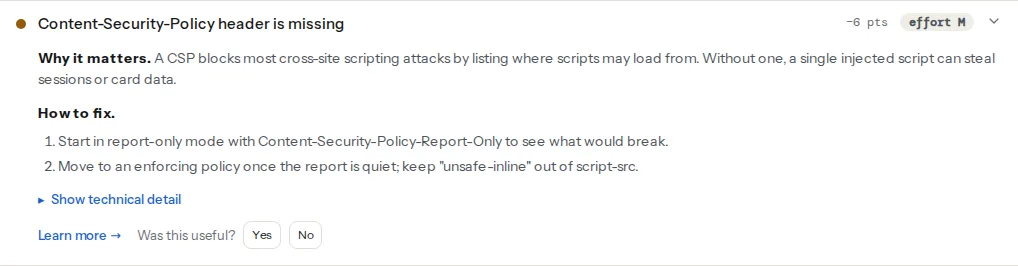
The CSP check passes on either the enforcing header or Content-Security-Policy-Report-Only, so you can start the rollout without failing the check; the technical detail says which one it found. The 'unsafe-inline' check looks at script-src, or default-src when there is no script-src.
The third-party finding comes from PageSpeed Insights and lists each vendor with bytes transferred and main-thread blocking time. Read it as a review list: each entry is a script that either gets pinned (rare), self-hosted (often) or removed (more often than you would think). The third-party scripts guide does that review; this guide handles the ones that stay on a CDN.
Step by step
1. Sort the scripts on the page into three groups
Open the page source, or the third-party finding, and put every external script and stylesheet in one of these:
| Group | Examples | What to do |
|---|---|---|
| Pinned library at a versioned URL | jQuery 3.7.1, Bootstrap 5.3.3 from cdnjs or jsDelivr, a Leaflet release | Add SRI, or self-host |
| Vendor script that updates in place | GTM, GA4, Meta pixel, Intercom, Hotjar, Cookiebot, Stripe.js | No SRI; allow the host in CSP; load late |
| Generated or per-user content | Google Fonts CSS, personalised widgets | No SRI; self-host the fonts |
Stripe.js is a useful example of group two: Stripe asks that it always be loaded from js.stripe.com and not self-hosted, and it is updated in place, so it gets a CSP entry and no hash.
2. Generate the hash for each pinned file
Download the exact file you reference and hash it. sha384 is the common choice; sha256 and sha512 also work, and you can list more than one, separated by spaces, if you want to change algorithms later.
# From a local copy
openssl dgst -sha384 -binary jquery-3.7.1.min.js | openssl base64 -A

# Straight from the CDN, in one line
curl -s https://code.jquery.com/jquery-3.7.1.min.js | openssl dgst -sha384 -binary | openssl base64 -A
The output is the base64 digest; the attribute is the algorithm name, a dash, and that digest. cdnjs and code.jquery.com print the same value next to each file, which is a good cross-check that you downloaded the right one.
3. Add the attributes
<!-- In the page <head> or before </body>, wherever the tag already is -->
<script
  src="https://code.jquery.com/jquery-3.7.1.min.js"
  integrity="sha384-PASTE-THE-DIGEST-FROM-STEP-2"
  crossorigin="anonymous"></script>

<link
  rel="stylesheet"
  href="https://cdn.jsdelivr.net/npm/[email protected]/dist/css/bootstrap.min.css"
  integrity="sha384-PASTE-THE-DIGEST-FROM-STEP-2"
  crossorigin="anonymous">
crossorigin="anonymous" is required for any file from another origin: without it the browser fetches the file in no-CORS mode, cannot read the bytes to hash them, and blocks it. The CDN has to answer with Access-Control-Allow-Origin for this to work; the public CDNs do. A file on your own origin needs no crossorigin.
Use a URL that names the version (jquery-3.7.1.min.js, [email protected]), never a floating one (jquery-latest.min.js, bootstrap@5). A floating URL changes on the next release and the hash stops matching.
4. Let the build tool do it for bundled assets
If the assets are built, the hashes should be too, so that every build is consistent:
- webpack: the
webpack-subresource-integrityplugin addsintegrityto every emitted script and stylesheet tag and to chunks loaded at runtime. - Next.js:
experimental.sri: { algorithm: 'sha256' }innext.config.jsadds hashes to the framework's own scripts. - Other bundlers have community plugins; check that the plugin covers chunks loaded later, not only the entry files.
This is the one case where SRI on first-party files earns its place: the HTML comes from your server and the assets from a CDN or bucket, so a tampered asset is caught even though the HTML is untouched.
5. Watch for the failure mode
When a hash stops matching, the browser does not load the file, fires the element's error event, and prints a console message saying the digest did not match and the resource was blocked. Nothing else tells you: CSP violation reports do not cover integrity failures, and analytics may be the very script that broke. Two habits close the gap. Load the page in a browser with the console open after every vendor or dependency update. And on pages that matter (checkout, sign-up), send yourself a beacon when a pinned script fails:
<script
  src="https://cdn.jsdelivr.net/npm/[email protected]/dist/lib.min.js"
  integrity="sha384-PASTE-THE-DIGEST"
  crossorigin="anonymous"
  onerror="navigator.sendBeacon('/sri-failed', this.src)"></script>
A handful of those beacons in a day means either the CDN changed the file (investigate before you update the hash) or you forgot to update the hash after bumping the version.
6. Put the CSP around it
SRI and CSP answer different questions. CSP says which origins may serve scripts and whether inline code may run; SRI says which exact bytes an allowed origin may serve for one tag. A strict CSP with nonces or hashes for inline code, plus SRI on the pinned CDN files, is the combination that leaves an attacker with no host to inject from and no file to swap. There was once a require-sri-for directive meant to force SRI on every script; it never shipped in stable browsers and was dropped from the specification, so there is no header that turns SRI on, only the attributes. The rollout order is in Content-Security-Policy from report-only to enforced; the short form is: report-only first, then enforce, then keep 'unsafe-inline' out of script-src, which is what the csp-unsafe-inline finding watches.
A script-src for a page with two pinned libraries and GA4 looks like this:
Content-Security-Policy: script-src 'self' 'nonce-RANDOM' https://code.jquery.com https://cdn.jsdelivr.net https://www.googletagmanager.com; object-src 'none'; base-uri 'self'The nonce covers your own inline snippet, the two CDN hosts serve pinned files with SRI, and the tag manager host is allowed without SRI because it updates in place.
7. Consider self-hosting instead
For most sites the better answer to "should I add SRI to this CDN file?" is "why is it on a CDN?". Copy the pinned library into your own assets, serve it from your origin with long cache headers, and the CDN can no longer serve you anything, modified or not. It also removes a DNS lookup and a TLS handshake per third-party host from the page load, which is why the third-party scripts guide recommends it for speed. The shared-cache argument for public CDNs stopped applying when browsers partitioned their caches per site. SRI remains the answer for the cases where you cannot self-host: a vendor that requires its own domain, or a build that must stay static.
Platform notes
WordPress
Core does not add integrity attributes, and wp_enqueue_script() has no parameter for one. Most plugins load their JavaScript from their own plugin folder, which is first-party and needs no SRI. The few that pull a library from a CDN (a map or a slider plugin using cdnjs) can be given the attributes through the script_loader_tag filter, in a small plugin or the child theme's functions.php:
// Add SRI to one enqueued script by its handle.
add_filter('script_loader_tag', function ($tag, $handle, $src) {
    if ($handle !== 'leaflet') {
        return $tag;
    }
    $integrity = 'sha384-PASTE-THE-DIGEST';
    return str_replace(
        ' src=',
        ' integrity="' . esc_attr($integrity) . '" crossorigin="anonymous" src=',
        $tag
    );
}, 10, 3);
Find the handle in the page source (id="leaflet-js", the handle is the part before -js). The hash has to be updated whenever the plugin updates the library version, so put a note in the plugin's changelog watch. Page-cache plugins serve the tag as generated, so the attributes survive caching.
Shopify
Shopify's own scripts and app scripts update in place and cannot be pinned. Libraries you add to theme.liquid from a CDN can carry integrity and crossorigin like any HTML; the theme editor keeps the attributes.
Static sites and frameworks
Build-time hashing (step 4) is the natural fit: every deploy regenerates the hashes, so they never go stale. For libraries copied into the repository, self-host and skip SRI.
Verify
- The page loads with no console message about a blocked resource or a digest mismatch, in Chrome and in Firefox.
- The security headers checker shows "Content-Security-Policy header is set" and "Content-Security-Policy blocks inline and wildcard scripts"; the third-party finding lists only vendors you decided to keep.
curl -sI https://cdn.example/lib.js | grep -i access-control-allow-originprints a value for every host you pinned, otherwisecrossorigin="anonymous"fails.- Temporarily change one character of a hash and reload: the script must be blocked and the
onerrorbeacon must fire. Then put the hash back.
Common mistakes
- SRI on a tag manager, analytics or chat script. The vendor updates it, the hash fails, the feature stops silently. Allow the host in CSP instead and load it late.
- Missing
crossorigin="anonymous"on a cross-origin file. The browser cannot verify an opaque response and blocks the file even though the hash is right. - A floating version in the URL.
bootstrap@5moves with every release; pin[email protected]. - Hashing the wrong file. The minified and unminified builds have different digests; hash exactly the URL you reference, and compare with the value the CDN prints.
- Treating SRI as a substitute for CSP. It pins files; it says nothing about inline scripts or about the second-level loads a pinned script makes. The CSP does that, and getReport checks the CSP.
- Updating the hash without asking why it changed. If the version in the URL did not change but the digest did, the CDN served a different file. That is the incident SRI exists to catch; investigate before you "fix" the hash.