A Content-Security-Policy is a list, sent by your server, of the places a page may load scripts, styles, images, fonts and frames from. A script that is not on the list does not run, which is what turns a cross-site scripting bug from "attacker steals every session" into a console error. It is also the header most likely to break your own site on day one. This guide takes you from no policy to an enforced one in stages, with a week or two of watching in between. If the other security headers are not in place yet, start with security headers from zero to A; they take minutes, a CSP takes weeks.
Quick answer
- Start with
Content-Security-Policy-Report-Only, not the enforcing header. It blocks nothing and tells you what it would have blocked. - Collect violations with
report-to(plusreport-urifor older browsers) for one to two weeks, and add the sources you actually use. - Allow inline scripts with a per-request nonce or a hash, not
'unsafe-inline'. With'strict-dynamic', scripts your trusted scripts load are trusted too. - Always include
object-src 'none',base-uri 'self'andframe-ancestors. - Rename the header to
Content-Security-Policywhen the reports are quiet, and re-run the security headers checker.
Why a CSP matters
Most sites run code they did not write: plugins, a tag manager, a chat widget, a review badge. Each is a way in. When one of them is compromised, or a comment field fails to escape a <script>, the injected code runs with full access to the page: it can read the form as the visitor types a card number, or send the session cookie elsewhere. Card-skimming attacks on online shops work exactly this way.
A policy that lists https://js.stripe.com and your own domain as the only script sources stops the skimmer from loading from evil.example. A policy without 'unsafe-inline' stops a script pasted straight into the page. That second part is where the work is, because most sites have inline scripts of their own.
How getReport checks it
The checker reads the headers of the final response. Four findings relate to a CSP:
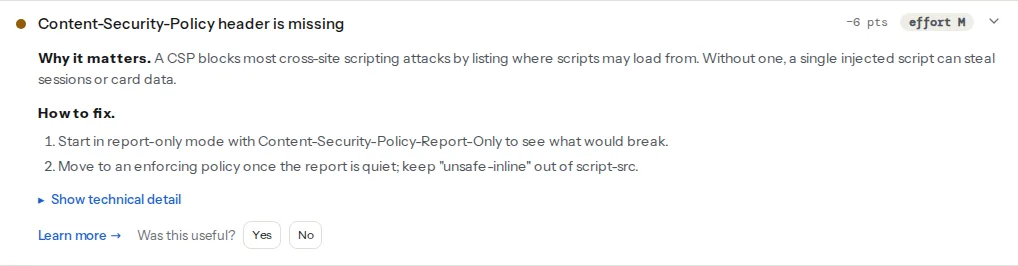
What the checks accept, which the cards do not spell out:
csp-presentpasses on either header. A report-only policy passes, and the evidence line notes it is "not enforced yet", so you can ship stage one and see progress.csp-unsafe-inlinereadsscript-src, ordefault-srcwhen there is noscript-src. It flags'unsafe-inline','unsafe-eval'or a bare*. It still flags'unsafe-inline'when a nonce makes modern browsers ignore it, so drop the fallback once you no longer need it.- Framing counts
frame-ancestorsonly from the enforcing header. Report-only does not protect against clickjacking, so keepX-Frame-Optionsuntil you enforce. See the clickjacking learn page.
Step by step
1. Know the directives you will use
| Directive | Controls | Typical value |
|---|---|---|
default-src | Fallback for every fetch directive not listed | 'self' |
script-src | JavaScript | 'self' plus a nonce, hosts |
style-src | Stylesheets and style attributes | 'self' 'unsafe-inline' to start |
img-src | Images, favicons | 'self' data: https: |
connect-src | fetch, XHR, WebSocket, beacons | 'self' plus analytics endpoints |
font-src | Web fonts | 'self' or the font host |
frame-src | Iframes your page embeds | video and payment hosts |
frame-ancestors | Who may embed your page | 'none' or 'self' |
base-uri | The <base> tag | 'self' |
form-action | Where forms may submit | 'self' plus payment hosts |
object-src | Plugins (<object>, <embed>) | 'none' |
upgrade-insecure-requests | Rewrites http:// subresources to https:// | no value |
upgrade-insecure-requests is also the safety net in fixing mixed content after moving to HTTPS. 'self' means the exact origin: same scheme, host and port. cdn.example.com is not 'self' on www.example.com. frame-ancestors, base-uri and form-action do not fall back to default-src, so set them explicitly. The Content-Security-Policy learn page has the short version.
2. Inventory what the page loads
Open the key pages (home, a product or article, the cart and checkout, a page with a form, a page with an embed) with DevTools → Network, and note every host that serves a script, style, font, image, frame or request. View the page source for <script> blocks without src and for onclick="…" style attributes. Those are your inline scripts.
3. Ship a report-only policy with reporting
Reporting-Endpoints: csp="https://example.com/csp-reports"
Content-Security-Policy-Report-Only: default-src 'self'; script-src 'self' https://www.googletagmanager.com; style-src 'self' 'unsafe-inline' https://fonts.googleapis.com; img-src 'self' data: https:; font-src 'self' https://fonts.gstatic.com; connect-src 'self'; frame-src https://www.youtube-nocookie.com; frame-ancestors 'self'; base-uri 'self'; form-action 'self'; object-src 'none'; report-to csp; report-uri https://example.com/csp-reports
In nginx, the server block:
add_header Reporting-Endpoints 'csp="https://example.com/csp-reports"' always;
add_header Content-Security-Policy-Report-Only "default-src 'self'; script-src 'self'; style-src 'self' 'unsafe-inline'; img-src 'self' data: https:; object-src 'none'; base-uri 'self'; frame-ancestors 'self'; report-to csp; report-uri https://example.com/csp-reports" always;
report-to is the current mechanism and needs the Reporting-Endpoints header; report-uri is deprecated but still what some browsers use, so send both. Browsers send report-uri reports as JSON with the application/csp-report type and report-to reports as application/reports+json. The endpoint can be a few lines that write to a log:
// csp-reports.mjs: run with node csp-reports.mjs, proxied at /csp-reports
import http from 'node:http';
http.createServer((req, res) => {
  let body = '';
  req.on('data', (chunk) => { if (body.length < 64_000) body += chunk; });
  req.on('end', () => { console.log(new Date().toISOString(), body); res.writeHead(204).end(); });
}).listen(8787);
4. Read the reports, tighten, repeat
Each report names the blocked URL (blocked-uri or blockedURL) and the directive it broke. Sort them into three piles:
- Yours, legitimate: your CDN, your analytics, a font host. Add the origin to the right directive.
- Inline: reported as
inline. Move the code into a file, or allow it with a nonce or hash (step 5). - Noise:
chrome-extension://,moz-extension://, and hosts you have never heard of injected by browser extensions or adware on the visitor's machine. Ignore them.
Run the cycle until a week of normal traffic brings only noise. On busy sites, sample the reports rather than logging every page view.
5. Replace unsafe-inline with nonces or hashes
Nonce: a random value generated per response, sent in the header and on each <script> you trust. An attacker's injected script does not know it. The nonce has to come from the code that renders the page. Stamping one in at the proxy (nginx sub_filter replacing a placeholder, for example) also stamps it into any injected markup that contains the placeholder, so it protects nothing.
In PHP, at the top of the template before any output:
<?php
$nonce = base64_encode(random_bytes(16));
header("Content-Security-Policy: default-src 'self'; script-src 'nonce-{$nonce}' 'strict-dynamic'; object-src 'none'; base-uri 'self'; frame-ancestors 'self'");
?>
<script nonce="<?= htmlspecialchars($nonce) ?>">
  document.documentElement.classList.add('js');
</script>
In Node with Express:
// server.mjs: npm install express, then node server.mjs
import crypto from 'node:crypto';
import express from 'express';

const app = express();
app.use((req, res, next) => {
  res.locals.nonce = crypto.randomBytes(16).toString('base64');
  res.setHeader('Content-Security-Policy',
    `default-src 'self'; script-src 'nonce-${res.locals.nonce}' 'strict-dynamic'; object-src 'none'; base-uri 'self'; frame-ancestors 'self'`);
  next();
});
app.get('/', (req, res) => {
  res.send(`<!doctype html><title>Home</title><script nonce="${res.locals.nonce}">console.log('allowed');</script>`);
});
app.listen(3000);
getreport.app works this way: its middleware generates a fresh nonce per request, the framework adds it to every script it emits, and script-src is 'nonce-…' 'strict-dynamic' with no 'unsafe-inline'.
A nonce means the HTML cannot be served from a shared page cache, because every visitor would get the same, now public, nonce. If your pages are cached, use hashes.
Hash: the SHA-256 of an inline script's exact contents, whitespace included. It suits static and cached pages whose inline scripts never change:
printf '%s' "document.documentElement.classList.add('js');" | openssl dgst -sha256 -binary | openssl base64script-src 'self' 'sha256-<the output>'Chrome's console error for a blocked inline script prints the hash it expected, which saves the command.
'strict-dynamic': scripts added by a nonced or hashed script (with document.createElement('script')) are trusted too, and host lists and 'self' are ignored in browsers that support it. That is what makes tag managers and loaders workable without listing every host they pull in.
Nonces and hashes do not cover onclick="…" attributes or javascript: links. Move those into event listeners in a script file.
6. Allow the usual third parties
Google Tag Manager: with 'strict-dynamic', give the container snippet the nonce and have it pass the nonce on to gtm.js, as in Google's nonce-aware snippet:
<script nonce="NONCE_FROM_SERVER">(function(w,d,s,l,i){w[l]=w[l]||[];w[l].push({'gtm.start':
new Date().getTime(),event:'gtm.js'});var f=d.getElementsByTagName(s)[0],
j=d.createElement(s),dl=l!='dataLayer'?'&l='+l:'';j.async=true;j.src=
'https://www.googletagmanager.com/gtm.js?id='+i+dl;var n=d.querySelector('[nonce]');
n&&j.setAttribute('nonce',n.nonce||n.getAttribute('nonce'));f.parentNode.insertBefore(j,f);
})(window,document,'script','dataLayer','GTM-XXXXXXX');</script>
Google's documentation also notes that Custom JavaScript variables in GTM need 'unsafe-eval', which the check flags. Built-in variable types avoid it.
Google Analytics 4 without 'strict-dynamic', Google's documented host list:
script-src https://*.googletagmanager.com
img-src https://*.google-analytics.com https://*.googletagmanager.com
connect-src https://*.google-analytics.com https://*.analytics.google.com https://*.googletagmanager.com
Google Fonts: style-src https://fonts.googleapis.com and font-src https://fonts.gstatic.com. Self-hosting the fonts removes both.
YouTube embeds: frame-src https://www.youtube.com https://www.youtube-nocookie.com, plus img-src https://i.ytimg.com if you show thumbnails yourself.
7. Enforce
Rename Content-Security-Policy-Report-Only to Content-Security-Policy, keep report-to, and watch the reports for another week. To tighten later, send the stricter version as report-only next to the enforcing one; browsers apply both headers independently.
Platform notes
WordPress
Core, themes and plugins print many inline scripts (settings objects like var wpApiSettings = {…}, the emoji loader, plugin configs), and most WordPress sites run a page cache, which rules out nonces on cached pages. A realistic first policy:
Content-Security-Policy: default-src 'self'; script-src 'self' 'unsafe-inline' https://www.googletagmanager.com; style-src 'self' 'unsafe-inline'; img-src 'self' data: https:; object-src 'none'; base-uri 'self'; frame-ancestors 'self'; form-action 'self'; upgrade-insecure-requestscsp-unsafe-inline will keep warning, and that is honest: inline scripts are still allowed. But framing, <base> hijacking, plugin objects and off-site form posts are now blocked, and the host list stops scripts loading from unknown domains. Use 'self' in frame-ancestors because the Customizer previews the site in a frame. Leave /wp-admin/ out of the first version.
From WordPress 5.7, the wp_script_attributes and wp_inline_script_attributes filters add attributes, including a nonce, to scripts printed through core's script-tag helpers. Scripts a plugin echoes directly are not covered.
Security plugins and some hosts can also send a CSP. Two policies are both enforced, so a resource must pass both. Keep one source.
Shopify
Shopify controls the storefront's response headers, so an enforcing CSP for the theme is not something you set. Run the checker to see what the platform sends.
Static sites / custom
On Netlify or Cloudflare Pages, set headers in _headers; on Vercel, in vercel.json. Static pages suit hashes. A <meta http-equiv="Content-Security-Policy"> tag works for most directives, but not for frame-ancestors, reporting or report-only mode.
Verify
- The security headers checker shows
csp-presentpassing without "report-only" in the evidence, andcsp-unsafe-inlinepassing once inline scripts use nonces or hashes. curl -sI https://example.com/ | grep -i content-securityprints one enforcing policy.- Click through checkout, forms, embeds and the consent banner with the console open. No "Refused to load" or "Refused to execute" messages.
Common mistakes
- Blocking your own CDN. Images or scripts from
cdn.example.comfail because'self'is one exact origin. Add the CDN origin. - Forgetting
data:inimg-src. Lazy-load placeholders and SVG icons in CSS disappear. Adddata:. - A report endpoint that floods. Every page view can send reports, and extensions add noise. Sample, cap the body size, rate limit.
- Two policies from two places. A plugin sends one, the server another, and something allowed in one is blocked by the other. Keep one source.
- Enforcing on day one. The tag manager or a payment iframe breaks silently for visitors. Report-only first.