Every cookie your site sets carries a few attributes that decide when the browser sends it back and who can read it. Three of them, Secure, HttpOnly and SameSite, are the difference between a session cookie that stays private and one that can be copied off a café Wi-Fi, read by an injected script, or ridden by another site. Setting them is usually one line of configuration. This guide explains each flag in plain terms, which of your cookies need which, and where to set them. The cookie findings sit in the same panel as the headers in security headers from zero to A.
Quick answer
| Cookie | Secure | HttpOnly | SameSite |
|---|---|---|---|
| Session / login | Yes | Yes | Lax (or Strict) |
| Cart, preferences read by the server | Yes | Yes | Lax |
| CSRF token read by JavaScript | Yes | No | Lax or Strict |
| Consent choice read by the banner | Yes | No | Lax |
| Analytics set by a script | Yes | Not possible | Lax |
| Cookie an embed on another site needs | Yes | Depends | None (requires Secure) |
- Set flags where the cookie is created: PHP settings, the framework's cookie options, or the proxy as a fallback.
- Run the security headers checker after each change; the cookie findings list the names still missing a flag.
Why cookie flags matter
A session cookie is a key. Whoever holds it is logged in as that visitor, no password needed. Each flag closes one way of stealing or misusing that key:
- Secure stops the browser from sending the cookie over plain
http://. Without it, one unencrypted request, such as a typedexample.combefore the redirect, or an oldhttp://image URL, carries the cookie in clear text across the network. - HttpOnly hides the cookie from JavaScript. Without it,
document.cookiereturns it, and any script on the page, including one injected through a vulnerable plugin, can send it to another server. - SameSite decides whether the cookie goes along with requests that another site starts. Without a restriction, a page on
evil.examplecan submit a hidden form to your "change email" URL, and the browser attaches the visitor's session. That is cross-site request forgery (CSRF).
None of these replaces the others. HttpOnly does not help against a network attacker, and Secure does not stop an injected script. HttpOnly also only protects the cookie, not the page: an injected script can still act as the visitor while they are on it, which is what a Content-Security-Policy is for.
How getReport checks it
The tool reads every Set-Cookie header on the final response of the page you enter and checks each cookie for the three attributes:
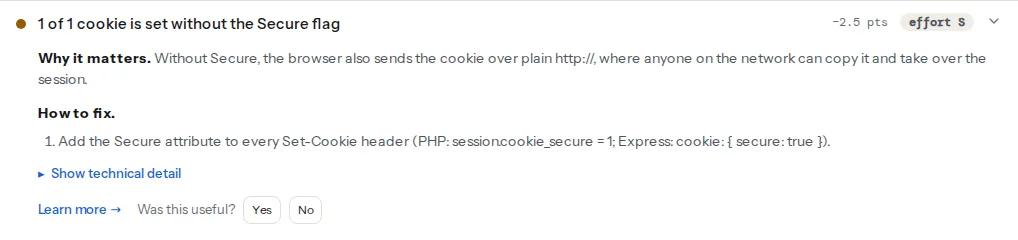
What it sees and what it does not:
- Only cookies from
Set-Cookieheaders on the final response. Cookies that scripts set in the browser (most analytics and many consent banners), cookies set on an earlier redirect, and cookies that appear only after logging in or adding to cart are not in the list. Check those pages in DevTools. - Names, never values. The finding lists cookie names; values are not stored.
- Any SameSite value counts as present.
SameSite=Nonepasses the SameSite check; if it lacksSecure, the Secure check flags it. - When the page sets no cookies at all, the three findings do not appear.
Step by step
1. List your cookies
In Chrome or Edge: DevTools → Application → Storage → Cookies → your domain. Firefox: Storage → Cookies. The table has columns for HttpOnly, Secure and SameSite. Visit the pages that matter (home, login, cart, checkout) because different pages set different cookies. For each cookie, note who sets it: your code, the CMS, a plugin, or a third-party script.
2. Decide the flags per cookie
Secure: every cookie. If the site is HTTPS-only (and it should be, see HSTS: enabling it safely), there is no reason for any cookie to travel over HTTP. Browsers also refuse to let an http:// page set a Secure cookie.
HttpOnly: every cookie JavaScript does not read. Session and login cookies first. The exceptions are cookies your own front-end code reads on purpose: a CSRF token in the double-submit pattern, a consent choice the banner checks, a theme preference. Those are not secrets, so being readable is fine.
SameSite: pick one explicitly.
Laxsends the cookie on your own site's requests and when a visitor follows a normal link to you from another site (a top-level GET navigation). It withholds it from cross-site form posts, iframes, images andfetch. Right for most cookies, including sessions.Strictnever sends the cookie on a request another site started, including clicking a link to you from an email or a search result. The visitor lands logged out and is logged in again on the next click. Good for high-value actions (banking, admin); surprising for a shop.Nonesends it everywhere and must be combined withSecure, or Chrome rejects the cookie. Only for cookies that genuinely work inside other sites: an embedded widget, a cross-site login or payment flow.
Chrome has treated a cookie without SameSite as Lax since 2020. Firefox and Safari did not adopt that default, which is why the check asks you to say it explicitly.
3. Use the name prefixes for important cookies
Two name prefixes make the browser enforce the flags:
__Secure-name: the browser accepts the cookie only withSecure, from an HTTPS page.__Host-name: additionally requiresPath=/and noDomainattribute, so the cookie is locked to exactly this host and a subdomain cannot overwrite it.
Set-Cookie: __Host-session=abc123; Path=/; Secure; HttpOnly; SameSite=LaxRenaming a cookie logs everyone out once, so do it with a release, not on a busy afternoon.
4. Set the flags where the cookie is created
PHP sessions, in php.ini (or .user.ini, or your host's PHP settings panel), cover PHPSESSID and any plugin that calls session_start():
session.cookie_secure = 1
session.cookie_httponly = 1
session.cookie_samesite = "Lax"
session.use_strict_mode = 1
PHP setcookie (PHP 7.3 and later accept an options array):
setcookie('prefs', 'dark', [
    'expires'  => time() + 60 * 60 * 24 * 30,
    'path'     => '/',
    'secure'   => true,
    'httponly' => true,
    'samesite' => 'Lax',
]);Express, for a cookie you set and for express-session:
// app.mjs: npm install express express-session, then SESSION_SECRET=… node app.mjs
import express from 'express';
import session from 'express-session';

const app = express();
app.set('trust proxy', 1); // behind nginx, Caddy or a load balancer that terminates TLS
app.use(session({
  secret: process.env.SESSION_SECRET,
  resave: false,
  saveUninitialized: false,
  cookie: { secure: true, httpOnly: true, sameSite: 'lax' },
}));

app.post('/prefs', (req, res) => {
  res.cookie('prefs', 'dark', { secure: true, httpOnly: true, sameSite: 'lax', maxAge: 30 * 24 * 3600 * 1000 });
  res.sendStatus(204);
});

app.listen(3000);
Without trust proxy, express-session sees a plain HTTP connection from the proxy and does not send a secure cookie at all.
nginx as a reverse proxy (1.19.3 and later) can add flags to cookies from the application, in the location with proxy_pass:
location / {
    proxy_pass http://app:3000;
    proxy_cookie_flags ~ secure httponly samesite=lax;
}
~ with no pattern matches every cookie; name one cookie instead to be selective (proxy_cookie_flags session secure httponly samesite=lax;). It applies to proxied responses only; for PHP-FPM behind nginx, use the php.ini settings above.
Apache with mod_headers, in the virtual host or .htaccess. Each line adds a flag only when the cookie does not already have it:
Header edit Set-Cookie "(?i)^((?:(?!;\s?secure).)+)$" "$1; Secure"
Header edit Set-Cookie "(?i)^((?:(?!;\s?httponly).)+)$" "$1; HttpOnly"
Header edit Set-Cookie "(?i)^((?:(?!;\s?samesite=).)+)$" "$1; SameSite=Lax"
Setting flags at the proxy is a fallback: it cannot tell a session cookie from the CSRF token your JavaScript needs. Where you can, set them in the code.
5. Know the limits of third-party cookies
A cookie set by widget.example inside your page is a third-party cookie. It needs SameSite=None; Secure to work at all, and even then Safari blocks third-party cookies by default and Firefox isolates them per site. A login, payment or chat flow that depends on one already fails for Safari visitors, whatever the flags. The fix belongs to the vendor; the cookie flags learn page has the short version of each attribute.
Platform notes
WordPress
WordPress core sets its login cookies with HttpOnly. Secure depends on the address: the wordpress_logged_in_… cookie is marked Secure only when the Site Address in Settings → General starts with https://. Make sure both addresses there use HTTPS, and in wp-config.php force HTTPS for logins and the dashboard:
define( 'FORCE_SSL_ADMIN', true );The cookie constants in wp-config.php (COOKIE_DOMAIN, COOKIEPATH, SITECOOKIEPATH) set where cookies apply, not their flags. Core sets no SameSite attribute on its cookies, so add it at the server (the Apache or nginx lines above) if you want it explicit.
For anonymous visitors, core itself sets hardly any cookies, so the cookies in a front-page report usually come from plugins: a PHP session (PHPSESSID, fixed by the php.ini lines), shop sessions, form or popup plugins. The evidence line names them, which tells you which plugin to update or configure.
Shopify
Shopify sets the storefront, cart and checkout cookies itself, and you cannot change their attributes. Cookies your theme or apps set from JavaScript are the part you control; set them with Secure and SameSite=Lax in the script.
Static sites / custom
A static site sets no cookies from the server unless the host or CDN adds its own (load-balancer or bot-protection cookies). Those are the host's to flag; if one is missing Secure, it is worth a support ticket.
Verify
- Re-run the checker. The findings read "All N cookies are set with the Secure flag", "hidden from JavaScript" and "have a SameSite attribute".
- From a terminal:
curl -sI https://example.com/ | grep -i set-cookieshows each cookie withSecure,HttpOnly(where intended) andSameSite. - Log in, add to cart and pay with a test card. Then open DevTools → Application → Cookies on those pages and check the columns for cookies the tool could not see.
Common mistakes
SameSite=NonewithoutSecure. Chrome drops the cookie, and the embed or login flow stops working. AddSecure.- HttpOnly on a cookie JavaScript needs. The consent banner reappears on every page, or form submissions fail the CSRF check. Remove HttpOnly from that one cookie only.
Stricton the session of a shop. Visitors arriving from a newsletter look logged out, and cross-site returns (a single sign-on redirect, a bank's 3-D Secure page posting back) lose the session. UseLax, andNone; Secureonly for the cookie the return step needs.- Secure flag, but the site still answers on HTTP. The cookie is protected, but the first
http://request can still be intercepted and redirected. Add the HTTP → HTTPS redirect and HSTS. - Flags only at the proxy. Every cookie gets the same flags, including the one the front end must read. Set them in the code and keep the proxy as a backstop.