Access-Control-Allow-Origin: * is the header developers add when a browser error says "blocked by CORS policy" and they want it to stop. Sometimes that is the right answer. Sometimes it means that any website in the world can read your logged-in users' data from inside their own browser. This guide explains which is which, why the wildcard is not even the worst case, and how to write an allowlist that works on nginx, Apache, Express, Next.js and WordPress.
Quick answer
- CORS is a browser rule about reading cross-origin responses. It is not a firewall; anyone can still
curlyour API. *is fine for resources that are the same for everyone and need no cookie: fonts, public JSON, images drawn on a canvas, static files.*is a leak on anything that varies per visitor (account data, cart contents, "who am I" endpoints), and dangerous on anything reachable only from inside a network.- Browsers refuse
*together withAccess-Control-Allow-Credentials: true. The pattern that actually leaks cookies is a server that echoes whateverOriginit receives and adds credentials. - The safe pattern: an explicit list of origins, echo only a listed origin, send
Vary: Origin, answer preflights. Check the page with the security headers checker and the API withcurl -H "Origin: …".
Why CORS matters
A browser keeps sites apart. JavaScript running on evil.example can send a request to bank.example, and the browser will even attach the visitor's bank.example cookies to it, but the script is not allowed to read the response. That rule is the same-origin policy, and it is the only thing standing between "a page you opened" and "a page that can read your e-mail".
CORS (Cross-Origin Resource Sharing) is the mechanism a server uses to relax that rule on purpose. When bank.example answers with Access-Control-Allow-Origin: https://app.bank.example, the browser lets a script on that one origin read the response. With *, it lets a script on any origin read it.
Two consequences follow, and they are the whole subject:
- CORS only governs browsers. A response with no CORS headers is still fully readable with
curl, Postman or a server-side fetch. CORS is not access control; it does not protect data from attackers, only from other websites running in your visitors' browsers. - The visitor's browser has the visitor's cookies and the visitor's network position. That is what makes a wrong CORS header serious: the attacker's page borrows the visitor's session, or the visitor's place inside a corporate network, to read something the attacker could not fetch directly.
When * is harmless
A response that is identical for every requester, and that a browser fetches without cookies, gains nothing from being hidden. Wildcard is correct for:
- Web fonts on a CDN. Browsers fetch
@font-facefiles in CORS mode, so a font served fromcdn.exampleto pages onexample.comneeds a CORS header, and*is the normal choice. - Public, unauthenticated APIs: exchange rates, a weather feed, a public search.
- Static JSON, images used in
<canvas>or WebGL, and scripts loaded withcrossorigin="anonymous"so that the browser reports full error details.
Since * cannot be combined with credentials, the browser sends these requests without cookies, and the server cannot personalise the answer. Nothing private is there to leak.
When * is risky
An endpoint that answers * and returns something that depends on the visitor:
/api/me,/wp-json/wp/v2/users/me,/cart,/account/orders: pages personalised by a cookie. With*, the browser strips credentials, so most of these will answer "not logged in" to a cross-origin request. Most, not all: some frameworks read the session from a header the browser does send, or fall back to IP-based identification.- Anything on an intranet, a VPN or behind an IP allowlist. The visitor's browser is inside the network; the attacker's page is not, but it runs in the visitor's browser. With
*on an internal dashboard, a visit to any malicious page while on the VPN lets that page read the dashboard. - Responses keyed on IP, such as "your region" or rate-limited previews.
The check warns on * because the header is on the page itself, where it never belongs: HTML pages are not cross-origin API resources, and a wildcard there usually means a blanket add_header that also covers every API route.
The actually dangerous pattern: reflection with credentials
The specification forbids Access-Control-Allow-Origin: * together with Access-Control-Allow-Credentials: true; browsers refuse to expose the response. Developers who hit that error sometimes "fix" it like this:
Access-Control-Allow-Origin: <whatever the Origin request header said>
Access-Control-Allow-Credentials: true
Now every origin is allowed and cookies are attached. A page on evil.example can fetch https://shop.example/api/me with credentials: 'include', the browser sends the visitor's session cookie, the server echoes evil.example as the allowed origin, and the attacker's script reads the visitor's name, address and order history. This is a full account-data leak, and no scanner that looks only at a plain response will see it, because the header is only produced when an Origin is sent. Step 2 below shows how to test for it by hand.
How getReport checks it
The checker fetches the page like a browser making a normal navigation, follows redirects, and reads Access-Control-Allow-Origin and Access-Control-Allow-Credentials on the final page. It grades in two steps: * alone is a warning; * combined with Access-Control-Allow-Credentials: true is a fail, because it shows the server is configured to allow credentials to everyone, and a browser will refuse the combination while a slightly different config would not. Any explicit origin, or no header at all, passes.
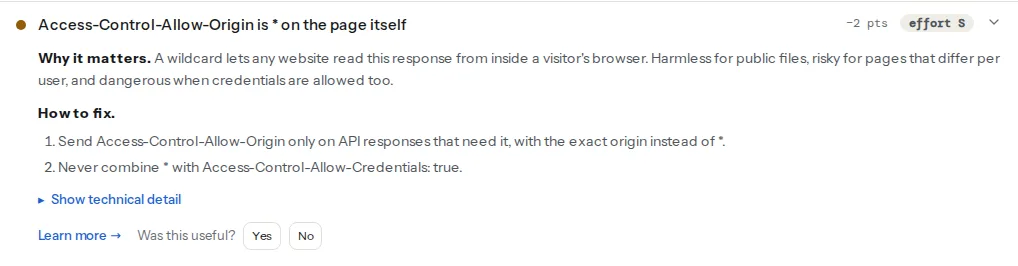
Two other findings in the same panel are part of the same defence. SameSite decides whether a cookie is attached to cross-site requests at all, so a Lax session cookie limits the damage of a reflection bug; and a CSP connect-src limits where your pages may send data, the mirror image of what CORS controls:
Note
The checker reads the response a browser gets when it navigates to the page, without an Origin header. A server that reflects origins will not show Access-Control-Allow-Origin in that response, so it passes the check. That is a limit of any single-response check, which is why step 2 tests the API by hand.
Step by step
1. Find where the header comes from
grep the server config, the application code and any CDN rules for Access-Control-Allow-Origin. Common sources: a site-wide add_header in nginx meant for fonts, a Header set in .htaccess copied from a forum post, app.use(cors()) with no options in Express, a WordPress plugin that "fixes" REST API errors, or a CDN "CORS" toggle applied to the whole zone.
2. Test the API for reflection
Send an origin you do not own and see what comes back:
curl -sI -H "Origin: https://evil.example" https://example.com/api/me \
  | grep -i -E "^access-control-|^vary:"
Access-Control-Allow-Origin: *with no credentials line: wildcard; harmless if the endpoint is public, otherwise change it.Access-Control-Allow-Origin: https://evil.exampleplusAccess-Control-Allow-Credentials: true: reflection with credentials. Fix today.Access-Control-Allow-Origin: https://app.example.com(a fixed value) or no header: the endpoint is not readable from evil.example. Good.
Repeat for a preflight, which is what the browser sends before a PUT, a DELETE or a POST with JSON:
curl -si -X OPTIONS -H "Origin: https://evil.example" \
  -H "Access-Control-Request-Method: POST" https://example.com/api/orders \
  | grep -i -E "^HTTP|^access-control-"
3. Write the allowlist
The pattern is the same on every server: if the incoming Origin is on the list, echo exactly that origin; otherwise send no Access-Control-Allow-Origin at all. Always add Vary: Origin, so that a cache does not serve the response meant for one origin to another. Send Access-Control-Allow-Credentials: true only if the front end really uses cookies cross-origin.
nginx, in nginx.conf (the map goes in the http block, the location in your server):
map $http_origin $cors_origin {
    default "";
    "https://app.example.com"   $http_origin;
    "https://admin.example.com" $http_origin;
}

server {
    location /api/ {
        # nginx drops add_header lines whose value is empty, so unknown origins get nothing
        add_header Access-Control-Allow-Origin $cors_origin always;
        add_header Access-Control-Allow-Credentials "true" always;
        add_header Vary Origin always;

        if ($request_method = OPTIONS) {
            add_header Access-Control-Allow-Origin $cors_origin always;
            add_header Access-Control-Allow-Credentials "true" always;
            add_header Access-Control-Allow-Methods "GET, POST, PUT, DELETE, OPTIONS" always;
            add_header Access-Control-Allow-Headers "Content-Type, Authorization" always;
            add_header Access-Control-Max-Age 86400 always;
            return 204;
        }
        proxy_pass http://app:3000;
    }
}Apache, in the virtual host or .htaccess (mod_headers and mod_setenvif enabled):
SetEnvIf Origin "^https://(app|admin)\.example\.com$" CORS_ORIGIN=$0
Header always set Access-Control-Allow-Origin "%{CORS_ORIGIN}e" env=CORS_ORIGIN
Header always set Access-Control-Allow-Credentials "true" env=CORS_ORIGIN
Header always merge Vary "Origin"Express, with the cors package, which handles preflights and Vary for you:
const cors = require('cors');

app.use('/api', cors({
  origin: ['https://app.example.com', 'https://admin.example.com'],
  credentials: true,
  methods: ['GET', 'POST', 'PUT', 'DELETE'],
}));
Never pass a function that returns true for every origin, and never origin: '*' together with credentials: true.
Next.js, in a route handler at app/api/me/route.js:
const ALLOWED = new Set(['https://app.example.com', 'https://admin.example.com']);

function corsHeaders(request) {
  const origin = request.headers.get('origin') ?? '';
  const headers = { Vary: 'Origin' };
  if (ALLOWED.has(origin)) {
    headers['Access-Control-Allow-Origin'] = origin;
    headers['Access-Control-Allow-Credentials'] = 'true';
  }
  return headers;
}

export async function GET(request) {
  return Response.json({ ok: true }, { headers: corsHeaders(request) });
}

export function OPTIONS(request) {
  return new Response(null, {
    status: 204,
    headers: {
      ...corsHeaders(request),
      'Access-Control-Allow-Methods': 'GET, POST, OPTIONS',
      'Access-Control-Allow-Headers': 'Content-Type, Authorization',
      'Access-Control-Max-Age': '86400',
    },
  });
}
4. Give fonts their own rule
If the reason for the site-wide wildcard was a font on another host, scope it to font files only, on the host that serves them:
location ~* \.(woff2?|ttf|otf|eot)$ {
    add_header Access-Control-Allow-Origin "*" always;
    add_header Cache-Control "public, max-age=31536000, immutable";
}
Fonts are the same bytes for everyone, so * is right here, and the rule no longer touches HTML or API responses.
Platform notes
WordPress
The REST API at /wp-json/ sends CORS headers from core: when a request carries an Origin, WordPress echoes that origin and adds Access-Control-Allow-Credentials: true. That looks like the reflection pattern above, and it is, with one mitigation built in: cookie authentication in the REST API only counts when the request also carries a valid nonce in X-WP-Nonce, and a cross-site page cannot obtain one. Without the nonce, the request is treated as logged out, so /wp-json/wp/v2/users/me answers 401 to evil.example even with cookies attached.
If your REST API is only ever called from your own front end and a known app, tighten it anyway. In a must-use plugin at wp-content/mu-plugins/rest-cors.php:
<?php
/**
 * Plugin Name: REST API CORS allowlist
 */
add_action('rest_api_init', function () {
    remove_filter('rest_pre_serve_request', 'rest_send_cors_headers');
    add_filter('rest_pre_serve_request', function ($served) {
        $allowed = ['https://app.example.com'];
        $origin  = get_http_origin();
        if ($origin && in_array($origin, $allowed, true)) {
            header('Access-Control-Allow-Origin: ' . esc_url_raw($origin));
            header('Access-Control-Allow-Methods: OPTIONS, GET, POST, PUT, PATCH, DELETE');
            header('Access-Control-Allow-Credentials: true');
            header('Vary: Origin', false);
        }
        return $served;
    });
}, 15);
Plugins that promise to "enable CORS" for headless setups often set * on every response, including the HTML, which is where the check catches it. Prefer the allowlist.
Shopify and hosted platforms
Storefront pages send no CORS header and you cannot add one. Apps talk to the Storefront API with their own tokens; there is nothing to configure on the theme.
Static sites
Netlify: a _headers file with /fonts/* then Access-Control-Allow-Origin: * indented on the next line, scoped to the folder. Vercel: headers in vercel.json with a source of /fonts/(.*). Keep the wildcard off /*.
Verify
- Re-run the security headers checker. The finding reads "Access-Control-Allow-Origin is not a wildcard".
- The reflection test from step 2, with a made-up origin, prints no
Access-Control-Allow-Originline, or a fixed origin that is not the one you sent. - The same test with a listed origin (
-H "Origin: https://app.example.com") echoes that origin andVary: Origin. - The real front end still works: log in, load the account page, place a test order. A browser console message "has been blocked by CORS policy" now names exactly the origin you forgot to list, which is the allowlist doing its job.
- Fonts still load from the CDN with no console errors.
Common mistakes
*on every response to silence one font error. Scope the header to the font files, on the host that serves them.- Echoing the
Originheader to "support all our domains". That allows all domains, full stop. Compare against a list, then echo. - An allowlist implemented as a substring or prefix match.
origin.startsWith('https://app.example.com')also matcheshttps://app.example.com.evil.example. Compare whole origins, exactly. Access-Control-Allow-Origin: nullin the list. Sandboxed iframes,file://pages and some redirects sendOrigin: null; allowing it lets an attacker's sandboxed frame in. Never allowlistnull.- Forgetting
Vary: Originbehind a CDN. The cache stores the response withAccess-Control-Allow-Origin: https://app.example.comand serves it to every origin, or to none. Always send it when the value depends on the request. - Treating CORS as protection against CSRF. CORS controls reading, not sending; a cross-site form can still POST with cookies attached. The defences for that are
SameSitecookies and CSRF tokens, covered in Cookie flags: Secure, HttpOnly, SameSite. Where your own pages may send data is a CSPconnect-srcquestion, in Content-Security-Policy from report-only to enforced; the rest of the header set is in Security headers from zero to A. The MDN CORS guide covers the preflight rules in full.