A browser can open the camera, read the location, take a payment, go fullscreen or talk to a USB device, but only when a page asks. The Permissions-Policy header lets you say in advance which of those your site will never ask for, so that a script you did not write, or an iframe you do not control, cannot ask either. It is one line, it breaks nothing on a site that does not use the features, and this guide gives you the line for your kind of site.
Quick answer
- Send
Permissions-Policy: camera=(), microphone=(), geolocation=(), payment=(), usb=()on every page.()means "nobody, not even this page". - Keep a feature on for yourself with
(self), and for one specific embed with a quoted origin:payment=(self "https://checkout.example"). - The header controls the top page and every iframe in it. An iframe additionally needs
allow="…"on the<iframe>tag for anything the header permits it. - It does not replace
Content-Security-Policy; CSP decides what loads, Permissions-Policy decides what loaded code may do. - The security headers checker reports the header as present or missing; the value is yours to get right.
Why Permissions-Policy matters
Every script that runs in your page, including the analytics tag, the chat widget, the A/B testing snippet and whatever those load in turn, runs with the same powers as your own code. If a third-party script is compromised (it happens: tag managers, ad networks and abandoned widgets have all been hijacked), it can call getUserMedia() and the browser will show your visitors a permission prompt with your domain on it. Some visitors click "Allow".
Iframes are the other route. A cross-origin iframe cannot use the camera or location on its own; the top page has to grant it with the allow attribute. But the default allowlist for most features is self, which means your own origin, and your own origin is exactly where injected scripts run.
The header closes both routes with one statement: "this site does not use these features, at all". After that, the call fails, no prompt appears, and the browser logs a policy violation in the console instead. For a site that never intends to use the camera, there is no downside.
It also documents intent for the people who come after you. A payment=(self "https://checkout.example") line tells the next developer exactly which embed is allowed to open the Payment Request API, which is more than most sites can say about their third-party scripts.
How getReport checks it
The checker fetches the page like a browser, follows redirects and looks for a Permissions-Policy response header on the final page. The check is a presence check: any non-empty value passes, and the evidence line shows the value so you can read what is actually being sent. It does not grade the directives, because there is no universally right list; a video-call app needs camera=(self) and a blog needs camera=(). The rest of this guide is about choosing the value.
The panel shows the header table with a row per header, marked where a header is missing or weak:
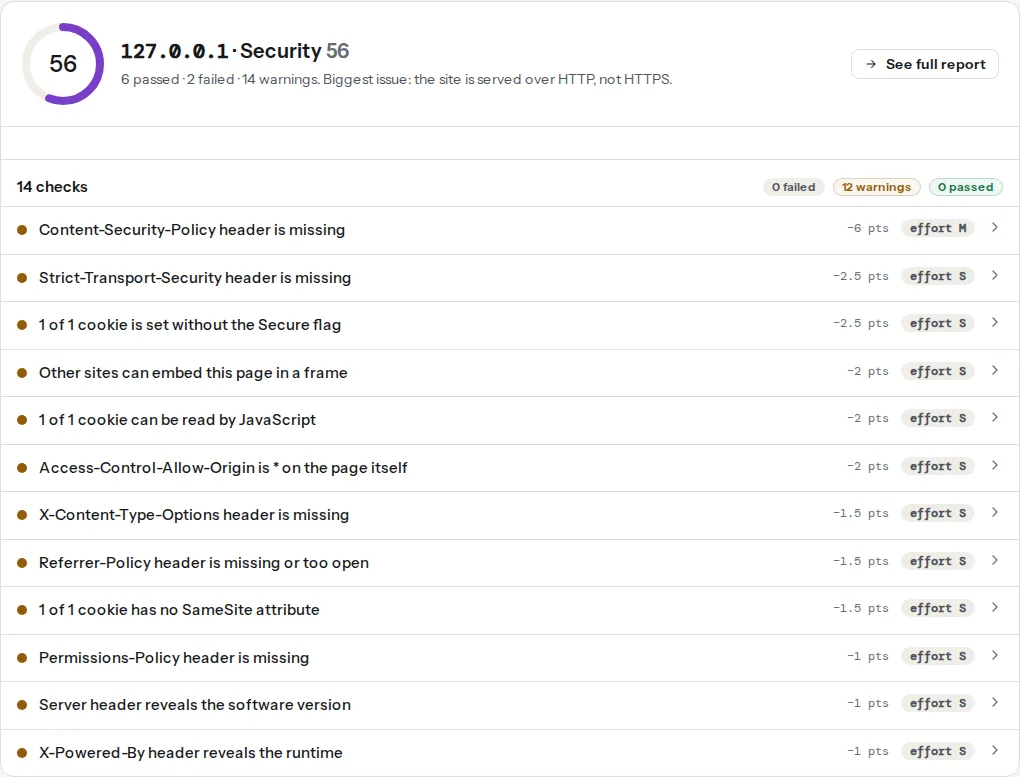
Two neighbours in the same panel are part of the same idea, limiting what a page can do to visitors:
Framing protection is about other sites embedding you; Permissions-Policy is about what you and the sites you embed may do. CSP is about which code is allowed to load in the first place. A site with all three has covered load, capability and embedding.
The syntax
The header is a comma-separated list of feature=(allowlist) entries:
Permissions-Policy: camera=(), microphone=(), geolocation=(self), payment=(self "https://checkout.example"), fullscreen=*Allowlist values:
| Allowlist | Meaning |
|---|---|
() | Nobody. The top page and every iframe are denied. |
(self) | The page's own origin, and same-origin iframes. Cross-origin iframes are denied. |
(self "https://a.example" "https://b.example") | Own origin plus the quoted origins, if their <iframe> also carries allow. |
* (no parentheses) | Any origin, including every iframe. Rarely what you want. |
Origins are quoted, with the scheme, no path, no trailing slash. A feature you do not mention keeps its browser default, which for most features is self. Unknown feature names are ignored, so listing a feature the browser does not know is harmless.
The features people actually set
camera,microphone: video and audio capture viagetUserMedia().geolocation: the Geolocation API. Keep(self)if you show "stores near me".payment: the Payment Request API (Apple Pay, Google Pay buttons in the browser). Shops allow their checkout provider's origin.usb,serial,bluetooth,hid: hardware access. Almost no site needs these.fullscreen:requestFullscreen(). Video embeds (YouTube, Vimeo) need it, and their<iframe>code includesallow="fullscreen"for that reason; a header value offullscreen=()breaks their fullscreen button.autoplay: media playing without a click. Video embeds ask for it too.display-capture: screen sharing.browsing-topics: opts your page out of Chrome's Topics API for interest-based advertising.interest-cohort=(), which you will find in older configs, targeted FLoC, which was withdrawn in 2022; the entry is ignored and can be deleted.
Permissions-Policy vs Feature-Policy
Feature-Policy was the first version of this header, with a different syntax (Feature-Policy: camera 'none'; geolocation 'self'). Chrome renamed it and changed the syntax to structured fields in version 88 (January 2021). If a config sends both, browsers that understand both apply the newer one. There is no need to keep the old header for a site that is being set up today; if you inherit one, replace it rather than maintaining two.
Browser support
Chrome and Edge honour the header since version 88. Firefox and Safari implement the underlying policy for iframes (the allow attribute) but their support for the response header itself has lagged; check the current state on caniuse before assuming a visitor's browser enforces it. This is a defence-in-depth header: it protects Chrome-family visitors today and costs nothing for the rest. The MDN Permissions-Policy reference lists every directive with its support table.
Step by step
1. List what your site uses
Search the site's own JavaScript and your third-party embeds for the APIs. A quick way for a content site: open the site, DevTools, Console, and run
document.featurePolicy.allowedFeatures()in Chrome. It prints every feature currently allowed for the page. Anything in that list you do not recognise as needed is a candidate for ().
Then look at the <iframe> tags on your pages: a YouTube embed carries allow="accelerometer; autoplay; clipboard-write; encrypted-media; gyroscope; picture-in-picture; web-share" and a allowfullscreen attribute. Those are the features the embed will ask for, and the header must not deny them to the embed's origin if you want it to keep working.
2. Pick a starting value
A content site (blog, brochure, documentation):
Permissions-Policy: camera=(), microphone=(), geolocation=(), payment=(), usb=(), serial=(), bluetooth=(), display-capture=(), browsing-topics=()Nothing here is used, so everything is off. fullscreen and autoplay are left at their defaults so video embeds keep working.
A shop with a hosted checkout that renders a payment button in an iframe:
Permissions-Policy: camera=(), microphone=(), geolocation=(), payment=(self "https://checkout.example"), usb=(), browsing-topics=()Replace https://checkout.example with the origin of the payment provider's iframe (look at the src of the iframe on your checkout page). The provider's embed code will include allow="payment" on the iframe; if it does not, the header alone does not grant it.
A site with a map or store finder that asks for the visitor's location from its own code:
Permissions-Policy: camera=(), microphone=(), geolocation=(self), payment=(), usb=(), browsing-topics=()If the map is an embedded iframe from another origin that asks for location itself, add that origin: geolocation=(self "https://www.google.com"), and make sure the iframe has allow="geolocation".
3. Set it on the server
nginx, in the server block:
add_header Permissions-Policy "camera=(), microphone=(), geolocation=(), payment=(), usb=(), browsing-topics=()" always;Apache, in .htaccess at the site root or in the virtual host (mod_headers enabled):
Header always set Permissions-Policy "camera=(), microphone=(), geolocation=(), payment=(), usb=(), browsing-topics=()"Caddy:
example.com {
    header Permissions-Policy "camera=(), microphone=(), geolocation=(), payment=(), usb=(), browsing-topics=()"
    reverse_proxy app:3000
}Cloudflare: Rules, Transform Rules, Modify Response Header, "Set static", header name Permissions-Policy and the value above. Choose "Set", not "Add", so an origin that already sends one is overwritten rather than duplicated.
Next.js, in next.config.js:
module.exports = {
  async headers() {
    return [
      {
        source: '/:path*',
        headers: [
          {
            key: 'Permissions-Policy',
            value: 'camera=(), microphone=(), geolocation=(), payment=(), usb=(), browsing-topics=()',
          },
        ],
      },
    ];
  },
};
WordPress without server access, as a must-use plugin in wp-content/mu-plugins/permissions-policy.php:
<?php
/**
 * Plugin Name: Permissions-Policy header
 */
add_action('send_headers', function () {
    header('Permissions-Policy: camera=(), microphone=(), geolocation=(), payment=(), usb=(), browsing-topics=()');
});
PHP-set headers reach only pages PHP renders; a page served from a cache plugin's static file or from the host's cache may not get it. Prefer the server config where you can reach it.
4. Grant iframes explicitly
The header allowlist and the <iframe allow> attribute work together: the iframe gets a feature only if both permit it. For a checkout iframe:
<iframe src="https://checkout.example/pay/48213"
        allow="payment"
        title="Payment"></iframe>
With payment=(self "https://checkout.example") in the header, this iframe may open the Payment Request API; any other iframe on the page may not, and neither may a script injected into your own page, because the header says self only for your origin and the checkout origin, and your own code never calls it.
Tip
An iframe without allow inherits nothing beyond the browser default, which for most features is deny cross-origin. So a stray embed on a page cannot use the camera even before you add the header. The header's job is to close the self route: scripts running as your origin.
5. Test in the browser
Load a page with the header, open DevTools:
- Application, Frames, top: Chrome lists "Permissions Policy" with each feature marked allowed or disabled, and says which header or attribute disabled it.
- Console: try
navigator.mediaDevices.getUserMedia({ video: true }). Withcamera=()the promise rejects withNotAllowedErrorand no prompt appears. Trydocument.featurePolicy.allowsFeature('camera'): it returnsfalse. - Embedded videos still go fullscreen, the payment button still renders, the store finder still asks for location. If any of those broke, the header denies a feature that embed needs; add the origin.
Platform notes
Shopify, Wix, Squarespace: response headers are set by the platform and cannot be changed by you. Run the checker to see what is there; there is nothing to configure.
Sites behind a tag manager: the header is still set at the server or CDN. The tag manager cannot loosen it, which is the point.
Video-call, kiosk or field-service apps that genuinely use the camera: camera=(self) and microphone=(self) keep them working for your own code while still denying every iframe and, importantly, still documenting that use.
Verify
- Re-run the security headers checker. The finding reads "Permissions-Policy header is set" and the evidence line shows your directives.
curl -sI https://example.com/ | grep -i permissions-policyprints the header once, with the value you configured. Two lines mean two sources (server and plugin, or origin and CDN); keep one.- In Chrome, DevTools, Application, Frames, top: camera and microphone show as disabled by the header.
- Video embeds go fullscreen and the checkout still takes a payment. Test the checkout with a real transaction on a staging store or a refundable order.
Common mistakes
fullscreen=()orautoplay=()on a site with video embeds. The fullscreen button in YouTube and Vimeo players stops working. Leave those features at their defaults, or allow the player's origin.- Denying
paymenton a shop whose provider uses the Payment Request API. Apple Pay and Google Pay buttons disappear from the checkout. Allow the provider's origin and keepallow="payment"on the iframe. - Copying the old
Feature-Policysyntax into the new header.camera 'none'is not validPermissions-Policy; the browser ignores the malformed entry and the feature stays allowed. Usecamera=(). - Setting the header only in
.htaccesswhile a CDN or cache serves the page. The response the visitor gets never touched Apache. Check withcurlfrom outside and set it at the edge if needed. - Treating it as a substitute for CSP. A script from a malicious origin still loads and runs; it just cannot open the camera. The header that stops it loading is CSP, rolled out in Content-Security-Policy from report-only to enforced. For the rest of the set, and the order to add them in, see Security headers from zero to A and, for the framing headers next to it in the panel, X-Content-Type-Options, X-Frame-Options and frame-ancestors.